

Introduction
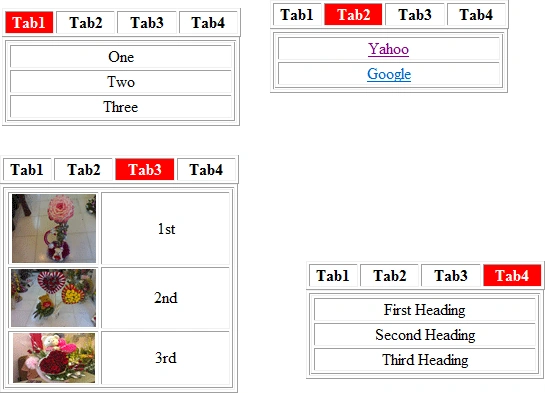
- <table style="width: 239px" border="1">
- <tr>
- <td id="td1" >Tab1</td>
- <td id="td2>Tab2</td>
- <td id="td3>Tab3</td>
- <td id="td4">Tab4</td>
- </tr>
- </table>
- <table border="1">
- <td class="style2">
- <table id="Table1" border="1" >
- <tr><td class="style4">One</td></tr>
- <tr><td class="style4">Two</td></tr>
- <tr><td class="style4">Three</td></tr>
- </table>
- <table id="Table2" border="1" style="display:none;" >
- <tr><td class="style4"><a href="http://www.yahoo.com">Yahoo</a></td></tr>
- <tr><td class="style4"><a href="http://www.Google.com">Google</a></td></tr>
- </table>
- <table id="Table3" border="1" style="display:none;" >
- <tr><td class="style5">
- <img alt="" src="Image/168241_1780007696922_1141309985_2052634_3074841_n.jpg"
- style="height: 69px; width: 84px" /></td><td class="style4">1st </td></tr>
- <tr><td class="style5">
- <img alt="" src="Image/168488_1809301029237_1141309985_2105127_5934469_n.jpg"
- style="height: 58px; width: 85px" /></td><td class="style4">2nd</td></tr>
- <tr><td class="style5">
- <img alt="" src="Image/180540_1801174706084_1141309985_2089035_3914864_n.jpg"
- style="height: 50px; width: 82px" /></td><td class="style4">3rd</td></tr>
- </table>
- <table id="Table4" border="1" style="display:none;" >
- <tr><td class="style4">First Heading</td></tr>
- <tr><td class="style4">Second Heading</td></tr>
- <tr><td class="style4">Third Heading</td></tr>
- </table>
- </td></tr>
- </table>
Note: Here we take an Image folder to store our images.
Step 2: Now we can write the JavaScript functions. We write it on the tabs (td elements).
- <td id="td1" onmouseover="Show1()" onmouseout ="Hide1()" class="style1">Tab1</td>
- <td id="td2" onmouseover="Show2()" onmouseout ="Hide2()" style="text-align: center"><b>Tab2</b></td>
- <td id="td3" onmouseover="Show3()" onmouseout ="Hide3()" class="style3">Tab3</td>
- <td id="td4" onmouseover="Show4()" onmouseout ="Hide4()" style="text-align: center"><b>Tab4</b></td>
Show1(): Shows the particular tab content and changes the color of the tab.
Hide1(): Activates on the onmouseout event; sets the default color of each tab.
- <script language="javascript" type="text/javascript">
- function Show1() {
- document.getElementById('Table1').style.display = 'Block';
- document.getElementById('Table2').style.display = 'None';
- document.getElementById('Table3').style.display = 'None';
- document.getElementById('Table4').style.display = 'None';
- document.getElementById('td1').style.backgroundColor = "Red";
- document.getElementById('td1').style.color = "White";
- }
- function Show2() {
- document.getElementById('Table1').style.display = 'None';
- document.getElementById('Table2').style.display = 'Block';
- document.getElementById('Table3').style.display = 'None';
- document.getElementById('Table4').style.display = 'None';
- document.getElementById('td2').style.backgroundColor = "Red";
- document.getElementById('td2').style.color = "White";
- }
- function Show4() {
- document.getElementById('Table1').style.display = 'None';
- document.getElementById('Table4').style.display = 'Block';
- document.getElementById('Table3').style.display = 'None';
- document.getElementById('Table2').style.display = 'None';
- document.getElementById('td4').style.backgroundColor = "Red";
- document.getElementById('td4').style.color = "White";
- }
- function Show3() {
- document.getElementById('Table1').style.display = 'None';
- document.getElementById('Table3').style.display = 'Block';
- document.getElementById('Table2').style.display = 'None';
- document.getElementById('Table4').style.display = 'None';
- document.getElementById('td3').style.backgroundColor = "Red";
- document.getElementById('td3').style.color = "White";
- }
- function Hide1() {
- document.getElementById('td1').style.backgroundColor = "White";
- document.getElementById('td1').style.color = "Black";
- }
- function Hide2() {
- document.getElementById('td2').style.backgroundColor = "White";
- document.getElementById('td2').style.color = "Black";
- }
- function Hide3() {
- document.getElementById('td3').style.backgroundColor = "White";
- document.getElementById('td3').style.color = "Black";
- }
- function Hide4() {
- document.getElementById('td4').style.backgroundColor = "White";
- document.getElementById('td4').style.color = "Black";
- }
- </script>
Note: Here we set the display property. It displays the table according to the Tab. At this time we set the display property of the other table to 'None'.
Complete Program
- <head runat="server">
- <title></title>
- <script language="javascript" type="text/javascript">
- function Show1() {
- document.getElementById('Table1').style.display = 'Block';
- document.getElementById('Table2').style.display = 'None';
- document.getElementById('Table3').style.display = 'None';
- document.getElementById('Table4').style.display = 'None';
- document.getElementById('td1').style.backgroundColor = "Red";
- document.getElementById('td1').style.color = "White";
- }
- function Show2() {
- document.getElementById('Table1').style.display = 'None';
- document.getElementById('Table2').style.display = 'Block';
- document.getElementById('Table3').style.display = 'None';
- document.getElementById('Table4').style.display = 'None';
- document.getElementById('td2').style.backgroundColor = "Red";
- document.getElementById('td2').style.color = "White";
- }
- function Show4() {
- document.getElementById('Table1').style.display = 'None';
- document.getElementById('Table4').style.display = 'Block';
- document.getElementById('Table3').style.display = 'None';
- document.getElementById('Table2').style.display = 'None';
- document.getElementById('td4').style.backgroundColor = "Red";
- document.getElementById('td4').style.color = "White";
- }
- function Show3() {
- document.getElementById('Table1').style.display = 'None';
- document.getElementById('Table3').style.display = 'Block';
- document.getElementById('Table2').style.display = 'None';
- document.getElementById('Table4').style.display = 'None';
- document.getElementById('td3').style.backgroundColor = "Red";
- document.getElementById('td3').style.color = "White";
- }
- function Hide1() {
- document.getElementById('td1').style.backgroundColor = "White";
- document.getElementById('td1').style.color = "Black";
- }
- function Hide2() {
- document.getElementById('td2').style.backgroundColor = "White";
- document.getElementById('td2').style.color = "Black";
- }
- function Hide3() {
- document.getElementById('td3').style.backgroundColor = "White";
- document.getElementById('td3').style.color = "Black";
- }
- function Hide4() {
- document.getElementById('td4').style.backgroundColor = "White";
- document.getElementById('td4').style.color = "Black";
- }
- </script>
- <style type="text/css">
- .style1
- {
- width: 45px;
- text-align: center;
- font-weight: bold;
- }
- .style2
- {
- width: 228px;
- }
- .style3
- {
- text-align: center;
- font-weight: bold;
- }
- .style4
- {
- width: 232px;
- text-align: center;
- }
- .style5
- {
- width: 90px;
- text-align: center;
- }
- </style>
- </head>
- <body>
- <form id="form1" runat="server">
- <div>
- <table style="width: 239px" border="1">
- <tr>
- <td id="td1" onmouseover="Show1()" onmouseout ="Hide1()" class="style1">Tab1</td>
- <td id="td2" onmouseover="Show2()" onmouseout ="Hide2()" style="text-align: center"><b>Tab2</b></td>
- <td id="td3" onmouseover="Show3()" onmouseout ="Hide3()" class="style3">Tab3</td>
- <td id="td4" onmouseover="Show4()" onmouseout ="Hide4()" style="text-align: center"><b>Tab4</b></td>
- </tr>
- </table>
- <table border="1">
- <tr>
- <td class="style2">
- <table id="Table1" border="1" >
- <tr><td class="style4">One</td></tr>
- <tr><td class="style4">Two</td></tr>
- <tr><td class="style4">Three</td></tr>
- </table>
- <table id="Table2" border="1" style="display:none;" >
- <tr><td class="style4"><a href="http://www.yahoo.com">Yahoo</a></td></tr>
- <tr><td class="style4"><a href="http://www.Google.com">Google</a></td></tr>
- </table>
- <table id="Table3" border="1" style="display:none;" >
- <tr><td class="style5">
- <img alt="" src="Image/168241_1780007696922_1141309985_2052634_3074841_n.jpg"
- style="height: 69px; width: 84px" /></td><td class="style4">1st </td></tr>
- <tr><td class="style5">
- <img alt="" src="Image/168488_1809301029237_1141309985_2105127_5934469_n.jpg"
- style="height: 58px; width: 85px" /></td><td class="style4">2nd</td></tr>
- <tr><td class="style5">
- <img alt="" src="Image/180540_1801174706084_1141309985_2089035_3914864_n.jpg"
- style="height: 50px; width: 82px" /></td><td class="style4">3rd</td></tr>
- </table>
- <table id="Table4" border="1" style="display:none;" >
- <tr><td class="style4">First Heading</td></tr>
- <tr><td class="style4">Second Heading</td></tr>
- <tr><td class="style4">Third Heading</td></tr>
- </table>
- </td></tr>
- </table>
- </div>
- </form>
- </body>
Rohatash KumarPosted Jun 29, 2011, 6:51 AM
Good work, thanks