

Introduction
If you look at the Component Tab of your Visual Studio Toolbox of Visual Studio 2010, you will notice that the BackgroundWorker component is the first in the list. If you have ever written multi-threaded applications, you must be familiar with the primary and worker or secondary threads. A primary thread is the default main thread of an application and executes the default execution path.
We often use background threads when a time-consuming process needs to be executed in the background without affecting the responsiveness of the user interface. This is where a BackgroundWorker component comes into play. If you are not familiar with the multi-threaded application, visit our Multithreading Programming using the C# section, where you can find many articles and tutorials.
A BackgroundWorker component executes code in a separate dedicated secondary thread. In this article, I will demonstrate how to use the BackgroundWorker component to execute a time-consuming process while the main thread is still available to the user interface.
Creating a BackgroundWorker
We can create a BackgroundWorker at design-time by dragging onto a Form or at run-time using the BackgroundWorker class.
The following code is added when you drag a BackgroundWorker component onto a Form.
private System.ComponentModel.BackgroundWorker backgroundWorker1;
this.backgroundWorker1 = new System.ComponentModel.BackgroundWorker();
BackgroundWorker Properties
Here is a list of BackgroundWorker class properties.
- CancellationPending: Indicates if an application has requested cancellation of a BackgroundWorker.
- IsBusy: Indicates if a BackgroundWorker is running an asynchronous operation.
- WorkerReportsProgress: Indicates a BackgroundWorker can report progress updates.
- WorkerSupportsCancellation: Indicates if a BackgroundWorker supports asynchronous cancellation.
BackgroundWorker Methods
BackgroundWorker has two methods, RunWorkerAsync and CancelAsync. The RunWorkerAsync starts the thread, and the CancelAsync stops the thread.
BackgroundWorker Events
DoWork event is the starting point for a BackgroundWorker. This event is fired when the RunWorkerAsync method is called. In this event handler, we call our code that is being processed in the background where our application is still doing some other work.
this.backgroundWorker1.DoWork += new System.ComponentModel.DoWorkEventHandler(this.backgroundWorker1_DoWork);
The DoWork event handler looks like this, where we need to call our time-consuming method.
private void backgroundWorker1_DoWork(object sender, DoWorkEventArgs e)
{
   BackgroundProcessLogicMethod();
}
ProgressChanged event occurs when ReportProgress is called. RunWorkerCompleted event occurs when the background operation has been completed.
BackgroundWorker Example
Now we are going to create a sample application. The user interface looks like Figure 1, where a Form has two Button controls and a RichTextBox control. While BackgroundWorker will be doing some background work, the user can still type in the RichTextBox.
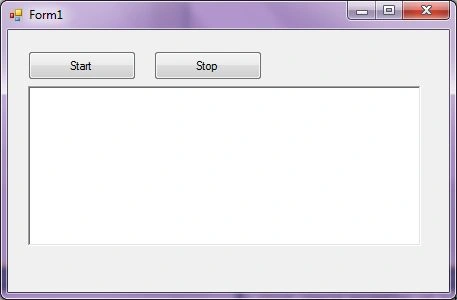
Figure 1
The start button click starts the processing BackgroundWorker, and the Stop button click stops the processing. While BackgroundWorker is doing work in the background, you may still type anything in the RichTextBox control.
The Start and Stop button click event handlers look like this.
private void StartButton_Click(object sender, EventArgs e)
{
   // Start BackgroundWorker
   backgroundWorker1.RunWorkerAsync(2000);
}

private void StopButton_Click(object sender, EventArgs e)
{
   // Cancel BackgroundWorker
   if (!backgroundWorker1.IsBusy)
   backgroundWorker1.CancelAsync();
}
And
private void backgroundWorker1_DoWork(object sender, DoWorkEventArgs e) {
    BackgroundWorker helperBW = sender as BackgroundWorker;
    int arg = (int) e.Argument;
    e.Result = BackgroundProcessLogicMethod(helperBW, arg);
    if (helperBW.CancellationPending) {
        e.Cancel = true;
    }
}
// Put all of background logic that is taking too much time
private int BackgroundProcessLogicMethod(BackgroundWorker bw, int a) {
    int result = 0;
    Thread.Sleep(20000);
    MessageBox.Show("I was doing some work in the background.");
    return result;
}
private void backgroundWorker1_RunWorkerCompleted(object sender, RunWorkerCompletedEventArgs e) {
    if (e.Cancelled) MessageBox.Show("Operation was canceled");
    else if (e.Error != null) MessageBox.Show(e.Error.Message);
    else MessageBox.Show(e.Result.ToString());
}
here is the code for the DoWork event, background worker method, and WorkerCompleted event.
Summary
In this article, we discussed how to create a BackgroundWorker in a Windows Forms application and run a process in the background while the UI is still responsive and available to the user.
Further Readings
- Introduction to Multithreading in C#
- Understanding Threading in .NET Framework
- Multithreading for Beginners
- Multithreading made easy in .NET 2.0
- Background worker simplified
- Multithreading in C#
- A Potentially Helpful C# Threading Manual
- Using the BackgroundWorker Component with composite user controls
- Using the BackgroundWorker component
- BackgroundWorker and CrystalReports
- Using the BackgroundWorker Component in .NET 2 applications
ali khajaviPosted Apr 28, 2023, 2:03 PM
Please introduce a book about ui thread in C#
Nicolae FieraruPosted Apr 7, 2021, 9:43 AM
On line 10, the exclamation mark is incorrect, it should be removed. We want to cancel the backgroundWorker when it is busy, otherwise there is no point to cancel something that does not run. Also, to avoid an error when pressing Start twice, we should put the condition if(!backgroundWorker1.IsBusy) { backgroundWorker1.RunWorkerAsync(2000); }
Nicolae FieraruPosted Apr 7, 2021, 9:28 AM
I think something is wrong with the code you provided. If I click on Start button and the background worker starts and then I click on Stop, nothing happens. After the background worker completes operation, it will report its result, then another pop-up shows 0.
Oliver ScharnefskiPosted Jan 24, 2020, 9:39 PM
Is there an exception handler missing in the code? By pressing the Stop button, the message "Invalid Operation Exception" appears showing the line "backgroundWorker1.CancelAsync()".
Pankajkumar PatelPosted Jul 30, 2019, 12:06 AM
Nice one ...
Ayo AyeniPosted Jul 29, 2019, 9:06 AM
Dear Mahesh Chand, I have read a few of your articles with fascination, thank you. I have a question regarding allowing the user to have multiple Forms ACTIVE simultaneously. I have read the ApplicationsContext and the Applications run which accomplishes this, however, I do not know whether it is possible to do this further down the hierarchy of calls. Let me explain, the initial form has calls to several other forms, in my case 12 (i.e. 12 menu options). One of the menu options shows a list of members with the member's basic details, just enough for the user to be able to select one, upon selection a more detailed form is presented to the user. So the user now can see both the members Form and the members detailed form. At this stage if the user finishes with the detailed form he/she has to close the members detailed form to gain access to the members form and then select a different member. What I would like to do is allow the user to be able to access both the members form and the members detailed form via the click of the mouse. So if the user after working on the members detailed form selects another member the details would be replaced automatically (programmatically) in the members detailed form. Can this be with ApplicationContext /Run or would multithreading be more appropriate for this type of application ? But that is not all ? what about all the other menu options ? Why can't they all be available as the user requires instead of forcing the closer of work (a form the user is working on) before selecting another task ?
Zakki AhmedPosted Jun 21, 2019, 2:58 AM
This not working on stop application
Faizan KhanPosted Aug 23, 2018, 12:10 PM
Hi, sir i want to creat a desktop application for my final year project in the university... kindly reply as i want to ask some question because i m not familiar with the c#/sharp...
Mahesh ChandPosted Aug 20, 2018, 10:23 PM
Formatted.
Satinder SinghPosted May 1, 2017, 4:26 PM
Very nicely explained Mahesh Sir
Former memberPosted Apr 16, 2017, 12:29 AM
I have read most of the your article since my college day, I observed your code is always complex to understand even in the simple logic.
Ammar ShaukatPosted Oct 21, 2015, 11:41 AM
Good
More JumpPosted Oct 8, 2015, 2:19 AM
thaks sir
Hashim ShafiqPosted Aug 21, 2015, 10:24 PM
nice
Linda JohnyPosted May 28, 2015, 4:21 AM
Very well explained..Good Work
srini vasuPosted Dec 4, 2014, 6:03 AM
Good example, Thread.Sleep(20000) is huge, interaction of application is very less.
Rakesh PandeyPosted Sep 3, 2014, 6:29 AM
very good work.. easy to understand and implement.. Nice work..
Rajan BajaniaPosted Jul 22, 2013, 3:12 AM
Hi, I am using Tab control in win forms and In One tab I am loading around 2000 csv files so the GUI gets hangs. I want my system not to hang and work on other tabs too. Please give suggestion. Thanks.
sumon banerjeePosted Apr 23, 2013, 3:37 AM
thanks. for a good tutorial.
sankarPosted Feb 13, 2013, 7:48 AM
hi , i need a sample for asp.net application for exporting grid data to excel/pdf using backgroundworker concept
Sam HobbsPosted Dec 8, 2011, 10:44 AM
I think it would help to explain the realtionship of the arguments parameeter of the RunWorkerAsync Method and the Argument member of the DoWorkEventArgs Class.
Mahesh ChandPosted Aug 20, 2010, 9:06 PM
Feel free to post any comments or ask your questions here