

A FolderBrowserDialog control is used to browse and select a folder on a computer. A typical FolderBrowserDialog looks like Figure 1 where you can see Windows Explorer-like features to navigate through folders and select a folder.
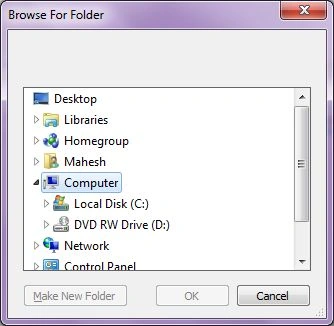
Figure 1
FolderBrowserDialog Control
We can create a FolderBrowserDialog control using a Forms designer at design-time or using the FolderBrowserDialog class in code at run-time (also known as dynamically). Unlike other Windows Forms controls, a FolderBrowserDialog does not have or need visual properties like others.
Design-time
To create a FolderBrowserDialog control at design-time, you simply drag and drop a FolderBrowserDialog control from Toolbox to a Form in Visual Studio. After you drag and drop a FolderBrowserDialog on a Form, the FolderBrowserDialog looks like Figure 2.

Figure 2
Adding a FolderBrowserDialog to a Form adds the following two lines of code.
private System.Windows.Forms.FolderBrowserDialog folderBrowserDialog1;
this.folderBrowserDialog1 = new System.Windows.Forms.FolderBrowserDialog();
Run-time
Creating a FolderBrowserDialog control at run-time is merely a work of creating an instance of the FolderBrowserDialog class, setting its properties, and adding the FolderBrowserDialog class to the Form controls.
The first step to creating a dynamic FolderBrowserDialog is to create an instance of the FolderBrowserDialog class. The following code snippet creates a FolderBrowserDialog control object.
FolderBrowserDialog folderDlg = new FolderBrowserDialog();
ShowDialog method displays the FolderBrowserDialog.
DialogResult result = folderDlg.ShowDialog();
Once the ShowDialog method is called, you can browse and select a file.
FolderBrowserDialog Properties
The selected path property represents the selected path in a FolderBrowserDialog control.
RootFolder property represents the root folder from where the browsing starts.
ShowNewFolderButton property represents a value indicating whether the New Folder button appears in the folder browser dialog box.
The following code snippet shows how to use a FolderBrowserDialog control and its properties.
private void BrowseFolderButton_Click(object sender, EventArgs e)
{
    FolderBrowserDialog folderDlg = new FolderBrowserDialog();
    folderDlg.ShowNewFolderButton = true;
    // Show the FolderBrowserDialog.
    DialogResult result = folderDlg.ShowDialog();
    if (result == DialogResult.OK)
    {
        textBox1.Text = folderDlg.SelectedPath;
        Environment.SpecialFolder root = folderDlg.RootFolder;
    }
}
Summary
A FolderBrowserDialog control allows users to launch Windows FolderBrowser Dialog and let users select a folder. In this article, we discussed how to use a Windows Folder Browser Dialog and set its properties in a Windows Forms application.
Kidanu Addis AlemayehuPosted Apr 15, 2024, 1:55 PM
Good job can you send full code that is to be run?
Sourav Kumar DasPosted Nov 19, 2019, 10:46 PM
Nice Basic gathering Information Sir.
Patrik RoyPosted Nov 19, 2019, 5:00 AM
Quick typo on line 02: add a space between "new" and "FolderBrowserDialog()".
G PadmaPosted Jul 29, 2019, 4:43 AM
Does anyone know how to verify whether selected folder has java project or not?
Hadshana KamalanathanPosted Sep 7, 2018, 10:52 AM
Nice article...
Ajeet MishraPosted May 13, 2016, 10:48 AM
Nice
Humayun Kabir MamunPosted Jan 3, 2016, 7:45 AM
Nice...
Venugopal DPosted Sep 21, 2015, 9:29 AM
Hi, can anyone help me to set remote machine folder as initial folder for openfiledialog
John QPosted Jun 1, 2012, 4:23 PM
Does anyone know where I can get a folderBrowserDialog with multi folders select capability? Thanks...
Mahesh ChandPosted May 30, 2012, 10:17 AM
Thanks guys. Harsh, I have written a Silverlight article too. Search this site or go to Silverlight category from header > Technologies.
John ChagbertPosted May 22, 2012, 8:49 AM
Thanks a lot - I had initially thought I could access this from a property in OpenFileDialog().
John ChagbertPosted May 22, 2012, 8:49 AM
Thanks a lot - I had initially thought I could access this from a property in OpenFileDialog().
Raj kumarPosted May 10, 2012, 8:59 AM
Hi this is tssrajkumar Its really helps me Thank you so much.. keep it on..
Harsh KapoorPosted Mar 12, 2012, 2:37 AM
Hi Mahesh, How can we do this in the Silverlight? browse folder dialog, without using out of browser support Thanks and Regards Harsh
ms khalidPosted Sep 3, 2010, 8:45 PM
i m connected on LAN with another pc now i want to browse a folder on that pc. how can i do this? i have used folderbrowsedialog but i can only browse folders in my own pc. also it displays the complete hierarchy of folders which dont want. please tell me hoe can i achieve my goal
joseph reddyPosted Jul 4, 2010, 11:44 PM
hi your explanation is very good and helpful.....thank you
DMR SantoshPosted Jun 29, 2010, 5:41 AM
It was good... helped me a lot