

Scaling
is a process of stretching or shrinking an element. The ScaleTransform scales
an element by a given factor.
The
ScaleTransform object in WPF represents ScaleTransform. The ScaleX and ScaleY
properties represent the factor related to x and y coordinates respectively. The
CenterX and CenterY properties represent the X and Y coordinates of the center
point. By default, a ScaleTransform is
centered at the point (0,0), which corresponds to the upper-left corner of the
rectangle.
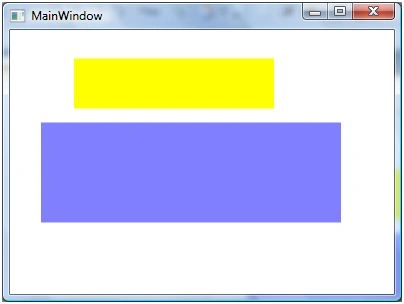
The
code listed in Listing creates two rectangles with same position and size
accepts the second rectangle is scaled to 1.5 and 2.0 toward the x and y axis
respectively. Scaling value 1.5 represents 150% increase and 2.0 represents
200% increase.
<Rectangle
Width="200" Height="50"
Fill="Yellow" Margin="61,27,117,184"
/>
<Rectangle
Width="200" Height="50"
Fill="Blue" Opacity="0.5" Margin="53,141,125,70">
<Rectangle.RenderTransform>
<ScaleTransform
ScaleX="1.5" ScaleY="2.0"
CenterX="50" CenterY="50" />
</Rectangle.RenderTransform>
</Rectangle>
The
output of Listing looks like Figure 1.
Figure
1
The
code listed in Listing creates a RotateTransform object dynamically and set it
as RenderTransform property of a Rectangle. The output looks like Figure .
private void ScaleTransformSample()
{
Rectangle
originalRectangle = new Rectangle();
originalRectangle.Width = 200;
originalRectangle.Height = 50;
originalRectangle.Fill = Brushes.Yellow;
LayoutRoot.Children.Add(originalRectangle);
Rectangle
scaledRectangle = new Rectangle();
scaledRectangle.Width = 200;
scaledRectangle.Height = 50;
scaledRectangle.Fill = Brushes.Blue;
scaledRectangle.Opacity = 0.5;
ScaleTransform
scaleTransform1 = new ScaleTransform(1.5, 2.0, 50, 50);
scaledRectangle.RenderTransform =
scaleTransform1;
LayoutRoot.Children.Add(scaledRectangle);
}
Join the conversation! Your thoughts help the community grow.