

In recent versions of .NET, the StatusBar control has been replaced with the StatusStrip control. To implement Status Bar in C# and Windows Forms app, please visit StatusStrip Control In C#.
SatusBar control is not available in Toolbox of Visual Studio 2010. StatusStrip control replaces StatusBar in Visual Studio 2010. But for backward compatibility support, StatusBar class is available in Windows Forms.
In this article, I will discuss how to create and use a StatusBar using StatusBar class in a Windows Forms application.
A StatusBar control is a combination of StatusBar panels where each panel can be used to display different information. For example, one panel can display current application status and other can display date and other information and so on. A typical StatusBar sits at the bottom of a form.
Creating a StatusBar
StatusBar class represents a StatusBar.
SatusBar control is not available in Toolbox of Visual Studio 2010. StatusStrip control replaces StatusBar in Visual Studio 2010. But for backward compatibility support, StatusBar class is available in Windows Forms.
In this article, I will discuss how to create and use a StatusBar using StatusBar class in a Windows Forms application.
A StatusBar control is a combination of StatusBar panels where each panel can be used to display different information. For example, one panel can display current application status and other can display date and other information and so on. A typical StatusBar sits at the bottom of a form.
Creating a StatusBar
StatusBar class represents a StatusBar.
- StatusBar mainStatusBar = new StatusBar();
A StatusBar is a combination of StatusBar panels. StatusBarPanel class represents a StatusBar panel. The following code snippet creates two panels and adds them to the StatusBar.
- StatusBarPanel statusPanel = new StatusBarPanel();
- StatusBarPanel datetimePanel = new StatusBarPanel();
- // Set first panel properties and add to StatusBar
- statusPanel.BorderStyle = StatusBarPanelBorderStyle.Sunken;
- statusPanel.Text = "Application started. No action yet.";
- statusPanel.ToolTipText = "Last Activity";
- statusPanel.AutoSize = StatusBarPanelAutoSize.Spring;
- mainStatusBar.Panels.Add(statusPanel);
- // Set second panel properties and add to StatusBar
- datetimePanel.BorderStyle = StatusBarPanelBorderStyle.Raised;
- datetimePanel.ToolTipText = "DateTime: " + System.DateTime.Today.ToString();
- datetimePanel.Text = System.DateTime.Today.ToLongDateString();
- datetimePanel.AutoSize = StatusBarPanelAutoSize.Contents;
- mainStatusBar.Panels.Add(datetimePanel);
Now, make sure ShowPanels property is true.
- mainStatusBar.ShowPanels = true;
In the end, we add StatusBar to the Form.
- Controls.Add(mainStatusBar);
Now let's create a Windows Forms application with a few controls on it. We are going to show current activity and date on the status bar. The Form looks like following.
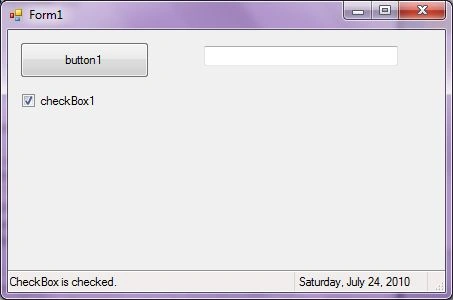
Here is the complete code. Download attached project for more details.
- protected StatusBar mainStatusBar = new StatusBar();
- protected StatusBarPanel statusPanel = new StatusBarPanel();
- protected StatusBarPanel datetimePanel = new StatusBarPanel();
- private void CreateStatusBar()
- {
- // Set first panel properties and add to StatusBar
- statusPanel.BorderStyle = StatusBarPanelBorderStyle.Sunken;
- statusPanel.Text = "Application started. No action yet.";
- statusPanel.ToolTipText = "Last Activity";
- statusPanel.AutoSize = StatusBarPanelAutoSize.Spring;
- mainStatusBar.Panels.Add(statusPanel);
- // Set second panel properties and add to StatusBar
- datetimePanel.BorderStyle = StatusBarPanelBorderStyle.Raised;
- datetimePanel.ToolTipText = "DateTime: " + System.DateTime.Today.ToString();
- datetimePanel.Text = System.DateTime.Today.ToLongDateString();
- datetimePanel.AutoSize = StatusBarPanelAutoSize.Contents;
- mainStatusBar.Panels.Add(datetimePanel);
- mainStatusBar.ShowPanels = true;
- // Add StatusBar to Form controls
- this.Controls.Add(mainStatusBar);
- }
- private void button1_Click(object sender, EventArgs e)
- {
- statusPanel.Text = "Button is clicked.";
- }
- private void checkBox1_CheckedChanged(object sender, EventArgs e)
- {
- statusPanel.Text = "CheckBox is checked.";
- }
- private void textBox1_TextChanged(object sender, EventArgs e)
- {
- statusPanel.Text = "TextBox edited.";
- }
Summary
In this article, we discussed discuss how to create and use a StatusBar control in a Windows Forms application.
Further readings
In this article, we discussed discuss how to create and use a StatusBar control in a Windows Forms application.
Further readings
Join the conversation! Your thoughts help the community grow.