

A VScrollBar control is a supporting control that is used to add vertical scrolling capability to a control that does not have built-in scrolling such as a container control. You do not need this control for the controls that already have built-in scrolling.
In this article, I will discuss how to create a VScrollBar control and apply vertical scrolling on Windows Forms controls that do not have a built-in scrolling feature. After that, I will discuss various properties and methods available for the VScrollBar control.
In this article, I will discuss how to create a VScrollBar control and apply vertical scrolling on Windows Forms controls that do not have a built-in scrolling feature. After that, I will discuss various properties and methods available for the VScrollBar control.
Creating a VScrollBar
We can create a VScrollBar control using a Forms designer at design-time or using the VScrollBar class in code at run-time (also known as dynamically).
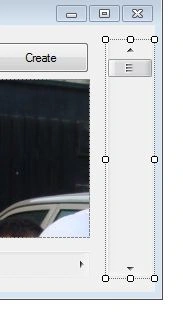
To create a VScrollBar control at design-time, you simply drag and drop a VScrollBar control from Toolbox to a Form in Visual Studio. After you drag and drop a VScrollBar on a Form, the VScrollBar looks like Figure 1. Once a VScrollBar is on the Form, you can move it around and resize it using the mouse and set its properties and events.
Creating a VScrollBar control at run-time is merely a work of creating an instance of VScrollBar class, setting its properties and adding VScrollBar class to the Form controls.
The first step to create a dynamic VScrollBar is to create an instance of VScrollBar class. The following code snippet creates a VScrollBar control object.
We can create a VScrollBar control using a Forms designer at design-time or using the VScrollBar class in code at run-time (also known as dynamically).
To create a VScrollBar control at design-time, you simply drag and drop a VScrollBar control from Toolbox to a Form in Visual Studio. After you drag and drop a VScrollBar on a Form, the VScrollBar looks like Figure 1. Once a VScrollBar is on the Form, you can move it around and resize it using the mouse and set its properties and events.
Figure 1
Creating a VScrollBar control at run-time is merely a work of creating an instance of VScrollBar class, setting its properties and adding VScrollBar class to the Form controls.
The first step to create a dynamic VScrollBar is to create an instance of VScrollBar class. The following code snippet creates a VScrollBar control object.
- VScrollBar vScroller = newVScrollBar();
In the next step, you may set properties of a VScrollBar control. The following code snippet sets the height and width properties of a VScrollBar.
- vScroller.Height = 200;
- vScroller.Width = 30;
Once a VScrollBar control is ready with its properties, the next step is to add the VScrollBar control to the Form. To do so, we use Form.Controls.Add method. The following code snippet adds a VScrollBar control to the current Form.
- this.Controls.Add(vScroller);
Setting VScrollBar Properties
After you place a VScrollBar control on a Form, the next step is to set properties.
The easiest way to set properties is from the Properties Window. You can open Properties window by pressing F4 or right clicking on a control and selecting Properties menu item. The Properties window looks like Figure 2.

After you place a VScrollBar control on a Form, the next step is to set properties.
The easiest way to set properties is from the Properties Window. You can open Properties window by pressing F4 or right clicking on a control and selecting Properties menu item. The Properties window looks like Figure 2.
Figure 2
Location, Height, Width, and Size
The Location property takes a point that specifies the starting position of the VScrollBar on a Form. The Size property specifies the size of the control. We can also use Width and Height property instead of Size property. The Dock property is used to dock a control. The following code snippet sets Dock, Width, and Height properties of a VScrollBar control.
- vScroller.Dock = DockStyle.Right;
- vScroller.Width = 30;
- vScroller.Height = 200;
Name
Name property represents a unique name of a VScrollBar control. It is used to access the control in the code. The following code snippet sets and gets the name and text of a VScrollBar control.
Name property represents a unique name of a VScrollBar control. It is used to access the control in the code. The following code snippet sets and gets the name and text of a VScrollBar control.
- authorGroup.Name = "VScrollBar1";
Maximum, Minimum, and Value
Value property of a VScrollBar represents the current value of a VScrollBar control. The Minimum and Maximum properties are used to set minimum and maximum limit of a VScrollBar. The following code snippet sets the Minimum, Maximum, and Value properties of a VScrollBar control.
Value property of a VScrollBar represents the current value of a VScrollBar control. The Minimum and Maximum properties are used to set minimum and maximum limit of a VScrollBar. The following code snippet sets the Minimum, Maximum, and Value properties of a VScrollBar control.
- vScroller.Minimum = 0;
- vScroller.Maximum = 100;
- vScroller.Value = 40;
Attaching VScrollBar to a Control
Horizontal scroll bar control is attached to a control by its scroll event. On the scroll event hander, we usually read the current value of a VScrollBar and based on this value, we apply it on other controls. For example, we can implement scrolling in a PictureBox control by displaying image in a PictureBox again on the scroll event bar.
The following code snippet adds an event handler for the Scroll event.
Horizontal scroll bar control is attached to a control by its scroll event. On the scroll event hander, we usually read the current value of a VScrollBar and based on this value, we apply it on other controls. For example, we can implement scrolling in a PictureBox control by displaying image in a PictureBox again on the scroll event bar.
The following code snippet adds an event handler for the Scroll event.
- vScroller.Scroll += new System.Windows.Forms.ScrollEventHandler(vScroller_Scroll);
The following code snippet is used to redraw the image on a PictureBox based on the value of the VScrollBar.
- privatevoid vScroller_Scroll(object sender, ScrollEventArgs e) {
- Graphics g = pictureBox1.CreateGraphics();
- g.DrawImage(pictureBox1.Image, newRectangle(0, 0, pictureBox1.Height, vScroller.Value));
- }
Summary
A VScrollBar control is used to add vertical scrolling feature to a Windows Forms control that does not have built-in scrolling feature. In this article, we discussed how to create a VScrollBar control in Windows Forms at design-time as well as run-time. After that, we saw how to use various properties and methods.
A VScrollBar control is used to add vertical scrolling feature to a Windows Forms control that does not have built-in scrolling feature. In this article, we discussed how to create a VScrollBar control in Windows Forms at design-time as well as run-time. After that, we saw how to use various properties and methods.
Rushi MehtaPosted Sep 10, 2018, 6:58 AM
Nice Article
Princy GuptaPosted Nov 14, 2017, 1:50 AM
Hello Sir, I want to change the dimensions of image using scroll bar on web page in asp.net c# . Please help me about this
AlexPosted Nov 2, 2010, 9:20 PM
Cool stuff you got here! But the thing is, I am using a WebBrowser control (with built-in scrolling), and once the page is loaded I want to make it automatically scroll to a specific location.I tried some experiments with: WebBrowser wb; wb.AutoScrollOffset = new Point(Math.Abs(panel1.AutoScrollPosition.X), Math.Abs(CurrentPoint.Y)); //or simply - wb.AutoScrollOffset = new Point(0, 300); But none of them worked. So I was trying to find how to access the scroll bars within the WebBrowser control, but I simply can't find them. Is there any way I can access the WebBrowser VScrollBar? I only found the bool wb.ScrollBarsEnabled... I appreciate any suggestion!
mohit mahajanPosted Jul 7, 2010, 12:53 AM
hello sir, i have some ISO format files (finger prints)i want to convert it into image and templetes files or encrypt and decript format will u plz tell me hon can i develop this tool in window form ? Thanks mohit