

WPF WrapPanel
WPF WrapPanel control is a panel that positions child elements in sequential position from left to right by default. If child elements that are stacked don’t fit in the row or column they are in, the remaining elements will wrap around in the same sequence. The following is an example of two wrap panels, one is horizontal and the second is vertical.
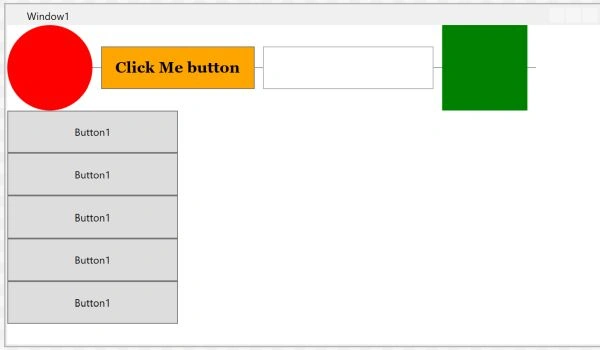
The WrapPanel element in XAML represents a Wrap Panel WPF control.
The following code snippet declares a WrapPanel in XAML and sets its height, width, and background properties.
- <WrapPanel Width="300" Height="200"
- Background="LightBlue" />
Note: To test this code, create a WPF app in Visual Studio and replace default Grid panel with the above code.
Set WrapPanel Orientation
The Orientation property sets the wrapping of child elements. It can either be horizontally or vertically. When we use the horizontal orientation, child content forms horizontal rows. When we use a vertical orientation, child content is first positioned in a vertical column.
The following code snippet sets the Orientation of a WrapPanel to Horizontal.
- <WrapPanel Orientation=”Horizontal”>
- Children
- </WrapPanel>
Listing 1 is the complete code that defines a WrapPanel and sets the Orientation, ItemHeight, and ItemWidth properties of a WrapPanel in XAML. This below code will have every item of a WrapPanel have height and width 100 respectively.
- <Window x:Class="WrapPanelSample.Window1"
- xmlns="http://schemas.microsoft.com/winfx/2006/xaml/presentation"
- xmlns:x="http://schemas.microsoft.com/winfx/2006/xaml"
- Title="Window1" Height="400" Width="539.426" Name="RootWindow">
- <WrapPanel Width="300" Height="200"
- Background="LightBlue" Orientation="Vertical"
- ItemHeight="100" ItemWidth="100" />
- </Window>
Listing 1.
Note: If you do not specify ItemHeight and ItemWidth properties of a WrapPanel, the default height and width of child items within a WrapPanel will be child elements height and width.
The code example in Listing 2 adds various child elements to a Wrap Panel.
- <WrapPanel>
- <Ellipse Width="100" Height="100" Fill="Red" />
- <Separator Width="10" />
- <Button Background="Orange" Width="180" Height="50"
- FontFamily="Georgia" FontSize="18"
- FontWeight="Bold" Name="ClickMeButton" >Click Me button</Button>
- <Separator Width="10" />
- <TextBox Height="50" Width="200" Name="Button1" />
- <Rectangle Width="100" Height="100" Fill="Green" />
- </WrapPanel>
Listing 2.
The XAML code example in Listing 3 declares a WrapPanel control, adds 8 ellipse to the panel, and keeps its orientation to horizontal by default.
- <WrapPanel >
- <Ellipse Width="100" Height="100" Fill="Red" />
- <Ellipse Width="90" Height="90" Fill="Orange" />
- <Ellipse Width="80" Height="80" Fill="Yellow" />
- <Ellipse Width="70" Height="70" Fill="LightGreen" />
- <Ellipse Width="60" Height="60" Fill="Green" />
- <Ellipse Width="50" Height="50" Fill="LightBlue" />
- <Ellipse Width="40" Height="40" Fill="Blue" />
- <Ellipse Width="30" Height="30" Fill="Black" />
- </WrapPanel>
Listing 3.
The output looks like Figure 1 where all child controls are wrapped horizontally.
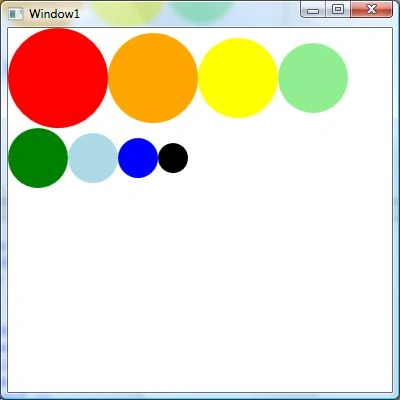
Figure 1.
- <WrapPanel Orientation="Vertical">
The output looks like Figure 2. As you can see Figure 2, the new controls are aligned vertically.
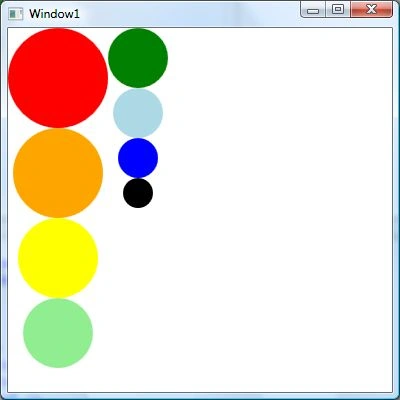
Figure 2.
The WrapPanel class in WPF represents a WrapPanel. The following code sample in Listing 4 creates a WrapPanel dynamically, sets its properties and adds five ellipses. The last line of the code sets the WrapPanel as the content of main windows, Name RootWindow.
- private void CreateDynamicWrapPanel()
- {
- // Create a WrapPanel and set its properties
- WrapPanel dynamicWrapPanel = new WrapPanel();
- dynamicWrapPanel.Background = new SolidColorBrush(Colors.LightBlue);
- dynamicWrapPanel.Orientation = Orientation.Horizontal;
- // Create Ellipses and add to StackPanel
- Ellipse redCircle = new Ellipse();
- redCircle.Width = 100;
- redCircle.Height = 100;
- redCircle.Fill = new SolidColorBrush(Colors.Red);
- dynamicWrapPanel.Children.Add(redCircle);
- Ellipse orangeCircle = new Ellipse();
- orangeCircle.Width = 80;
- orangeCircle.Height = 80;
- orangeCircle.Fill = new SolidColorBrush(Colors.Orange);
- dynamicWrapPanel.Children.Add(orangeCircle);
- Ellipse yellowCircle = new Ellipse();
- yellowCircle.Width = 60;
- yellowCircle.Height = 60;
- yellowCircle.Fill = new SolidColorBrush(Colors.Yellow);
- dynamicWrapPanel.Children.Add(yellowCircle);
- Ellipse greenCircle = new Ellipse();
- greenCircle.Width = 40;
- greenCircle.Height = 40;
- greenCircle.Fill = new SolidColorBrush(Colors.Green);
- dynamicWrapPanel.Children.Add(greenCircle);
- Ellipse blueCircle = new Ellipse();
- blueCircle.Width = 20;
- blueCircle.Height = 20;
- blueCircle.Fill = new SolidColorBrush(Colors.Blue);
- dynamicWrapPanel.Children.Add(blueCircle);
- // Display WrapPanel into a Window
- RootWindow.Content = dynamicWrapPanel;
- }
The complete Window class is listed in Listing 5.
- public partial class Window1 : Window
- {
- public Window1()
- {
- InitializeComponent();
- CreateDynamicWrapPanel();
- }
- private void CreateDynamicWrapPanel()
- {
- // Create a WrapPanel and set its properties
- WrapPanel dynamicWrapPanel = new WrapPanel();
- dynamicWrapPanel.Background = new SolidColorBrush(Colors.LightBlue);
- dynamicWrapPanel.Orientation = Orientation.Horizontal;
- // Create Ellipses and add to StackPanel
- Ellipse redCircle = new Ellipse();
- redCircle.Width = 100;
- redCircle.Height = 100;
- redCircle.Fill = new SolidColorBrush(Colors.Red);
- dynamicWrapPanel.Children.Add(redCircle);
- Ellipse orangeCircle = new Ellipse();
- orangeCircle.Width = 80;
- orangeCircle.Height = 80;
- orangeCircle.Fill = new SolidColorBrush(Colors.Orange);
- dynamicWrapPanel.Children.Add(orangeCircle);
- Ellipse yellowCircle = new Ellipse();
- yellowCircle.Width = 60;
- yellowCircle.Height = 60;
- yellowCircle.Fill = new SolidColorBrush(Colors.Yellow);
- dynamicWrapPanel.Children.Add(yellowCircle);
- Ellipse greenCircle = new Ellipse();
- greenCircle.Width = 40;
- greenCircle.Height = 40;
- greenCircle.Fill = new SolidColorBrush(Colors.Green);
- dynamicWrapPanel.Children.Add(greenCircle);
- Ellipse blueCircle = new Ellipse();
- blueCircle.Width = 20;
- blueCircle.Height = 20;
- blueCircle.Fill = new SolidColorBrush(Colors.Blue);
- dynamicWrapPanel.Children.Add(blueCircle);
- // Display Panel into a Window
- RootWindow.Content = dynamicWrapPanel;
- }
- }
Summary
In this article, I discussed WrapPanel in WPF and how to use it in your WPF app.
Rushi MehtaPosted Nov 11, 2018, 10:44 PM
Nice Article