
Blue Theme Orange Theme Green Theme Red Theme
 
Discover the top 5 tips for understanding .NET Interop
Home | Forums | Videos | Advertise | Certifications | Downloads | Blogs | Interviews | Jobs | Beginners | Training
 | Consulting  
Submit an Article Submit a Blog 
 Jump to
Skip Navigation Links
TechnologyExpand Technology
WebsiteExpand Website
Nevron Chart
Search :       Advanced Search »
Home » XML in C# » Using XSL and .NET To Display Database Tables in your Web Browser

Using XSL and .NET To Display Database Tables in your Web Browser

This article describes how you can leverage .NET and XSL as a powerful and flexible means to rendering database reports into your Web Browser.

Author Rank :
Page Views : 18184
Downloads : 451
Rating :
 Rate it
Level : Beginner
   Print Read/Post comments Post a comment  Similar Articles  
   Email to a friend  Bookmark  Author's other articles  
Download Files:
DataSetToHTML.zip
 
 
Discover the top 5 tips for understanding .NET Interop
Become a Sponsor
 Tag Cloud
 Latest Jobs
More ... 
 Latest Interview Questions
More ... 

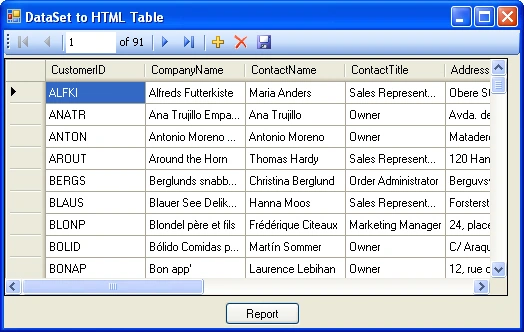
Figure 1a - DataBound Customer NorthWind Table in a Windows Form
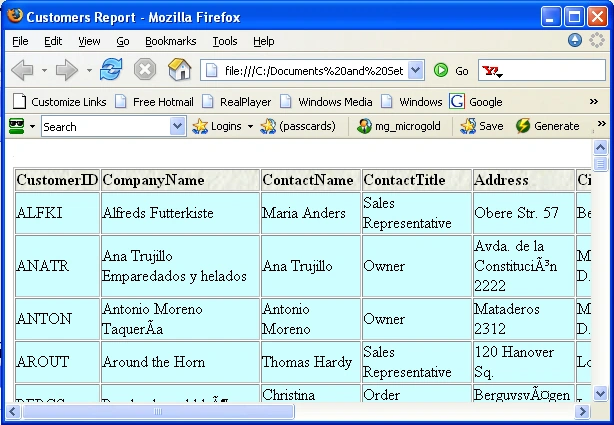
 

Figure 1b - Table Shown in Web Browser

Introduction

I'm currently working on a project that uses XSL (EXtensible Stylesheet Language) to create reports from data by transforming XML into HTML.  I've decided this route is the way to go if you really want the flexibility you need to generate reports and tailor them easily to your needs.  Admittedly, XPath and XSL provide an additional learning curve, but once you get the hang of it, there is no substitute.  You would not find the reporting flexibility, for example, in Crystal Reports or other reporting tools.

In this article we'll show you how to transform any table inside of a dataset into an HTML table and display it in the browser.

The Code

The code for getting our customer table in the database into a table in the browser is fairly straightforward and involves 4 easy steps.

1) Fill a DataSet From the Database

2) Write the DataSet as a DiffGram to XML

3)  Transform the XML to HTML using XSL.

4) Display the HTML in a browser

Because of .NET's well designed architecture, there are almost as many lines of code as there are steps to performing this operation as seen in Listing 1:

Listing 1 - C# Code for Transforming a DataSet into HTML

// 1) Fill the DataSet with the Customer Data from the NWind Database
this.customersTableAdapter.Fill(this.fPNWINDDataSet.Customers);

// 2) Write the XML data for the customer as a diffgram to an xml file
this.fPNWINDDataSet.Customers.WriteXml(@"customer.xml", XmlWriteMode.DiffGram);

XmlDocument doc = new XmlDocument();

// 3) load the customer table into an xmldocument and perform an XSL transform
doc.Load(
@"customer.xml");

XmlWriter writer = XmlWriter.Create(@"customertable.html");
XslTransform transform = new XslTransform();
// load the xslt file used for transformation

transform.Load(@"../../GenerateCustomerReport.xslt");

// transform the customer data in the xml document using the transform
transform.Transform(doc.CreateNavigator(),
null, writer);
writer.Close();

// 4) Display the table in the browser
Process.Start(@"customertable.html");

So the hard part of creating a table in the browser from a database table is not actually the C# coding.  The difficult part is writing the XSL that will generate the table.  When you are designing your reports you will find yourself spending most of your time playing with XSL rather than C#.  The nice part about designing the report using XSL is that you can test and debug against your Xml file directly inside of Visual Studio without having to recompile any C#.

Designing the Table

The first step in creating your report is to open up a pure HTML editor such as Front Page and visually design how you want your table to look.  I've created a simple table shown below with a cool whitestone background for the header:
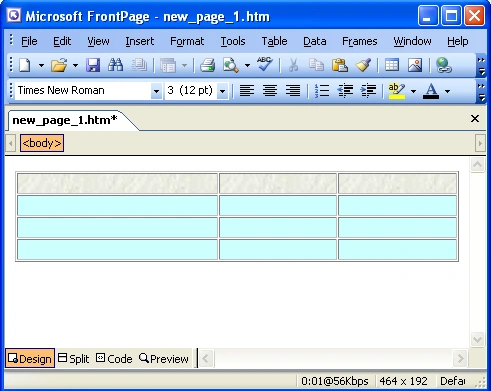
Figure 2 - HTML Table Design in Front Page

Now copy the source of the HTML into your blank XSL Transform File.  You'll probably need to play with the paths after you add it to your code, but the html tags will be correct.

Listing 2 - HTML Shell of your Table

<html>
<head>
<meta
http-equiv="Content-Language" content="en-us">
<meta
http-equiv="Content-Type" content="text/html; charset=windows-1252">
<title>
New Page 1</title>
</head>
 

<body>
<table border="1" width="100%" id="table1" cellspacing="1" cellpadding="0">
   
<tr>
       
<td background="stone.jpg" width="199"></td>
       
<td background="stone.jpg">&nbsp;</td>
       
<td background="stone.jpg">&nbsp;</td>
   
</tr>
  
  <tr>
       <td width="199" bgcolor="#CCFFFF">&nbsp;</td>
            <td bgcolor="#CCFFFF">&nbsp;</td>
            <td bgcolor="#CCFFFF">&nbsp;</td>
      </tr>
      <tr>
            <td width="199" bgcolor="#CCFFFF">&nbsp;</td>
            <td bgcolor="#CCFFFF">&nbsp;</td>
            <td bgcolor="#CCFFFF">&nbsp;</td>
      </tr>
      <tr>
 
          <td width="199" bgcolor="#CCFFFF">&nbsp;</td>
           <td bgcolor="#CCFFFF">&nbsp;</td>
           <td bgcolor="#CCFFFF">&nbsp;</td>
      </tr>

</table>

</body>
</html>

Now we have the a basic shell for creating our XSL Transform markup around the HTML markup.  All we need to do is substitute the xsl and xpath expressions in the places we need to fill in the html table from the DataSet as shown in listing 3:

Listing 3 - XSL for producing an HTML table from the Diffgram

<?xml version="1.0" encoding="UTF-8" ?>
<
xsl:stylesheet version="1.0" xmlns:xsl="http://www.w3.org/1999/XSL/Transform">

      <!--
variable for substituting spaces -->
      <
xsl:variable name="SPC" select="'&#x20;'" />

      <!--
main template for generating html table-->
      <
xsl:template match="/">
      <
html>
         <
head>
           <
meta http-equiv="Content-Language" content="en-us" />
           <
meta http-equiv="Content-Type" content="text/html;
                   charset=windows-1252
" />

           <
title>
            <!--
get the name of the report from the table name-->
            <
xsl:value-of select="name(current()/*/*/*[1])" />
           
 Report
           </
title>

         </
head>
         <
body>
           <
table border="1" width="100%" id="table1" cellspacing="1" cellpadding="0">
             <
tr>

              <!--
loop through the first row and get the column names -->
               <
xsl:for-each select="current()/*/*/*[1]/*">                                   
               <
td background="stone.jpg" width="199">
                 <
B>
                  <
xsl:value-of select="name()" />
                 </
B>
               </
td>
              </
xsl:for-each>                                      
             </
tr>

             <!--
loop through each row and get the row data -->
             <
xsl:for-each select="current()/*/*/*">
               <
tr>
                  <!--
loop through each column in the row -->
                  <!--
and get the data in the cell -->
                  <
xsl:for-each select="current()/*">
                      <
td bgcolor="#CCFFFF">
                        <
xsl:value-of select="." />
                      </
td>
                   </
xsl:for-each>
               </
tr>
             </
xsl:for-each>
           </
table>
         </
body>
       </
html>
    </
xsl:template>
</
xsl:stylesheet>

In order to understand why we used the XPath expressions shown in listing 2 of the XSL we need to look at the diffgram we generate from the dataset.  A diffgram is an XML representation of the DataSet.  In our example we are only exporting the Customer table, so we only need to write XSL for a single table.  Each row of the Customers table inside of the diffgram is grouped directly under the NorthWind DataSet.  All the nodes under the Customers row contain the actual column name and data for that particular row.  Knowing the structure of the XML data we want to transform to HTML gives us an idea of the XSL we need to write. 

Listing 4 - Part of the XML Diffgram of the Customer Table

<?xml version="1.0" standalone="yes"?>
<
diffgr:diffgram xmlns:msdata="urn:schemas-microsoft-com:xml-msdata" xmlns:diffgr="urn:schemas-microsoft-com:xml-diffgram-v1">
<
FPNWINDDataSet xmlns="http://tempuri.org/FPNWINDDataSet.xsd">
  <
Customers diffgr:id="Customers1" msdata:rowOrder="0">
    <
CustomerID>ALFKI</CustomerID>
    <
CompanyName>Alfreds Futterkiste</CompanyName>
    <
ContactName>Maria Anders</ContactName>
    <
ContactTitle>Sales Representative</ContactTitle>
    <
Address>Obere Str. 57</Address>
    <
City>Berlin</City>
    <
PostalCode>12209</PostalCode>
    <
Country>Germany</Country>
    <
Phone>030-0074321</Phone>
    <
Fax>030-0076545</Fax>
  
</Customers>
   <
Customers diffgr:id="Customers2" msdata:rowOrder="1">
     <
CustomerID>ANATR</CustomerID>
     <
CompanyName>Ana Trujillo Emparedados y helados</CompanyName>
     <
ContactName>Ana Trujillo</ContactName>
     <
ContactTitle>Owner</ContactTitle>
     <
Address>Avda. de la Constitucin 2222</Address>
     <
City>Mxico D.F.</City>
     <
PostalCode>05021</PostalCode>
     <
Country>Mexico</Country>
     <
Phone>(5) 555-4729</Phone>
     <
Fax>(5) 555-3745</Fax>
  </
Customers>

First of all, we want to write a header row with all the column names.  Since all Customer nodes contain the column names in their column nodes, we just need to get the first row and strip out all the column tag names. The following XSL loop let's us cycle through the columns in the first row.  It selects the XPath expression representing the nodes inside the first Customer Row.
 

     <xsl:for-each select="current()/*/*/*[1]/*">     


Then we can use the  xsl  name function to pick out each tags name to get us the name of the column.
 

     <xsl:value-of select="name()" />

The next step is to populate the actual data for every row.  To loop through the rows of the data table, we'll use the following for-each xsl/xpath expression.  This XPath expression selects each Customers node in the diffgram

             <!-- loop through each row and get the row data -->
             <
xsl:for-each select="current()/*/*/*">

Now we need to loop through each column containing the data.  So we'll have another loop that uses xpath to pick each child node out of the current Customers Node:

<!-- loop through each column in the row -->
<!--
and get the data in the cell -->
<
xsl:for-each select="current()/*">

Finally we need to pull the data out of each Column Node that we are looping through and place them into the HTML <td> tag using XSL value-of the current column data.  (A period(.) represents the current node you are on inside the transform)

<td bgcolor="#CCFFFF">
<
xsl:value-of select="." />
</
td>

Conclusion

With the power of XSL, you can bend XML data to your will and render it to a browser.  As with any other new language XSL and XPATH, take a bit of time to get the hang of, but once you've used it in one or two reports, there is no turning back.  .NET  gives you the added power of passing parameters from C# directly to your XSL Transform, so you can easily have your C# Code interact with your reports through button presses and checkboxes.  Anyway,  now that I have finished reporting to you about the power to transform your life using C# .NET and XSL, hopefully it will benefit you in your work.

Comment Request!
Thank you for reading this post. Please post your feedback, question, or comments about this post Here.
Login to add your contents and source code to this article
 Article Extensions
Contents added by yinsu kolay on May 15, 2009
 [Top] Rate this article
 
 About the author
 
Mike Gold

Michael Gold is President of Microgold Software Inc., makers of the WithClass UML Tool. His company is a Microsoft VBA Partner and Borland Partner. Mike is a Microsoft MVP and founding member of C# Corner. He has a BSEE and MEng EE from Cornell University and has consulted for Chase Manhattan Bank, JP Morgan, Merrill Lynch, and Charles Schwab. Currently he is a senior developer at Finisar Corp. He has been involved in several .NET book projects, and is currently working on a book for using .NET with embedded systems.

He can be reached at mike@c-sharpcorner.com

Looking for C# Consulting?
C# Consulting is founded in 2002 by the founders of C# Corner. Unlike a traditional consulting company, our consultants are well-known experts in .NET and many of them are MVPs, authors, and trainers. We specialize in Microsoft .NET development and utilize Agile Development and Extreme Programming practices to provide fast pace quick turnaround results. Our software development model is a mix of Agile Development, traditional SDLC, and Waterfall models.
Click here to learn more about C# Consulting.
 
Introducing MaxV - one click. infinite control. Hyper-V Hosting from MaximumASP.
Finally – a virtual platform that delivers next-generation Windows Server 2008 Hyper-V virtualization technology from a managed hosting partner you can truly depend on. Visit www.maximumasp.com/max for a FREE 30 day trial. Hurry offer ends soon. Climb aboard the MaxV platform and take advantage of High Availability, Intelligent Monitoring, Recurrent Backups, and Scalability – with no hassle or hidden fees. As a managed hosting partner focused solely on Microsoft technologies since 2000, MaximumASP is uniquely qualified to provide the superior support that our business is built on. Unparalleled expertise with Microsoft technologies lead to working directly with Microsoft as first to offer IIS 7 and SQL 2008 betas in a hosted environment; partnering in the Go Live Program for Hyper-V; and product co-launches built on WS 2008 with Hyper-V technology.
Dynamic PDF
ceTE software specializes in components for dynamic PDF generation and manipulation. The DynamicPDF™ product line allows you to dynamically generate PDF documents, merge PDF documents and new content to existing PDF documents from within your applications.
Discover the Top 5 .NET Memory Management Fundamentals
To write the best .NET code, you need to know exactly how the .NET framework really manages memory. Ricky Leeks presents the Top 5 fundamental facts of .NET memory management. Learn more.
Nevron Chart for .NET 2010.1 Now Available
The leading .NET charting control now features PDF, Flash and Silverlight export, visualization of large datasets and more. Deliver true charting functionality to your BI, Scorecard, Presentation or Scientific apps. Download evaluation now.
ASP.NET 4 Hosting
Get 2 Months Free of ASP.NET Hosting for Only $4.95/month! Receive FREE MS SQL and MySQL Databases Including ASP.NET 4/3.5, MVC 3.0, Silverlight 4, Windows 2008/IIS 7.0 Plus FREE IIS 7 Modules. Host UNLIMITED ASP.NET Web Sites – Click Here!
 
 Post a Feedback, Comment, or Question about this article
Subject:
Comment:
DevExpress Free UI Controls
Become a Sponsor
 Comments
program by Mohd On February 9, 2008
programing to design a pyramid using in c#
Reply | Email | Modify 
program by Mohd On February 9, 2008
to design a program of binary search tree in recursive method using c#
Reply | Email | Modify 

 © 2012  contents copyright of their authors. Rest everything copyright Mindcracker. All rights reserved.