

Introduction Keywords Using Match Type user can specify which variations of Text will trigger some Ad. Although keyword that has Broad match will be triggered by the largest set of search words, it's the most expensive. On the other hand keyword with Exact match will be triggered only if user searches for the word that is equal to the value that was specified by the Text property. Each of those approaches has some advantages and disadvantages. One of the biggest advantages in this approach is that we can review statistics for each phrase. We could add only one word and specify Broad match, but then we couldn't examine statistic for one specific phrase (in this sample, we couldn't distinguish phrase "hot" from other phrases). Implementation Generating combinations of words Here's the complete code:
This article will explain how to programmatically add Keywords under some AdGroup. Presented is an application that adds all combinations of certain set of keywords under specified AdGroup. For that purpose application can use one of the following libraries:
Keyword is an object that specifies on which searches would be some Ad shown. Keyword is composed of two properties: Text and MatchType.
MatchType closely define some Keyword. MatchType can have on of the following values:
AdWordsKeywordGenerator app shows one approach that combines Match types that are provided by the AdWords platform.
AdWordsKeywordGenerator
AdWordsKeywordGenerator takes set of words and makes all combination with those words. After that it uploads them to the AdWords system.
For example, if user specifies words "summer" and "hot", AdWordsKeywordGenerator will upload keywords:
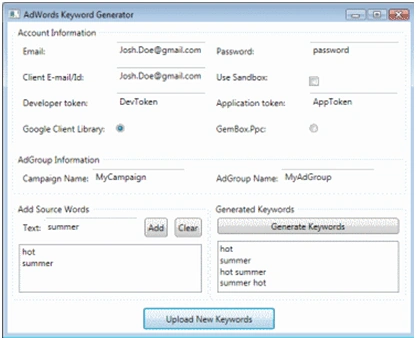
To use application follow these steps:
AdWordsKeywordGenerator is WPF application written in C# using Visual Studio 2008.
Typical application workflow is:
o Logging to AdWords platform
o Getting AdGroup
o Adding new Keywords to AdGroup
o Uploading changes to AdWords platform
For Generating combination of words we use class KeywordGenerator. It has method GenerateCombinations that accepts list of source words, makes combinations and returns them in a new list.
Uploading combinations
For uploading combinations we can use two different libraries: google-api-adwords-dotnet (GoogleLibraryUploader class) and 3rd party AdWords .NET API (GemBoxPpcUploader class).
GoogleLibraryUploader
Uploading new keywords using google-api-adwords-dotnet is made of the following steps:
{
// User.
private AdWordsUser user;
// Login.
public void Login(string email, string password, string developerToken, string applicationToken, string userAgent,
bool useSandbox, string clientCustomerIdOrClientEmail)
{
// This can be set in config file.
ApplicationConfiguration.email = email;
ApplicationConfiguration.password = password;
ApplicationConfiguration.developerToken = developerToken;
ApplicationConfiguration.applicationToken = applicationToken;
if (clientCustomerIdOrClientEmail.Contains('@'))
ApplicationConfiguration.clientEmail = clientCustomerIdOrClientEmail;
else
ApplicationConfiguration.clientCustomerId = clientCustomerIdOrClientEmail;
ApplicationConfiguration.adWordsApiUrl = useSandbox ? "https://adwords-sandbox.google.com" : "https://adwords.google.com";
this.user = new AdWordsUser();
}
// Upload keywords to AdGroup.
public void UploadKeywordsToAdGroup(string campaignName, string adGroupName, IList<string> keywords)
{
// Get AdGroupService.
AdGroupService adGroupService = (AdGroupService)this.user.GetService(AdWordsService.v200909.AdGroupService);
// Get All AdGroups
AdGroupPage page = adGroupService.get(new AdGroupSelector());
// Select specified AdGroup.
AdGroup adGroup = page == null || page.entries == null ? null :
page.entries.FirstOrDefault(x => x.campaignName == campaignName && x.name == adGroupName);
if (adGroup == null)
throw new System.ApplicationException("AdGroup with name " + adGroupName + " doesn't exists!");
// Create AdGroupCriterionOperations with new keywords.
List<AdGroupCriterionOperation> operations = new List<AdGroupCriterionOperation>();
foreach (string keyword in keywords)
{
// Create AdGroupCriterion
AdGroupCriterion criterion = new BiddableAdGroupCriterion()
{
adGroupId = adGroup.id,
adGroupIdSpecified = true,
criterion = new Keyword()
{
text = keyword,
matchType = KeywordMatchType.EXACT,
matchTypeSpecified = true
}
};
// Create AdGroupCriterionOperation
AdGroupCriterionOperation keywordOperation = new AdGroupCriterionOperation()
{
@operator = Operator.ADD,
operatorSpecified = true,
operand = criterion
};
// Ad operation to the list.
operations.Add(keywordOperation);
}
// Get AdGroupCriterionService Here's the complete code:
AdGroupCriterionService adGroupCriterionService =
(AdGroupCriterionService)this.user.GetService(AdWordsService.v200909.AdGroupCriterionService);
// Upload new keywords.
adGroupCriterionService.mutate(operations.ToArray());
}
}
GemBoxPpcUploader
Uploading new keywords using GemBox.Ppc AdWords API is made of the following steps:
{
// Account (contains user)
private AwAccount account;
static GemBoxPpcUploader()
{
// Set license. We use free version of GemBox.Ppc.
PpcInfo.SetLicense("FREE-LIMITED-KEY");
}
// Login.
public void Login(string email, string password, string developerToken, string applicationToken, string userAgent,
bool useSandbox, string clientCustomerIdOrClientEmail)
{
// Create Account.
this.account = new AwAccount(new AwUser(email, password, developerToken, applicationToken, userAgent, useSandbox, clientCustomerIdOrClientEmail))
{
// This enables automatic downloading so we don't need to call Download() method.
DownloadLazy = true
};
}
// Upload keywords to AdGroup.
public void UploadKeywordsToAdGroup(string campaignName, string adGroupName, IList<string> keywords)
{
if (this.account == null)
throw new ApplicationException("You haven't login to account!");
// Get Campaing.
Campaign camp = this.account.Campaigns.SingleOrDefault(x => x.Name == campaignName);
if (camp == null)
throw new ApplicationException("Campaign with name " + campaignName + " doesn't exists!");
// Get AdGroup.
AdGroup adGroup = camp.AdGroups.SingleOrDefault(y => y.Name == adGroupName);
if (adGroup == null)
throw new ApplicationException("AdGroup with name " + adGroupName + " doesn't exists!");
// Add new Keywords.
foreach (string keyword in keywords)
adGroup.Criterions.Add(new BiddableAdGroupCriterion()
{
Criterion = new Keyword()
{
Text = keyword,
MatchType = KeywordMatchType.EXACT
}
});
// Upload changes.
this.account.UploadChanges();
}
}
Conclusion
As always in programming, there is more than one method to achieve the same thing.
Google api-adwords-dotnet is a set of proxy classes built from WSDLs plus some extra classes that enables logging to AdWords platform. It is completely free but it is not completely optimized for .NET platform and requires some manual work (casting, setting xxxSpecified properties, different ids, etc).
On the other hand, GemBox.Ppc is optimized for .NET, encapsulates different AdWords services and provides many utilities out of the box. However, Free version has limitations.
Join the conversation! Your thoughts help the community grow.