

Data binding is a connection between the User Interface and a business object or other data provider. The data binding capabilities of XAML and Silverlight offer more power and flexibility with less runtime code. The User Interface object is called the target; the provider of the data is called the source.
Now let's create a simple application.
- Create a Silverlight application in visual studio 2008
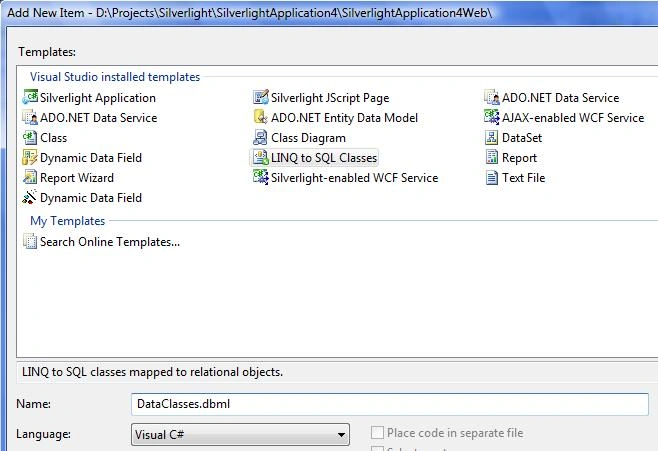
- Add Linq to SQL Classes in App_Code folder of your web project. In .NET 3.5, the LINQ to SQL is used to connect with the database and read, add, updated data. This is an alternative to ADO.NET to access data.
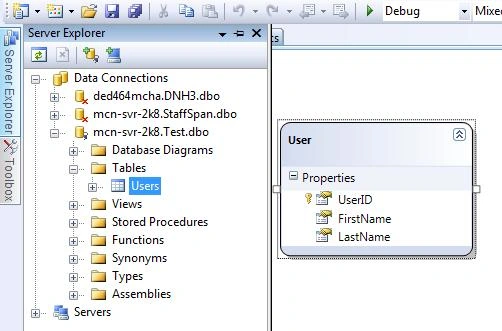
- Add the database object you want to access in the application. I drag Users table from the Server Explorer to my designer. This action adds a User object to the project.
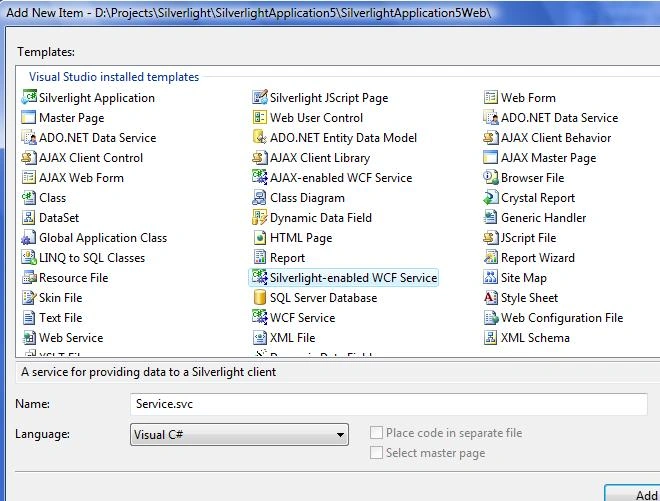
- Add a Silvelight Enabled WCF Service project to the Web Project by selecting Silverlight-enabled WFC Service from the templates below.
- Update Service.cs as below to implement the IService. In below code, I add a method called GetUsers. This method uses LINQ to get all authors from the database table. If you are not familiar with LINQ, visit LINQ & XLINQ LINQ & XLINQ section to learn more about it.
using System;
using System.Linq;
using System.Runtime.Serialization;
using System.ServiceModel;
using System.ServiceModel.Activation;
using System.Collections.Generic;
using System.Text;
[ServiceContract(Namespace = "")]
[AspNetCompatibilityRequirements(RequirementsMode = AspNetCompatibilityRequirementsMode.Allowed)]
public class Service
{
[OperationContract]
public List<User> GetUsers(string FirstName)
{
DataClassesDataContext db = new DataClassesDataContext();
var matchingCustomers = from cust in db.Users
where cust.FirstName.StartsWith(FirstName)
select cust;
return matchingCustomers.ToList();
}
}
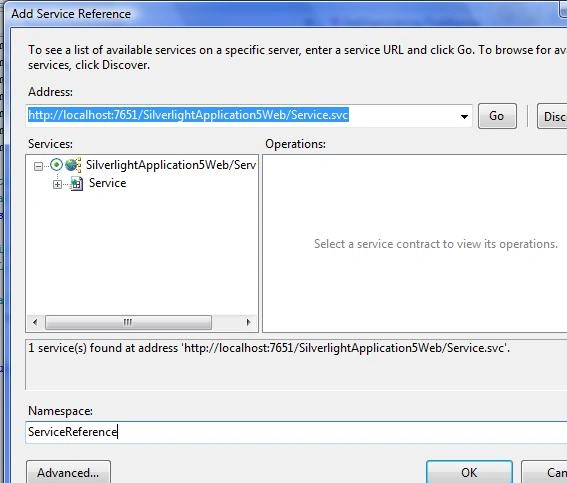
- Add Service reference of the Silvelight Enabled WCF Service in Silverlight Project. Right click on the References and select Add Service Reference and select your service. This action adds the service reference to your project and now you can call WFC service method.
- Create the Page.xaml with TextBox, Button and DataGrid as below
<UserControl xmlns:my="clr-namespace:System.Windows.Controls;assembly=System.Windows.Controls.Data" x:Class="SilverlightApplication4.Page"
xmlns="http://schemas.microsoft.com/winfx/2006/xaml/presentation"
xmlns:x="http://schemas.microsoft.com/winfx/2006/xaml"
Width="700" Height="500">
<Grid x:Name="LayoutRoot" Background="White" ShowGridLines="False">
<Grid.RowDefinitions>
<RowDefinition Height="10" />
<RowDefinition Height="50" />
<RowDefinition Height="*" />
<RowDefinition Height="10" />
</Grid.RowDefinitions>
<Grid.ColumnDefinitions>
<ColumnDefinition Width="10" />
<ColumnDefinition Width="*" />
<ColumnDefinition Width="10" />
</Grid.ColumnDefinitions>
<Border BorderBrush="Black" BorderThickness="2" Grid.Row="1" Grid.Column="1"/>
<StackPanel Grid.Row="1" Grid.Column="1" Orientation="Horizontal">
<TextBlock Text="Name: " VerticalAlignment="Bottom" FontSize="18" Margin="15,0,0,0" />
<TextBox x:Name="FirstName" Width="250" Height="30" Margin="2,0,0,4" VerticalAlignment="Bottom"/>
<Button x:Name="Search" Width="75" Height="30" Margin="20,0,0,4" Content="Search" VerticalAlignment="Bottom" Background="Blue" FontWeight="Bold" FontSize="14" Click="Search_Click" />
</StackPanel>
<my:DataGrid x:Name="DataGrid1" AlternatingRowBackground="Beige" AutoGenerateColumns="False" Width="700" Height="300" Grid.Row="2" Grid.Column="1" CanUserResizeColumns="True">
<my:DataGrid.Columns>
<my:DataGridTextColumn
Header="First Name"
Width="120"
DisplayMemberBinding="{Binding FirstName}"
FontSize="11" />
<my:DataGridTextColumn
Header="Last Name"
Width="120"
DisplayMemberBinding="{Binding LastName}"
FontSize="11" />
</my:DataGrid.Columns>
</my:DataGrid>
</Grid>
</UserControl>
- Add Search Button event handeler to Page.xaml.cs
private void Search_Click(object sender, RoutedEventArgs e)
{
ServiceReference1.ServiceClient webService = new ServiceReference1.ServiceClient();
webService.GetUsersCompleted += new EventHandler<ServiceReference1.GetUsersCompletedEventArgs>(webService_GetUsersCompleted);
webService.GetUsersAsync(FirstName.Text);
}
void webService_GetUsersCompleted(object sender, ServiceReference1.GetUsersCompletedEventArgs e)
{
DataGrid1.ItemsSource = e.Result;
}
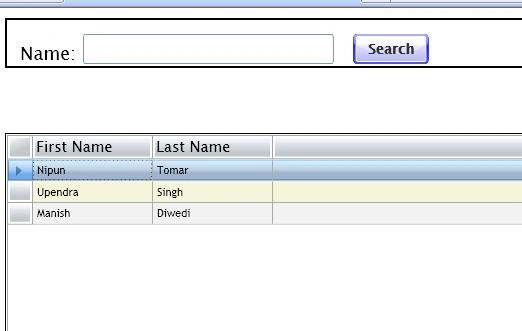
- Run the Appliation and you can see the screen as below
Gowtham RajamanickamPosted Apr 11, 2016, 3:04 AM
good one...
ankit patelPosted Nov 5, 2012, 5:52 AM
yeah this is so easy to understand ....
Riddhi ValechaPosted Nov 1, 2012, 12:42 AM
Hi...But when we add new functions/methods, then how do we update the Silverlight-Enabled WCF Service??I tried it a number of times... but could not get the solution..Please help !!
Ivan SeditedPosted Nov 3, 2011, 1:25 AMEdited Nov 3, 2011, 1:30 AM
Hi. I do the same things and by working with local sqlexpress there are no problems, but when i want to use another server i have exception- "the remore server returned an error: not found" in async method when the endinvoke method is called. May be there no some rules on sql server or something else. Can you help me?
praval singhPosted Aug 8, 2009, 3:24 AM
Hi, i am trying to connect database with silverlight project bt after couples of forum told me that u can't connect database direct in silverlight project i want to fill combobox . for this i try to wcf enable service in my project after doing this i incorporate wcf services and Linq to access data but i am unable to create object of wcf service in mainpage.xaml.cs in userconrol_loaded event please suggest me Thanks