

There was a requirement that the application can't run more than one instance, and if already running then show the message to the user and set that window as active.
For this purpose we need System.Threading.Mutex, which synchronizes the execution of threads across process boundaries.
Also, we can use SetForegroundWindow function which brings the thread that created the specified window into the foreground and activates the window. Keyboard input is directed to the window, and various visual cues are changed for the user.
Here is a small example code:
using System;
using System.Collections.Generic;
using System.Linq;
using System.Windows.Forms;
using System.Threading;
using System.Diagnostics;
using System.Runtime.InteropServices;
namespace OnlyOneInstanceOfApp
{
static class Program
{
//boolean to
indicate application has initial ownership of mutex
private
static bool
isNew;
[DllImport("user32.dll")]
private static extern bool
SetForegroundWindow(IntPtr hWnd);
/// <summary>
/// The main entry point for the application.
/// </summary>
[STAThread]
static void Main()
{
//Create
mutex at application start and try to get the ownership
using
(var m = new Mutex(true, "OnlyOneInstanceOfApp", out isNew))
{
//If
application owns the mutex, continue the execution
if
(isNew)
{
Application.EnableVisualStyles();
Application.SetCompatibleTextRenderingDefault(false);
Application.Run(new Form1());
}
//else
show user message that application is running and set focus to that application
window
else
{
MessageBox.Show("Application already running");
Process
current = Process.GetCurrentProcess();
foreach
(Process process in
Process.GetProcessesByName(current.ProcessName))
{
if (process.Id != current.Id)
{
SetForegroundWindow(process.MainWindowHandle);
break;
}
}
}
}
}
}
}
When we run the application we see

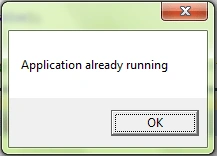
And now if we again run the application we see the message:
Join the conversation! Your thoughts help the community grow.