

A simple solution that I use:
Make a batch file (Uninstall.bat) with the following call
@echo off
msiexec /x {xxxxxxxx-xxxx-xxxx-xxxx-xxxxxxxxxxxx}
(Path depends of your Windows version, check where your system32 folder is located)
That last part is the product code which you can find in the properties of your setup project.
-
Add the Uninstall.bat in application folder
right click on Application Folder > Add > File > Uninstall.bat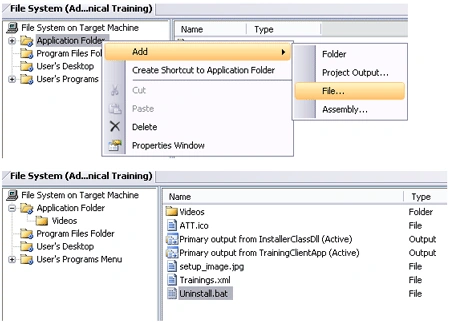
-
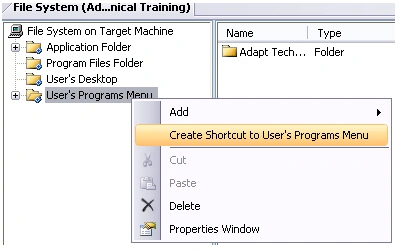
Right click on "User's Programs Menu" and select "Create Shortcut to User's Programs Menu".
-
Rename it to Uninstall
-
Change the target of Uninstall shortcut to the Uninstall.bat.
Uninstall shortcut > Properties Window > Target > Application Folder > Uninstall.bat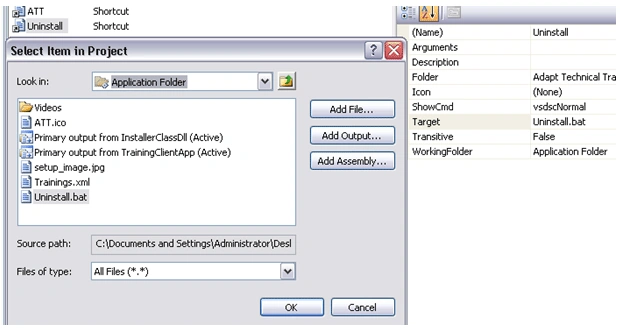
-
Rebuild the project and you are done.
John ChagbertPosted Jul 8, 2013, 12:02 PM
I think the initial response was great and simple! I like it. I have come upon this article after several unsuccessful searched articles on the web. Please put some RATING scheme on this site to make a quick SEO. Thanks
Hayk DavtyanPosted Jan 7, 2012, 3:08 PM
Hello Nipun, I want you to write me exact code in uninstall.bat file:` @echo off msiexec.........????? my system32 folder actually is in C:\Windows\System32 so what exactly should I write in uninstall.bat file???/ and my second question . I made an install project,so when I install it, and then I make changes and rebult my project, then I am trying to reinstall, it doessn't allows me, and says that at first I uninstall last version, and after it try to do .....so where can I set the proporty about reinstall allowance property.. thanks beforehand
subhash sekharPosted Jan 4, 2011, 7:47 AM
Hi, It's working fine. can we hide product code when we are uninstalling.
Peter NielsenPosted Aug 30, 2010, 2:58 PM
I am using the same approach as Stephen suggests, you can see a closer description here: http://endofstream.com/creating-uninstaller-in-a-visual-studio-project/
Stephen BuckleyeditedPosted Jun 28, 2010, 11:53 PMEdited Jun 29, 2010, 12:00 AM
Instead of making a batch file, I coded my Program.cs file to catch String[] arguments, looking for "-uninstall" as the first argument, and the GUID as the second, if this is met, then Program.cs uses a Process object to run msiexec /x using the provided GUID. I then placed an Uninstall shortcut that calls MyApp.exe -uninstall [ProductCode] This worked for me, setup replaces [ProductCode] token with the actual product code in the shortcut, and the uninstall dialog is launched. I did this to keep the workings internal rather than have another file associated with the Program Files directory, as Vista protocol is getting pickier. Sample Code Program.cs static void Main(String[] args) { if(args.Length > 1) && (args[0] == "-uninstall") { Process uinst = new Process() uinst.StartInfo.FileName = Environment.GetFolderPath(SystemPath) + "\\msiexec"; uinst.StartInfo.Arguments = "/x " + args[1]; uinst.Start(); } else { // Normal app loading here } } Then create a link in the Start Menu in the setup that links to your app, and set Arguments property of link to "-uninstall [ProductCode]" Any thoughts? [email protected]
Lery TorresPosted Jul 7, 2009, 4:25 PM
Hi, I would like to hide the command windows when the uninstalled has begun. Could you help me?