

The ADO.NET Data Services framework consists of a combination of patterns and libraries that enable the creation and consumption of data services for the web. Its goal is to facilitate the creation of flexible data services that are integrated with the web, using URIs to point to pieces of data and simple, well-known formats to represent that data, such as JSON and plain XML. This results in the data service being surfaced to the web as a REST-style resource collection that is addressable with URIs and that agents can interact with using the usual HTTP verbs such as GET, POST or DELETE. ADO.NET Data Services models the data exposed through the data service using an Entity-Relationship derivative called Entity Data Model (EDM). This organizes the data in the form of instances of "entity types", or "entities", and the associations between them.
In Silverlight 2 ADO.NET Data Services is composed of in-memory library allows asynchronous LINQ queries that are translated into the URI syntax automatically.ADO.NET Data Services maps the four data verbs into the four HTTP verbs:
Create == POST
Read == GET
Update == PUT
Delete == DELETE
Essentially it provides a way to use a data model across the firewall. It works by exposing IQueryable endpoints through a URI-based syntax allowing developers control over how the data is retrieved through Filtering, Sorting and Paging.
Prerequisites
Install the following in order to use ADO.NET Data Services with Silverlight.
- Visual Studio 2008
- ADO.NET Data Services Silverlight Add-On
- ASP.NET 3.5 Extensions Preview (Dec 2007)
- ADO.NET Entity Framework Beta 3
- ADO.Net Entity Framework Tools Dec 07 Community Technology Preview
- Visual Studio 2008 Service Pack 1 (SP1)
Create a Silverlight application in visual studio 2008
Creating ADO.NET Entity Data Model
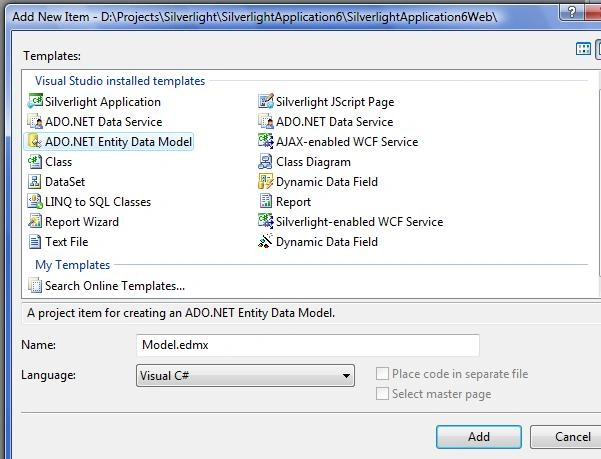
- Add new item ADO.NET Entity Data Model to App_Code folder of Web Application
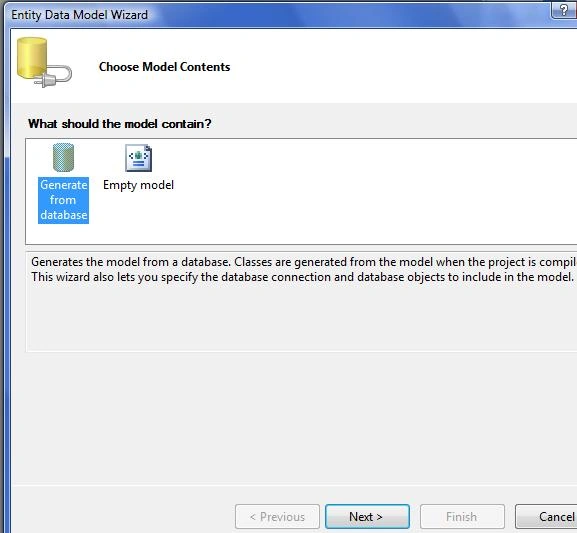
- In Entity Data Model Wizard select Generate from Database
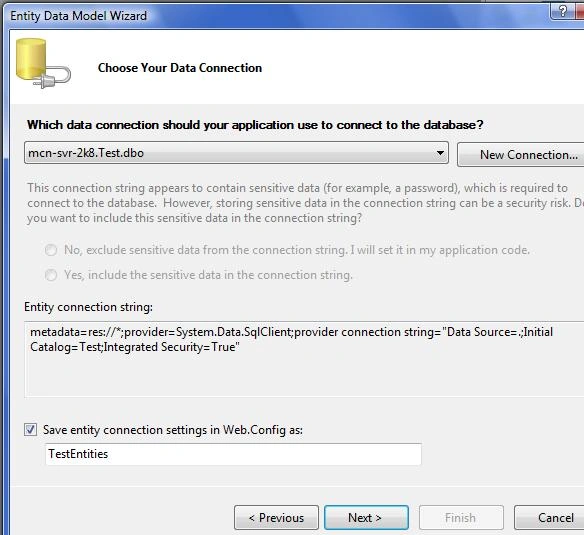
- Select a data Connection or create new connection
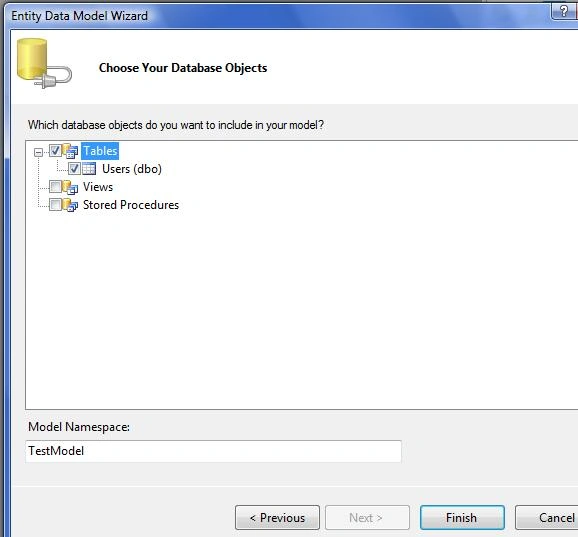
- Choose database objects
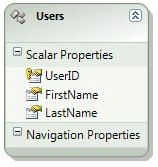
- Model.edmx will be like below
Creating ADO.NET Data Service
- Add ADO.NET Data Service to the Web Application
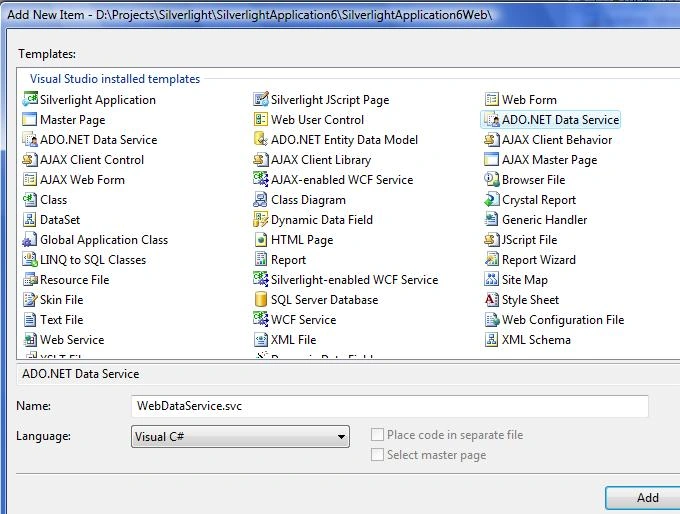
- Open WebDataService.cs and update the line
public class WebDataService : DataService< /* TODO: put your data source class name here */ >
with
public class WebDataService : DataService< TestModel.TestEntities > - Set the operation rules and access rules in InitializeService
public static void InitializeService(IDataServiceConfiguration config)
{
// TODO: set rules to indicate which entity sets and service operations are visible, updatable, etc.
// For testing purposes use "*" to indicate all entity sets/service operations.
// "*" should NOT be used in production systems.
config.SetEntitySetAccessRule("*", EntitySetRights.All);
config.SetServiceOperationAccessRule("*", ServiceOperationRights.All);
}
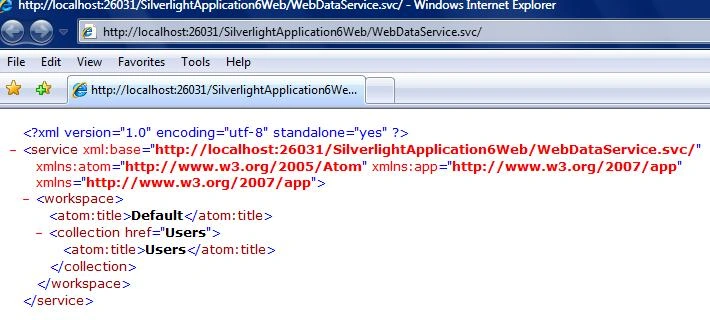
- Run the Service and results will be as below
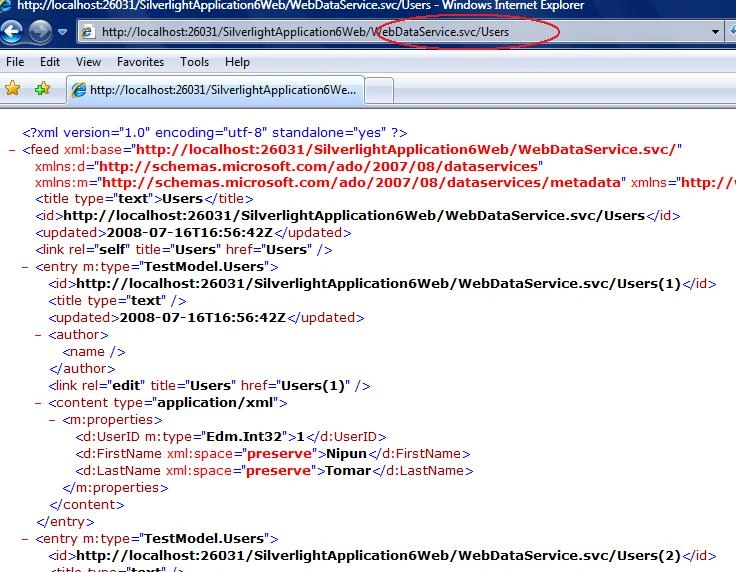
- And if use the database object name then the respective records are displayed
Create ADO.NET Data Service Proxy for Silverlight Project
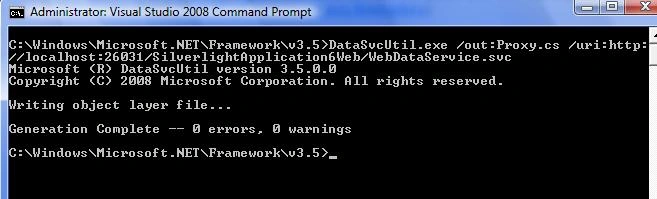
- Open command prompt and navigate to C:\WINDOWS\Microsoft.NET\Framework\v3.5 folder. Type the following command
DataSvcUtil.exe /out:Proxy.cs /uri:http://localhost:26031/silverlightApplication6Web/WebDataService.svc
Here Proxy.cs is the name of proxy file to be genarated and http://localhost:26031/silverlightApplication6Web/WebDataService.svc is the URL of ADO.NET Data Service. - The resulting screen
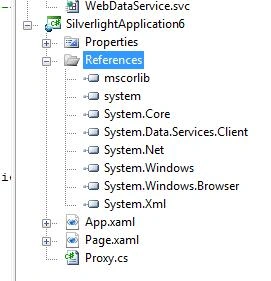
- Check the Proxy.cs under C:\Windows\Microsoft.NET\Framework\v3.5 and add this proxy file to Silverlight project. Add a reference for ADO.Net Data Services assembly System.Data.Services.Client.dll (formerly called Microsoft.Data.WebClient.dll).
Retrieving the record from Database in Silverlight
- Create a datagrid in Page.xaml
<Grid x:Name="LayoutRoot" Background="White">
<Grid.RowDefinitions>
<RowDefinition Height="8*" />
<RowDefinition />
<RowDefinition />
</Grid.RowDefinitions>
<my:DataGrid x:Name="dataGrid" Margin="10" AutoGenerateColumns="True" AutoGeneratingColumn="OnGeneratedColumn"/>
<StackPanel Grid.Row="1" Orientation="Horizontal">
<Button x:Name="ButtonSelect" Margin="10" Content="Get Data" Click="ButtonSelect_Click" />
</StackPanel>
</Grid>
- Create the Button Click event to retrieve data from database
/// <summary>
/// Handles the click event of ButtonSelect
/// </summary>
/// <param name="sender"></param>
/// <param name="e"></param>
private void ButtonSelect_Click(object sender, RoutedEventArgs e)
{
//1. Using the untyped approach using DataServiceContext
//DataServiceContext proxy = new DataServiceContext(new Uri("WebDataService.svc", UriKind.Relative));
//var query = proxy.CreateQuery<Users>("Users?orderby=UserID");
//2. Using the generated class that inherits from DataServiceContext
TestEntities proxy = new TestEntities(new Uri("WebDataService.svc", UriKind.Relative));
//var query = proxy.Users.OrderBy(u => u.FirstName);
//create more comples query
//var query = proxy.Users.OrderBy(u => u.FirstName).Skip(1).Take(5);
//var query = proxy.Users.Where(u => u.UserID == 1);
//3. Using LINQ to ADO.Net Data Services
var query = (from u in proxy.Users where u.UserID > 0 orderby u.LastName descending select u);
// Cast the query to a DataServiceQuery
DataServiceQuery<Users> userQuery = (DataServiceQuery<Users>)query;
userQuery.BeginExecute(new AsyncCallback(OnLoadComplete), query);
}
/// <summary>
/// AsyncCallback to the BeginExecute
/// </summary>
/// <param name="result"></param>
void OnLoadComplete(IAsyncResult result)
{
// Get a reference to the Query
DataServiceQuery<Users> query = (DataServiceQuery<Users>)result.AsyncState;
// Get the results and add them to the collection
// List<Users> Users = query.EndExecute(result).ToList();
// or Get the results and add them to datagrid
dataGrid.ItemsSource = query.EndExecute(result).ToList();
}
That's all you are done. Run the code and you will see the result. I will discuss the Insert,Update and Delete Operations in next article.
Madhav JoshiPosted Jul 27, 2011, 6:52 AM
HI Nipun, I have data service which has function which executes stored procedure(with no paramaters intake and its not assocaited with any table when i do function import) but return type is string. I am able to see content of data when i access the function : http://localhost:Portnum/Webdataservice.svc/GetData Now problem i am facing is as below: I have to store the contents of returned result into string variable.I tried with many things but all in vain. So please do suggest if you know. Thanks, Madhav Joshi
Joseph Britto BrittoPosted May 28, 2009, 8:22 AM
public Page() { InitializeComponent(); this.Loaded += new RoutedEventHandler(Page_Loaded); } void Page_Loaded(object sender, RoutedEventArgs e) { Uri uri = new Uri(HtmlPage.Document.DocumentUri, "NorthwindDataService1.svc"); NorthwindEntities context = new NorthwindEntities(uri); var query = from cust in context.CustomerSet select cust; var dsQuery = (DataServiceQuery<customer>)query; dsQuery.BeginExecute( result => dgCustomers.ItemsSource = dsQuery.EndExecute(result), null); }
Vusa NyathiPosted Oct 28, 2008, 4:18 AM
Nipun, I have been trying to get your example to work on my computer for a couple of days now.I get an "An error occurred while processing this request" when i step through my code to the "dataGrid.ItemsSource = query.EndExecute(result).ToList();" line. How did you get your code to work yet there are some people who are claiming that there are know compatibity problems between silverlight and Ado.net Data services??...SOS , please help. Vusa
Frank PattonPosted Sep 15, 2008, 8:26 PM
the ado folks want us to use service references.. the proxy doesn't generate.. could you publish a version of your excellent July 19 article using a service reference .. or an update example .. all of the ado artices on the next are, to me, very very way over complicated .. i just want to get in and out of the sql database using silverlight. Thanks! [email protected]
Frank PattonPosted Aug 27, 2008, 4:20 PM
are there ado updates that will change or allow you a different approach?
Frank PattonPosted Aug 27, 2008, 4:19 PM
are there ado updates that will change or allow you a different approach?