

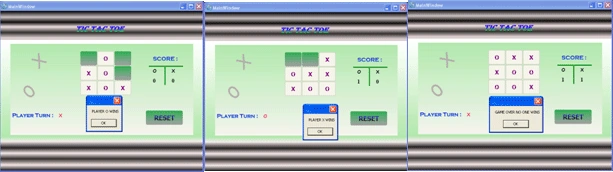
- First of all we will start our application with the design session.
Select a New project from the file menu and name it as "TICTACTOE". Then you will get a window like this: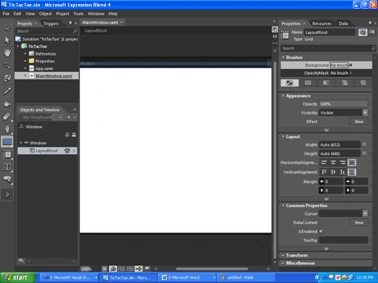
- Now Select the layout from the object and timeline window and change the background using gradient brush from the properties window according to your choice.
As my window layout is as under: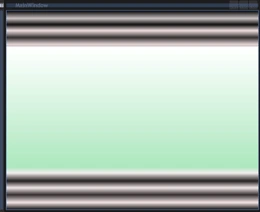
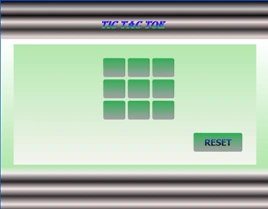
- Select the Rectangle tool from the tool box. Draw out a rectangle in the window and also change its background color to "#FEE7DAAC" and set stroke as No Brush so that your window looks as follows:
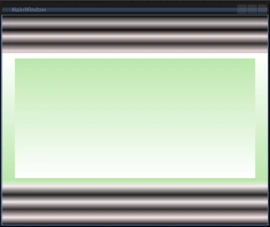
- Again select a Wrap panel tool from the toolbox and draw it on a rectangle.
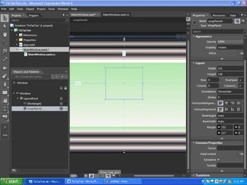
- In this step we will draw a button in a wrap panel and rename it to Button1, set its margin="0" and then change its background with the same process that we used for the rectangle. In the common properties of the properties window change the content of the button to "" (blank).
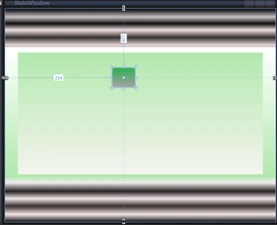
- Copy-paste 8 new buttons by right clicking on Button1inObjects and Timeline, set the margin="0" for all and rename them as "Button2, Button3, 4, 5, 6, 7, 8……….……Button9".
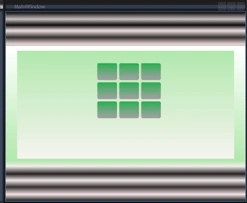
- Draw one more button and rename it as resetbutton and in its content type "RESET"
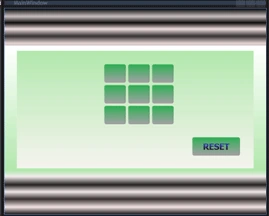
- Select a Label from the toolbox window, place it on top in the center of the window, rename it as Title and write "Tic Tac Toe" in the content of the common property; also change its foreground and background colors to whatever you choose.
- Similarly draw labels for (Players turn, X, O, Score , 0 etc.) as shown in the Image:
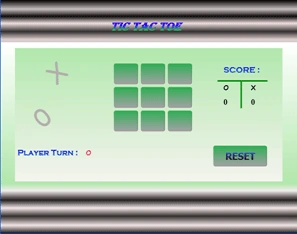
- Our Design is Ready now so let's type some code to make it a running Game.
MainWindow.xaml.cs
using System.Windows;
using System.Windows.Controls;
using System.Windows.Data;
using System.Windows.Documents;
using System.Windows.Input;
using System.Windows.Media;
using System.Windows.Media.Imaging;
using System.Windows.Shapes;
namespace TicTacToe
{
/// <summary>
/// Interaction logic for MainWindow.xaml
/// </summary>
public partial class MainWindow
{
int turn;
int i, j;
public MainWindow()
: base()
{
this.InitializeComponent();
}
private void Window_Loaded(object sender, RoutedEventArgs e)
{
turn = 1;
}
private void win(string btnContent)
{
if ((Button1.Content == btnContent & Button2.Content == btnContent &
Button3.Content == btnContent)
| (Button1.Content == btnContent & Button4.Content == btnContent &
Button7.Content == btnContent)
| (Button1.Content == btnContent & Button5.Content == btnContent &
Button9.Content == btnContent)
| (Button2.Content == btnContent & Button5.Content == btnContent &
Button8.Content == btnContent)
| (Button3.Content == btnContent & Button6.Content == btnContent &
Button9.Content == btnContent)
| (Button4.Content == btnContent & Button5.Content == btnContent &
Button6.Content == btnContent)
| (Button7.Content == btnContent & Button8.Content == btnContent &
Button9.Content == btnContent)
| (Button3.Content == btnContent & Button5.Content == btnContent &
Button7.Content == btnContent))
{
if (btnContent == "O")
{
MessageBox.Show("PLAYER O WINS");
Label1.Content = ++i;
}
else if (btnContent == "X")
{
MessageBox.Show("PLAYER X WINS");
Label2.Content = ++j;
}
disablebuttons();
}
else
{
foreach (Button btn in wrapPanel1.Children)
{
if (btn.IsEnabled == true)
return;
}
MessageBox.Show("GAME OVER NO ONE WINS");
}
}
private void disablebuttons()
{
foreach (Button btn in wrapPanel1.Children)
{
btn.IsEnabled = false;
}
}
private void Button_Click(object sender, RoutedEventArgs e)
{
Button btn = sender as Button;
if (turn == 1)
{
btn.Content = "O";
Label0.Content = "X";
}
else
{
btn.Content = "X";
Label0.Content = "O";
}
btn.IsEnabled = false;
win(btn.Content.ToString());
turn += 1;
if (turn > 2)
turn = 1;
}
private void Reset_Click(object sender, RoutedEventArgs e)
{
foreach (Button btn in wrapPanel1.Children)
{
btn.Content = "";
btn.IsEnabled = true;
}
}
}}
MainWindow.xaml
<Window
xmlns="http://schemas.microsoft.com/winfx/2006/xaml/presentation"
xmlns:x="http://schemas.microsoft.com/winfx/2006/xaml"
xmlns:d="http://schemas.microsoft.com/expression/blend/2008" xmlns:mc="http://schemas.openxmlformats.org/markup-compatibility/2006" mc:Ignorable="d"
x:Class="TicTacToe.MainWindow"
x:Name="Window"
Title="MainWindow" Width="600" Height="500">
<Grid x:Name="LayoutRoot">
<Grid.Background>
<LinearGradientBrush EndPoint="0.5,1" StartPoint="0.5,0"
MappingMode="RelativeToBoundingBox">
<GradientStop Color="Black" Offset="0"/>
<GradientStop Color="#FF161313" Offset="1"/>
<GradientStop Color="#FFC8C0C0" Offset="0.039"/>
<GradientStop Color="#FE0E0C0C" Offset="0.07"/>
<GradientStop Color="#FEEFDFDF" Offset="0.1"/>
<GradientStop Color="#FE332E2E" Offset="0.135"/>
<GradientStop Color="#FEE4D4D4" Offset="0.17"/>
<GradientStop Color="#FECCC2C2" Offset="0.178"/>
<GradientStop Color="#FEFFFFFF" Offset="0.183"/>
<GradientStop Color="#FEF3E5E5" Offset="0.965"/>
<GradientStop Color="#FE352E2E" Offset="0.926"/>
<GradientStop Color="#FEF1E7E7" Offset="0.891"/>
<GradientStop Color="#FE231F1F" Offset="0.857"/>
<GradientStop Color="#FEF1EBEB" Offset="0.817"/>
<GradientStop Color="#FEB1E7AC" Offset="0.787"/>
</LinearGradientBrush>
</Grid.Background>
<Rectangle Margin="28,96,29,104">
<Rectangle.Fill>
<LinearGradientBrush EndPoint="0.5,1" StartPoint="0.5,0">
<GradientStop Color="#FFF5F4EF" Offset="1"/>
<GradientStop Color="#FEB1E7AC"/>
</LinearGradientBrush>
</Rectangle.Fill>
</Rectangle>
<WrapPanel Height="130" HorizontalAlignment="Left" Margin="232,117,0,0" x:Name="wrapPanel1" VerticalAlignment="Top" Width="151">
<Button x:Name="Button1" Content="" HorizontalAlignment="Left" Height="43" Margin="0" VerticalAlignment="Top" Width="50" Foreground="Purple" FontWeight="Bold" FontSize="16" BorderBrush="{x:Null}" Click="Button_Click">
<Button.Background>
<LinearGradientBrush EndPoint="0.5,1" MappingMode="RelativeToBoundingBox" StartPoint="0.5,0">
<GradientStop Color="#FFA3A1A5" Offset="1"/>
<GradientStop Color="#FF2EAF53"/>
</LinearGradientBrush>
</Button.Background>
</Button>
<Button x:Name="Button2" Content="" Height="43" Foreground="Purple" Margin="0" VerticalAlignment="Top" BorderBrush="{x:Null}" HorizontalAlignment="Left" Width="50" FontWeight="Bold" FontSize="16" Click="Button_Click">
<Button.Background>
<LinearGradientBrush EndPoint="0.5,1" MappingMode="RelativeToBoundingBox" StartPoint="0.5,0">
<GradientStop Color="#FFA3A1A5" Offset="1"/>
<GradientStop Color="#FF2EAF53"/>
</LinearGradientBrush>
</Button.Background>
</Button>
<Button x:Name="Button3" Content="" Foreground="Purple" Height="43" Width="50" BorderBrush="{x:Null}" HorizontalAlignment="Left" VerticalAlignment="Top" FontWeight="Bold" FontSize="16" Margin="0" Click="Button_Click">
<Button.Background>
<LinearGradientBrush EndPoint="0.5,1" MappingMode="RelativeToBoundingBox" StartPoint="0.5,0">
<GradientStop Color="#FFA3A1A5" Offset="1"/>
<GradientStop Color="#FF2EAF53"/>
</LinearGradientBrush>
</Button.Background>
</Button>
<Button x:Name="Button4" Height="43" Margin="0" Foreground="Purple" VerticalAlignment="Top" BorderBrush="{x:Null}" FontWeight="Bold" FontSize="16" Click="Button_Click" Width="50">
<Button.Background>
<LinearGradientBrush EndPoint="0.5,1" MappingMode="RelativeToBoundingBox" StartPoint="0.5,0">
<GradientStop Color="#FFA3A1A5" Offset="1"/>
<GradientStop Color="#FF2EAF53"/>
</LinearGradientBrush>
</Button.Background>
</Button>
<Button x:Name="Button5" Content="" HorizontalAlignment="Right" Height="43" Margin="0" Foreground="Purple" VerticalAlignment="Top" Width="50" FontWeight="Bold" FontSize="16" BorderBrush="{x:Null}" Click="Button_Click">
<Button.Background>
<LinearGradientBrush EndPoint="0.5,1" MappingMode="RelativeToBoundingBox" StartPoint="0.5,0">
<GradientStop Color="#FFA3A1A5" Offset="1"/>
<GradientStop Color="#FF2EAF53"/>
</LinearGradientBrush>
</Button.Background>
</Button>
<Button x:Name="Button6" Content="" HorizontalAlignment="Left" Margin="0" Width="50" FontWeight="Bold" Foreground="Purple" FontSize="16" BorderBrush="{x:Null}" Click="Button_Click" Height="43">
<Button.Background>
<LinearGradientBrush EndPoint="0.5,1" MappingMode="RelativeToBoundingBox" StartPoint="0.5,0">
<GradientStop Color="#FFA3A1A5" Offset="1"/>
<GradientStop Color="#FF2EAF53"/>
</LinearGradientBrush>
</Button.Background>
</Button>
<Button x:Name="Button7" Content="" Margin="0" Foreground="Purple" FontWeight="Bold" FontSize="16" BorderBrush="{x:Null}" Click="Button_Click" HorizontalAlignment="Left" Width="50" Height="43">
<Button.Background>
<LinearGradientBrush EndPoint="0.5,1" MappingMode="RelativeToBoundingBox" StartPoint="0.5,0">
<GradientStop Color="#FFA3A1A5" Offset="1"/>
<GradientStop Color="#FF2EAF53"/>
</LinearGradientBrush>
</Button.Background>
</Button>
<Button x:Name="Button8" Content="" HorizontalAlignment="Right" Margin="0" Width="50" Foreground="Purple" FontWeight="Bold" FontSize="16" BorderBrush="{x:Null}" Click="Button_Click" Height="43">
<Button.Background>
<LinearGradientBrush EndPoint="0.5,1" MappingMode="RelativeToBoundingBox" StartPoint="0.5,0">
<GradientStop Color="#FFA3A1A5" Offset="1"/>
<GradientStop Color="#FF2EAF53"/>
</LinearGradientBrush>
</Button.Background>
</Button>
<Button x:Name="Button9" Content="" HorizontalAlignment="Right" Height="43" Margin="0" Foreground="Purple" VerticalAlignment="Top" Width="50" FontWeight="Bold" FontSize="16" BorderBrush="{x:Null}" Click="Button_Click">
<Button.Background>
<LinearGradientBrush EndPoint="0.5,1" MappingMode="RelativeToBoundingBox" StartPoint="0.5,0">
<GradientStop Color="#FFA3A1A5" Offset="1"/>
<GradientStop Color="#FF2EAF53"/>
</LinearGradientBrush>
</Button.Background>
</Button>
</WrapPanel>
<Button x:Name="Reset" Content="RESET" HorizontalAlignment="Right" Height="43" Margin="0,0,59,133" VerticalAlignment="Bottom" Width="109" BorderBrush="{x:Null}" FontWeight="Bold" FontSize="18.667" Click="Reset_Click">
<Button.Foreground>
<LinearGradientBrush EndPoint="0.5,1" StartPoint="0.5,0">
<GradientStop Color="#FF343ECC" Offset="0"/>
<GradientStop Color="#FF1B0D0D" Offset="1"/>
</LinearGradientBrush>
</Button.Foreground>
<Button.Background>
<LinearGradientBrush EndPoint="0.5,1" MappingMode="RelativeToBoundingBox" StartPoint="0.5,0">
<GradientStop Color="#FFA3A1A5" Offset="1"/>
<GradientStop Color="#FF2EAF53"/>
</LinearGradientBrush>
</Button.Background>
</Button>
<Label x:Name="Title" Content="Tic Tac Toe" Height="43" Margin="213,32,218,0" VerticalAlignment="Top" FontWeight="Bold" FontStyle="Italic" FontFamily="Algerian" FontSize="24">
<Label.Foreground>
<LinearGradientBrush EndPoint="0.5,1" StartPoint="0.5,0">
<GradientStop Color="#FF1AE743" Offset="1"/>
<GradientStop Color="#FF2B00FF" Offset="0.359"/>
</LinearGradientBrush>
</Label.Foreground>
</Label>
<Label x:Name="Labelx" Content="Player Turn : " HorizontalAlignment="Left" Height="34" Margin="28,0,0,141" VerticalAlignment="Bottom" Width="133" FontFamily="Copperplate Gothic Bold" FontSize="16" FontWeight="Bold" Background="#00CE1E1E">
<Label.Foreground>
<LinearGradientBrush EndPoint="0.5,1" StartPoint="0.5,0">
<GradientStop Color="#FF1316E2" Offset="0"/>
<GradientStop Color="#FF1662DC" Offset="1"/>
</LinearGradientBrush>
</Label.Foreground>
</Label>
<Label x:Name="Label0" Content="O" HorizontalAlignment="Left" Height="25" Margin="165,0,0,150.577" VerticalAlignment="Bottom" Width="21" FontFamily="Comic Sans MS" FontSize="13.333" FontWeight="Bold" Foreground="#FFEF2D59"/>
<Label x:Name="Score" Content="SCORE : " HorizontalAlignment="Right" Height="34" Margin="0,126,68,0" VerticalAlignment="Top" Width="84" FontFamily="Copperplate Gothic Bold" FontSize="16" FontWeight="Bold" Background="#00CE1E1E">
<Label.Foreground>
<LinearGradientBrush EndPoint="0.5,1" StartPoint="0.5,0">
<GradientStop Color="#FF1316E2" Offset="0"/>
<GradientStop Color="#FF1662DC" Offset="1"/>
</LinearGradientBrush>
</Label.Foreground>
</Label>
<Label x:Name="LabelX" Content="X" HorizontalAlignment="Right" Height="25" Margin="0,160,76,0" VerticalAlignment="Top" Width="21" FontFamily="Comic Sans MS" FontSize="13.333" FontWeight="Bold"/>
<Label x:Name="LabelO1" Content="O" HorizontalAlignment="Right" Height="25" Margin="0,160,131,0" VerticalAlignment="Top" Width="21" FontFamily="Comic Sans MS" FontSize="13.333" FontWeight="Bold"/>
<Rectangle HorizontalAlignment="Right" Height="3" Margin="0,160,59,0" VerticalAlignment="Top" Width="100" Fill="#FF068F0E"/>
<Rectangle Fill="#FF068F0E" HorizontalAlignment="Right" Margin="0,160,110,0" Width="3" Height="56" VerticalAlignment="Top"/>
<Label x:Name="Label1" Content="0" HorizontalAlignment="Right" Height="27" Margin="0,189,131,0" VerticalAlignment="Top" Width="21" FontWeight="Bold" FontSize="16" FontFamily="Times New Roman"/>
<Label x:Name="Label2" Content="0" HorizontalAlignment="Right" Height="27" Margin="0,189,76,0" VerticalAlignment="Top" Width="21" FontWeight="Bold" FontSize="16" FontFamily="Times New Roman"/>
<Label Content="0" HorizontalAlignment="Left" Margin="56.925,194.982,0,206.342" Width="43.85" FontSize="48" FontFamily="Comic Sans MS" Foreground="#FFB4ADAD" RenderTransformOrigin="0.5,0.5">
<Label.RenderTransform>
<TransformGroup>
<ScaleTransform/>
<SkewTransform/>
<RotateTransform Angle="-42.495"/>
<TranslateTransform/>
</TransformGroup>
</Label.RenderTransform>
</Label>
<Label Content="X" HorizontalAlignment="Left" Margin="85.336,103.242,0,0" Width="54.681" FontSize="48" FontFamily="Comic Sans MS" Foreground="#FFB4ADAD" RenderTransformOrigin="0.5,0.5" Height="73.025" VerticalAlignment="Top">
<Label.RenderTransform>
<TransformGroup>
<ScaleTransform/>
<SkewTransform/>
<RotateTransform Angle="-42.233"/>
<TranslateTransform/>
</TransformGroup>
</Label.RenderTransform>
</Label>
</Grid>
</Window>
JokPosted May 13, 2025, 4:39 PM
Private char currentPlayer = 'X'; private void Cell_Click(object sender, RoutedEventArgs e) { Button btn = sender as Button; if (string.IsNullOrEmpty(btn.Content as string)) { btn.Content = currentPlayer.ToString(); currentPlayer = currentPlayer == 'X' ? 'O' : 'X'; } }
Naveen RajPosted Oct 14, 2014, 4:55 AM
very nice