

- Download the Ajax Control Toolkit.
- Add a new tab in the toolbox
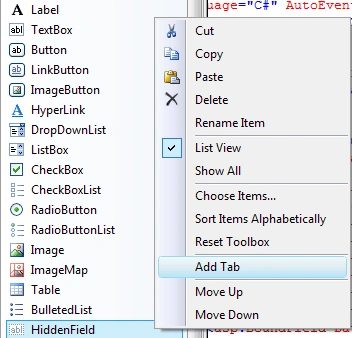
Choose items -> browse and select AjaxcontrolToolkit.dll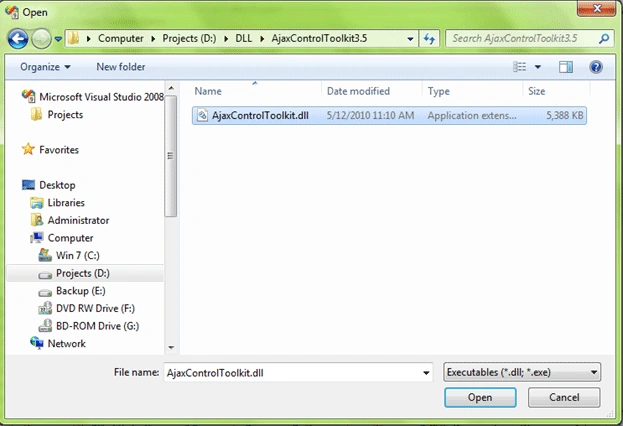
- Open the sharepoint web.config and update the following sections
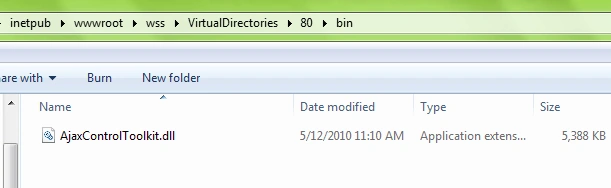
- Make sure SharePoint has access to AjaxControlToolkit.dll by either deploying the assembly to the Global Assembly Cache (GAC) or by putting in the \BIN folder of the SharePoint site's folder.
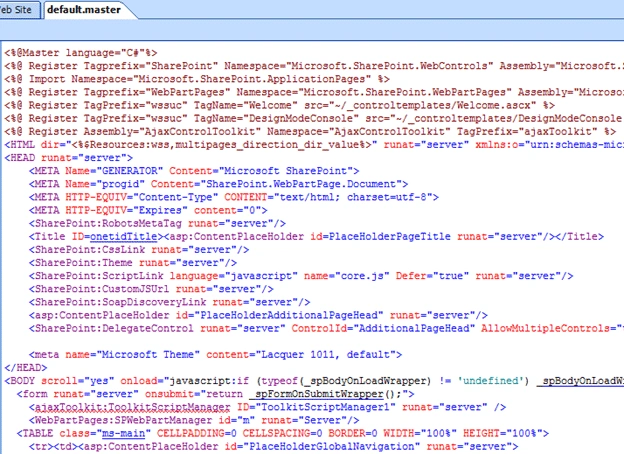
- Edit the sharepoint master page in Sharepoint designer and add ToolkitScriptManager to the it
- Now you can to write your code, open project in Visual studio 2008 then add reference of System.Web.Extensions, AjaxControlToolkit to the project. (In my case I am using one of my existing Web part application from sharepoint webpart using ASP.NET web user control.
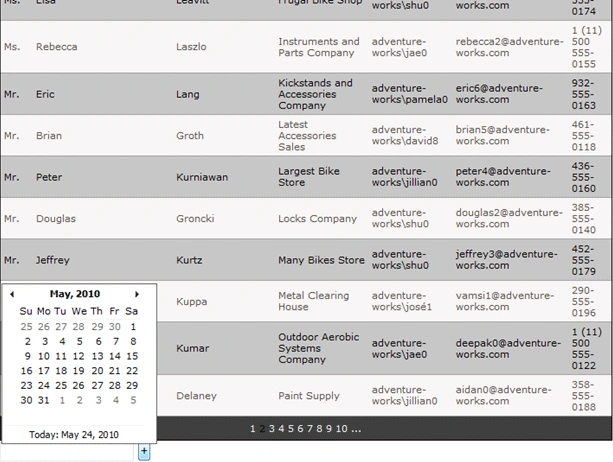
- In SampleWebUserControl.ascx drag drop the UpdatePanel and CalendarExtender
- So finally you have the AjaxControlToolkit working in your sharepoint website
<?xml version="1.0" encoding="UTF-8" standalone="yes"?>
<configuration>
<configSections>
<!--AJAX.NET SUPPORT 1 of 8 START-->
<sectionGroup name="system.web.extensions" type="System.Web.Configuration.SystemWebExtensionsSectionGroup, System.Web.Extensions, Version=3.5.0.0, Culture=neutral, PublicKeyToken=31BF3856AD364E35">
<sectionGroup name="scripting" type="System.Web.Configuration.ScriptingSectionGroup, System.Web.Extensions, Version=3.5.0.0, Culture=neutral, PublicKeyToken=31BF3856AD364E35">
<section name="scriptResourceHandler" type="System.Web.Configuration.ScriptingScriptResourceHandlerSection, System.Web.Extensions, Version=3.5.0.0, Culture=neutral, PublicKeyToken=31BF3856AD364E35" requirePermission="false" allowDefinition="MachineToApplication" />
<sectionGroup name="webServices" type="System.Web.Configuration.ScriptingWebServicesSectionGroup, System.Web.Extensions, Version=3.5.0.0, Culture=neutral, PublicKeyToken=31BF3856AD364E35">
<section name="jsonSerialization" type="System.Web.Configuration.ScriptingJsonSerializationSection, System.Web.Extensions, Version=3.5.0.0, Culture=neutral, PublicKeyToken=31BF3856AD364E35" requirePermission="false" allowDefinition="Everywhere" />
<section name="profileService" type="System.Web.Configuration.ScriptingProfileServiceSection, System.Web.Extensions, Version=3.5.0.0, Culture=neutral, PublicKeyToken=31BF3856AD364E35" requirePermission="false" allowDefinition="MachineToApplication" />
<section name="authenticationService" type="System.Web.Configuration.ScriptingAuthenticationServiceSection, System.Web.Extensions, Version=3.5.0.0, Culture=neutral, PublicKeyToken=31BF3856AD364E35" requirePermission="false" allowDefinition="MachineToApplication" />
<section name="roleService" type="System.Web.Configuration.ScriptingRoleServiceSection, System.Web.Extensions, Version=3.5.0.0, Culture=neutral, PublicKeyToken=31BF3856AD364E35" requirePermission="false" allowDefinition="MachineToApplication" />
</sectionGroup>
</sectionGroup>
</sectionGroup>
<!--AJAX.NET SUPPORT 1 of 8 END-->
</configSections>
<SharePoint>
<SafeControls>
<!--AJAX.NET SUPPORT 2 of 8 START-->
<SafeControl Assembly="System.Web.Extensions, Version=3.5.0.0,Culture=neutral, PublicKeyToken=31bf3856ad364e35" Namespace="System.Web.UI" TypeName="*" Safe="True" />
<SafeControl Assembly="AjaxControlToolkit" Namespace="AjaxControlToolkit" TypeName="*" Safe="True" />
<!--AJAX.NET SUPPORT 2 of 8 END-->
</SafeControls>
</SharePoint>
<system.web>
<httpHandlers>
<!--AJAX.NET SUPPORT 3 of 8 START-->
<remove verb="*" path="*.asmx" />
<add verb="*" path="*.asmx" validate="false" type="System.Web.Script.Services.ScriptHandlerFactory, System.Web.Extensions, Version=3.5.0.0, Culture=neutral, PublicKeyToken=31bf3856ad364e35" />
<add verb="*" path="*_AppService.axd" validate="false" type="System.Web.Script.Services.ScriptHandlerFactory, System.Web.Extensions, Version=3.5.0.0, Culture=neutral, PublicKeyToken=31bf3856ad364e35" />
<add verb="GET,HEAD" path="ScriptResource.axd" type="System.Web.Handlers.ScriptResourceHandler, System.Web.Extensions, Version=3.5.0.0, Culture=neutral, PublicKeyToken=31bf3856ad364e35" validate="false" />
<!--AJAX.NET SUPPORT 3 of 8 END-->
</httpHandlers>
<httpModules>
<!--AJAX.NET SUPPORT 4 of 8 START-->
<add name="ScriptModule" type="System.Web.Handlers.ScriptModule, System.Web.Extensions, Version=3.5.0.0, Culture=neutral, PublicKeyToken=31bf3856ad364e35" />
<!--AJAX.NET SUPPORT 4 of 8 END-->
</httpModules>
<compilation batch="false" debug="true">
<assemblies>
<!--AJAX.NET SUPPORT 5 of 8 END-->
<add assembly="System.Web.Extensions, Version=3.5.0.0, Culture=neutral, PublicKeyToken=31bf3856ad364e35" />
<add assembly="System.Web.Extensions.Design, Version=3.5.0.0, Culture=neutral, PublicKeyToken=31BF3856AD364E35" />
<!--AJAX.NET SUPPORT 5 of 8 START-->
</assemblies>
</compilation>
<pages enableSessionState="false" enableViewState="true" enableViewStateMac="true" validateRequest="false" pageParserFilterType="Microsoft.SharePoint.ApplicationRuntime.SPPageParserFilter, Microsoft.SharePoint, Version=12.0.0.0, Culture=neutral, PublicKeyToken=71e9bce111e9429c" asyncTimeout="7">
<!--AJAX.NET SUPPORT 6 of 8 START-->
<controls>
<add tagPrefix="asp" namespace="System.Web.UI" assembly="System.Web.Extensions, Version=3.5.0.0, Culture=neutral, PublicKeyToken=31bf3856ad364e35" />
<add tagPrefix="asp" namespace="System.Web.UI.WebControls" assembly="System.Web.Extensions, Version=3.5.0.0, Culture=neutral, PublicKeyToken=31BF3856AD364E35" />
<add tagPrefix="ajaxToolkit" namespace="AjaxControlToolkit" assembly="AjaxControlToolkit" />
</controls>
<!--AJAX.NET SUPPORT 6 of 8 END-->
</pages>
<trust level="Full" originUrl="" />
</system.web>
<!--AJAX.NET SUPPORT 7 of 8 START-->
<runtime>
<assemblyBinding>
<dependentAssembly>
<assemblyIdentity name="System.Web.Extensions" publicKeyToken="31bf3856ad364e35"/>
<bindingRedirect oldVersion="1.0.0.0-1.1.0.0" newVersion="3.5.0.0"/>
</dependentAssembly>
<dependentAssembly>
<assemblyIdentity name="System.Web.Extensions.Design" publicKeyToken="31bf3856ad364e35"/>
<bindingRedirect oldVersion="1.0.0.0-1.1.0.0" newVersion="3.5.0.0"/>
</dependentAssembly>
</assemblyBinding>
</runtime>
<!--AJAX.NET SUPPORT 7 of 8 END-->
<!--AJAX.NET SUPPORT 8 of 8 START-->
<system.web.extensions>
<scripting>
<webServices>
<jsonSerialization maxJsonLength="500000">
<converters>
</converters>
</jsonSerialization>
</webServices>
<scriptResourceHandler enableCompression="false" enableCaching="true" />
</scripting>
</system.web.extensions>
<system.webServer>
<validation validateIntegratedModeConfiguration="false" />
<modules>
<add name="ScriptModule" preCondition="integratedMode" type="System.Web.Handlers.ScriptModule, System.Web.Extensions, Version=3.5.0.0, Culture=neutral, PublicKeyToken=31bf3856ad364e35" />
</modules>
<handlers>
<remove name="WebServiceHandlerFactory-ISAPI-2.0" />
<add name="ScriptHandlerFactory" verb="*" path="*.asmx" preCondition="integratedMode" type="System.Web.Script.Services.ScriptHandlerFactory, System.Web.Extensions, Version=3.5.0.0, Culture=neutral, PublicKeyToken=31bf3856ad364e35" />
<add name="ScriptHandlerFactoryAppServices" verb="*" path="*_AppService.axd" preCondition="integratedMode" type="System.Web.Script.Services.ScriptHandlerFactory,
System.Web.Extensions, Version=3.5.0.0, Culture=neutral,
PublicKeyToken=31bf3856ad364e35" />
<add name="ScriptResource" preCondition="integratedMode" verb="GET,HEAD" path="ScriptResource.axd" type="System.Web.Handlers.ScriptResourceHandler,
System.Web.Extensions, Version=3.5.0.0, Culture=neutral,
PublicKeyToken=31bf3856ad364e35" />
</handlers>
</system.webServer>
<!--AJAX.NET SUPPORT 8 of 8 END-->
</configuration>
<%@ Control Language="C#" AutoEventWireup="true" Inherits="SampleWebPart.SampleWebUserControl, SampleWebPart, Version=1.0.0.0, Culture=neutral, PublicKeyToken=9f4da00116c38ec5" %>
<%@ Register Assembly="AjaxControlToolkit" Namespace="AjaxControlToolkit" TagPrefix="ajaxToolkit" %>
<asp:UpdatePanel ID="UpdatePanel1" runat="server">
<ContentTemplate>
<asp:GridView ID="GridView1" runat="server" AllowPaging="True" AllowSorting="True"
AutoGenerateColumns="False" CellPadding="4" DataKeyNames="CustomerID" DataSourceID="SqlDataSource1"
GridLines="Horizontal" BackColor="White" BorderColor="#000000"
BorderWidth="1px">
<RowStyle BackColor="#C8C7C7" ForeColor="Black" />
<AlternatingRowStyle BackColor="#F9F6F6" ForeColor="#55514B" />
<Columns>
<asp:BoundField DataField="CustomerID" HeaderText="CustomerID" InsertVisible="False"
ReadOnly="True" SortExpression="CustomerID" Visible="False" />
<asp:BoundField DataField="Title" HeaderText="Title" SortExpression="Title" />
<asp:BoundField DataField="FirstName" HeaderText="FirstName" SortExpression="FirstName" />
<asp:BoundField DataField="MiddleName" HeaderText="MiddleName" SortExpression="MiddleName" />
<asp:BoundField DataField="LastName" HeaderText="LastName" SortExpression="LastName" />
<asp:BoundField DataField="Suffix" HeaderText="Suffix" SortExpression="Suffix" />
<asp:BoundField DataField="CompanyName" HeaderText="CompanyName" SortExpression="CompanyName" />
<asp:BoundField DataField="SalesPerson" HeaderText="SalesPerson" SortExpression="SalesPerson" />
<asp:BoundField DataField="EmailAddress" HeaderText="EmailAddress" SortExpression="EmailAddress" />
<asp:BoundField DataField="Phone" HeaderText="Phone" SortExpression="Phone" />
</Columns>
<FooterStyle BackColor="White" ForeColor="#333333" />
<PagerStyle BackColor="#3F3F3F" ForeColor="White" HorizontalAlign="Center" />
<SelectedRowStyle BackColor="#339966" Font-Bold="True" ForeColor="White" />
<HeaderStyle BackColor="#3F3F3F" Font-Bold="True" ForeColor="White" />
</asp:GridView>
<asp:SqlDataSource ID="SqlDataSource1" runat="server" ConnectionString="<%$ ConnectionStrings:AdventureWorksConnectionString %>"
SelectCommand="SELECT [CustomerID], [Title], [FirstName], [MiddleName], [LastName], [Suffix], [CompanyName], [SalesPerson], [EmailAddress], [Phone]
FROM SalesLT.Customer"></asp:SqlDataSource>
</ContentTemplate>
</asp:UpdatePanel>
<asp:TextBox ID="TextBox1" runat="server"></asp:TextBox>
<ajaxToolkit:CalendarExtender ID="CalendarExtender1" runat="server" PopupButtonID="Button1"
TargetControlID="TextBox1">
</ajaxToolkit:CalendarExtender>
<asp:Button ID="Button1" runat="server" Text="+" />
Jiteendra SampathiraoPosted Jan 20, 2011, 6:42 AM
its helpful to me...thnx
vijay vPosted Dec 1, 2010, 2:13 AM
thanks...
Amit MathurPosted Sep 28, 2010, 10:14 PM
Hi Nipun, I had followed all the steps written in this article. But still I am not able to use my ajaxcontroltoolkit controls in my SharePoint application. Can you please suggest me what else is needed or if you can help me personally I'll be really thankful to you. Thanks Amit Mathur mail [at] amitmathur.in
cynthia mendoncaPosted Jul 26, 2010, 8:53 AM
when i make changes in the sharepoint web.config file my site doesnt work. what other steps i have to follow to make it work
saroj laddhaeditedPosted Jul 10, 2010, 8:19 AMEdited Oct 12, 2012, 2:45 PM
Thanks for this article its really very helpful. till now i was just wondering how to do it.but after reading this im able to implement ajax in sharepoint thanx.