Ajax CollapsiblePanelExtender in Asp.Net:
There are the following easy steps to understand how to use Ajax CollapsiblePanelExtender control in Asp.Net.
Step 1: Create new Ajax enabled web site.
Step 2: Now go to solution explorer and right click on root directory and click on Add reference then add AjaxControlTollkit.dll.
Step 3: Copy the following code and paste on to your page.
<%@ Page Language="C#" AutoEventWireup="true" CodeFile="Default.aspx.cs" Inherits="_Default" %>
<%@ Register Assembly="AjaxControlToolkit" Namespace="AjaxControlToolkit" TagPrefix="ajaxToolkit" %>
<!DOCTYPE html PUBLIC "-//W3C//DTD XHTML 1.1//EN" "http://www.w3.org/TR/xhtml11/DTD/xhtml11.dtd">
<html xmlns="http://www.w3.org/1999/xhtml">
<head id="Head1" runat="server">
<title>CollapsiblePanel</title>
</head>
<body>
<form id="form1" runat="server">
<asp:ScriptManager runat="server" ID="scriptManager1" />
<div style="width: 410px; background: gray;">
<asp:Panel runat="server" ID="panel1">
<div style="font-weight: bold; background-color: ThreeDShadow;">
<table width="100%">
<tr>
<td align="left">Clicking Here To view my profile
<asp:Label runat="server" ID="textLabel" />
</td>
<td align="right" width="10px">
<asp:Image ID="Image1" runat="server" />
</td>
</tr>
</table>
</div>
</asp:Panel>
<asp:Panel runat="server" ID="panel2" Width="98%" HorizontalAlign="center">
<div>
<table width="100%">
<tr valign="top">
<td align="left" width="100px">
<img src="myPhoto.jpg" />
</td>
<td align="left">Hi<br />This is Purushottam rathore<br />Noida-201301<br />India
</td>
</tr>
</table>
</div>
</asp:Panel>
<ajaxToolkit:CollapsiblePanelExtender runat="server" ID="cpe" TargetControlID="panel2" CollapseControlID="panel1" ExpandControlID="panel1" Collapsed="true" CollapsedSize="0" ExpandedSize="120" ExpandedText="(Collapse...)" CollapsedText="(Expand...)" TextLabelID="textLabel" ImageControlID="Image1" ExpandedImage="Img/collapse.jpg" CollapsedImage="Img/expand.jpg">
</ajaxToolkit:CollapsiblePanelExtender>
</div>
</form>
</body>
</html>
Step4: Now Debug the application by press F5,
Output: you will get the following output:


Figure 1:
Click on the header or image (Right corner), you will see as follows:
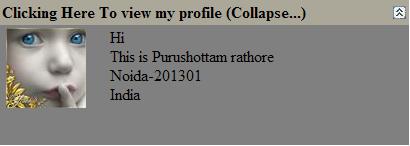
Figure 2: