

The Accordion control is used to specify a set of panes, similar to the famous menu in Microsoft Outlook. Each pane is made up of a header template and a content template. The header templates of all panes are always visible, while only one content template is visible. The user selects which pane to view by clicking on the header. The content from the previously active pane is hidden from view, and the content of the newly selected pane is displayed instead.
There are the following properties of Accordion control:
-
FadeTransitions
-
TransitionDuration
-
FramesPerSecond
-
SelectedIndex
-
AutoSize
-
Height etc.
The Accordion control can provide a fade transition when switching among active panes. You set the FadeTransitions property to true and can set the TransitionDuration and FramesPerSecond values. The default values are 250 milliseconds and 40 frames per second, respectively.
The SelectedIndex property lets you declaratively and programmatically control which pane to show.
The AutoSize property is None by default, meaning that the size of the Accordion control changes based on the active pane. Other content on the screen may be shifted to accommodate the changing size. But when the AutoSize property is set to Limit, the size is restricted to the Height value. The active pane will display scroll bars if the content is larger than the space available. The other possible value is Fill, which will result in expanding a pane if the content is not large enough to satisfy the Height value provided.
Example:
<% <
<%@ Register Assembly="AjaxControlToolkit" Namespace="AjaxControlToolkit" TagPrefix="ajaxToolkit" %>
<!DOCTYPE html PUBLIC "-//W3C//DTD XHTML 1.0 Transitional//EN" "http://www.w3.org/TR/xhtml1/DTD/xhtml1-transitional.dtd">
<head id="Head1" runat="server">
<title>Accordion</title>
</head>
<body style="font: verdana">
<form id="form1" runat="server">
<asp:ScriptManager ID="scriptManager" runat="server" />
<div>
<ajaxToolkit:Accordion runat="server" ID="theAccordion" SelectedIndex="0" AutoSize="Limit" BackColor="LightCyan" FadeTransitions="true" TransitionDuration="333" FramesPerSecond="30" Width="275px" Height="205">
<Panes>
<ajaxToolkit:AccordionPane ID="AccordionPane1" runat="server">
<Header>
<table width="100%" cellpadding="0" cellspacing="0" style="border-bottom: 1px solid Navy; border-top: 1px solid Navy; border-left: 1px solid Navy; border-right: 1px solid Navy;">
<tr style="background: gray; font-size: larger;">
<td>
Models
</td>
</tr>
</table>
</Header>
<Content>
<div style="background: #336699">
<ul>
<li>Male Models</li>
<li>Female Models</li>
<li>Comments</li>
<li>Blogs</li>
<li>Contact to models</li>
</ul>
</div>
</Content>
</ajaxToolkit:AccordionPane>
<ajaxToolkit:AccordionPane ID="AccordionPane2" runat="server">
<Header>
<table width="100%" cellpadding="0" cellspacing="0" style="border-bottom: 1px solid Navy; border-top: 1px solid Navy; border-left: 1px solid Navy; border-right: 1px solid Navy;">
<tr style="background: gray; font-size: larger;">
<td>
Photographer
</td>
</tr>
</table>
</Header>
<Content>
<div style="background: #336699">
<ul>
<li>Men Photographer</li>
<li>Female Photographer</li>
<li>Comments</li>
<li>Blog</li>
<li>Send Email</li>
</ul>
</div>
</Content>
</ajaxToolkit:AccordionPane>
<ajaxToolkit:AccordionPane ID="AccordionPane3" runat="server">
<Header>
<table width="100%" cellpadding="0" cellspacing="0" style="border-bottom: 1px solid Navy; border-top: 1px solid Navy; border-left: 1px solid Navy; border-right: 1px solid Navy;">
<tr style="background: gray; font-size: larger;">
<td>
Agents
</td>
</tr>
</table>
</Header>
<Content>
<div style="background: #336699">
<ul>
<li>Agent's Models</li>
<li>Agent's Photographer</li>
<li>Agent's Comments</li>
<li>Blog</li>
<li>Contact To Agent</li>
</ul>
</div>
</Content>
</ajaxToolkit:AccordionPane>
<ajaxToolkit:AccordionPane ID="AccordionPane4" runat="server">
<Header>
<table width="100%" cellpadding="0" cellspacing="0" style="border-bottom: 1px solid Navy; border-top: 1px solid Navy; border-left: 1px solid Navy; border-right: 1px solid Navy;">
<tr style="background: gray; font-size: larger;">
<td>
HairStylist
</td>
</tr>
</table>
</Header>
<Content>
<div style="background: #336699">
<ul>
<li>Latest HairStyle</li>
<li>Modern HairStyle</li>
<li>Comments</li>
<li>Blog</li>
<li>Send Email</li>
</ul>
</div>
</Content>
</ajaxToolkit:AccordionPane>
</Panes>
</ajaxToolkit:Accordion>
</div>
</form>
</body>
</html>
Output:
If I set SelectedIndex="0" then by default content of first AccordionPane will be visible as follows-
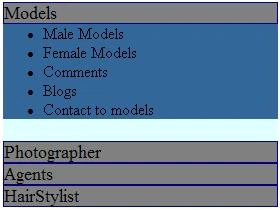
Figure 1:
If I click on header of second AccordionPane (Photographer) then you will see something like this.
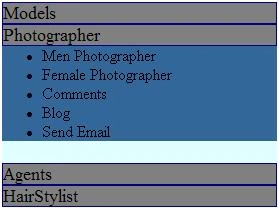
Figure 2:
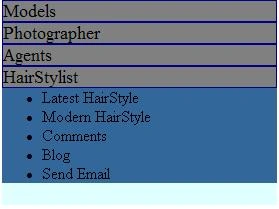
Figure 3:
Here The Accordion control is used with four panes. The header for each pane shows the title and the content shows the track listings.
danny droreditedPosted Nov 23, 2009, 3:57 AMEdited Jan 16, 2013, 5:24 AM
thanks for the code.<br>very cool control, I already know where i'm going to add something like this :D<br><br>--------------------------------<br>Danny