

Introduction:
The TreeView control is one of the most important controls of ASP.NET controls. It is used to display records in a hierarchical format.

Figure 1: TreeView control structure
How to use TreeView control: Follow these steps:
Step 1: Open Visual Studio 2008 and drag a TreeView control from the toolbar and drop on page as follows:
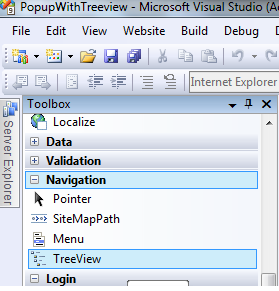
Figure 2:
Step 2: Copy this code and paste on your page.
<asp:TreeView ID="CourseTreeView" runat="server" OnSelectedNodeChanged="CourseTreeView_SelectedNodeChanged" ShowLines="true" DataSourceID="XmlDataSource1" ExpandDepth="1" PopulateNodesFromClient="false">
<Nodes>
<asp:TreeNode Text="Puru" PopulateOnDemand="false" Value="-1" />
</Nodes>
</asp:TreeView>
<asp:XmlDataSource ID="XmlDataSource1" runat="server" DataFile="~/treenode.xml">
</asp:XmlDataSource>
Here I am binding the node from a xml file. This is optional. You can bind a TreeView node from a database or fix the node directly within the <node> tab.
How to open a popup upon a click of any node in a TreeView?
I am using a small JavaScript function for popup on click.
<script type="text/javascript" language="javascript">
Sys.WebForms.PageRequestManager.getInstance().add_endRequest(EndRequestHandler);
function EndRequestHandler(sender, args) {
alert($get("<%=TextBox1.ClientID %>").value);
}
</script>
The following example demonstrates how to use a TreeView control and how to popup on click of any node.
Example:
<%@ Page Language="C#" AutoEventWireup="true" CodeFile="Default.aspx.cs" Inherits="_Default" %>
<!DOCTYPE html PUBLIC "-//W3C//DTD XHTML 1.0 Transitional//EN" "http://www.w3.org/TR/xhtml1/DTD/xhtml1-transitional.dtd">
<html xmlns="http://www.w3.org/1999/xhtml">
<head id="Head1" runat="server">
<title>Untitled Page</title>
</head>
<body>
<form id="form1" runat="server">
<asp:ScriptManager ID="ScriptManager1" runat="server">
</asp:ScriptManager>
<asp:UpdatePanel ID="UpdatePanel1" runat="server">
<ContentTemplate>
<asp:TreeView ID="CourseTreeView" runat="server" OnSelectedNodeChanged="CourseTreeView_SelectedNodeChanged"
ShowLines="true" DataSourceID="XmlDataSource1" ExpandDepth="1" PopulateNodesFromClient="false">
<Nodes>
<asp:TreeNode Text="Puru" PopulateOnDemand="false" Value="-1" />
</Nodes>
</asp:TreeView>
<asp:XmlDataSource ID="XmlDataSource1" runat="server" DataFile="~/treenode.xml">
</asp:XmlDataSource>
<span style="display: none;">
<asp:TextBox ID="TextBox1" runat="server"></asp:TextBox>
</span>
</ContentTemplate>
</asp:UpdatePanel>
<script type="text/javascript" language="javascript">
Sys.WebForms.PageRequestManager.getInstance().add_endRequest(EndRequestHandler);
function EndRequestHandler(sender, args) {
alert($get("<%=TextBox1.ClientID %>").value);
}
</script>
</form>
</body>
</html>
protected void CourseTreeView_SelectedNodeChanged(object sender, EventArgs e)
{
TextBox1.Text = CourseTreeView.SelectedNode.Text;
}
Output:

Figure 3: Output of TreeView control.
If you click on any tree node, a popup will be shown as follows:

Figure 4: PopUp shown upon click of a tree node.
nasurudeenPosted Aug 23, 2014, 6:51 AM
i need xml data base file
Rajesh BPosted Jul 3, 2013, 6:22 AM
nice
vinoth kumarPosted Jul 8, 2011, 2:24 PM
in tree view..we r creating the design..then wat we want to do...
gauravPosted Jul 7, 2011, 5:52 AM
jh,,
mahmut sami yazarPosted Mar 31, 2011, 8:10 AM
http://3d2f.com/programs/17-386-9rays-net-treeview-for-asp-net-download.shtml
Scott KPosted Feb 2, 2011, 4:29 PM
I was wondering if you could post or email the code behind page for getting more than 2 levels to work on the tree view. Javascript works great. Thanks.