

What is Worker Process?
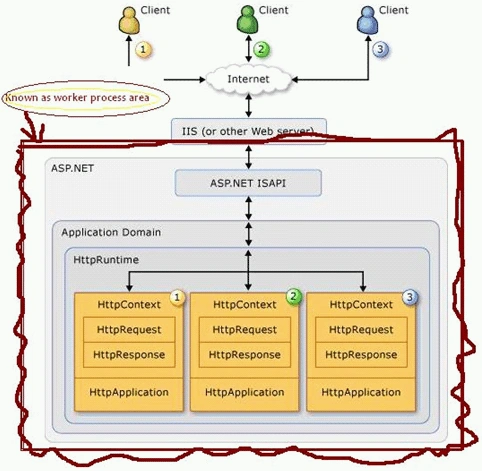
"The "Process" which is responsible for processing Asp.net application request and sending back response to the client , is known as "Worker Process".
All ASP.NET functionalities runs within the scope of this process."
So finally I can write it...
"Process which is responsible for all asp.net requests and response cycle is known as worker process."
What about Worker process in Web Farm?
A Web farm contains multiple ASP.NET worker processes.
Each server in the group of servers handles a separate ASP.NET worker process.
What about Worker process in Web Garden?
A Web garden contains multiple ASP.NET worker processes.
Each CPU in the SMP server handles a separate ASP.NET worker process.
Let's See the Worker Process
Running IIS 5.0: Aspnet_wp.ex
Running IIS 6.0: W3wp.exe
ISAPI
ISAPI is the first and highest performance entry point into IIS for custom Web Request handling
ISAPI (Internet Server Application Program Interface) is a set of Windows program (APIs (DLL)) calls that let you write a Web server application that will run faster than a common gateway interface (CGI) application.
Let's technically see this...
When the first ASP.NET request comes in the DLL will spawn a new process in another EXE – aspnet_wp.exe/w3wp.exe – and route processing to this spawned process. This process in turn loads and hosts the .NET runtime. Every request that comes into the ISAPI DLL then routes to this worker process via Named Pipe calls.
A request starts on the browser where the user types in a URL, clicks on a hyperlink or submits an HTML form. Or a client application might make call against an ASP.NET based Web Service, which is also serviced by ASP.NET. On the server side the Web Server IIS picks up the request. At the lowest level ASP.NET interfaces with IIS through an ISAPI extension.
In IIS .aspx is mapped through an 'Application Extension' (aka. as a script map) that is mapped to the ASP.NET ISAPI dll - aspnet_isapi.dll. Every request that fires ASP.NET must go through an extension that is registered and points at aspnet_isapi.dll.
ISAPI is very low level it also is very fast, but fairly unmanageable for application level development. So, ISAPI has been mainly relegated for some time to providing bridge interfaces to other application or platforms. But ISAPI isn't dead by any means. In fact, ASP.NET on Microsoft platforms interfaces with IIS through an ISAPI extension that hosts .NET and through it the ASP.NET runtime. ISAPI provides the core interface from the Web Server and ASP.NET uses the unmanaged ISAPI code to retrieve input and send output back to the client. The content that ISAPI provides is available via common objects like HttpRequest and HttpResponse that expose the unmanaged data as managed objects with a nice and accessible interface.
What Kind of HTTP Server Is Needed to Run ISAPI?
To host Web sites, you must have an Internet server that supports the Hypertext Transfer Protocol (HTTP). If you have chosen an ISAPI-compliant Web server (for example, Microsoft Internet Information Server), you can take advantage of server extension DLLs to create small, fast Internet server applications.
A special kind of ISAPI DLL is called an ISAPI filter, which can be designated to receive control for every HTTP request. You can create an ISAPI filter for encryption or decryption, for logging, for request screening, or for other purposes.
ISAPI consists of two components: Extensions and Filters. These are the only two types of application that can be developed using ISAPI.
Extensions
ISAPI Extensions are true applications that run on IIS. They have access to all of the functionality provided by IIS. ISAPI extensions are implemented as DLLs that are loaded into a process that is controlled by IIS. Clients can access ISAPI extensions in the same way they access a static HTML page.
Filters
ISAPI filters are used to modify or enhance the functionality provided by IIS. They always run on an IIS server and filter every request until they find one they need to process. Filters can be programmed to examine and modify both incoming and outgoing streams of data.
Filters are implemented as DLL files and can be registered on an IIS server on a site level or a global level (i.e., apply to all sites on an IIS server). Filters are initialized when the worker process is started and listens to all requests to the site on which it is installed.
Common tasks performed by ISAPI filters include:
- Changing request data (URLs or headers) sent by the client
- Controlling which physical file gets mapped to the URL
- Controlling the user name and password used with anonymous or basic authentication
- Modifying or analyzing a request after authentication is complete
- Modifying a response going back to the client
- Running custom processing on "access denied" responses
- Running processing when a request is complete
- Run processing when a connection with the client is closed
- Performing special logging or traffic analysis.
- Performing custom authentication.
- Handling encryption and compression.
Example
Following are the main Server side scripting languages which support ISAPI.
- ASP
- ASP.NET
- Perl
- PHP
Sthitaprajnya Debasis NayakPosted Jan 17, 2016, 2:38 PM
Nice Article...
Praneeth ChandraPosted Mar 30, 2009, 1:41 AM
Indeed a very good article, and would be grateful to you, if you can share the knowledge of implementing isapi filters for logging, encryption and decryption.
Katie hitchcokePosted Jan 8, 2009, 8:07 AM
hi, this is what i was puzzled for since last couple of months this is really help us to got about worker process. thanks