

Introduction:
Fully transparent and animated game.
Name of this game is Point Taker. In this game you first have to create a profile. As you create your profile in C drive a folder will generate named PointTaker. If you have created your profile then in C drive in PointTaker folder two files are generated of your profile name starting with p1 and p2 and in that all your profile related data will saved. This profile files are helpful when you resume your game the next time you play.
When you start the game you will find a moving square and a static blinking square. By the moving square you have to pass.
Exactly on the blinking square. If you do this then you will get a one point and another static blinking square generated at another location. And you have to repeat it again. To win this game you have to get 100 points. It means you need to pass 100 blinking squares. You can control a moving square by up, down, left and right arrow. If moving square touches the boundary then your game will be over so be careful about that.
Now if you want to quit the game in half then press Esc. You will find two options; restart and quit. If you go with restart then the game starts again and if you go with quit then you exit from the Game. But don't worry about that you just have to play the game again from the start. When you play the game the next time it starts as it is from last as you left it. All these things are managed by your profile. Here, no concept of database. Handling of your profile just from the simple text files.
Interesting thing here is that your desktop background changed automatically at the increment of 5 points.
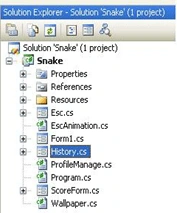
Now, let's move on code...
- I have used 3 class file and 4 forms for this game.
- Form1 form for where game is played.
- Esc form come in action when Esc button presses or Close button press which is on the score form.
- Score Form displays player score and History form displays player's profile history.
- Wallpaper class changes your desktop background , EscAnimation class uses to give some moving animation effect and ProfileManage class use to manage player's profile
Download the source code and enjoy the game.
Asfend YarPosted Feb 29, 2016, 1:55 PM
good
yoga muthuPosted Jan 28, 2014, 5:15 AM
not properly run
jazz KatuaPosted Nov 2, 2013, 3:59 PM
After an error (commented many times here) and a folder which contained 64 TMP-files, i deleted the whole bunch. Not gonna waste time on this one to get it running
Thilmi KuruppuPosted Sep 22, 2013, 2:47 PM
it throws an exception in profile mange. What can i do??
kinjal patelPosted Jan 7, 2013, 5:28 AM
i got am error while running your application . is it compatible to vs 2010.
Adee BhatPosted May 7, 2012, 2:23 AM
Showing Error ProfileManager class and comment the code in constructor and try to run it again. i did this its working but snake is not able to eat pointer he moves over pointer plzz help
Ejas ShaikPosted Feb 8, 2012, 12:53 PM
When running this application it throws some exception The type initializer for 'Snake.ProfileManage' threw an exception.
enrico padolinaPosted Nov 15, 2011, 6:49 AM
I hope your still here, i got this error, and don't know how to fix it. Mind telling me how? Error 1 Invalid Resx file. Could not find a part of the path 'C:\Users\user\AppData\Local\Temporary Projects\Resources\start.png'. Line 123, position 5. C:\Users\user\AppData\Local\Temporary Projects\WindowsFormsApplication1\Resources.resx 123 5 WindowsFormsApplication1
kristine ocampoPosted Jul 13, 2011, 1:15 AM
tHERe's an error on your code pls help me solve this kind of error.... ProfileManage.getPicturePath() TypeInitializationException was unhandled my version is 2010 thank you...
Agus SudiartaPosted Jun 29, 2011, 2:14 AM
i a beginner C# could i dowdload this source code?i need for my collage
Don SchaeferPosted Jun 27, 2011, 7:28 PM
Hello, I just downloaded the code and it said it was done in a previous version of Visual Studio and had to convert it to VS2010 format. It said it converted fine, but the game does not run. I suspect it might also need an older version of .NET, can you tell me what version it was developed for? I'm running VS 10 and .NET 4 Thanks, Don
zazazaza zazaPosted Apr 20, 2011, 3:42 PM
hello this exe FIle not work .. what can I do?
han hanPosted Mar 12, 2011, 9:58 PM
hay woa
lerie taylorPosted Mar 5, 2011, 11:26 AM
This source didn't work out of the zip for visual studio 2010
dimple soniPosted Jan 20, 2011, 1:00 PM
mast h........
wang mqPosted Jan 3, 2011, 5:44 AM
//getPicturePath() method gives path of pics folder in which all pictures are there for the Game to set the desktop background. ProfileManage.getPicturePath(); when i start it ,VS2008 said here is wrong
Jared CoePosted Dec 29, 2010, 3:34 PM
Really? Really?!
abo basharPosted Dec 29, 2010, 1:40 PM
??? ???????????
Vinod KumarPosted Dec 19, 2010, 12:45 PM
I am new to this C#.net and i want to learn it. i know the basic concept . please suggest some book to learn programming..
muralikrishna narraPosted Dec 8, 2010, 5:30 AM
Hi sir this is verygood article sir i need code for these snake game