

A C# extension method allows developers to extend the functionality of an existing type without creating a new derived type, recompiling, or otherwise modifying the original type. C# extension method is a special kind of static method that is called as if it was an instance method on the extended type. In this article, we will create a class library and extend its functionality from the caller code by implementing extension methods in C#.
C# Extension Method
C# extension method is a static method of a static class, where the "this" modifier is applied to the first parameter. The type of the first parameter will be the type that is extended.
Extension methods are only in scope when you explicitly import the namespace into your source code with a using directive.
Create a Class Library
Create a project Class Library project in Visual Studio.

Add the following code to Class 1. Class 1 has two methods, Display and Print.
using System;
using System.Text;

namespace ClassLibExtMethod
{
    public class Class1
    {
        public string Display()
        {
            return ("I m in Display");
        }

        public string Print()
        {
            return ("I m in Print");
        }
    }
}
Create a Caller Application
Now create a console application in Visual Studio using New Project. Select File > New > Project and select Visual C# and Console Application, as shown below.
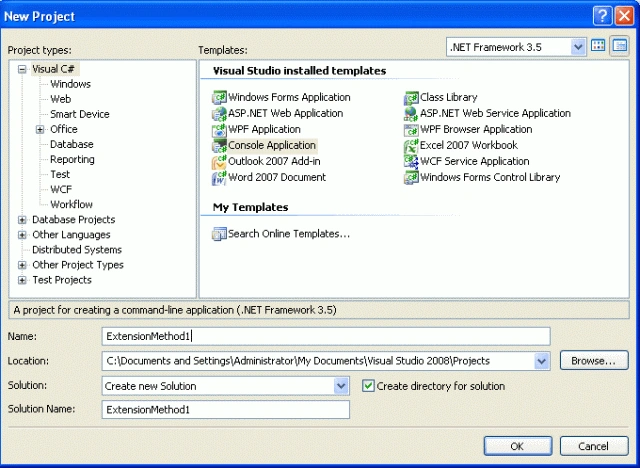
Add the reference of the previously created class library to this project.
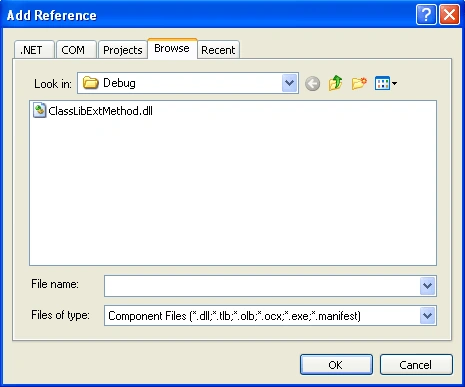
Use the following code and use the ClassLibExtMEthod.dll in your namespace:
using System;
using System.Text;
using ClassLibExtMethod;

namespace ExtensionMethod1
{
    public static class XX
    {
         public static void NewMethod(this Class1 ob)
        {
            Console.WriteLine("Hello I m extended method");
        }
    }

    class Program
    {
        static void Main(string[] args)
        {
            Class1 ob = new Class1();
            ob.Display();
            ob.Print();
            ob.NewMethod();
            Console.ReadKey();
        }
    }
}
In the above code, you see a static class XX with a method, NewMethod. If you notice, the NewMethod takes Class1 as a parameter. This is how you extend an existing library and add your methods. Now, this New Method is available via the class library.
When you use Visual Studio Intellisense, you can see the extension method is represented with an arrow (different from the normal method sign) since they were instance methods on the extended type. See the figure below:

The output of the preceding program looks like the following.

Benefits of extension methods
- Extension methods allow existing classes to be extended without relying on inheritance or changing the class's source code.
- If the class is sealed, there is no concept of extending its functionality. For this, a new concept is introduced, in other words, extension methods.
- This feature is important for all developers, especially if you would like to use the dynamism of the C# enhancements in your class's design.
More code snippets of extension expansion methods
using System;
using System.Text;

namespace ExtensionMethod2
{
    public static class ExtMetClass
    {
        public static int IntegerExtension(this string str)
        {
            return Int32.Parse(str);
        }
    }

    class Program
    {
        static void Main(string[] args)
        {
            string str = "123456";
            int num = str.IntegerExtension();
            Console.WriteLine("The output using extension method: {0}", num);
            Console.ReadLine();
        }
    }
}
In the preceding program, we used an extension method IntegerExtension(), to convert a string to a numeric type.
Important points for the use of extension methods
- An extension method must be defined in a top-level static class.
- An extension method with the same name and signature as an instance method will not be called.
- Extension methods cannot be used to override existing methods.
- The concept of extension methods cannot be applied to fields, properties, or events.
- Overuse of extension methods is not a good style of programming.
Conclusion
I hope this article will help you to understand Extension Methods in C# 3.0 and above. If you want to learn more about Extension methods, here is another use case: Create and Use an Extension Method in C#
Ashutosh PuspwanPosted May 4, 2022, 4:51 AM
You are still using VS 2005 great
Anuja SarnaikPosted Jul 28, 2021, 4:32 PM
Very clear
Gurpreet AroraPosted Jun 30, 2021, 2:04 PM
Nice article
Shivaji KakadPosted Dec 5, 2020, 7:22 PM
This is very informative article, thanks for sharing!
Kalu RamPosted Jun 28, 2020, 3:01 PM
Great Sir !!
José LujánPosted Mar 25, 2020, 1:19 AM
You are crack!
Raju PaladiyaPosted Mar 9, 2020, 1:30 AM
Very good article
Yogendra SahuPosted Jan 21, 2020, 2:43 AM
Hey..!! Thanks, man for this knowledge
Aman singhPosted Oct 1, 2019, 6:29 AM
Hi. Correct me If I am wrong. Eventually I will be having three classes. a) class A which will be extended which has a method A(). b) Static class B which will basically inject a new method B(this A a) to the class A. c) class C which will be going to use the method A() and method B(this A a) of the class A. Now if add another method C(this A a) in class B then I have to recompile it so that other classes can user that method C(this A a). But what if add method C() directly in the class A then I have to recompile it so that other classes can user that method C(). What is the use case of this extension methods in the real world projects?
Pankajkumar PatelPosted Aug 20, 2019, 11:37 PM
Good article
Irshad AhmedPosted Aug 9, 2019, 1:14 AM
Nice Explanation thanks
Laxmidhar SahooPosted May 5, 2019, 4:49 PM
Thanks for a gond naration
Aditya KumarPosted Apr 23, 2019, 4:28 AM
You cleared all my doubt related to extension method. Thank you sir.
Karan PrincePosted Apr 15, 2019, 4:20 AM
Really helpful. Now I can create extension methods. Many Thanks.
Lillian PiersonPosted Apr 12, 2019, 5:35 AM
It is very helpful. thanks for sharing.
MahmoudShehatta ShehattaPosted Nov 24, 2018, 3:45 PM
Thank you very much sir , it is a helpful article
Amarjit KumarPosted Aug 20, 2018, 8:47 AM
Thanks for describing this concept in easy way.....Thanks for doing this kind of work from all the developer community...Keep on helping sir.
Prabhu NarayananPosted Jun 29, 2018, 1:22 PM
Thank you so much to clear explaination
Devinder KumarPosted May 23, 2018, 7:36 AM
Why we use always static modifier in extension method.
Carsen BusettePosted Apr 10, 2018, 3:42 PM
Much thanks, This was explained very simple and was well understood.
Rajenthiran TPosted Apr 9, 2018, 5:49 AM
Thank you so much. Its very useful.
Praveen SPosted Apr 3, 2018, 7:47 AM
Expalined very well.
Piyush KumarPosted Mar 24, 2018, 6:33 AM
Could you please explain why an extension method must be defined in a top-level static class?
Jitendra KumarPosted Feb 14, 2018, 4:34 AM
Its nice and useful
Harsh KumarPosted Feb 14, 2018, 4:29 AM
Nicely explained with easy to understand example.
Sanwar RanwaPosted Feb 2, 2018, 4:05 AM
Nice article thanks .....
Dnyaneshwar BabarPosted Nov 3, 2017, 4:53 AM
Clearly understand actual concept..........keep writing!
Anjali SoniPosted Oct 6, 2017, 6:20 AM
This is very useful thank you so much .....Easy Example
Amit GobarePosted Jan 19, 2017, 9:52 AM
Understood actual concept.....Nice Article!
khaleek ahmadPosted Apr 12, 2016, 5:50 AM
Great Job!! Keep it Up.....
pagadala sreenivasPosted Nov 25, 2015, 6:56 AM
Neat and Clear , Thank you.
Sunder SinghPosted Sep 3, 2015, 7:09 AM
Thanks...
Akash MalhotraPosted Jun 24, 2015, 5:45 AM
Thanks for the Great article...very well explained
nega testacPosted Nov 5, 2014, 8:07 AM
Check the well explained tutorial, http://www.negablog.com/2014/11/create-custom-extension-method-in-c.html
Sandesh MittalPosted Sep 25, 2014, 9:34 AM
First time heard about this concept. Well explained.
chandu kcckPosted Aug 22, 2014, 10:24 PM
Clear and explained each step with relevant points, it greate article..... Thanks
Dasharath VishwakarmaPosted May 19, 2014, 8:20 AM
neat and clear, useful article
Sonu GuptaPosted Oct 10, 2013, 9:55 AM
Good article thanks
sanjay guptaPosted Aug 14, 2013, 2:18 AM
Greate article ...Thanks ...
Mahesh AllePosted Mar 15, 2013, 7:14 AM
Great article. It is very useful. Thank you for posting this article.
santhosh iypeeditedPosted Jan 21, 2012, 8:46 AMEdited Jan 21, 2012, 8:49 AM
Very clear and explained each step with relevant points, well organized steps...well done
jayasuthanPosted Jul 15, 2011, 9:21 AM
Short and Sweet