
Blue Theme Orange Theme Green Theme Red Theme
 
Home | Forums | Videos | Advertise | Certifications | Downloads | Blogs | Interviews | Jobs | Beginners | Training
 | Consulting  
Submit an Article Submit a Blog 
 Jump to
Skip Navigation Links
TechnologyExpand Technology
WebsiteExpand Website
Team Foundation Server Hosting
Search :       Advanced Search »
Home » ASP.NET & Web Forms » MyCollegeMyFriend - An Open Source Project developed using ASP.NET 2.0

MyCollegeMyFriend - An Open Source Project developed using ASP.NET 2.0

MyCollegeMyFriend is an open source Website project developed using C# and ASP.NET 2.0. Anybody can download and make changes to this project and upload the changes.

Author Rank :
Page Views : 17063
Downloads : 1056
Rating :
 Rate it
Level : Intermediate
   Print Read/Post comments Post a comment  Similar Articles  
   Email to a friend  Bookmark  Author's other articles  
Download Files:
MyCollegeMyFriend.zip
 
 
Team Foundation Server Hosting
Become a Sponsor
 Tag Cloud
 Latest Jobs
More ... 
 Latest Interview Questions
More ... 


MyCollegeMyFriend is a small but open source project developed using ASP.NET 2.0 and C#. The purpose of this project is to create a Website where you can have your college buddies sign-up and keep upto date.

Introduction

Here user can register themselves. User can  see college, university and other member profile. Registered user can make their friend network  by adding member in his/her friend list.

User can search college by University, by country, by course.

Here admin can post new university, college. Admin User ID and password is->

UserLoginID- rahul
Password -   rahul

By login these you will find a option admin. By clicking on this button you will redirect on admin page from here admin can post new university and new college.

I am going to show some pages of project. I have uploaded the application. The database is inside App_Data folder.

To run the project just attach the database and change the connection string in webconfig file.

 In webconfig file there is a key MyCollegeMyFriendConnectionString. Just change this according to your and enjoy the project. My database is in SQL SERVER 2005.

In this project i did not use real data. I just add images from the internet.

Now the Project->

This is the default page. Here all University, College and member are showing, by clicking on the image we will redirect to detail page.

From the head user can search college by universiy, Country, Course. You can see university college on university detail page.
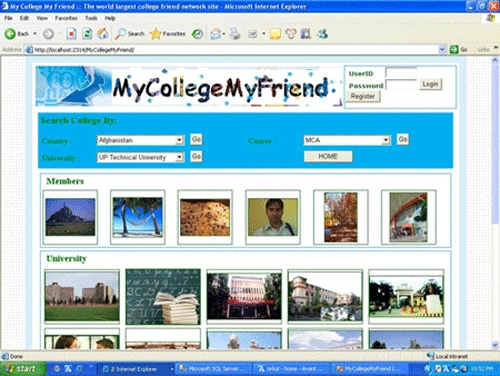


Image 1.

Default part 2
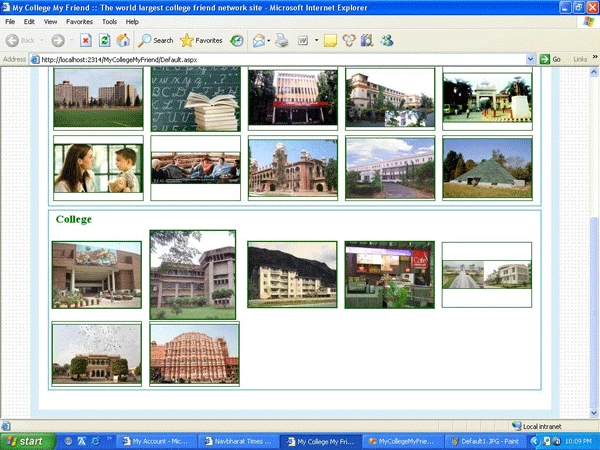


Image 2.

This is the University Detail page.
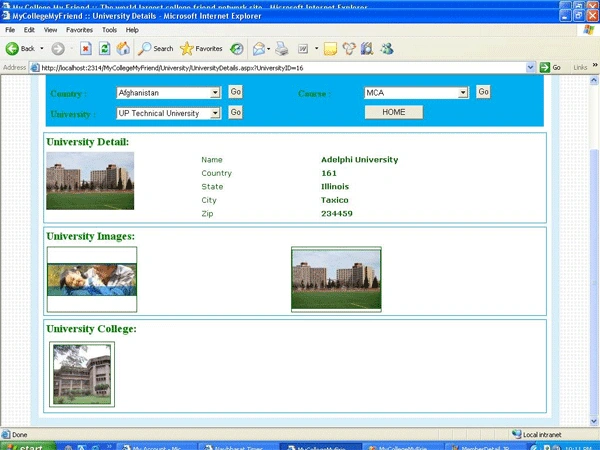


Image3.

This is the college detail page.
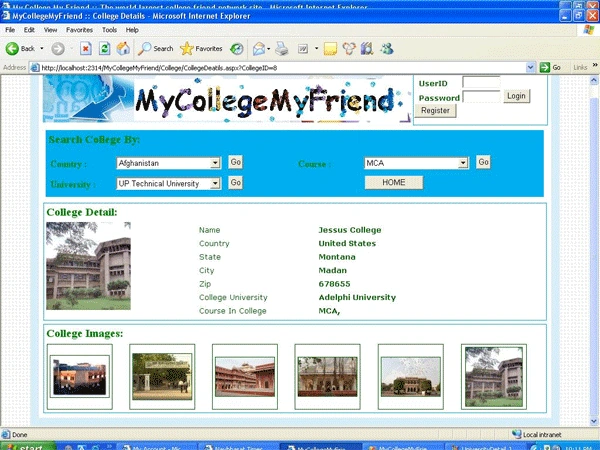


Image 4.

This is the member detail page.
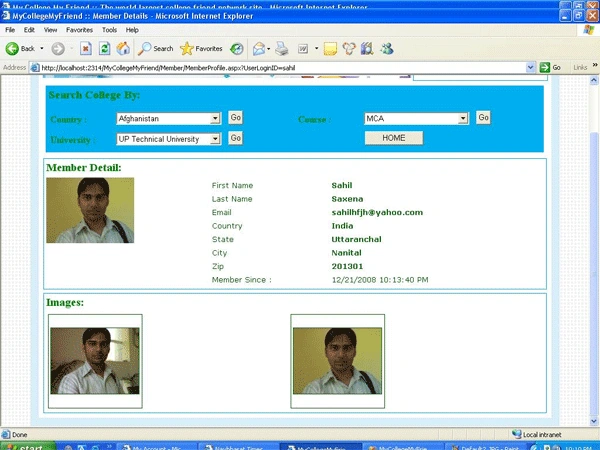


Image 5.

This is the page which will show after login by rahul userID and rahul password.
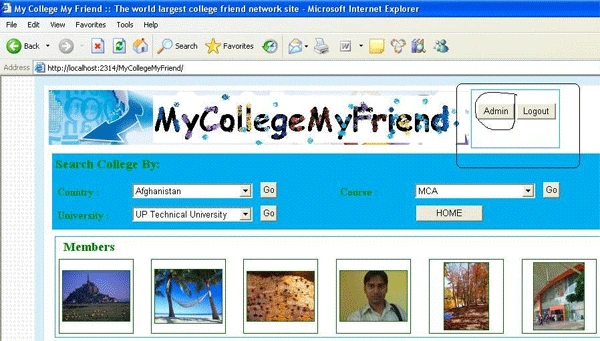


Image 6.

This is admin default page which will come after cliking on admin button from default page. From this page admin can register new university and college.
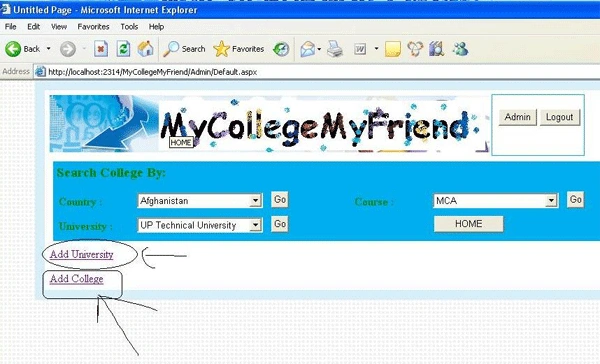
Image 7.

This is Add University  page.
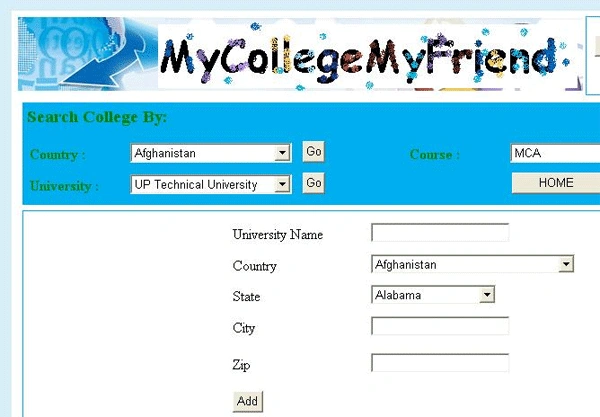
 Image 8.

Same as college add page after inserting detail when u click on add button you will redirect to add image page. On that page you can upload image.

This is member registration page.
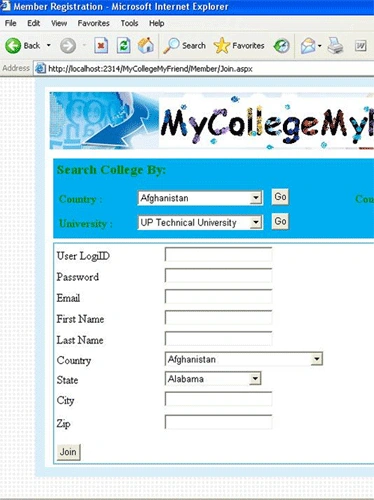
Image 9.

This is project which I think. If there is any problem the please write to me
4rahulsaxena@gmail.com


Comment Request!
Thank you for reading this post. Please post your feedback, question, or comments about this post Here.
Login to add your contents and source code to this article
 [Top] Rate this article
 
 About the author
 
Rahul Kumar Saxena
Rahul shows great interests in working with Microsoft technologies. He specializes in the implementation of DataBase & Graphics. His area of expertise includes: C#, ASP.NET,ADO.NET,Windows Forms & Web Services. He hails from background , Master's in Computer Application. With programming he loves photography, traveling and reading books.
(Talabpur*)
Looking for C# Consulting?
C# Consulting is founded in 2002 by the founders of C# Corner. Unlike a traditional consulting company, our consultants are well-known experts in .NET and many of them are MVPs, authors, and trainers. We specialize in Microsoft .NET development and utilize Agile Development and Extreme Programming practices to provide fast pace quick turnaround results. Our software development model is a mix of Agile Development, traditional SDLC, and Waterfall models.
Click here to learn more about C# Consulting.
 
Introducing MaxV - one click. infinite control. Hyper-V Hosting from MaximumASP.
Finally – a virtual platform that delivers next-generation Windows Server 2008 Hyper-V virtualization technology from a managed hosting partner you can truly depend on. Visit www.maximumasp.com/max for a FREE 30 day trial. Hurry offer ends soon. Climb aboard the MaxV platform and take advantage of High Availability, Intelligent Monitoring, Recurrent Backups, and Scalability – with no hassle or hidden fees. As a managed hosting partner focused solely on Microsoft technologies since 2000, MaximumASP is uniquely qualified to provide the superior support that our business is built on. Unparalleled expertise with Microsoft technologies lead to working directly with Microsoft as first to offer IIS 7 and SQL 2008 betas in a hosted environment; partnering in the Go Live Program for Hyper-V; and product co-launches built on WS 2008 with Hyper-V technology.
Dynamic PDF
ceTE software specializes in components for dynamic PDF generation and manipulation. The DynamicPDF™ product line allows you to dynamically generate PDF documents, merge PDF documents and new content to existing PDF documents from within your applications.
Discover the Top 5 .NET Memory Management Fundamentals
To write the best .NET code, you need to know exactly how the .NET framework really manages memory. Ricky Leeks presents the Top 5 fundamental facts of .NET memory management. Learn more.
Nevron Chart for .NET 2010.1 Now Available
The leading .NET charting control now features PDF, Flash and Silverlight export, visualization of large datasets and more. Deliver true charting functionality to your BI, Scorecard, Presentation or Scientific apps. Download evaluation now.
ASP.NET 4 Hosting
Get 2 Months Free of ASP.NET Hosting for Only $4.95/month! Receive FREE MS SQL and MySQL Databases Including ASP.NET 4/3.5, MVC 3.0, Silverlight 4, Windows 2008/IIS 7.0 Plus FREE IIS 7 Modules. Host UNLIMITED ASP.NET Web Sites – Click Here!
 
 Post a Feedback, Comment, or Question about this article
Subject:
Comment:
Nevron Chart
Become a Sponsor
 Comments
Excellent by Murtuza On January 14, 2009
Code works great. I hope you are thinking about adding some extra functionality to the demo application in your next article.
Reply | Email | Modify 
Re: Excellent by Rahul Kumar On January 15, 2009
Thanx murtuzakabul 4 comment, Sure, in future I will add some extra in this.
Reply | Email | Modify 
Connection String! by Chang On March 25, 2010
Hey Rahul,
First thanks a lot for your time and your help on this website. We do appreciate that. Second, on this project would you please help us fix the connection string! I was hoping maybe you can provide a new version that does not require people to change the connection string. Please help if you can. 

Many people like me, are having trouble running this demo because they do not know how to get the connection string working. Please, despite the extra effort, would you please help us? 
Thanks in advance, and sorry for any inconvenience!

Chang 
Reply | Email | Modify 
Re: Excellent by Kizimoto On March 25, 2010
Is anyone willing to help me set up my connection string? here is how i try to solve the problem:


<connectionStrings>
<remove name="SQLConnectionString"/>
<add name="MyCollegeMyFriendConnectionString1" connectionString="Data Source=.\SQLExpress;integrated security=true;attachdbfilename=|DataDirectory|MyCollegeMyFriend.mdf;user instance=true"/>
</connectionStrings>


When i run the code, it says there is something wrong with my connection string. Anybody help please!

Reply | Email | Modify 
Re: Excellent by Kizimoto On March 25, 2010
How did you fix the connection string! I cannot make it work. This is how i am trying to get it set up, but up to now it does not work.


<connectionStrings>
<remove name="SQLConnectionString"/>
<add name="MyCollegeMyFriendConnectionString1" connectionString="Data Source=.\SQLExpress;integrated security=true;attachdbfilename=|DataDirectory|MyCollegeMyFriend.mdf;user instance=true"/>
</connectionStrings>


Can anyone help me and help me stop this nightmare i am having! I have been trying to get this done for more than a week and now I am at the edge of cracking...
Please help. I am using SQL 2008 and i would like to do start using it with no password. 
Please someone help me on this!
Reply | Email | Modify 
Excellent by Arjun On April 28, 2009
Great piece of work in the demo although it helps me I would like to add some more features in the future.
Reply | Email | Modify 
Re: Excellent by Rahul Kumar On April 30, 2009
HI arjun Sure u can add more functionality wecome Friend
Reply | Email | Modify 
Thumbs up! by Nosnibor On June 3, 2009
Nice Demo...
Reply | Email | Modify 
Re: Thumbs up! by Rahul Kumar On June 4, 2009
thanks dear
Reply | Email | Modify 
Object Reference not set to an instance of an object by Puneet Sharma On June 17, 2009

Object reference not set to an instance of an object.

Description: An unhandled exception occurred during the execution of the current web request. Please review the stack trace for more information about the error and where it originated in the code.

Exception Details: System.NullReferenceException: Object reference not set to an instance of an object.

Source Error:

Line 335:        get
Line 336:        {
Line 337:            return bool.Parse(ConfigurationManager.AppSettings["RethrowError"].ToString());
Line 338:        }
Line 339:    }

Source File: c:\Users\TPKS\Documents\Visual Studio 2005\WebSites\MyCollegeMyFriend\App_Code\Configurations.cs    Line: 337
Reply | Email | Modify 
Re: Object Reference not set to an instance of an object by Rahul Kumar On December 9, 2009
Hi Can you check youe connection string.
Reply | Email | Modify 
object refrenece not set to an instance of an object by ravi On November 7, 2009
sir, i m also getting the same exception as poonam as got, there is some problem in configuration.cs file

could you please explain me why i m getting this exception?

Reply | Email | Modify 
Re: object refrenece not set to an instance of an object by Rahul Kumar On December 9, 2009
Hi Ravi, can you check your connection string.
Reply | Email | Modify 
Re: Re: object refrenece not set to an instance of an object by akumiro On March 14, 2010
Incredible! This is actually better than all those starter kits on Microsoft website. I am still getting some trouble with the connection string but it is a great thing you did Mr Rahul
Reply | Email | Modify 
Re: Re: Re: object refrenece not set to an instance of an object by Rahul Kumar On March 17, 2010
Thanks AKUMIRO,
                             I will be very happy If I solve your connection string problem, could I know what problem you are facing....

Reply | Email | Modify 
Re: Re: Re: Re: object refrenece not set to an instance of an object by akumiro On March 23, 2010
Thanks Mr. Rahul. I finally figured out how to make it work. This is a great application. Would you please update the code if you have done any new change? 
Thanks in advance,
Akumiro
Reply | Email | Modify 
Re: Re: Re: Re: Re: object refrenece not set to an instance of an object by Rahul Kumar On March 24, 2010
Reply | Email | Modify 
Project by Dharmesh On April 29, 2010
I just downloaded the project, I haven't even extract it yet, but it's looking great.
Nice effort...
Reply | Email | Modify 
Re: Project by Rahul Kumar On May 2, 2010
Hi Dharmesh,
                      You can fiind my all project here

Reply | Email | Modify 
Re: Re: Project by akumiro On May 4, 2010
This is a great piece of work! I am very surprised not too many people have heard of it. Rahul, would you mind if you share this project at codeplex.com? Since this is an open source project I am very sure many people will be interested in contributing to the development of this project. Also, if anyone has mad any significant improvement on this software please do share with the community,
cheers...
Reply | Email | Modify 
Re: Re: Project by manish On June 21, 2010
Hello rahul what exactly i have to change in my connection string to make it run.
Reply | Email | Modify 
Re: Re: Re: Project by Rahul Kumar On June 22, 2010
Hi Manish in a Connection string you need to pass 4 value

Data Source="Your Server Name";
Initial Catalog="DataBase Name";
Uid=sa;
pwd=wintellect ; //Whatever u set 


So these value depend on u what u set to connect to database in SQLSERVER...

Hope this will solve your problem, if not then send me your connection string.
Reply | Email | Modify 
web.config by Parul On September 2, 2010
nyc work...
sir,i m g8ng some problem in its web.config file..
Error 1 Could not load file or assembly 'System.Web.Extensions, Version=1.0.61025.0, Culture=neutral, PublicKeyToken=31bf3856ad364e35' or one of its dependencies. The system cannot find the file specified.
i have olredy chnged connection string..


Reply | Email | Modify 
Re: web.config by Rahul Kumar On September 3, 2010
Hi Parul,
 This is not a connection string problem. I think it's a problem of asp.net AJAX. have you installed it in your system...


Reply | Email | Modify 
Re: Re: web.config by Jitendra On January 10, 2011
Hi, Really nice stuff it is....It definitely helps to freshers(who are in final semister)....Thanx..
Reply | Email | Modify 
code by sudheer On January 18, 2011
Hey Please send the Alumni project source code using Asp.net,c#
Reply | Email | Modify 
Discover the top 5 tips for understanding .NET Interop
 © 2012  contents copyright of their authors. Rest everything copyright Mindcracker. All rights reserved.