

In this article I am going to show how we can read and parse a CSS file in asp.net.
This is my aspx code
<%@ Page Language="C#" AutoEventWireup="true" CodeFile="Default.aspx.cs" Inherits="_Default" %>
<!DOCTYPE html PUBLIC "-//W3C//DTD XHTML 1.0 Transitional//EN" "http://www.w3.org/TR/xhtml1/DTD/xhtml1-transitional.dtd">
<html xmlns="http://www.w3.org/1999/xhtml">
<head runat="server">
<title>Reading a css file</title>
</head>
<body>
<form id="form1" runat="server">
<div>
<table cellpadding="2" cellspacing="2" border="2" width="50%" align="center" style="padding: 20px;">
<tr>
<td>
<table cellpadding="2" cellspacing="2" width="100%" align="center">
<tr>
<td valign="top">
<span style="font-family: Verdana; font-size: 10pt; font-weight: bold;">Class Name</span>
</td>
<td valign="top">
<asp:DropDownList ID="DDLCssClass" runat="server" OnSelectedIndexChanged="DDLCssClass_SelectedIndexChanged"
AutoPostBack="true" Width="100px">
</asp:DropDownList>
</td>
<td valign="top">
<span style="font-family: Verdana; font-size: 10pt; font-weight: bold;">Class Property</span>
</td>
<td valign="top">
<asp:ListBox ID="lstClassProperty" runat="server" Width="200px" Height="200px"></asp:ListBox>
</td>
</tr>
</table>
</td>
</tr>
</table>
</div>
</form>
</body>
</html>
This is my aspx.cs code
using System;
using System.Collections.Generic;
using System.Linq;
using System.Web;
using System.Web.UI;
using System.Web.UI.WebControls;
using System.IO;
using System.Collections.Generic;
using System.Text;
using System.Text.RegularExpressions;
public partial class _Default : System.Web.UI.Page
{
string aa = null;
static string[] parts;
private List<string> styleSheets;
private SortedList<string, StyleClass> scc;
public SortedList<string, StyleClass> Styles
{
get { return this.scc; }
set { this.scc = value; }
}
protected void Page_Load(object sender, EventArgs e)
{
if (!Page.IsPostBack)
{
CssParser();
GetStyleSheet(Server.MapPath("StyleSheet.css"));
}
}
//To parse Css file.
public void CssParser()
{
this.styleSheets = new List<string>();
this.scc = new SortedList<string, StyleClass>();
}
//Get Style sheet to parse
public void GetStyleSheet(string path)
{
this.styleSheets.Add(path);
ParseStyleSheet(path);
}
public string GetStyleSheet(int index)
{
return this.styleSheets[index];
}
//Parsing style sheet
private void ParseStyleSheet(string path)
{
string content = CleanUp(File.ReadAllText(path));
parts = content.Split('}');
for (int i = 0; i < parts.Length - 1; i++)
{
string[] parts1 = parts[i].Split('{');
string str = parts1[0].ToString().Remove(0, 1);
aa = aa + str + ",";
}
int len = aa.LastIndexOf(',');
string ss = aa.Remove(len);
string ss1 = aa.Remove(len - 1);
string[] parts2 = ss.Split(',');
//Binding all class of a css file to a drop down list
DDLCssClass.DataSource = parts2;
DDLCssClass.DataBind();
lstClassProperty.Items.Clear();
//Bind all property of a selected css class
GetCssClassProperty(parts, DDLCssClass.SelectedValue);
}
private string CleanUp(string s)
{
string temp = s;
string reg = "(/\\*(.|[\r\n])*?\\*/)|(//.*)";
Regex r = new Regex(reg);
temp = r.Replace(temp, "");
temp = temp.Replace("\r", "").Replace("\n", "");
return temp;
}
public class StyleClass
{
private string _name = string.Empty;
public string Name
{
get { return _name; }
set { _name = value; }
}
private SortedList<string, string> _attributes = new SortedList<string, string>();
public SortedList<string, string> Attributes
{
get { return _attributes; }
set { _attributes = value; }
}
}
protected void DDLCssClass_SelectedIndexChanged(object sender, EventArgs e)
{
lstClassProperty.Items.Clear();
GetCssClassProperty(parts, DDLCssClass.SelectedValue);
}
//To Bind all property of a css class
private void GetCssClassProperty(string[] classArray, string className)
{
for (int i = 0; i < classArray.Length - 1; i++)
{
string[] parts1 = classArray[i].Split('{');
if ("." + className == parts1[0].ToString())
{
string[] parts3 = parts1[1].Split(';');
for (int j = 0; j < parts3.Length - 1; j++)
{
lstClassProperty.Items.Add(parts3[j].ToString());
}
}
}
}
}
When you run the application then all class of a giving style sheet file will bind in a drop down list like...
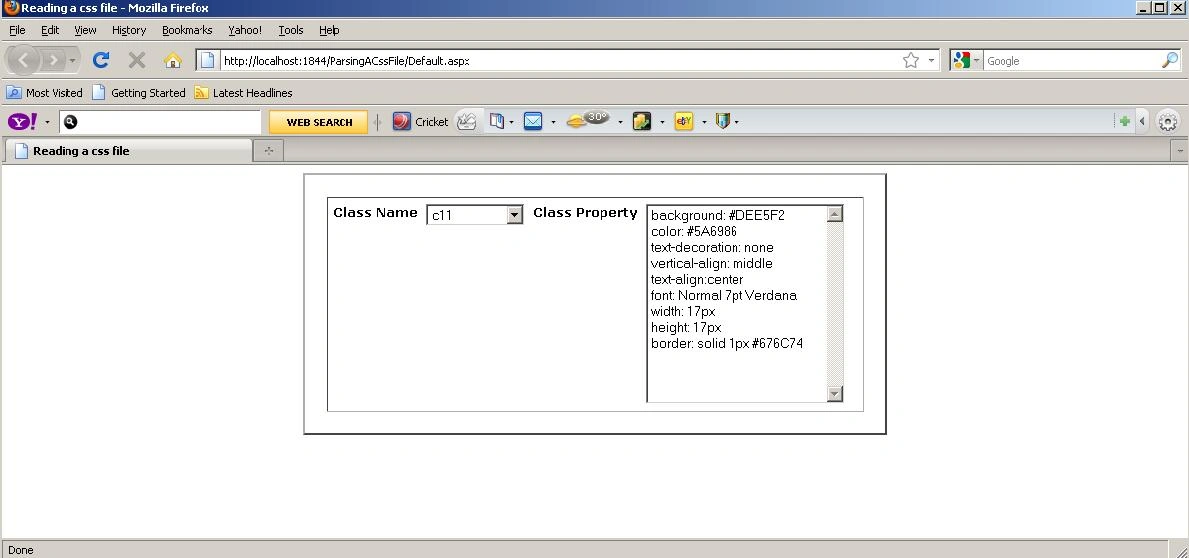
Image 1.
When you change your css class then property of that selected class will show in list box...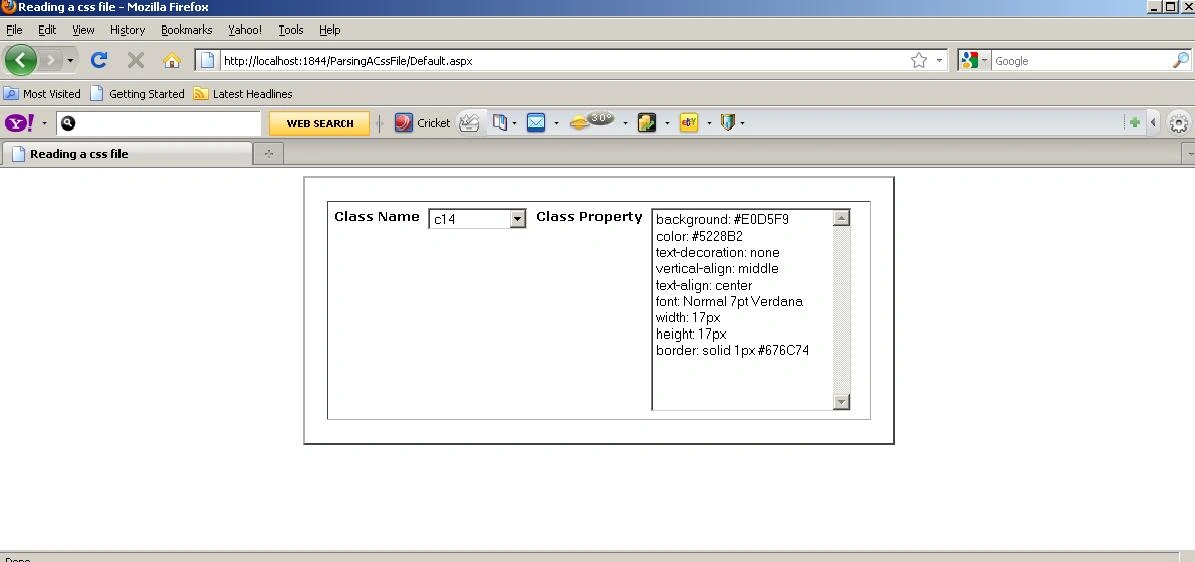
Image 2.
chap neoxPosted Aug 6, 2013, 3:03 AM
thanks for posting this
Akhil MittalPosted Dec 7, 2012, 12:46 AM
What about tags and id tags for eg. i,body,p,div............ and #divId,#pName.......................
Lori BeckPosted Oct 18, 2011, 8:10 AM
Just what I was looking for -- thank you!!
priyank bhavsarPosted Jun 20, 2011, 2:09 AM
very useful article.. Thanks
sudheer reddyPosted Sep 9, 2010, 8:05 AM
Helped a lot
Blocked AccountPosted Sep 2, 2010, 2:35 AM
Nice Article, Keep it up.