

One of the most common functionalities used in Web development is sending email from a Web page.
The .NET framework makes the task of sending email from a Web page easier and in this article, I'll show you "how to send email with attachment file".
This is the aspx code:
<%@ Page Language="C#" AutoEventWireup="true" CodeFile="Default.aspx.cs" Inherits="_Default" %>
<!DOCTYPE html PUBLIC "-//W3C//DTD XHTML 1.0 Transitional//EN" "http://www.w3.org/TR/xhtml1/DTD/xhtml1-transitional.dtd">
<html xmlns="http://www.w3.org/1999/xhtml">
<head runat="server">
<title>Mail With Attachement</title>
</head>
<body>
<form id="form1" runat="server">
<div>
<table cellpadding="4" cellspacing="4" width="40%" align="center" border="0" style="border-color: Silver;">
<tr>
<td align="center" style="background-color: Gray; height: 30px;">
<span>Sending mail with attachement in asp.net. </span>
</td>
</tr>
<tr>
<td>
<table cellpadding="2" cellspacing="2" width="70%" align="center" style="background-color: #A5A5A5;">
<tr>
<td>
<asp:Label ID="lblMailFrom" runat="server" Text="From:" Width="100px"></asp:Label>
<asp:TextBox ID="txtFrom" runat="server" Width="200px"></asp:TextBox>
</td>
</tr>
<tr>
<td>
<asp:Label ID="lblMailTo" runat="server" Text="To:" Width="100px"></asp:Label>
<asp:TextBox ID="txtMailTo" runat="server" Width="200px"></asp:TextBox>
</td>
</tr>
<tr>
<td>
<asp:Label ID="lblSubject" runat="server" Text="Subject:" Width="100px"></asp:Label>
<asp:TextBox ID="txtSubject" runat="server" Width="200px"></asp:TextBox>
</td>
</tr>
<tr>
<td>
<asp:Label ID="lblAttachFile" runat="server" Text="File to send:" Width="100px"></asp:Label>
<input type="file" id="fileAttachement" runat="server" name="fileAttachement" width="200px" />
</td>
</tr>
<tr>
<td>
<asp:Label ID="lblMessage" runat="server" Text="Your Message:" Width="100px"></asp:Label>
<asp:TextBox ID="txtMessage" runat="server" TextMode="MultiLine" Height="80px" Width="200px"></asp:TextBox>
</td>
</tr>
<tr>
<td align="center">
<asp:Button ID="btnSendMail" runat="server" Text="Send Mail" OnClick="btnSendMail_Click"
Width="140px" />
</td>
</tr>
</table>
</td>
</tr>
</table>
</div>
</form>
</body>
</html>
aspx.cs code:
using System;
using System.Data;
using System.Configuration;
using System.Web;
using System.Web.Security;
using System.Web.UI;
using System.Web.UI.WebControls;
using System.Web.UI.WebControls.WebParts;
using System.Web.UI.HtmlControls;
using System.IO;
using System.Net.Mail;
public partial class _Default : System.Web.UI.Page
{
string FileNameToAttache;
protected void Page_Load(object sender, EventArgs e)
{
}
protected void btnSendMail_Click(object sender, EventArgs e)
{
MailMessage message = new MailMessage();
message.From = new MailAddress(txtFrom.Text);
message.To.Add(new MailAddress(txtMailTo.Text));
message.Body = txtMessage.Text;
message.IsBodyHtml = true;
message.Subject = txtSubject.Text;
if (AttachFile.PostedFile != null)
{
HttpPostedFile attFile = AttachFile.PostedFile;
int attachFileLength = attFile.ContentLength;
if (attachFileLength > 0)
{
FileNameToAttache = Path.GetFileName(AttachFile.PostedFile.FileName);
AttachFile.PostedFile.SaveAs(Server.MapPath(FileNameToAttache));
message.Attachments.Add(new Attachment(Server.MapPath(FileNameToAttache)));
}
}
SmtpClient emailWithAttach = new SmtpClient();
emailWithAttach.Host = "localhost";
emailWithAttach.DeliveryMethod = SmtpDeliveryMethod.Network;
emailWithAttach.UseDefaultCredentials = true;
emailWithAttach.Send(message);
}
}
On running the Application, output will be: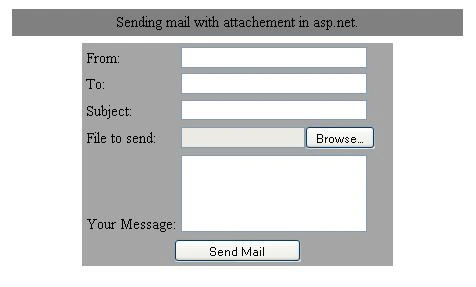
Image 1.
Aabasaheb SangalePosted May 31, 2013, 7:22 AM
When I run above code follwing error are occured:No connection could be made because the target machine actively refused it 127.0.0.1:25,plz give me solution
ArockiaeditedPosted Apr 10, 2013, 5:40 PMEdited Apr 10, 2013, 5:40 PM
code didnt worked for me!!! it gives error "System.Net.Mail.SmtpException was unhandled by user" in emailWithAttach.Send(message); plz help
hariomeditedPosted Apr 9, 2013, 9:52 AMEdited Apr 9, 2013, 9:53 AM
didnt worked for me!!! gives error System.Net.Mail.SmtpException was unhandled by user
Mohamed AsanePosted Oct 11, 2012, 10:47 AM
very good article
pavan kumarPosted Jan 18, 2011, 11:14 PM
ur articles so nice i really appreciate sir but in this article i am getting the error on this line emailWithAttach.Send(message); pls clarify my error its a request
Abhimanyu K VatsaPosted Jun 7, 2010, 10:22 AM
Hello Rahu Bhaiya...... your article is really nice for novice. i have some problem on it. how to refer the web.config file credential. i don't want the "localhost". i want to refer only and only web.config file. please tell me how i change to get it. thanks
sa saPosted Sep 15, 2009, 3:43 AM
d