

I posted in my previous article how we can upload file.
But I face problem when I try to upload file with update panel. The File Upload Control doesn't work inside an
Update Panel due to security reasons and restrictions a browser implies. But by
using some property we can upload a file with update panel.
In this article I am going to show how we can upload
file in asp.net with update panel. Here I use
<Triggers>
<asp:PostBackTrigger ControlID="ButtonUpload"
/>
</Triggers>
This is the aspx code.
<%@ Page Language="C#"
AutoEventWireup="true"
CodeFile="Default.aspx.cs"
Inherits="_Default"
%>
<!DOCTYPE html PUBLIC
"-//W3C//DTD XHTML 1.0 Transitional//EN"
"http://www.w3.org/TR/xhtml1/DTD/xhtml1-transitional.dtd">
<html xmlns="http://www.w3.org/1999/xhtml">
<head runat="server">
<title>Upload File With Update Panel</title>
</head>
<body>
<form id="form1" runat="server">
<div>
<asp:ScriptManager ID="ScriptManager1"
runat="server">
</asp:ScriptManager>
<table cellpadding="4"
cellspacing="4"
width="90%"
align="center">
<tr>
<asp:UpdatePanel ID="UpdatePanel1"
runat="server">
<ContentTemplate>
<asp:Label ID="Label1" runat="server"
Text="Select A
File To Upload:" ForeColor="Black"></asp:Label>
<asp:FileUpload ID="FileUpload1"
runat="server"
/>
<asp:Button ID="ButtonUpload"
runat="server"
Height="25px"
OnClick="ButtonUpload_Click"
Text="Upload"
Width="128px"
/>
<br
/>
<asp:Label ID="Label2" runat="server"></asp:Label>
<br
/>
</ContentTemplate>
<Triggers>
<asp:PostBackTrigger ControlID="ButtonUpload"
/>
</Triggers>
</asp:UpdatePanel>
</tr>
</table>
</div>
</form>
</body>
</html>
This is the aspx.cs code
using System;
using System.Collections.Generic;
using System.Linq;
using System.Web;
using System.Web.UI;
using System.Web.UI.WebControls;
using System.IO;
public partial class _Default :
System.Web.UI.Page
{
protected void
Page_Load(object sender, EventArgs e)
{
}
protected void
ButtonUpload_Click(object sender, EventArgs e)
{
FileUpload1.PostedFile.SaveAs(Server.MapPath(".") + "//"
+ System.IO.Path.GetFileName(FileUpload1.PostedFile.FileName));
Label2.Text =
FileUpload1.PostedFile.FileName;
Label2.Text =
FileUpload1.PostedFile.FileName;
}
}
When I run the application then output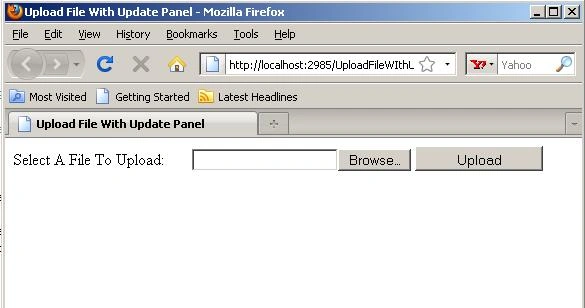
mona bagherePosted May 11, 2014, 4:38 AM
There is no answer?
mona bagherePosted May 10, 2014, 4:16 AM
hello.This code is postback.why ?