

In this article I am going to show how we can use watermark textbox in WPF application.
For this I have added a class file named as Helper.cs.
using System;
using System.Collections.Generic;
using System.Linq;
using System.Text;
using System.Windows.Data;
using System.Windows;
namespace WaterMarkTextBox
{
class Helper : IMultiValueConverter
{
public object Convert(object[] values, Type targetType, object parameter, System.Globalization.CultureInfo culture)
{
if (values[0] is bool && values[1] is bool)
{
bool hasText = !(bool)values[0];
bool hasFocus = (bool)values[1];
if (hasFocus || hasText)
return Visibility.Collapsed;
}
return Visibility.Visible;
}
public object[] ConvertBack(object value, Type[] targetTypes, object parameter, System.Globalization.CultureInfo culture)
{
throw new NotImplementedException();
}
}
}
This is my XAML code..
<Window x:Class="WaterMarkTextBox.MainWindow"
xmlns="http://schemas.microsoft.com/winfx/2006/xaml/presentation"
xmlns:x="http://schemas.microsoft.com/winfx/2006/xaml"
Title="WaterMark TextBox" Height="350" Width="525"
xmlns:local="clr-namespace:WaterMarkTextBox">
<Window.Resources>
<SolidColorBrush x:Key="brushWatermarkBackground" Color="White" />
<SolidColorBrush x:Key="brushWatermarkBorder" Color="Indigo" />
<BooleanToVisibilityConverter x:Key="BooleanToVisibilityConverter" />
<local:Helper x:Key="Helper" />
<Style x:Key="EntryFieldStyle" TargetType="Grid" >
<Setter Property="HorizontalAlignment" Value="Stretch" />
<Setter Property="VerticalAlignment" Value="Center" />
<Setter Property="Margin" Value="20,0" />
</Style>
</Window.Resources>
<Grid x:Name="LayoutRoot">
<Grid.RowDefinitions>
<RowDefinition Height="30" />
<RowDefinition Height="30" />
<RowDefinition Height="10" />
<RowDefinition Height="30" />
<RowDefinition Height="10" />
<RowDefinition Height="30" />
<RowDefinition Height="10" />
<RowDefinition Height="30" />
<RowDefinition Height="10" />
<RowDefinition Height="30" />
<RowDefinition Height="Auto" />
</Grid.RowDefinitions>
<Grid.ColumnDefinitions>
<ColumnDefinition Width="100"></ColumnDefinition>
<ColumnDefinition Width="100"></ColumnDefinition>
<ColumnDefinition Width="Auto"></ColumnDefinition>
</Grid.ColumnDefinitions>
<Grid Grid.Row="1" Grid.Column="1">
<TextBlock x:Name="tbFirstName">First Name</TextBlock>
</Grid>
<Grid Grid.Row="1" Grid.Column="2">
<TextBlock Margin="5,2" Text="First Name ..." Foreground="LightGray">
<TextBlock.Visibility>
<MultiBinding Converter="{StaticResource Helper}">
<Binding ElementName="txtFirstName" Path="Text.IsEmpty" />
<Binding ElementName="txtFirstName" Path="IsFocused" />
</MultiBinding>
</TextBlock.Visibility>
</TextBlock>
<TextBox Name="txtFirstName" Background="Transparent"
Width="140" MaxLength="50" />
</Grid>
<Grid Grid.Row="3" Grid.Column="1">
<TextBlock x:Name="tbLastName">Last Name</TextBlock>
</Grid>
<Grid Grid.Row="3" Grid.Column="2">
<TextBlock Margin="5,2" Text="Last Name ..." Foreground="LightGray" >
<TextBlock.Visibility>
<MultiBinding Converter="{StaticResource Helper}">
<Binding ElementName="txtLastName" Path="Text.IsEmpty" />
<Binding ElementName="txtLastName" Path="IsFocused" />
</MultiBinding>
</TextBlock.Visibility>
</TextBlock>
<TextBox Name="txtLastName" Background="Transparent" Width="140" MaxLength="50" />
</Grid>
<Grid Grid.Row="5" Grid.Column="1">
<TextBlock x:Name="tbEmail">Email</TextBlock>
</Grid>
<Grid Grid.Row="5" Grid.Column="2">
<TextBlock Margin="5,2" Text="Email..." Foreground="LightGray">
<TextBlock.Visibility>
<MultiBinding Converter="{StaticResource Helper}">
<Binding ElementName="txtEmail" Path="Text.IsEmpty" />
<Binding ElementName="txtEmail" Path="IsFocused" />
</MultiBinding>
</TextBlock.Visibility>
</TextBlock>
<TextBox Name="txtEmail" Background="Transparent"
Width="140" MaxLength="50" />
</Grid>
<Grid Grid.Row="7" Grid.Column="1">
<TextBlock x:Name="tbCountry">Country</TextBlock>
</Grid>
<Grid Grid.Row="7" Grid.Column="2">
<TextBlock Margin="5,2" Text="Country..." Foreground="LightGray">
<TextBlock.Visibility>
<MultiBinding Converter="{StaticResource Helper}">
<Binding ElementName="txtCountry" Path="Text.IsEmpty" />
<Binding ElementName="txtCountry" Path="IsFocused" />
</MultiBinding>
</TextBlock.Visibility>
</TextBlock>
<TextBox Name="txtCountry" Background="Transparent"
Width="140" MaxLength="50" />
</Grid>
<Grid Grid.Row="9" Grid.Column="2">
<Button x:Name="Submit" Content="Submit"></Button>
</Grid>
</Grid>
</Window>
When we run the application then window will look like this.
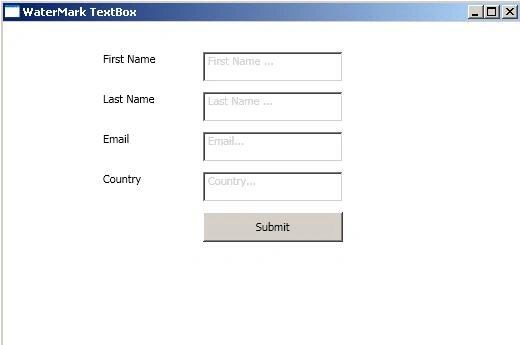
Image 1.
If we write in textbox then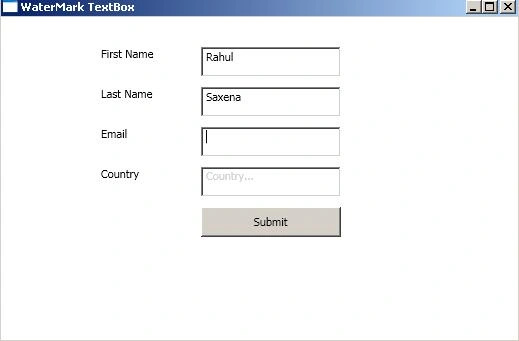
Image 2.
formula oneePosted Jun 1, 2010, 1:01 AM
Am not able to run this program due to : 1) Assembly " watermarkTextBox" not found.... and 2) The type "local-helper"not found.... I dnt knw hw to rectify this.. can anyone plz suggest..am using vs2008...