

This sample demonstrates how to drop content in target location on page using
JQuery in web application.
Getting Started
Creating a ASP.NET Application:
- Open Visual Studio 2010.
- Go to File => New => Web Site.
- Select ASP.NET Web Site from the Installed templates
- Enter the Name and choose the location.
- Click OK.
Draggable:
Call .js and .css file inside of page head tag.
<metacharset="utf-8">
<title>jQuery
Droppable Sample</title>
<linkrel="stylesheet"href="theme/jquery.ui.all.css">
<scriptsrc="jquery-1.4.4.js"></script>
<scriptsrc="ui/jquery.ui.core.js"></script>
<scriptsrc="ui/jquery.ui.widget.js"></script>
<scriptsrc="ui/jquery.ui.mouse.js"></script>
<scriptsrc="ui/jquery.ui.draggable.js"></script>
<scriptsrc="ui/jquery.ui.droppable.js"></script>
<style>
#draggable{
width: 100px;
height: 100px;
padding: 0.5em;
float: left;
margin: 10px10px10px0;
}
#droppable{
width: 150px;
height: 150px;
padding: 0.5em;
float: left;
margin: 10px; }
</style>
<script>
$(function () {
$("#draggable").draggable();
$("#droppable").droppable({
drop: function (event, ui) {
$(this)
.addClass("ui-state-highlight")
.find("p")
.html("Dropped!");
}
});
});
</script>
Now put this code inside of form tag.
<divclass="demo">
<divid="draggable"class="ui-widget-content"style="border:
thin solid red;">
<p>Drag
me to my target</p>
</div>
<divid="droppable"class="ui-widget-header"
style="border:
thin solid #008000;
background-color:
#FFFFFF">
<p>Drop
here</p>
</div>
Build and run the application to see the result.
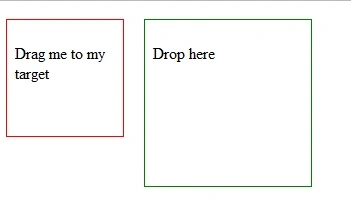
Image 1.
This is the result when we drop the content in target location.
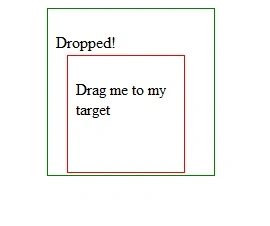
Image 2.
We are done here, if question or comments drop me a line in comments section.
Join the conversation! Your thoughts help the community grow.