

This article demonstrates how to get system environment information like
Operating System,.NET Version, Machine Name, Username, Domain Name, Directory
Name, Command Line using wpf.
Here we go, first of all create a new WPF Project.
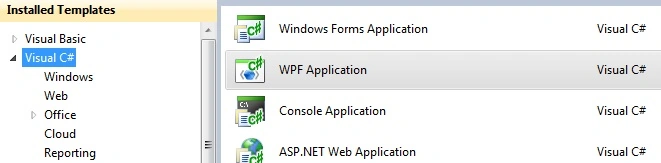
Image1.
By default wpf application has some assembly
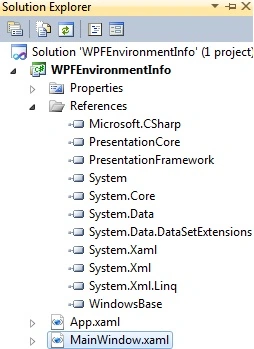
Image2.
Now let's start working on .xaml page. First of all add a namespace for mscorlib
assembly.
xmlns:r="clr-namespace:System;assembly=mscorlib"
MSCorlib- It is special, any compiler needs it because it contains types that
are required to make the language syntax work. System.Array, System.Int32,
System.String, System.Exception, etc.
Write this .xamlcode on page:
<TextBlock>
<Label
Content="Operating
System Version : "></Label>
<Label
Content="{x:Static
r:Environment.OSVersion}"></Label>
<LineBreak></LineBreak>
<Label
Content="Dot
NET Version : "></Label>
<Label
Content="{x:Static
r:Environment.Version}"></Label>
<LineBreak></LineBreak>
<Label
Content="Machine
Name : "></Label>
<Label
Content="{x:Static
r:Environment.MachineName}"></Label>
<LineBreak></LineBreak>
<Label
Content="User
Name : "></Label>
<Label
Content="{x:Static
r:Environment.UserName}"></Label>
<LineBreak></LineBreak>
<Label
Content="User
Domain Name : "></Label>
<Label
Content="{x:Static
r:Environment.UserDomainName}"></Label>
<LineBreak></LineBreak>
<Label
Content="System
Directory : "></Label>
<Label
Content="{x:Static
r:Environment.SystemDirectory}"></Label>
<LineBreak></LineBreak>
<Label
Content="Current
Directory : "></Label>
<Label
Content="{x:Static
r:Environment.CurrentDirectory}"></Label>
<LineBreak></LineBreak>
<Label
Content="Command
Line : "></Label>
<Label
Content="{x:Static
r:Environment.CommandLine}"></Label>
</TextBlock>
Run application:
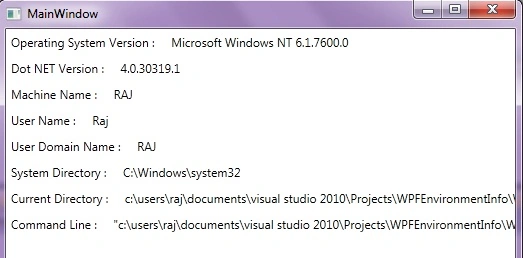
Image3.
Here you can see operating system version, dot net version, machine name, user
name, domain name, system directory name, current directory name, command line.
Hope this will help you to get system environment information. If you have any
question and doubts then drop me a line in c-sharpcorner comment section.
kumara swamy rakamPosted Aug 25, 2011, 12:59 AM
I have *.exe I didn't install in my system but I can run that exe file, I want to make this application as single instance application and I have done it but the problem is that It is being executed whenever user account changes by using switchuser. I want to avoid this .exe file execution in different user accounts, while it is running in another user account. How can I do it please help me. [email protected] Thank you in advance
Drew ShenemaneditedPosted Jan 5, 2011, 8:42 AMEdited Jan 5, 2011, 8:42 AM
Quick and simple to follow. great article Raj
nesrine melienePosted Dec 2, 2010, 8:26 AM
Sometimes i didn't express but it' s really important