

This article demonstrates how to use Facebook share button functionality with master page or without master page in asp.net.
The use of facebook share button is when you click on share button which opens a Facebook share dialog. If user has facebook account then they can then share the web page on their Facebook "wall" with their friends on Facebook, adding comments. Their friends will have the opportunity to share with their friends, and so on.
Let's start without master page first.
First of all make a new asp.net website and put this code on page.
First of all put this script inside of head tag.
<head runat="server">
<title>Facebook
share sampel</title>
<script src="http://static.ak.fbcdn.net/connect.php/js/FB.Share"
type="text/javascript"></script>
<script src="http://static.ak.connect.facebook.com/js/api_lib/v0.4/FeatureLoader.js.php"
type="text/javascript">
</script>
</head>
And now add a html link button on page.
<form id="form1" runat="server">
<div>
<a name="sharebutton" type="button" href="http://www.facebook.com/sharer.php">Share</a>
</div>
</form>
Now run the application.
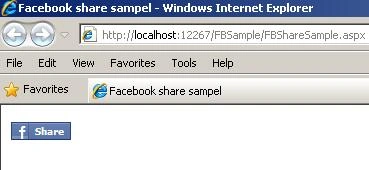
Image 1.
When you click on Share button..one dialog window will open.
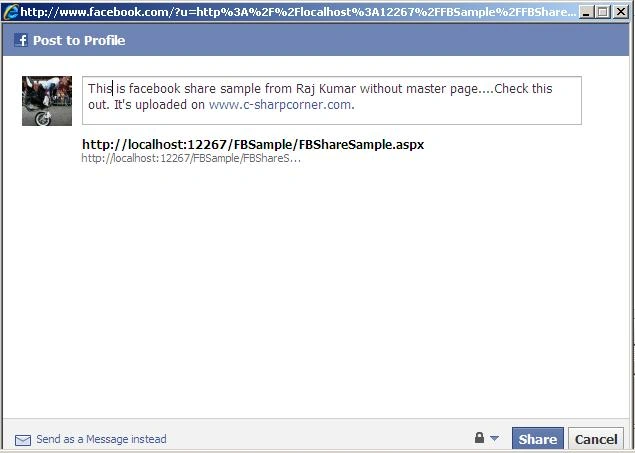
Image 2.
You can send as a message instead to friends using to click a link button below of dialog window.
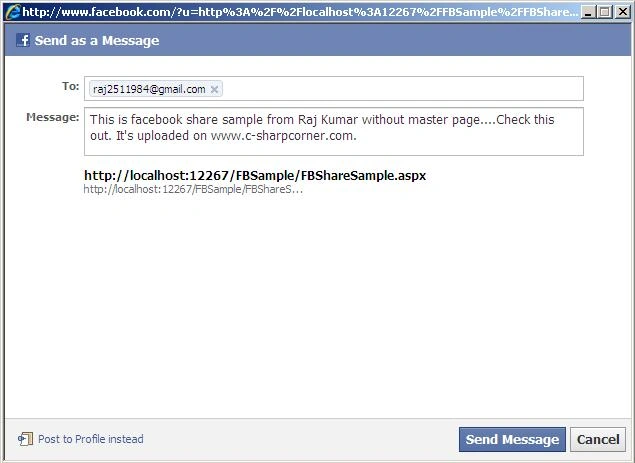
Image 3.
Now put you message in message textbox and click Share or Send Message buton, you will see a message window.

Image 4.
To see you message login on facebook and click on Profile button from top of header.
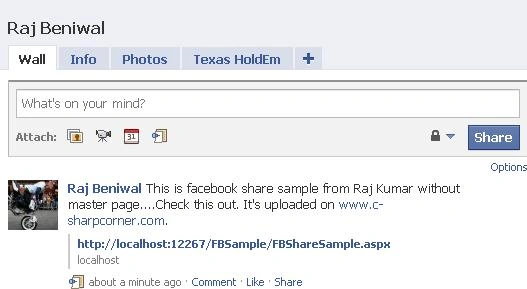
Image 5.
Now let's work master page.
Drag and Drop a label inside of content place holder.
<asp:Content ID="Content2"
ContentPlaceHolderID="MainContent"
Runat="Server">
<asp:Label ID="lblShare"
runat="server"
Text=""></asp:Label>
</asp:Content>>
Code Behind.
using System.Web.UI.HtmlControls;
protected void Page_Load(object sender, EventArgs
e)
{
lblShare.Text = "<a
name=\"fb_share\" type=\"button\"></a>"
+
"<script
" +
"src=\"http://static.ak.fbcdn.net/connect.php/js/FB.Share\"
" +
"type=\"text/javascript\"></script>";
HtmlMeta
tag = new HtmlMeta();
tag.Name = "title";
tag.Content = "This
is the page title";
Page.Header.Controls.Add(tag);
HtmlMeta
tag1 = new HtmlMeta();
tag.Name = "description";
tag.Content = "This
is a page description.";
Page.Header.Controls.Add(tag1);
}
And finally run application.
Abed elfattah YacoubPosted Feb 23, 2018, 12:06 AM
Not working , the script URL is expired ...:)
Anu VPosted Oct 5, 2016, 2:08 AM
I need to post a news on facebook page without login..
Jin LongPosted Jun 2, 2015, 5:55 AM
great post
Madhurendra KumarPosted Feb 27, 2014, 3:38 AM
What kind of joke it is it is not working I had paste the same thing but din't get any output
namrata manePosted Oct 24, 2013, 7:55 AM
Same here, getting the error message "The message could not be posted to this Wall."
jolenePosted Jul 20, 2013, 4:20 AM
Same here, getting the error message "The message could not be posted to this Wall."
Reddy EPosted Dec 5, 2012, 1:34 AM
Hi, I am getting the below message. "The message could not be posted to this Wall."
Mansoor AhmadPosted May 10, 2011, 10:16 AM
Hi Raj! this post was really helpfull for me as I am quite a new programmer. this worked really fine but i face some problem as it works fine in IE8 on the localhost but when I put it on the real page it works fine withe firefox and chrome but didn't work with IE8 . I have also tried to write the xml validation in the html tag but it also didn't worked. in IE8 it dosent show the fb share icon but just an ordinary link text and it dosent work. my actual requirement is that I have an advertisement website where people can upload there products so I want that if a person assa a product he can see a lfb share link on the page so if he wants to post it on his fb wall that he has uploaded a product to my website. And I also want the thumbnail of the product he uploaded on his fb wall. thanks in advane
Bjork BragadottirPosted Nov 18, 2010, 6:38 PM
Thank you for this article I'm still having a problem because I'm displaying a link to a newssite. I would like the content of the news to appear on facebook instead of the link itself like you do hope you can help me regards BN
Rohatash KumarPosted Oct 20, 2010, 12:07 AM
Really it is helpful
Mahesh ChandPosted Oct 18, 2010, 8:11 AM
Keep them coming :)