This article demonstrates you how to make pictures slideshow, pictures list, pictures paging, pictures rotating in Silverlight 4.
So here we go:
First of all as usual make a new Silverlight project and give and name and browse save location of the project.
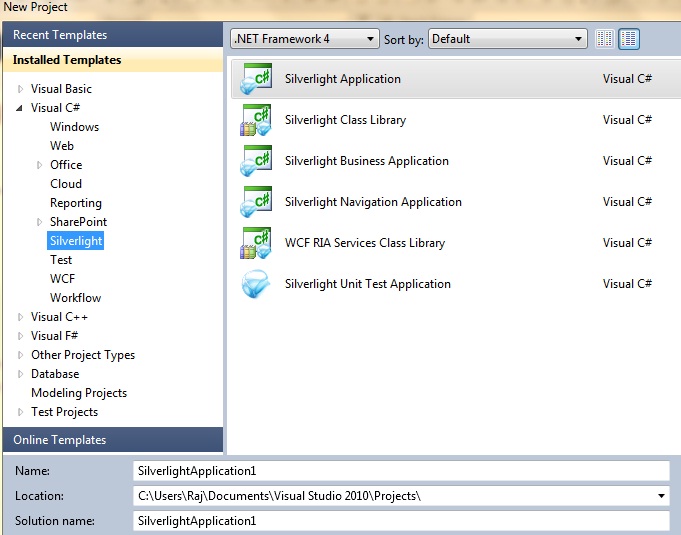
Image1.
Now add a new image folder and .xml file in web project under ClientBin folder and add some pictures in pictures folder and call those pictures in .xml file.
Let's start work on UI part:
First of all add three classes.
PhotoSlideShow.cs
using System;
using System.Net;
using System.Windows;
using System.Windows.Controls;
using System.Windows.Documents;
using System.Windows.Ink;
using System.Windows.Input;
using System.Windows.Media;
using System.Windows.Media.Animation;
using System.Windows.Shapes;
using System.Windows.Media.Imaging;
namespace SLRotatorExample
{
public class PhotoSlideShow
{
#region Private Member Variables
public Uri ThumbImageUri { get; set; }
private Uri imageUri;
private String redirectLink;
private Int32 order;
private Int32 buttonNumber;
private bool displayImage;
private string title;
private string description;
#endregion
#region Constructors
/// <summary>
/// Creates new instance of a SlideShowImage.
/// </summary>
public PhotoSlideShow()
{
}
#endregion
#region Properties
/// <summary>
/// Sets imageUri.
/// </summary>
public Uri ImageUri
{
set { imageUri = value; }
}
/// <summary>
/// Gets BitmapImage from imageUri.
/// </summary>
public BitmapImage ImageSource
{
get { return new BitmapImage(imageUri); }
}
/// <summary>
/// Gets/Sets image redirect link when image is clicked.
/// </summary>
public String RedirectLink
{
get { return redirectLink; }
set { redirectLink = value; }
}
/// <summary>
/// Gets/Sets order images are to be displayed.
/// </summary>
public Int32 Order
{
get { return order; }
set { order = value; }
}
/// <summary>
/// Gets/Sets number on image buttons.
/// </summary>
public Int32 ButtonNumber
{
get { return buttonNumber; }
set { buttonNumber = value; }
}
/// <summary>
/// Gets/Sets whether or not image is displayed.
/// </summary>
public bool DisplayImage
{
get { return displayImage; }
set { displayImage = value; }
}
/// <summary>
/// Gets/Sets Image Title;
/// </summary>
public string Title
{
get { return title; }
set { title = value; }
}
/// <summary>
/// Gets/Sets Image Description;
/// </summary>
public string Description
{
get { return description; }
set { description = value; }
}
#endregion
}
}
PhotoAlbumLoadedEventArgs.cs
using System;
using System.Net;
using System.Windows;
using System.Windows.Controls;
using System.Windows.Documents;
using System.Windows.Ink;
using System.Windows.Input;
using System.Windows.Media;
using System.Windows.Media.Animation;
using System.Windows.Shapes;
namespace SLRotatorExample
{
public class PhotoAlbumLoadedEventArgs : EventArgs
{
#region Private Member Variables
private bool pictureAlbumLoaded;
#endregion
#region Public Methods
/// <summary>
/// Argument indicating if Picture album has loaded.
/// </summary>
/// <param name="loadCompleted"></param>
public PhotoAlbumLoadedEventArgs(bool loadCompleted)
{
pictureAlbumLoaded = loadCompleted;
}
#endregion
#region Properties
/// <summary>
/// Indicates if PictureAlbum was loaded successfully from SlideShowImages file.
/// </summary>
public bool PictureAlbumLoadedSuccessfully
{
get { return pictureAlbumLoaded; }
}
#endregion
}
}
PhotoAlbum.cs
using System;
using System.Collections.Generic;
using System.Xml.Linq; // had to add reference to this in project
using System.Net;
namespace SLRotatorExample
{
public class PhotoAlbum
{
#region Private Member Variables
private List<PhotoSlideShow> slideShowImages;
private double imageWidth;
private double imageHeight;
private XDocument xdoc;
public delegate void PictureAlbumLoaded(object sender, PhotoAlbumLoadedEventArgs a);
public event PictureAlbumLoaded pictureAlbumLoaded;
#endregion
#region Constructors
/// <summary>
/// Creates new instance of PictureAlbum.
/// </summary>
public PhotoAlbum()
{
}
#endregion
#region Public Methods
/// <summary>
/// Asynchronously gets Advertisements.xml file.
/// </summary>
public void LoadPictureAlbumXMLFile()
{
WebClient xmlClient = new WebClient();
xmlClient.DownloadStringCompleted += new DownloadStringCompletedEventHandler(LoadXMLFile);
xmlClient.DownloadStringAsync(new Uri("Advertisements.xml", UriKind.RelativeOrAbsolute));
}
#endregion
#region Private Methods
/// <summary>
/// Parses Advertisements.xml file and loads contents into slideShowImages collection.
/// Then fires pictureAlbumLoadedEvent.
/// </summary>
/// <param name="sender"></param>
/// <param name="e"></param>
private void LoadXMLFile(object sender, DownloadStringCompletedEventArgs e)
{
if (e.Error == null)
{
Int32 buttonNumber = 0;
slideShowImages = new List<PhotoSlideShow>();
PhotoAlbumLoadedEventArgs pictureAlbumLoadedCompletedSuccessfully = null;
try
{
xdoc = XDocument.Parse(e.Result);
imageWidth = Convert.ToDouble(xdoc.Element("PictureAlbum").Attribute("ImageWidth").Value);
imageHeight = Convert.ToDouble(xdoc.Element("PictureAlbum").Attribute("ImageHeight").Value);
foreach (XElement item in xdoc.Elements("PictureAlbum").Elements("SlideShowImage"))
{
if (item.Element("DisplayImage").Value.ToLower() == "true")
{
PhotoSlideShow slideShowImage = new PhotoSlideShow();
if (item.Element("ImageUri").Value.Contains("http"))
slideShowImage.ImageUri = new Uri(item.Element("ImageUri").Value,
UriKind.Absolute);
else
slideShowImage.ImageUri = new Uri(item.Element("ImageUri").Value, UriKind.Relative);
if (item.Element("ImageUri").Value.Contains("http"))
slideShowImage.ThumbImageUri = new Uri(item.Element("ImageUri").Value, UriKind.Absolute);
else
slideShowImage.ThumbImageUri = new Uri(item.Element("ImageUri").Value,
UriKind.Relative);
slideShowImage.RedirectLink = item.Element("RedirectLink").Value;
slideShowImage.Order = Convert.ToInt32(item.Element("Order").Value);
slideShowImage.ButtonNumber = buttonNumber++;
slideShowImage.Title = item.Element("Title").Value;
slideShowImage.Description =
item.Element("Description").Value;
slideShowImages.Add(slideShowImage);
}
}
pictureAlbumLoadedCompletedSuccessfully = new PhotoAlbumLoadedEventArgs(true);
}
catch
{
pictureAlbumLoadedCompletedSuccessfully = new PhotoAlbumLoadedEventArgs(false);
}
finally
{
// Fire off pictureAlbumLoadedHandler so the listeners can respond.
pictureAlbumLoaded(this, pictureAlbumLoadedCompletedSuccessfully);
}
}
}
#endregion
#region Properties
/// <summary>
/// Collection of SlideShowImage's obtained loaded from SlideShowImages.xml file.
/// </summary>
public List<PhotoSlideShow> SlideShowImages
{
get { return slideShowImages; }
}
/// <summary>
/// Width of images obtained from Advertisements.xml file.
/// </summary>
public double ImageWidth
{
get { return imageWidth; }
}
/// <summary>
/// Height of images obtained from Advertisements.xml file.
/// </summary>
public double ImageHeight
{
get { return imageHeight; }
}
#endregion
}
}
MainPage.xaml
<UserControl x:Class="SLRotatorExample.MainPage"
xmlns="http://schemas.microsoft.com/winfx/2006/xaml/presentation"
xmlns:x="http://schemas.microsoft.com/winfx/2006/xaml"
xmlns:d="http://schemas.microsoft.com/expression/blend/2008"
xmlns:mc="http://schemas.openxmlformats.org/markup-compatibility/2006"
xmlns:this="clr-namespace:SLRotatorExample;assembly=SLRotatorExample"
xmlns:System="clr-namespace:System;assembly=mscorlib"
mc:Ignorable="d" >
<UserControl.Resources >
<Storyboard x:Name="strbMouseEnter" >
<DoubleAnimation To="100" Duration="0:0:0.3" Storyboard.TargetProperty="Height" Storyboard.TargetName="grdDetail"/>
</Storyboard>
<Storyboard x:Name="strbMouseLeave" Completed="strbMouseLeave_Completed">
<DoubleAnimation To="0" Duration="0:0:0.1" Storyboard.TargetProperty="Height" Storyboard.TargetName="grdDetail"/>
</Storyboard>
</UserControl.Resources>
<Border BorderBrush="#3F3F3F" CornerRadius="4" BorderThickness="1" Width="475"
Background="#3F3F3F" Margin="10,30,20,10" Padding="6,6,6,6" Height="370">
<Grid Name="layoutRoot" Canvas.Left="60" Canvas.Top="2" Width="470" Margin="-4,-4,-5,-3">
<Grid.RowDefinitions>
<RowDefinition Height="300" />
<RowDefinition Height="107" />
</Grid.RowDefinitions>
<StackPanel x:Name="imageStackPanel" Grid.Row="0" Grid.Column="0" Margin="-1,0,1,0" Height="300" />
<Border x:Name="navigationBorder" Background="Black" Opacity=".5" CornerRadius="10" BorderBrush="Black" BorderThickness="0" Canvas.Left="218"Canvas.Top="155" Width="200" Height="20" Margin="269,0,1,70" VerticalAlignment="Bottom" d:LayoutOverrides="Height" >
<StackPanel x:Name="navigationStackPanel" Orientation="Horizontal" Margin="2,1,2,1" >
<Polygon x:Name="arrowLeft" MouseLeftButtonDown="LeftArrow_MouseLeftButtonDown" MouseEnter="Arrow_MouseEnter" MouseLeave="Arrow_MouseLeave"
Points="0,6,10,0,10,12" Fill="Yellow" VerticalAlignment="Center" Margin="2,2,8,2" />
<StackPanel x:Name="numberedItemsStackPanel" Orientation="Horizontal" />
<Polygon x:Name="arrowRight" MouseLeftButtonDown="RightArrow_MouseLeftButtonDown" MouseEnter="Arrow_MouseEnter" MouseLeave="Arrow_MouseLeave"
Points="0,0,10,6,0,12" Fill="Yellow" VerticalAlignment="Center" Margin="2" />
</StackPanel>
</Border>
<ListBox x:Name="lstbImage" Grid.Column="0" Padding="0"
d:LayoutOverrides="HorizontalAlignment" Background="#3F3F3F" Margin="0,0,1,0"
BorderBrush="{StaticResource DefaultedBrush}" Style="{StaticResource DefaultListBoxStyle}"
ItemContainerStyle="{StaticResource DefaultListBoxItemStyle}" VerticalAlignment="Top" Grid.Row="1" Height="82">
<ListBox.ItemsPanel >
<ItemsPanelTemplate >
<StackPanel Orientation="Horizontal" >
</StackPanel>
</ItemsPanelTemplate>
</ListBox.ItemsPanel>
</ListBox>
<this:LoadingAnimation Grid.RowSpan="2" x:Name="MyLoading" Visibility="Collapsed">
<this:LoadingAnimation.RenderTransform>
<ScaleTransform ScaleX="0.3" ScaleY="0.3" CenterX="200" CenterY="200"/>
</this:LoadingAnimation.RenderTransform>
</this:LoadingAnimation>
<Grid Margin="0,0,1,0" Height="70" VerticalAlignment="Bottom" x:Name="grdDetail">
<Grid.RowDefinitions >
<RowDefinition Height="20"/>
<RowDefinition Height="50"/>
<RowDefinition Height="1*"/>
</Grid.RowDefinitions>
<Grid.ColumnDefinitions >
<ColumnDefinition Width="100"/>
<ColumnDefinition />
</Grid.ColumnDefinitions>
<Border Opacity=".5" Background="Black" Grid.RowSpan ="3" Grid.ColumnSpan ="2" HorizontalAlignment="Stretch" VerticalAlignment="Stretch"></Border>
<Border Background="Transparent" BorderBrush="Black" BorderThickness="1" Grid.RowSpan ="3" Grid.ColumnSpan ="2" HorizontalAlignment="Stretch" VerticalAlignment="Stretch"></Border>
<TextBlock x:Name="TitleTextBlock" Grid.ColumnSpan="2" Grid.Row="0" HorizontalAlignment="Left" VerticalAlignment="Top" Foreground="White" Margin="5,0,0,0" FontWeight="Bold" FontSize="13.333"></TextBlock>
<TextBlock x:Name="DescriptionTextBlock" Grid.ColumnSpan="2" Grid.Row="1" TextWrapping="Wrap" HorizontalAlignment="Left"VerticalAlignment="Top" Foreground="White" Margin="5,0,0,0"></TextBlock>
</Grid>
</Grid>
</Border>
</UserControl>
MainPage.xaml.cs
using System;
using System.Collections.Generic;
using System.Linq;
using System.Windows;
using System.Windows.Controls;
using System.Windows.Input;
using System.Windows.Media.Animation;
using System.Windows.Threading;
using System.Windows.Media;
using System.Windows.Shapes;
using System.Windows.Browser;
using System.Threading;
using System.Windows.Media.Imaging;
using System.Xml;
namespace SLRotatorExample
{
public partial class MainPage : UserControl
{
#region Private Member Variables
private List<PhotoSlideShow> pictures = new List<PhotoSlideShow>();
private double imageWidth;
private double imageHeight;
private int lastImageIndex = 0;
private int nextImageIndex = 0;
private int currentlyHighlightedIndex = 0;
private int imageCount = 0;
private Storyboard fadeOutStoryboard;
private Storyboard fadeInStoryboard;
private bool enableAutoPlay;
private int autoPlayIntervalSeconds;
private bool displayNumberedButtons;
private bool displayArrows;
private bool buttonsStopStartAutoPlay;
private bool leavePaused;
private bool enableAnimations;
private bool displayImageBorder;
private int imageBorderThickness;
private string argbBorderColor;
private string imageRotatorDiv;
private string browserWindowOptions = "";
DispatcherTimer autoPlayTimer = new System.Windows.Threading.DispatcherTimer();
private HtmlPopupWindowOptions htmlPopupWindowOptions = new HtmlPopupWindowOptions();
delegate void NewImagesHandler(Int32 imageIndex, Visibility visibility);
PhotoAlbum pictureAlbum = new PhotoAlbum();
static int imagesToLoadCount = 0;
Object objLock1 = new Object();
int index = 0;
#endregion
#region Constructors
/// <summary>
/// Overloaded contstructor that takes in InitParams and stores them into
/// private member variables for later use.
/// </summary>
/// <param name="parameters"></param>
public MainPage(IDictionary<string, string> parameters)
{
InitializeComponent();
// retrieve the initParams, convert back any ASCII characters
foreach (var item in parameters)
{
switch (item.Key)
{
case "autoPlay":
enableAutoPlay = Convert.ToBoolean(item.Value);
break;
case "autoPlayInterval":
autoPlayIntervalSeconds = Convert.ToInt32(item.Value);
break;
case "numberedNavigation":
displayNumberedButtons = Convert.ToBoolean(item.Value);
break;
case "arrowNavigation":
displayArrows = Convert.ToBoolean(item.Value);
break;
case "stopStartAutoPlay":
buttonsStopStartAutoPlay = Convert.ToBoolean(item.Value);
break;
case "animation":
enableAnimations = Convert.ToBoolean(item.Value);
break;
case "border":
displayImageBorder = Convert.ToBoolean(item.Value);
break;
case "borderThickness":
imageBorderThickness = Convert.ToInt32(item.Value);
break;
case "argb":
argbBorderColor = item.Value.ToString().Replace("|", ",");
break;
case "imageRotatorDiv":
imageRotatorDiv = item.Value.ToString();
break;
case "browserWindowOptions":
browserWindowOptions = item.Value.ToString().Replace("|", ",");
break;
}
}
LoadPictureAlbum();
}
#endregion
#region Private Methods
/// <summary>
/// Sets up event listener for when SlideShowImages.xml file is loaded and
/// then calls method to load that file and populate the picture album.
/// </summary>
private void LoadPictureAlbum()
{
pictureAlbum.pictureAlbumLoaded += new PhotoAlbum.PictureAlbumLoaded(PictureAlbumLoaded);
pictureAlbum.LoadPictureAlbumXMLFile();
}
/// <summary>
/// Callback method that fires when LoadPictureAlbumXMFFile has completed.
/// It creates first image right away, then asynchronously creates rest
/// of the images.
/// </summary>
/// <param name="sender"></param>
/// <param name="a"></param>
private void PictureAlbumLoaded(object sender, PhotoAlbumLoadedEventArgs args)
{
try
{
if (args.PictureAlbumLoadedSuccessfully)
{
imageWidth = pictureAlbum.ImageWidth;
imageHeight = pictureAlbum.ImageHeight;
pictures = pictureAlbum.SlideShowImages;
imageCount = pictures.Count;
// create first image
AddNewImage(0, Visibility.Visible);
//used to bind first image title, description
TitleTextBlock.Text = pictures.ElementAt(Convert.ToInt32(0)).Title;
DescriptionTextBlock.Text = pictures.ElementAt(Convert.ToInt32(0)).Description;
imagesToLoadCount = imageCount - 1;
// create rest of images asynchronously
for (int i = 1; (i < pictures.Count); i++)
{
ThreadPool.QueueUserWorkItem(ProcessSlideShowImage, i.ToString());
}
//used to bind all images in thumbnail listbox
for (int i = 0; (i < pictures.Count); i++)
{
//used to bind all thumbnail images
PhotoSlideShow imageData = pictures[i] as PhotoSlideShow;
Image image = new Image()
{
Width = 70,
Height = 70,
Source = new BitmapImage(imageData.ThumbImageUri),
Margin = new Thickness(0, 0, 2, 0),
Cursor = Cursors.Hand,
Tag = i
};
image.MouseLeftButtonDown += new MouseButtonEventHandler(image_MouseLeftButtonDown);
lstbImage.Items.Add(image);
//ThumbImagesStackPanel.Children.Add(image);
//used to select first image in thumbnail collection
lstbImage.ScrollIntoView(lstbImage.Items[index]); //scroll to the current item
lstbImage.SelectedIndex = index; //highlight the selected item in the list box scroller
}
}
else
{
throw new Exception("The Advertisements.xml file failed to load the PictureAlbum class successfully.");
}
}
finally
{
pictureAlbum.pictureAlbumLoaded -= new PhotoAlbum.PictureAlbumLoaded(PictureAlbumLoaded);
}
}
// when mouse is clicked
void image_MouseLeftButtonDown(object sender, MouseButtonEventArgs e)
{
int index = (int)(sender as Image).Tag;
//if (enableAutoPlay && buttonsStopStartAutoPlay)
// leavePaused = true;
nextImageIndex = index;
SelectedPicture(nextImageIndex);
}
/// <summary>
/// WaitCallback method asynchronous calls to create image controls.
/// Image that's created must be added to page on dispatcher thread.
/// </summary>
/// <param name="imageIndex"></param>
private void ProcessSlideShowImage(object imageIndex)
{
NewImagesHandler newImageHandler = new NewImagesHandler(AddNewImage);
object[] args = { Convert.ToInt32(imageIndex), Visibility.Collapsed };
Dispatcher.BeginInvoke(newImageHandler, args);
}
/// <summary>
/// Creates new Image control and adds it to imageStackPanel's children collection.
/// Once all Image controls are created call methods to setup rest of Silverlight control.
/// </summary>
/// <param name="imageIndex"></param>
/// <param name="visibility"></param>
private void AddNewImage(int imageIndex, Visibility visibility)
{
MyLoading.Visibility = Visibility.Visible;
Image image = new Image();
image.Width = imageWidth;
image.Height = imageHeight;
image.Source = pictures.ElementAt(Convert.ToInt32(imageIndex)).ImageSource;
image.MouseLeftButtonDown += new MouseButtonEventHandler(NewWindow_Click);
image.Visibility = visibility;
imageStackPanel.Children.Add(image);
image.ImageOpened += new EventHandler<RoutedEventArgs>(image_ImageOpened);
lock (objLock1)
{
imagesToLoadCount -= 1;
// Image control creation completed, setup rest of ImageRotator control.
if (imagesToLoadCount == 0)
{
SetupNavication();
SetupAutoPlayTimer();
}
}
}
/// <summary>
/// Helper method to determine what navigational elements
/// need to be setup and displayed.
/// </summary>
private void SetupNavication()
{
if (displayNumberedButtons)
CreateNumberedButtons();
if (!displayArrows)
{
arrowLeft.Visibility = Visibility.Collapsed;
arrowRight.Visibility = Visibility.Collapsed;
}
if (!displayNumberedButtons && !displayArrows)
navigationBorder.Visibility = Visibility.Collapsed;
}
/// <summary>
/// Helper method to determine if auto play should be setup or not.
/// </summary>
private void SetupAutoPlayTimer()
{
if (enableAutoPlay)
StartAutoPlayTimer(this, null);
}
/// <summary>
/// Opens new popup window with uri of the selected imagesToLoadCount
/// redirect link.
/// </summary>
/// <param name="sender"></param>
/// <param name="e"></param>
private void NewWindow_Click(object sender, RoutedEventArgs e)
{
string redirectLink = pictures.ElementAt(nextImageIndex).RedirectLink;
string browserWindowOptions = this.browserWindowOptions;
HtmlPage.Window.Navigate(new Uri(redirectLink), "_blank", browserWindowOptions);
}
/// <summary>
/// Creates numbered buttons and wires up required events for interaction.
/// </summary>
private void CreateNumberedButtons()
{
for (int i = 1; i <= imageCount; i++)
{
TextBlock numberTextBlock = new TextBlock();
numberTextBlock.FontWeight = FontWeights.Bold;
numberTextBlock.Margin = new Thickness(2);
numberTextBlock.Opacity = 1;
numberTextBlock.Width = 15;
numberTextBlock.VerticalAlignment = VerticalAlignment.Center;
numberTextBlock.Text = i.ToString();
numberTextBlock.Tag = i - 1;
SolidColorBrush sl = new SolidColorBrush();
sl.Color = Colors.Yellow;
numberTextBlock.Foreground = sl;
numberTextBlock.MouseLeftButtonDown += new MouseButtonEventHandler(Number_MouseLeftButtonDown);
numberTextBlock.MouseEnter += new MouseEventHandler(Number_MouseEnter);
numberTextBlock.MouseLeave += new MouseEventHandler(Number_MouseLeave);
if (displayNumberedButtons == false)
numberTextBlock.Visibility = Visibility.Collapsed;
numberedItemsStackPanel.Children.Add(numberTextBlock);
}
}
/// <summary>
/// Contains change logic for when new image is selected.
/// </summary>
/// <param name="index"></param>
private void SelectedPicture(int index)
{
MyLoading.Visibility = Visibility.Visible;
if (displayNumberedButtons)
{
((TextBlock)numberedItemsStackPanel.Children.ElementAt(currentlyHighlightedIndex)).Opacity = 1;
((TextBlock)numberedItemsStackPanel.Children.ElementAt(nextImageIndex)).Opacity = .3;
}
currentlyHighlightedIndex = nextImageIndex;
autoPlayTimer.Stop();
if (enableAnimations)
FadeOut();
else
SwitchImage();
lstbImage.SelectedIndex = index;
//used to bind image title and description
TitleTextBlock.Text = pictures.ElementAt(Convert.ToInt32(index)).Title;
DescriptionTextBlock.Text = pictures.ElementAt(Convert.ToInt32(index)).Description;
MyLoading.Visibility = Visibility.Collapsed;
}
/// <summary>
/// Contains logic to track next image to be displayed.
/// </summary>
/// <returns></returns>
private int NextPictureImage()
{
nextImageIndex++;
if (nextImageIndex == imageCount)
{
nextImageIndex = 0;
return 0;
}
else
return nextImageIndex;
}
/// <summary>
/// Contains logic to track last image displayed.
/// </summary>
/// <returns></returns>
private int LastPictureImage()
{
nextImageIndex--;
if (nextImageIndex < 0)
{
nextImageIndex = imageCount - 1;
return nextImageIndex;
}
else
return nextImageIndex;
}
/// <summary>
/// Contains logic to faid out current image.
/// </summary>
private void FadeOut()
{
DoubleAnimation fadeOutDoubleAnimation = new DoubleAnimation();
fadeOutDoubleAnimation.From = 1;
fadeOutDoubleAnimation.To = 0;
fadeOutDoubleAnimation.Duration = new Duration(TimeSpan.FromSeconds(1));
fadeOutStoryboard = new Storyboard();
fadeOutStoryboard.Children.Add(fadeOutDoubleAnimation);
fadeOutStoryboard.Completed += new EventHandler(FadeOutStoryboard_Completed);
Storyboard.SetTarget(fadeOutDoubleAnimation, ((Image)imageStackPanel.Children.ElementAt(lastImageIndex)));
Storyboard.SetTargetProperty(fadeOutDoubleAnimation, new PropertyPath(ListBox.OpacityProperty));
layoutRoot.Resources.Add("fadeOutStoryboard", fadeOutStoryboard);
fadeOutStoryboard.Begin();
layoutRoot.Resources.Remove("fadeOutStoryboard");
}
/// <summary>
/// Contains logic to faid in new image.
/// </summary>
private void FadeIn()
{
DoubleAnimation fadeInDoubleAnimation = new DoubleAnimation();
fadeInDoubleAnimation.From = 0;
fadeInDoubleAnimation.To = 1;
fadeInDoubleAnimation.Duration = new Duration(TimeSpan.FromSeconds(1));
fadeInStoryboard = new Storyboard();
fadeInStoryboard.Children.Add(fadeInDoubleAnimation);
Storyboard.SetTarget(fadeInDoubleAnimation, ((Image)imageStackPanel.Children.ElementAt(nextImageIndex)));
Storyboard.SetTargetProperty(fadeInDoubleAnimation, new PropertyPath(ListBox.OpacityProperty));
layoutRoot.Resources.Add("fadeInStoryboard", fadeInStoryboard);
fadeInStoryboard.Begin();
layoutRoot.Resources.Remove("fadeInStoryboard");
}
/// <summary>
/// Contains logic to process image changing.
/// </summary>
private void SwitchImage()
{
MyLoading.Visibility = Visibility.Visible;
((Image)imageStackPanel.Children.ElementAt(lastImageIndex)).Visibility = Visibility.Collapsed;
((Image)imageStackPanel.Children.ElementAt(nextImageIndex)).Visibility = Visibility.Visible;
lastImageIndex = nextImageIndex;
if (enableAutoPlay && buttonsStopStartAutoPlay && leavePaused == false)
autoPlayTimer.Start();
lstbImage.SelectedIndex = lastImageIndex;
MyLoading.Visibility = Visibility.Collapsed;
}
#endregion
#region Event Handlers
/// <summary>
/// Sets up and starts autoplay timer.
/// </summary>
/// <param name="o"></param>
/// <param name="sender"></param>
public void StartAutoPlayTimer(object o, RoutedEventArgs sender)
{
if (numberedItemsStackPanel.Children.Count > 0)
((TextBlock)numberedItemsStackPanel.Children.ElementAt(0)).Opacity = .5;
autoPlayTimer.Interval = new TimeSpan(0, 0, 0, 0, autoPlayIntervalSeconds * 2500);
autoPlayTimer.Tick += new EventHandler(AutoPlayTimerTicked);
autoPlayTimer.Start();
}
/// <summary>
/// Handles tick event for timer. Selects next picture.
/// </summary>
/// <param name="o"></param>
/// <param name="sender"></param>
private void AutoPlayTimerTicked(object o, EventArgs sender)
{
SelectedPicture(NextPictureImage());
}
/// <summary>
/// Handles storyboard animation completed event. Fades in next image.
/// </summary>
/// <param name="sender"></param>
/// <param name="e"></param>
private void FadeOutStoryboard_Completed(object sender, EventArgs e)
{
((Image)imageStackPanel.Children.ElementAt(lastImageIndex)).Visibility = Visibility.Collapsed;
((Image)imageStackPanel.Children.ElementAt(nextImageIndex)).Visibility = Visibility.Visible;
lastImageIndex = nextImageIndex;
FadeIn();
if ((enableAutoPlay || buttonsStopStartAutoPlay) && leavePaused == false)
autoPlayTimer.Start();
}
/// <summary>
/// Handles arrow buttons mouseenter event.
/// </summary>
/// <param name="sender"></param>
/// <param name="e"></param>
private void Arrow_MouseEnter(object sender, MouseEventArgs e)
{
((Polygon)sender).Opacity = .5;
}
/// <summary>
/// Handles arrow buttons mouseleave event.
/// </summary>
/// <param name="sender"></param>
/// <param name="e"></param>
private void Arrow_MouseLeave(object sender, MouseEventArgs e)
{
((Polygon)sender).Opacity = 1;
}
/// <summary>
/// Handles LeftArrow's MouseLeftButtonDown event.
/// </summary>
/// <param name="sender"></param>
/// <param name="e"></param>
private void LeftArrow_MouseLeftButtonDown(object sender, MouseButtonEventArgs e)
{
MyLoading.Visibility = Visibility.Visible;
if (enableAutoPlay && buttonsStopStartAutoPlay)
leavePaused = false;
SelectedPicture(LastPictureImage());
MyLoading.Visibility = Visibility.Collapsed;
}
/// <summary>
/// Handles RightArrow's MouseLeftButtonDown event.
/// </summary>
/// <param name="sender"></param>
/// <param name="e"></param>
private void RightArrow_MouseLeftButtonDown(object sender, MouseButtonEventArgs e)
{
MyLoading.Visibility = Visibility.Visible;
if (enableAutoPlay && buttonsStopStartAutoPlay)
leavePaused = false;
SelectedPicture(NextPictureImage());
MyLoading.Visibility = Visibility.Collapsed;
}
/// <summary>
/// Handles Number's MouseLeave event.
/// </summary>
/// <param name="sender"></param>
/// <param name="e"></param>
private void Number_MouseLeave(object sender, MouseEventArgs e)
{
MyLoading.Visibility = Visibility.Visible;
if (nextImageIndex != Convert.ToInt32(((TextBlock)sender).Tag))
((TextBlock)sender).Opacity = 1;
lstbImage.SelectedIndex = nextImageIndex;
MyLoading.Visibility = Visibility.Collapsed;
}
/// <summary>
/// Handles Number's MouseEnter event.
/// </summary>
/// <param name="sender"></param>
/// <param name="e"></param>
private void Number_MouseEnter(object sender, MouseEventArgs e)
{
MyLoading.Visibility = Visibility.Visible;
if (nextImageIndex != Convert.ToInt32(((TextBlock)sender).Tag))
((TextBlock)sender).Opacity = .5;
lstbImage.SelectedIndex = nextImageIndex;
MyLoading.Visibility = Visibility.Collapsed;
}
/// <summary>
/// Handles Numbers MouseLeftButtonDown event.
/// </summary>
/// <param name="sender"></param>
/// <param name="e"></param>
private void Number_MouseLeftButtonDown(object sender, RoutedEventArgs e)
{
MyLoading.Visibility = Visibility.Visible;
if (enableAutoPlay && buttonsStopStartAutoPlay)
leavePaused = true;
nextImageIndex = Convert.ToInt32(((TextBlock)sender).Tag);
SelectedPicture(nextImageIndex);
MyLoading.Visibility = Visibility.Collapsed;
}
#endregion
void image_ImageOpened(object sender, RoutedEventArgs e)
{
// hide the loading animation
MyLoading.Visibility = Visibility.Collapsed;
}
private void strbMouseLeave_Completed(object sender, EventArgs e)
{
strbMouseEnter.Begin();
}
}
}
Now run the application and see result.

Image2.