

This articles demonstrates how to use Silverlight CRUD operations using a WCF service. We will use a Data Grid data control.
Create a new Silverlight project using .NET Framework 4.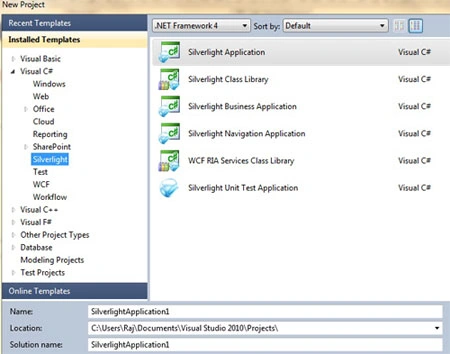
Image 1.
You will see the project layout like this. The web project works like a server project with all the database related classes and services, .aspx test pages, configuration file and the other project has all the .xaml pages controls.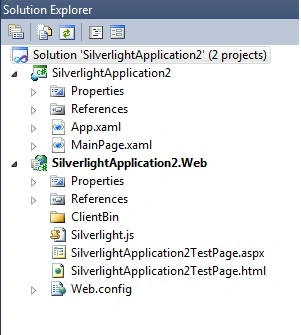
Image 2.
Now add a new Silverlight enabled WCF service.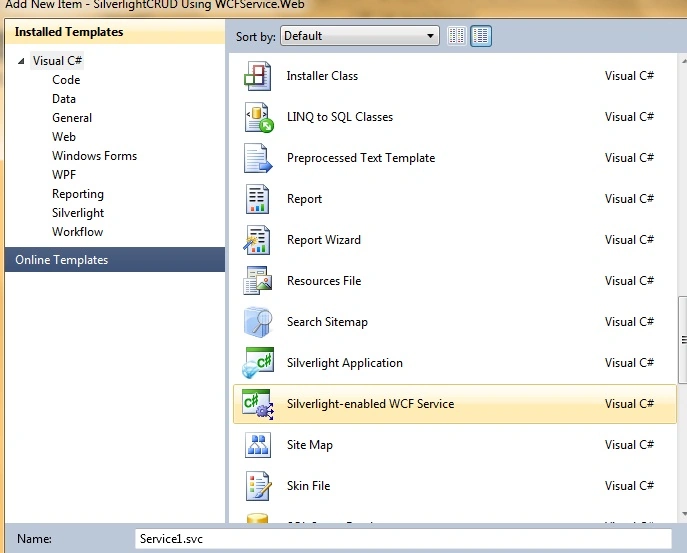
Image 3.
In this sample I am using the Northwnd database available in the App_Data folder. First add a new class to the web project.
Customers.cs
using System;
using System.Collections.Generic;
using System.Linq;
using System.Web;
namespace SilverlightCRUD_Using_WCFService.Web
{
public class Customers
{
public string CustomerID { get; set; }
public string CompanyName { get; set; }
public string ContactName { get; set; }
public string ContactTitle { get; set; }
}
}
Now add functions to the service class. This is the connection string.
string conn = "Data Source=.\\SQLEXPRESS;AttachDbFilename=|DataDirectory|\\NORTHWND.MDF;Integrated Security=True;User Instance=True";
Add these namespaces to the service class.
using System.Data.SqlClient;
using System.Collections.Generic;
This function is used for the customer records from the database:
[OperationContract]
public List<Customers>GetAllCustomers()
{
List<Customers> customers = new List<Customers>();
using (SqlConnection con = new SqlConnection(conn))
{
using (SqlCommandcmd = new SqlCommand())
{
//cmd.CommandText = "GetAllCustomers";
cmd.CommandText = "Select CustomerID,CompanyName,ContactName,ContactTitle From Customers";
cmd.Connection = con;
//cmd.CommandType = System.Data.CommandType.StoredProcedure;
con.Open();
SqlDataReader reader = cmd.ExecuteReader();
while (reader.Read())
{
Customers customer = new Customers();
customer.CustomerID = Convert.ToString(reader["CustomerID"].ToString());
customer.CompanyName = Convert.ToString(reader["CompanyName"]);
customer.ContactName = Convert.ToString(reader["ContactName"]);
customer.ContactTitle = Convert.ToString(reader["ContactTitle"]);
customers.Add(customer);
}
}
}
return customers;
}
This method is used to update customer information.
[OperationContract]
public int UpdateCustomer(Customers customer)
{
using (SqlConnection con = new SqlConnection(conn))
{
using (SqlCommand cmd = new SqlCommand())
{
string CommandText = "UPDATE Customers" +
" SET(CompanyName = @CompanyName, ContactName = @ContactName, ContactTitle = @ContactTitle)" +
" WHERECustomerID =" + customer.CustomerID;
cmd.CommandText = "Update Customers SET CompanyName=@CompanyName,ContactName=@ContactName,ContactTitle=@ContactTitle WHERE CustomerID = @CustomerID";
//cmd.CommandText = CommandText;
cmd.Connection = con;
//cmd.CommandType = System.Data.CommandType.StoredProcedure;
cmd.Parameters.Add("@CustomerID", System.Data.SqlDbType.VarChar).Value = customer.CustomerID;
cmd.Parameters.Add("@CompanyName", System.Data.SqlDbType.VarChar).Value = customer.CompanyName;
cmd.Parameters.Add("@ContactName", System.Data.SqlDbType.VarChar).Value = customer.ContactName;
cmd.Parameters.Add("@ContactTitle", System.Data.SqlDbType.VarChar).Value = customer.ContactTitle;
con.Open();
returnConvert.ToInt32(cmd.ExecuteScalar());
}
}
}
This method inserts a new customer entry in the database.
[OperationContract]
public int InsertCustomer(Customers customer)
{
using (SqlConnection con = new SqlConnection(conn))
{
using (SqlCommand cmd = new SqlCommand())
{
cmd.CommandText = "INSERT INTO Customers(CustomerID,CompanyName,ContactName,ContactTitle) Valu(@CustomerID,@CompanyName,@ContactName,@ContactTitle)";
cmd.Connection = con;
//cmd.CommandType = System.Data.CommandType.StoredProcedure;
cmd.Parameters.Add("@CustomerID", System.Data.SqlDbType.VarChar).Value = customer.CustomerID;
cmd.Parameters.Add("@CompanyName", System.Data.SqlDbType.VarChar).Value = customer.CompanyName;
cmd.Parameters.Add("@ContactName", System.Data.SqlDbType.VarChar).Value = customer.ContactName;
cmd.Parameters.Add("@ContactTitle", System.Data.SqlDbType.VarChar).Value = customer.ContactTitle;
con.Open();
returnConvert.ToInt32(cmd.ExecuteScalar());
}
}
}
This method is used to delete customer details from the database.
[OperationContract]
public bool DeleteCustomer(string customerId)
{
using (SqlConnection con = new SqlConnection(conn))
{
using (SqlCommandcmd = new SqlCommand())
{
cmd.CommandText = "Delete FROM Customers Where CustomerID = @CustomerID";
cmd.Connection = con;
//cmd.CommandType = System.Data.CommandType.StoredProcedure;
cmd.Parameters.Add("@CustomerID", System.Data.SqlDbType.VarChar).Value = customerId;
con.Open();
returnConvert.ToBoolean(cmd.ExecuteNonQuery() > 0);
}
}
}
Here we have completed the service work. Now let's start working on the UI part. First of all add a service reference to the project.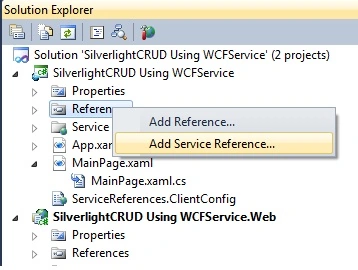
Image 4.
Now discover the service reference and click OK.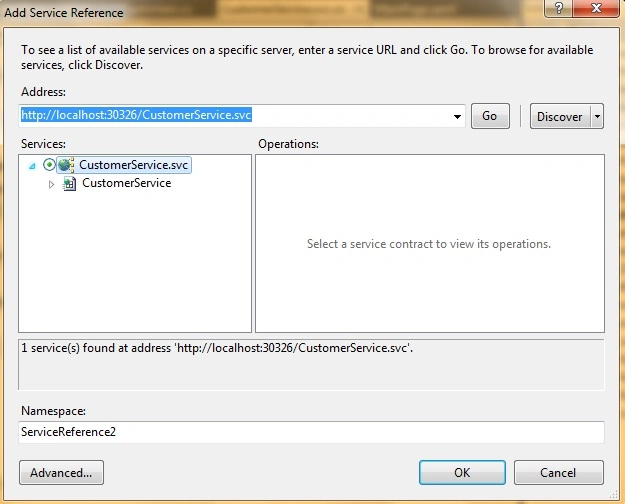
Image 5.
Start working on the MainPage.xaml now.
<UserControl x:Class="SilverlightCRUD_Using_WCFService.MainPage"
xmlns="http://schemas.microsoft.com/winfx/2006/xaml/presentation"
xmlns:x="http://schemas.microsoft.com/winfx/2006/xaml"
xmlns:d="http://schemas.microsoft.com/expression/blend/2008"
xmlns:mc="http://schemas.openxmlformats.org/markup-compatibility/2006"
xmlns:data="clr-namespace:System.Windows.Controls;assembly=System.Windows.Controls.Data"
mc:Ignorable="d"
d:DesignHeight="500" d:DesignWidth="450"
xmlns:sdk="http://schemas.microsoft.com/winfx/2006/xaml/presentation/sdk">
<Grid x:Name="LayoutRoot" Background="White">
<data:DataGridAutoGenerateColumns="False"HorizontalAlignment="Left"
Margin="5,5,0,0"
Name="customerGrid"VerticalAlignment="Top"
SelectionMode="Single"AllowDrop="True"LoadingRow="customerGrid_LoadingRow"></data:DataGrid>
<sdk:Label Height="20"HorizontalAlignment="Left" Margin="22,350,0,0" Name="label1"VerticalAlignment="Top" Width="106" Content="Company Name: " />
<TextBox Height="23"HorizontalAlignment="Left" Margin="134,347,0,0" Name="CompanyNametextBox"VerticalAlignment="Top" Width="160" />
<sdk:Label Height="19"HorizontalAlignment="Left" Margin="22,375,0,0" Name="label2"VerticalAlignment="Top" Width="93" Content="Contact Name:" />
<TextBox Height="23"HorizontalAlignment="Left" Margin="133,376,0,0" Name="ContactNametextBox"VerticalAlignment="Top" Width="161" />
<sdk:Label Height="24"HorizontalAlignment="Left" Margin="22,403,0,0" Name="label3"VerticalAlignment="Top" Width="106" Content="Contact Title:" />
<TextBox Height="23"HorizontalAlignment="Left" Margin="133,404,0,0" Name="ContactTitletextBox"VerticalAlignment="Top" Width="161" />
<Button Content="Update" Height="23"HorizontalAlignment="Left" Margin="210,441,0,0" Name="Updatebutton"VerticalAlignment="Top" Width="75" Click="UpdateButton_Click" />
<Button Content="Delete" Height="23"HorizontalAlignment="Left" Margin="288,441,0,0" Name="Deletebutton"VerticalAlignment="Top" Width="75" Click="Deletebutton_Click" />
<Button Content="Insert" Height="23"HorizontalAlignment="Left" Margin="132,441,0,0" Name="Insertbutton"VerticalAlignment="Top" Width="75" Click="Insertbutton_Click" />
<sdk:Label Height="18"HorizontalAlignment="Left" Margin="22,322,0,0" Name="label4"VerticalAlignment="Top" Width="106" Content="Customer ID:" />
<TextBox Height="23"HorizontalAlignment="Left" Margin="134,317,0,0" Name="CustomerIDtextBox"VerticalAlignment="Top" Width="161"IsEnabled="True" />
<sdk:DataPager Height="26"HorizontalAlignment="Left" Source="{Binding Path=ItemsSource,ElementName=customerGrid}" Margin="226,271,0,0" Name="dataPager1"PageSize="10"VerticalAlignment="Top" Width="200" />
</Grid>
</UserControl>
MainPage.xaml.cs.
Add the service namespace.
using SilverlightCRUD_Using_WCFService.ServiceReference1;
This code and events are used to show customer details.
public MainPage()
{
InitializeComponent();
customerGrid.Columns.Add(new DataGridTextColumn
{
Header = "CustomerID",
Binding = new Binding("CustomerID"),
});
customerGrid.Columns.Add(new DataGridTextColumn
{
Header = "CompanyName",
Binding = newBinding("CompanyName"),
Width = newDataGridLength(140)
});
customerGrid.Columns.Add(new DataGridTextColumn
{
Header = "ContactName",
Binding = new Binding("ContactName"),
Width = new DataGridLength(100)
});
customerGrid.Columns.Add(new DataGridTextColumn
{
Header = "ContactTitle",
Binding = new Binding("ContactTitle"),
});
LoadCustomersGrid();
}
private void LoadCustomersGrid()
{
CustomerServiceClient customer = new CustomerServiceClient();
customer.GetAllCustomersCompleted += new EventHandler<GetAllCustomersCompletedEventArgs>(customer_GetAllCustomersCompleted);
customer.GetAllCustomersAsync();
}
void customer_GetAllCustomersCompleted(object sender, GetAllCustomersCompletedEventArgs e)
{
PagedCollectionView pageCollectionView = new PagedCollectionView(e.Result);
dataPager1.DataContext = pageCollectionView;
customerGrid.ItemsSource = pageCollectionView;
}
Now run the application.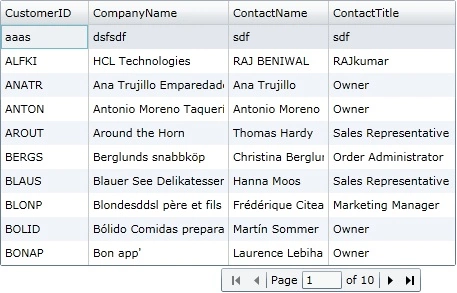
Image 6.
This piece of code is used to show row details in text boxes.
private void customerGrid_LoadingRow(object sender, DataGridRowEventArgs e)
{
e.Row.MouseLeftButtonUp += newMouseButtonEventHandler(Row_MouseLeftButtonUp);
}
void Row_MouseLeftButtonUp(object sender, MouseButtonEventArgs e)
{
Customers customer = customerGrid.SelectedItem as Customers;
CustomerIDtextBox.Text = customer.CustomerID;
ContactNametextBox.Text = customer.ContactName;
ContactTitletextBox.Text = customer.ContactTitle;
CompanyNametextBox.Text = customer.CompanyName;
}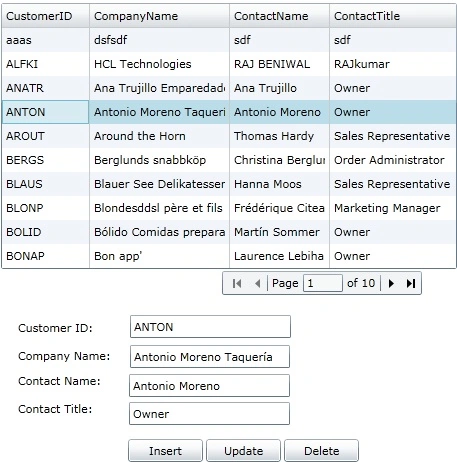
Image 7.
This code and event is used to update the selected record.
private void UpdateButton_Click(object sender, RoutedEventArgs e)
{
if (Validate())
{
CustomerServiceClient customerServiceClient = new CustomerServiceClient();
customerServiceClient.UpdateCustomerCompleted += newEventHandler<UpdateCustomerCompletedEventArgs>(customerServiceClient_UpdateCustomerCompleted);
Customers customer = new Customers();
customer.CustomerID = CustomerIDtextBox.Text;
customer.CompanyName = CompanyNametextBox.Text;
customer.ContactName = ContactNametextBox.Text;
customer.ContactTitle = ContactTitletextBox.Text;
customerServiceClient.UpdateCustomerAsync(customer);
}
}
void customerServiceClient_UpdateCustomerCompleted(object sender, UpdateCustomerCompletedEventArgs e)
{
if (e.Result> -1)
{
MessageBox.Show("Record Updated Successfully", "Update", MessageBoxButton.OK);
ClearTextBoxes();
LoadCustomersGrid();
}
}
private void ClearTextBoxes()
{
CustomerIDtextBox.Text = string.Empty;
CompanyNametextBox.Text = string.Empty;
ContactNametextBox.Text = string.Empty;
ContactTitletextBox.Text = string.Empty;
CustomerIDtextBox.Focus();
}
private bool Validate()
{
if (CustomerIDtextBox.Text.Trim().Length == 0)
{
MessageBox.Show("Name cannot be blank", "Error", MessageBoxButton.OK);
CustomerIDtextBox.Focus();
returnfalse;
}
elseif (CompanyNametextBox.Text.Trim().Length == 0)
{
MessageBox.Show("Name cannot be blank", "Error", MessageBoxButton.OK);
CompanyNametextBox.Focus();
returnfalse;
}
elseif (ContactNametextBox.Text.Trim().Length == 0)
{
MessageBox.Show("Phone No cannot be blank", "Error", MessageBoxButton.OK);
ContactNametextBox.Focus();
returnfalse;
}
elseif (ContactTitletextBox.Text.Trim().Length == 0)
{
MessageBox.Show("Phone No cannot be blank", "Error", MessageBoxButton.OK);
ContactTitletextBox.Focus();
returnfalse;
}
else
{
returntrue;
}
}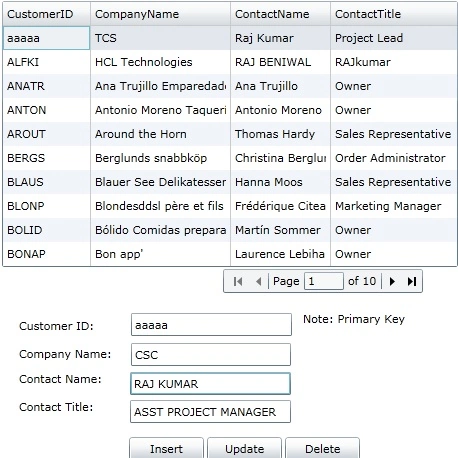
Image 8.
Note: No need to update the Customer ID because it is the primary key.
And click Update.
Image 9.
This code and event is used to insert a new record entry.
private void Insertbutton_Click(object sender, RoutedEventArgs e)
{
if (Validate())
{
CustomerServiceClient customerServiceClient = new CustomerServiceClient();
customerServiceClient.InsertCustomerCompleted += newEventHandler<InsertCustomerCompletedEventArgs>(customerServiceClient_InsertCustomerCompleted);
Customers customer = new Customers();
customer.CustomerID = CustomerIDtextBox.Text;
customer.CompanyName = CompanyNametextBox.Text;
customer.ContactName = ContactNametextBox.Text;
customer.ContactTitle = ContactTitletextBox.Text;
customerServiceClient.InsertCustomerAsync(customer);
}
}
void customerServiceClient_InsertCustomerCompleted(object sender, InsertCustomerCompletedEventArgs e)
{
if (e.Result> -1)
{
MessageBox.Show("Record Inserted Successfully", "Insert", MessageBoxButton.OK);
ClearTextBoxes();
LoadCustomersGrid();
}
}
Now run the application and put a new entry in text boxes.
Image 10.
Click the Insert button now.
Image 11.
This code and event is used to delete the selected row entry.
private void Deletebutton_Click(object sender, RoutedEventArgs e)
{
if (CustomerIDtextBox.Text == "")
{
MessageBox.Show("Select a record to delete", "Delete", MessageBoxButton.OK);
}
else
{
if (MessageBox.Show("Are you sure you want to delete ? ", "Delete", MessageBoxButton.OKCancel) == MessageBoxResult.OK)
{
CustomerServiceClient customerServiceClient = new CustomerServiceClient();
customerServiceClient.DeleteCustomerCompleted += newEventHandler<DeleteCustomerCompletedEventArgs>(customer_DeleteCustomerCompleted);
customerServiceClient.DeleteCustomerAsync(CustomerIDtextBox.Text);
}
}
}
void customer_DeleteCustomerCompleted(object sender, DeleteCustomerCompletedEventArgs e)
{
if (e.Result)
{
MessageBox.Show("Record Deleted", "Delete", MessageBoxButton.OK);
ClearTextBoxes();
LoadCustomersGrid();
}
else
{
MessageBox.Show("Deletion failed", "Delete", MessageBoxButton.OK);
}
}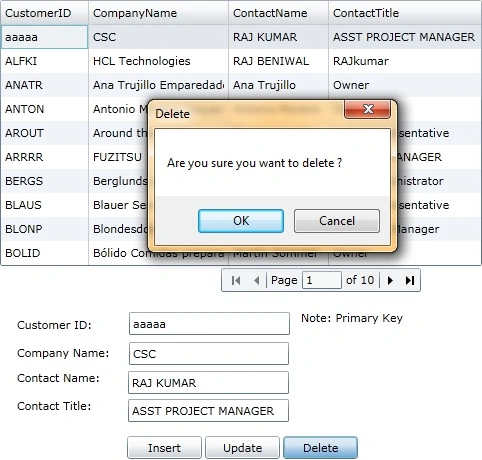
Image 12.
We are done here with Silverlight CRUD using a WCF service. If you have questions and comments related to this article then drop me a line in the C# corner comment section.
imran bhattiPosted Nov 25, 2020, 12:23 AM
Thanks to you, it helped me in building crud logic.
Enrique PadillaPosted Jul 31, 2014, 2:06 PM
Gracia por el ejemplo, reci?n inicio en esto de Silverlight (thanks so much)
Enrique PadillaPosted Jul 31, 2014, 2:05 PM
Hola
Santosh YadavPosted Mar 14, 2013, 12:22 PM
nice article but can we perform crud operation inside the datagrid with input validation ?
Santosh YadavPosted Nov 4, 2012, 1:32 PM
thanku sir your article is so easy to learn....... Thankyou again.....!!!
ankit patelPosted Oct 1, 2012, 9:45 AM
Really great ^^
ankit patelPosted Oct 1, 2012, 9:44 AM
best post everrrrrrrrrrrrrrr
Karen GonzalezPosted Jul 5, 2011, 1:21 PM
Thanks for the tutorial. I am a beginner about Silverlight, I'm seventeen and I'm doing a similar project, but I want to use 3 projects.. 1.- My silverlight project 2.- My silverlight project.web 3. (In this project I want to have only my WCF Service) I want to consume the WCF Service located in the third project. I did my WCF Service in a third project. so I could add the Service Reference to my first project, but when I debug the solution it doesn't show any error and even the DataGrid doesn't show any register. When I have only two projects, the registers are showed in the DataGrid. But I need have my WCF Service in a separated project. What could be the reason that the registers are not showed? There aren't connection to the database? Need I a reference or something like that? I need an example when it use 3 projects. Or know the reason about the register are not showed. Advance Thanks. Karen González. p.d. If you didn't understand me, I can send you my SL project. I need your help. Sorry If I have grammatical errors, I'm learning english..
bob kennellyPosted May 15, 2011, 9:55 PM
I 've been looking through alot of books and examples and this has got to be one of the best! Thanks very much Raj Kumar, you really are a MVP!
suresh sahuPosted Dec 3, 2010, 9:36 AM
Hi Raj, I am new to silverlight and WCF Can you give any example where we can do CRUD operations uisng LINQ to SQL or LINQ to Entities and creating WCF service project seperately and consuming that in Silverlight. I will be greatful if you can send me the sample code of that. Keep writing such good samples.... :) Advance Thanks..... Regards, Suresh
DRIPSPosted Nov 16, 2010, 1:01 AM
lovely article bt one problem I am having.the selected row on my datagrid does not show the text on my textboxes.what is it that i am missing. thanks.