

This article will show you how to use DetailsView control without using of SQLDataSource data control. CellPadding="6" ForeColor="#333333" AutoGenerateRows="false"
GridLines="None" AllowPaging="True" AutoGenerateDeleteButton="True"
AutoGenerateEditButton="True" AutoGenerateInsertButton="True"
onitemdeleting="DetailsView1_ItemDeleting"
onpageindexchanging="DetailsView1_PageIndexChanging"
oniteminserting="DetailsView1_ItemInserting"
onitemupdating="DetailsView1_ItemUpdating"
oniteminserted="DetailsView1_ItemInserted"
onitemupdated="DetailsView1_ItemUpdated"
onmodechanging="DetailsView1_ModeChanging1">
<FooterStyle BackColor="#5D7B9D" Font-Bold="True" ForeColor="White" />
<CommandRowStyle BackColor="#E2DED6" Font-Bold="True" />
<RowStyle BackColor="#F7F6F3" ForeColor="#333333" />
<FieldHeaderStyle BackColor="#E9ECF1" Font-Bold="True" />
<PagerStyle BackColor="#284775" ForeColor="White" HorizontalAlign="Center" />
<Fields>
<asp:TemplateField HeaderText="CustomerID" Visible="True" InsertVisible="True" >
<ItemTemplate>
<asp:Label ID="CustomerIDLabel" Text='<%# Eval("CustomerID") %>' runat="server"></asp:Label>
</ItemTemplate>
<EditItemTemplate>
<asp:TextBox ID="EditCustomerID" runat="server" Text='<%# Bind("CustomerID") %>' MaxLength="10" /></EditItemTemplate>
<InsertItemTemplate>
<asp:TextBox ID="InsertCustomerIDTextBox" runat="server" Text='<%# Bind("CustomerID") %>' MaxLength="10" /></InsertItemTemplate>
</asp:TemplateField>
<asp:TemplateField HeaderText="CompanyName">
<ItemTemplate>
<asp:Label ID="CompanyNameLabel" runat="server" Text='<%# Bind("CompanyName") %>'></asp:Label>
</ItemTemplate>
<EditItemTemplate>
<asp:TextBox ID="EditCompanyNameTextBox" runat="server" Text='<%# Bind("CompanyName") %>' MaxLength="10" /></EditItemTemplate>
<InsertItemTemplate>
<asp:TextBox ID="InsertCompanyNameTextBox" runat="server" Text='<%# Bind("CompanyName") %>' MaxLength="10" /></InsertItemTemplate>
</asp:TemplateField>
<asp:TemplateField HeaderText="ContactName">
<ItemTemplate>
<asp:Label ID="ContactNameLabel" runat="server" Text='<%# Bind("ContactName") %>'></asp:Label>
</ItemTemplate>
<EditItemTemplate>
<asp:TextBox ID="EditContactNameTextBox" runat="server" Text='<%# Bind("ContactName") %>' MaxLength="10" /></EditItemTemplate>
<InsertItemTemplate>
<asp:TextBox ID="InsertContactNameTextBox" runat="server" Text='<%# Bind("ContactName") %>' MaxLength="10" /></InsertItemTemplate>
</asp:TemplateField>
<asp:TemplateField HeaderText="ContactTitle">
<ItemTemplate>
<asp:Label ID="ContactTitleLabel" runat="server" Text='<%# Bind("ContactTitle") %>'></asp:Label>
</ItemTemplate>
<EditItemTemplate>
<asp:TextBox ID="EditContactTitleTextBox" runat="server" Text='<%# Bind("ContactTitle") %>' MaxLength="10" /></EditItemTemplate>
<InsertItemTemplate>
<asp:TextBox ID="InsertContactTitleTextBox" runat="server" Text='<%# Bind("ContactTitle") %>' MaxLength="10" /></InsertItemTemplate>
</asp:TemplateField>
<asp:TemplateField HeaderText="Address">
<ItemTemplate>
<asp:Label ID="AddressLabel" runat="server" Text='<%# Bind("Address") %>'></asp:Label>
</ItemTemplate>
<EditItemTemplate>
<asp:TextBox ID="EditAddressTextBox" runat="server" Text='<%# Bind("Address") %>' MaxLength="10" /></EditItemTemplate>
<InsertItemTemplate>
<asp:TextBox ID="InsertAddressTextBox" runat="server" Text='<%# Bind("Address") %>' MaxLength="10" /></InsertItemTemplate>
</asp:TemplateField>
<asp:TemplateField HeaderText="City">
<ItemTemplate>
<asp:Label ID="CityLabel" runat="server" Text='<%# Bind("City") %>'></asp:Label>
</ItemTemplate>
<EditItemTemplate>
<asp:TextBox ID="EditCityTextBox" runat="server" Text='<%# Bind("City") %>' MaxLength="10" /></EditItemTemplate>
<InsertItemTemplate>
<asp:TextBox ID="InsertCityTextBox" runat="server" Text='<%# Bind("City") %>' MaxLength="10" /></InsertItemTemplate>
</asp:TemplateField>
<asp:TemplateField HeaderText="Region">
<ItemTemplate>
<asp:Label ID="RegionLabel" runat="server" Text='<%# Bind("Region") %>'></asp:Label>
</ItemTemplate>
<EditItemTemplate>
<asp:TextBox ID="EditRegionTextBox" runat="server" Text='<%# Bind("Region") %>' MaxLength="10" /></EditItemTemplate>
<InsertItemTemplate>
<asp:TextBox ID="InsertRegionTextBox" runat="server" Text='<%# Bind("Region") %>' MaxLength="10" /></InsertItemTemplate>
</asp:TemplateField>
<asp:TemplateField HeaderText="PostalCode">
<ItemTemplate>
<asp:Label ID="PostalCodeLabel" runat="server" Text='<%# Bind("PostalCode") %>'></asp:Label>
</ItemTemplate>
<EditItemTemplate>
<asp:TextBox ID="EditPostalCodeTextBox" runat="server" Text='<%# Bind("PostalCode") %>' MaxLength="10" /></EditItemTemplate>
<InsertItemTemplate>
<asp:TextBox ID="InsertPostalCodeTextBox" runat="server" Text='<%# Bind("PostalCode") %>' MaxLength="10" /></InsertItemTemplate>
</asp:TemplateField>
<asp:TemplateField HeaderText="Country">
<ItemTemplate>
<asp:Label ID="CountryLabel" runat="server" Text='<%# Bind("Country") %>'></asp:Label>
</ItemTemplate>
<EditItemTemplate>
<asp:TextBox ID="EditCountryTextBox" runat="server" Text='<%# Bind("Country") %>' MaxLength="10" /></EditItemTemplate>
<InsertItemTemplate>
<asp:TextBox ID="InsertCountryTextBox" runat="server" Text='<%# Bind("Country") %>' MaxLength="10" /></InsertItemTemplate>
</asp:TemplateField>
<asp:TemplateField HeaderText="Phone">
<ItemTemplate>
<asp:Label ID="PhoneLabel" runat="server" Text='<%# Bind("Phone") %>'></asp:Label>
</ItemTemplate>
<EditItemTemplate>
<asp:TextBox ID="EditPhoneTextBox" runat="server" Text='<%# Bind("Phone") %>' MaxLength="10" /></EditItemTemplate>
<InsertItemTemplate>
<asp:TextBox ID="InsertPhoneTextBox" runat="server" Text='<%# Bind("Phone") %>' MaxLength="10" /></InsertItemTemplate>
</asp:TemplateField>
<asp:TemplateField HeaderText="Fax">
<ItemTemplate>
<asp:Label ID="FaxLabel" runat="server" Text='<%# Bind("Fax") %>'></asp:Label>
</ItemTemplate>
<EditItemTemplate>
<asp:TextBox ID="EditFaxTextBox" runat="server" Text='<%# Bind("Fax") %>' MaxLength="10" /></EditItemTemplate>
<InsertItemTemplate>
<asp:TextBox ID="InsertFaxTextBox" runat="server" Text='<%# Bind("Fax") %>' MaxLength="10" /></InsertItemTemplate>
</asp:TemplateField>
</Fields>
<HeaderStyle BackColor="#5D7B9D" Font-Bold="True" ForeColor="White" />
<EditRowStyle BackColor="#999999" />
<AlternatingRowStyle BackColor="White" ForeColor="#284775" />
</asp:DetailsView>
In my previous article DetailsView Rich Data Control we have learned how to use DetailsView using SQLDataSource data control...I got many mails about how to use DetailsView without SQLDataSource. So here we go.....
I m using Northwind database. Here is my connection string:
<connectionStrings>
<add name="ConnectionString" connectionString="Data Source=RAJ-PC\SQLSERVER2005;UID=sa;pwd=wintellect;Initial Catalog=NORTHWND;" providerName="System.Data.SqlClient"/>
</connectionStrings>
Here is html code for the control
<asp:DetailsView ID="DetailsView1" runat="server" DataKeyNames="CustomerID"
string str = ConfigurationManager.ConnectionStrings["ConnectionString"].ConnectionString;
SqlCommand cmd = new SqlCommand();
DataTable dt = new DataTable();
SqlConnection con;
Page load event.
protected void Page_Load(object sender, EventArgs e)
{
if (!IsPostBack)
{
getCustomers();
}
}
private void getCustomers()
{
con = new SqlConnection(str);
cmd.Connection = con;
cmd.CommandText = "SELECT * FROM CUSTOMERS";
SqlDataAdapter ad = new SqlDataAdapter(cmd);
ad.Fill(dt);
DetailsView1.DataSource = dt;
DetailsView1.DataBind();
}
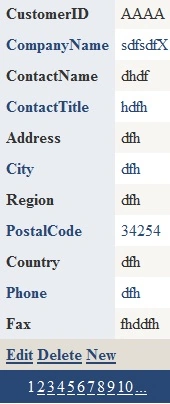
Figure 1.
ItemUpdate event fired.
protectedted void DetailsView1_ItemUpdating(objectDetailsViewUpdateEventArgs e)
{
con = new SqlConnection(str);
DataKey key = DetailsView1.DataKey;
TextBox txtCompanyName = (TextBox)DetailsView1.FindControl("EditCompanyNameTextBox");
TextBox txtContactName = (TextBox)DetailsView1.FindControl("EditContactNameTextBox");
TextBox txtContactTitle = (TextBox)DetailsView1.FindControl("EditContactTitleTextBox");
TextBox txtAddress = (TextBox)DetailsView1.FindControl("EditAddressTextBox");
TextBox txtCity = (TextBox)DetailsView1.FindControl("EditCityTextBox");
TextBox txtRegion = (TextBox)DetailsView1.FindControl("EditRegionTextBox");>);
TextBox txtPostalCode = (TextBox)DetailsView1.FindControl("EditPostalCodeTextBox");
TextBox txtCountry = (TextBox)DetailsView1.FindControl("EditCountryTextBox");
TextBox txtPhone = (TextBox)DetailsView1.FindControl("EditPhoneTextBox");
TextBox txtFax = (TextBox)DetailsView1.FindControl("EditFaxTextBox");
cmd.Connection = con;
cmd.CommandText = "UPDATE CUSTOMERS SET CompanyName ='" + txtCompanyName.Text + "',ContactName ='" + txtContactName.Text + "',ContactTitle ='" + txtContactTitle.Text + "',Address ='" + txtAddress.Text + "',City ='" + txtCity.Text + "', Region ='" + txtRegion.Text + "',PostalCode ='" + txtPostalCode.Text + "',Country ='" + txtCountry.Text + "',Phone ='" + txtPhone.Text + "',Fax ='" + txtFax.Text + "' WHERE CustomerID='" + key.Value.ToString() + "'"ot;;
con.Open();
cmd.ExecuteNonQuery();
MessageLabel.Text = "Record updated successfully";
getCustomers();
con.Close();
}
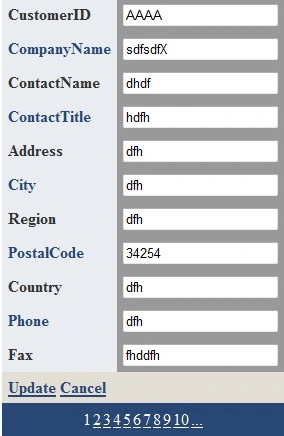
Figure 2.
ItemInsert event fired.
protected void DetailsView1_ItemInserting(object sender, DetailsViewInsertEventArgs e)
{
con = new SqlConnection(str);
TextBox txtCustomerID = (TextBox)DetailsView1.FindControl("InsertCustomerIDTextBox");
TextBox txtCompanyName = (TextBox)DetailsView1.FindControl("InsertCompanyNameTextBox");
TextBox txtContactName = (TextBox)DetailsView1.FindControl("InsertContactNameTextBox");
TextBox txtContactTitle = (TextBox)DetailsView1.FindControl("InsertContactTitleTextBox");
TextBox txtAddress = (TextBox)DetailsView1.FindControl("InsertAddressTextBox");
TextBox txtCity = (TextBox)DetailsView1.FindControl("InsertCityTextBox");
TextBox txtRegion = (TextBox)DetailsView1.FindControl("InsertRegionTextBox");
TextBox txtPostalCode = (TextBox)DetailsView1.FindControl("InsertPostalCodeTextBox");
TextBox txtCountry = (TextBox)DetailsView1.FindControl("InsertCountryTextBox");
TextBox txtPhone = (TextBox)DetailsView1.FindControl("InsertPhoneTextBox");
TextBox txtFax = (TextBox)DetailsView1.FindControl("InsertFaxTextBox");
cmd.Connection = con;
cmd.CommandText = "INSERT INTO CUSTOMERS(CustomerID, CompanyName,ContactName,ContactTitle,Address,City,Region,PostalCode,Country,Phone,Fax) Values('" + txtCustomerID.Text + "', '" + txtCompanyName.Text + "', '" + txtContactName.Text + "', '" + txtContactTitle.Text + "', '" + txtAddress.Text + "' , '" + txtCity.Text + "', '" + txtRegion.Text + "', '" + txtPostalCode.Text + "', '" + txtCountry.Text + "', '" + txtPhone.Text + "', '" + txtFax.Text + "')";
con.Open();
cmd.ExecuteNonQuery();
MessageLabel.Text = "Record inserted successfully";
getCustomers();
con.Close();
}
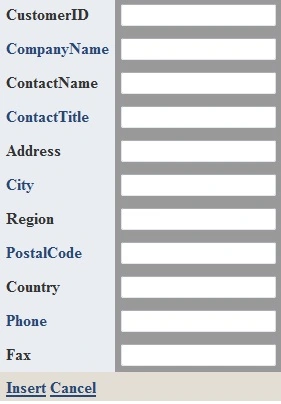
Figure 3.
ItemDelete fired.
protecteded void DetailsView1_ItemDeleting(object sender, DetailsViewDeleteEventArgs e)
{
DataKey key = DetailsView1.DataKey;
MessageLabel.Text = "The key value is " + key.Value.ToString() + ".";
con = new SqlConnection(str);
cmd.Connection = con;
cmd.CommandText = "DELETE FROM CUSTOMERS WHERE CustomerID='" + key.Value.ToString() + "'";
con.Open();
cmd.ExecuteNonQuery();
con.Close();
MessageLabel.Text = "Record deleted successfully";
getCustomers();
}
PageIndex changing event used for paging.
protected void DetailsView1_PageIndexChanging(object sender, DetailsViewPageEventArgs e)
{
DetailsView1.PageIndex = e.NewPageIndex;
getCustomers();
}
venkatesh kumarPosted Apr 2, 2013, 6:07 AM
how i find auto generated text box during upading.
AVJEET SINGH SANGHAPosted Dec 9, 2010, 11:31 PM
thnx for the help