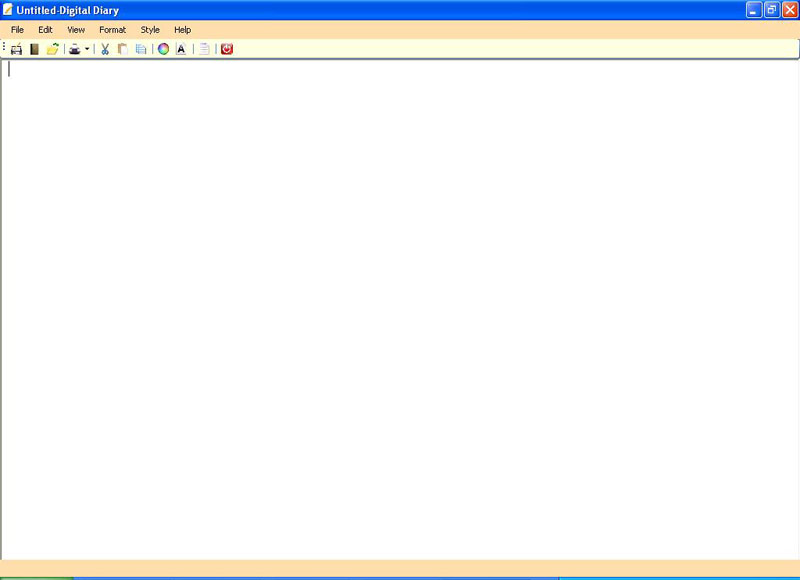
Here we will see the code to develop our own Notepad in C#.
using System;
using System.Collections.Generic;
using System.ComponentModel;
using System.Data;
using System.Drawing;
using System.Text;
using System.Windows.Forms;
namespace notpad
{
public partial class Form1 : Form
{
public SaveFileDialog sfd;//instance of savefiledialog to save files
public OpenFileDialog ofd;//instance of openfiledialog to open files
public int index;
#region "Constructor"
public Form1()//initialization in Constructor
{
InitializeComponent();
sfd = new SaveFileDialog();
ofd = new OpenFileDialog();
this.Text = "Untitled-Digital Diary";
richTextBox1.TabIndex = 5;
undoToolStripMenuItem.Enabled = false;
richTextBox1.Focus();
}
#endregion
#region "Menu Item"
private void newToolStripMenuItem_Click(object sender, EventArgs e)
{
sfd.Title = "Save";
DialogResult dr = MessageBox.Show("Do you want to save the file", "save", MessageBoxButtons.YesNo, MessageBoxIcon.Question);
if (dr.Equals(DialogResult.Yes))//statement that execute when user click on yes button
{
SaveFile();//calling user defined function SaveFile function
//richTextBox1.Clear();
//this.Text = "Untitled-Digital Diary";
}
else if (dr.Equals(DialogResult.No))//statament that execute when user click on no button of dialog
{
richTextBox1.Clear();
this.Text = "Untitled-Digital Diary";
}
}
private void saveToolStripMenuItem_Click(object sender, EventArgs e)
{
SaveFile();//calling SaveFile user defined fucntion
}
private void openToolStripMenuItem_Click(object sender, EventArgs e)
{
if (richTextBox1.Modified == true)//checking either richtext box have entered value or not
{
DialogResult dr = MessageBox.Show("Do you want to save changes to the opened file", "unsaved document", MessageBoxButtons.YesNo, MessageBoxIcon.Question);
if (dr == DialogResult.No)
{
richTextBox1.Modified = false;
OpenFile();//calling OpenFile user defined function
}
else
{
if (this.Text == "Untitled-Digital Diary")//checking form Title to Untitled-Digital Diary
{
///Calling SaveFile and OpenFile user defined functions
SaveFile();
OpenFile();
}
else
{
DialogResult dr1 = MessageBox.Show("the text in the file has been changed.Do you want to save the changes", "Open", MessageBoxButtons.YesNo, MessageBoxIcon.Question);
if (dr1 == DialogResult.Yes)
{
richTextBox1.SaveFile(this.Text);
OpenFile();
}
else
{
OpenFile();
}
}
}
}
else
{
OpenFile();
}
}
private void exitToolStripMenuItem_Click(object sender, EventArgs e)
{
//statement that execute on click of exit button
//and chekcing whether textbox modified or not if modified
//then prompt user to save or not
if (richTextBox1.Modified == true)
{
DialogResult dr = MessageBox.Show("Do you want to save the file before exiting", "unsaved file", MessageBoxButtons.YesNo, MessageBoxIcon.Question);
if (dr == DialogResult.Yes)
{
SaveFile();
richTextBox1.Modified = false;
Application.Exit();
}
else
{
richTextBox1.Modified = false;
Application.Exit();
}
}
}
private void toolStripButton1_Click(object sender, EventArgs e)
{
//calling SaveFile function
SaveFile();
}
private void saveAsToolStripMenuItem_Click(object sender, EventArgs e)
{
sfd.Title = "Save As";
sfd.Filter = "Text Document|*.txt";
sfd.DefaultExt = "txt";
sfd.ShowDialog();
richTextBox1.SaveFile(sfd.FileName, RichTextBoxStreamType.PlainText);
this.Text = sfd.FileName;
}
private void cutToolStripMenuItem_Click(object sender, EventArgs e)
{
//performs Cut operation in richTextBox
richTextBox1.Cut();
}
private void pasteToolStripMenuItem_Click(object sender, EventArgs e)
{
//perform paste operation in richtextbox
richTextBox1.Paste();
}
private void copyToolStripMenuItem_Click(object sender, EventArgs e)
{
//perform copy operation
richTextBox1.Copy();
}
private void selectAllToolStripMenuItem_Click(object sender, EventArgs e)
{
//selecting all content or text in richtextbox
richTextBox1.SelectAll();
}
private void undoToolStripMenuItem_Click(object sender, EventArgs e)
{ //performs undo operation and checking user can undo or not
if (richTextBox1.CanUndo)
{
richTextBox1.Undo();
}
}
private void redoToolStripMenuItem_Click(object sender, EventArgs e)
{
//Redo
statusStrip1.Text = "used to redo last changed text";
if (richTextBox1.CanRedo)
{
richTextBox1.Redo();
}
}
private void timeDateToolStripMenuItem_Click(object sender, EventArgs e)
{
//putting or inserting current date time in richtextbox
richTextBox1.Text += Convert.ToString(DateTime.Now);
}
private void findToolStripMenuItem_Click(object sender, EventArgs e)
{
//calling and creating instance of findform and to search values
findform findob = new findform(this);
findob.Show();
}
private void fontToolStripMenuItem_Click(object sender, EventArgs e)
{
//setting richtextbox text font and color
FontDialog fd = new FontDialog();
fd.Font = richTextBox1.SelectionFont;
fd.Color = richTextBox1.SelectionColor;
if (fd.ShowDialog() == DialogResult.OK)
{
richTextBox1.SelectionFont = fd.Font;
richTextBox1.SelectionColor = fd.Color;
}
}
private void wordWrapToolStripMenuItem_Click(object sender, EventArgs e)
{
//performing wordwrap operation
if (wordWrapToolStripMenuItem.Checked == false)
{
wordWrapToolStripMenuItem.Checked = true;
richTextBox1.WordWrap = true;
}
else
{
wordWrapToolStripMenuItem.Checked = false;
richTextBox1.WordWrap = false;
}
}
private void toolStripTextBox1_Click(object sender, EventArgs e)
{
Gotoform gob = new Gotoform(this);
gob.Show();
}
private void statusBarToolStripMenuItem_Click(object sender, EventArgs e)
{ //statuslabel1.Text = "Cols " + richTextBox1.Text.Length;
}
private void findNextToolStripMenuItem_Click(object sender, EventArgs e)
{
findform f = new findform(this);
f.Show();
}
private void replaceToolStripMenuItem_Click(object sender, EventArgs e)
{
replaceform ob = new replaceform(this);
ob.Show();
}
private void addBulletToolStripMenuItem_Click(object sender, EventArgs e)
{
//putting bullets into richtextbox
try
{
richTextBox1.BulletIndent = 10;
richTextBox1.SelectionBullet = true;
}
catch (Exception ex)
{
MessageBox.Show(ex.Message.ToString(), "Error");
}
}
private void removeBulletToolStripMenuItem_Click(object sender, EventArgs e)
{
//removing bullets
try
{
richTextBox1.SelectionBullet = false;
}
catch (Exception ex)
{
MessageBox.Show(ex.Message.ToString(), "Error");
}
}
private void leftIndentationToolStripMenuItem_Click(object sender, EventArgs e)
{
//setting alignment of text into richtextbox
try
{
richTextBox1.SelectionAlignment = HorizontalAlignment.Left;
}
catch (Exception ex1)
{
MessageBox.Show(ex1.Message.ToString());
}
}
private void centerIntendationToolStripMenuItem_Click(object sender, EventArgs e)
{
try
{
richTextBox1.SelectionAlignment = HorizontalAlignment.Center;
}
catch (Exception ex1)
{
MessageBox.Show(ex1.Message.ToString());
}
}
private void rightIntendationToolStripMenuItem_Click(object sender, EventArgs e)
{
try
{
richTextBox1.SelectionAlignment = HorizontalAlignment.Right;
}
catch (Exception ex1)
{
MessageBox.Show(ex1.Message.ToString());
}
}
private void backGroundColorToolStripMenuItem_Click(object sender, EventArgs e)
{
//setting background color of richtextbox
ColorDialog cr = new ColorDialog();
if (cr.ShowDialog() == DialogResult.OK)
{
richTextBox1.BackColor = cr.Color;
}
}
private void toolStripTextBox2_Click(object sender, EventArgs e)
{
richTextBox1.SelectedText = "";
}
private void aboutToolStripMenuItem_Click(object sender, EventArgs e)
{
AboutBox1 ab = new AboutBox1();
ab.ShowDialog();
}
#endregion
#region "Function To Save File"
private void SaveFile()
{
//setting title of savefiledialog to Save As
sfd.Title = "Save As";
sfd.Filter = "Text Document|*.txt";//applied filter
sfd.DefaultExt = "txt";//applied default extension
if (sfd.ShowDialog() == DialogResult.OK)
{
// if (this.Text!= "Untitled-Digital Diary")
{
// richTextBox1.SaveFile(this.Text, RichTextBoxStreamType.PlainText);
//
}
// else if(this.Text=="Untitled-Digital Diary")
//
{
richTextBox1.SaveFile(sfd.FileName, RichTextBoxStreamType.PlainText);
this.Text = sfd.FileName;
// }
}
}
#endregion
#region "User Defined Function to Open File"
private void OpenFile()
{
//putting title of openfiledialog to Open Document
ofd.Title = "Open Document";
//ofd.DefaultExt = "txt";
ofd.Filter = "Text Files|*.txt";//appliing filter
ofd.FileName = string.Empty;//setting filename box to blank
if (ofd.ShowDialog() == DialogResult.OK)
{
if (ofd.FileName == String.Empty)
{
return;
}
else
{
//reading or loading selected file into richtextbox
string str = ofd.FileName;
richTextBox1.LoadFile(str,RichTextBoxStreamType.PlainText);
this.Text =ofd.FileName;
}
}
}
#endregion
//reading line and col number in richtextbox to statusstrip
private void richTextBox1_TextChanged(object sender, EventArgs e)
{
undoToolStripMenuItem.Enabled = true;
statuslabel1.Text = "Line: " + (richTextBox1.GetLineFromCharIndex(Int32.MaxValue)+1) + " Cols: " + richTextBox1.Text.Length;
}
#region "Printing"
private void printPreviewToolStripMenuItem_Click(object sender, EventArgs e)
{
printPreviewDialog1.Document = printDocument1;
printPreviewDialog1.ShowDialog();
}
private void toolStripMenuItem1_Click(object sender, EventArgs e)
{
printDialog1.Document = printDocument1;
if (printDialog1.ShowDialog() == DialogResult.OK)
{
printDocument1.Print();
}
}
private void pageSetUPToolStripMenuItem_Click(object sender, EventArgs e)
{
pageSetupDialog1.Document = printDocument1;
pageSetupDialog1.ShowDialog();
}
private void printDocument1_PrintPage(object sender, System.Drawing.Printing.PrintPageEventArgs e)
{
e.Graphics.DrawString(richTextBox1.Text, richTextBox1.Font, Brushes.Black, 100, 100);
}
#endregion
#region "Function For GoTo"
public void Goto(int line)//Goto line function to navigate user to line number
{
index = richTextBox1.GetFirstCharIndexFromLine(line - 1);
richTextBox1.Select(index, 0);
richTextBox1.Focus();
}
#endregion
#region "Function For FindNext"
public void FindNext(string str)//user defind function for Findig value into ichtextbox
//and perform search operaiton
{
try
{
// int result = richTextBox1.Find(str, index, str.Length, RichTextBoxFinds.WholeWord);
if (index== -1)
{
MessageBox.Show("Word Search Complete");
}
else
{
int starting = richTextBox1.Text.IndexOf(str, index);
richTextBox1.Select(starting, str.Length);
richTextBox1.Focus();
index = starting+ str.Length;
}
}
catch (SystemException s)
{
MessageBox.Show(s.Message.ToString(),"Error message");
}
}
#endregion
#region "Standard ToolBar Event"
private void toolStripButton6_Click(object sender, EventArgs e)
{
newToolStripMenuItem_Click(this, e);
}
private void toolStripButton5_Click(object sender, EventArgs e)
{
openToolStripMenuItem_Click(this, e);
}
private void printPreviewToolStripMenuItem1_Click(object sender, EventArgs e)
{
printPreviewToolStripMenuItem_Click(this, e);
}
private void pageSetUPToolStripMenuItem1_Click(object sender, EventArgs e)
{ pageSetUPToolStripMenuItem_Click(this, e);
}
private void toolStripButton4_Click(object sender, EventArgs e)
{ exitToolStripMenuItem_Click(this, e);
}
private void toolStripButton2_Click(object sender, EventArgs e)
{
backGroundColorToolStripMenuItem_Click(this, e);
}
private void toolStripButton3_Click(object sender, EventArgs e)
{
fontToolStripMenuItem_Click(this, e);
}
private void toolStripButton7_Click(object sender, EventArgs e)
{
addBulletToolStripMenuItem_Click(this, e);
}
private void toolStripButton8_Click(object sender, EventArgs e)
{
cutToolStripMenuItem_Click(this, e);
}
private void toolStripButton9_Click(object sender, EventArgs e)
{
copyToolStripMenuItem_Click(this, e);
}
private void toolStripButton10_Click(object sender, EventArgs e)
{
pasteToolStripMenuItem_Click(this, e);
}
#endregion
private void Form1_Load(object sender, EventArgs e)
{
}
}
}
Snapshot: