Introduction
This is a short article on how to use a combo box control to display and select all the named colors. A small strip of the color and its name for all the known colors is shown in the drop down of the combo box control as shown below. 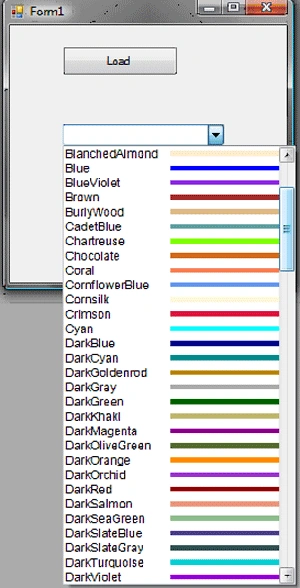
The combo box control has a DrawItem event which needs to be implemented in the code to achieve this. There is a property called DrawMode for the combo box control which determines whether the operating system or the code will handle the drawing of the items in the list. This property must be set to 'OwnerDrawFixed' using the properties window in order for the DrawItem event implementation to be called.
Sample application
The solution contains only a single project and that project contains a single form. On the form, I have a button, the click of which will populate the combo box with all the named colors in the Color struct. I am using the selected color for changing the background color of a panel on the form.
The button click implementation is as shown below. I have used reflection to get a collection of all the colors in System.Drawing.Color structure. The color names are then added to the combo box list.
private void btnLoad_Click(object sender, EventArgs e)
{
ArrayList ColorList = new ArrayList();
Type colorType = typeof(System.Drawing.Color);
PropertyInfo[] propInfoList = colorType.GetProperties(BindingFlags.Static |BindingFlags.DeclaredOnly | BindingFlags.Public);
foreach (PropertyInfo c in propInfoList)
{
this.cmbboxClr.Items.Add(c.Name);
}
}
In the combo box control's DrawItem event, the Graphics object (can be obtained through the Graphics property of the DrawItemEventArgs) is used to draw a strip of the named color using its FillRectangle method. The DrawString method is used to add the name of the color. The DrawItem event will be triggered for each item added to the combo box.
private void cmbboxClr_DrawItem(object sender, DrawItemEventArgs e)
{
Graphics g = e.Graphics;
Rectangle rect = e.Bounds;
if (e.Index >= 0)
{
string n = ((ComboBox)sender).Items[e.Index].ToString();
Font f = new Font("Arial", 9, FontStyle.Regular);
Color c = Color.FromName(n);
Brush b = new SolidBrush(c);
g.DrawString(n, f, Brushes.Black, rect.X, rect.Top);
g.FillRectangle(b, rect.X + 110, rect.Y + 5, rect.Width - 10, rect.Height - 10);
}
}
A snap shot of the sample form: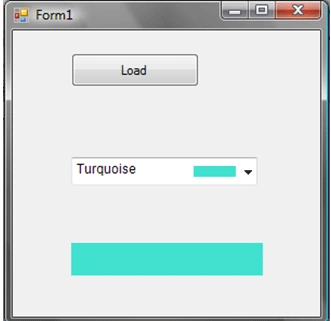
You can download the full project and open in Visual studio 2005 for more details.

Using a Combobox to Select Colors
Join the conversation! Your thoughts help the community grow.
Sign in to leave a comment
It is the same account you read, post and publish with — and you will come straight back to this page.
Hussnain RazaPosted Oct 5, 2013, 2:41 AM
Works Great Thanku so much U solved my problem
Former memberPosted Jul 10, 2013, 7:25 AM
giving error
Nagaraj radderPosted Nov 8, 2012, 1:58 AM
Hi i'm using DatagridCombobox to Select Colors. see this link http://www.c-sharpcorner.com/uploadfile/renuka11/using-a-combobox-to-select-colors/i;m using DrawItem property to fill colours in the DatagridCombobox. Problem is it's not binding at form load instead it's binding at DataGridViewEditingControlShowingEventArgs event fires. pls help me i how can i do this
suman kumarPosted May 4, 2012, 8:09 AM
Helo How i can use this code in vb.net. Please answer me..
RaananPosted Jun 29, 2011, 4:53 PM
work like a charm!! Tx :)
Adolf RobateditedPosted Jun 5, 2010, 10:05 AMEdited Jun 5, 2010, 10:06 AM
Thank you so much
kalpana reddyPosted Apr 1, 2009, 2:30 AM
i hav tried by adding the Namespaces,now no more error but wen i debug it only color names are added not the colors in combobox and when i select it no action is taking place,but i can C that event is fired thanku
kalpana reddyPosted Mar 31, 2009, 3:58 AM
i have tried this application but its giving error near Arraylist,BindingFlags saying that "R u mising any assembly refernec" do i need to add any Reference if so pls let me know