
High Performance Abstraction Layer for Non-Blocking Asynchronous Thread Safe SqlServer Calls
One of the things I find myself doing frequently is writing (and re-writing) plumbing code to execute database CRUD operations. I wrote an abstraction layer over asynchronous SqlServer calls that allows developers to correctly make async calls without having to deal with any of the complex plumbing normally required.
The Database
This library assumes we are using a SqlServer database because it is executing the asynchronous calls on the SqlCommand behind the scenes.
The Connection String
We need a connection string as we would with any normal ADO.NET operation. The only additional requirement is that we specify "Asynchronous Processing=true".
The Main Helper Class
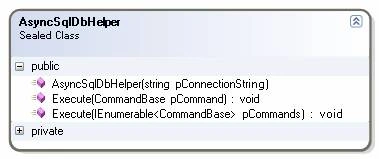
We instantiate the helper with our connection string and can then execute any commands against the database we want. All we have to do is instantiate some of our command objects and we can call Execute(). The helper class will create a SqlConnection and the SqlCommand, execute the database call asynchronously and then execute a callback method (that we will specify in our command object) once a response is received. After all this is completed the helper will properly clean up the SqlCommand and SqlConnection. The nice thing is that the complex plumbing is abstracted and all we have to worry about is calling Execute() and handling the response.
The Commands
All the commands have a constructor where we pass the delegate that will be called once the asynchronous process completes.
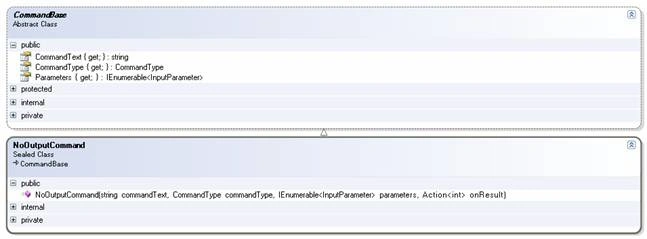
NoOutputCommand
This object is used when we have a database call where we don't receive any response, such as an update:
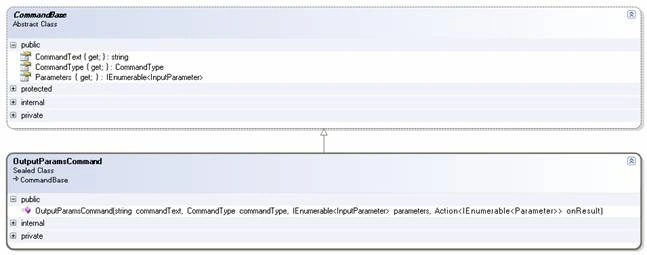
OutputParamsCommand
This is the object to use if we have output or return parameters. Notice how the Action delegate will give us an enumerable of Parameters with the return values.
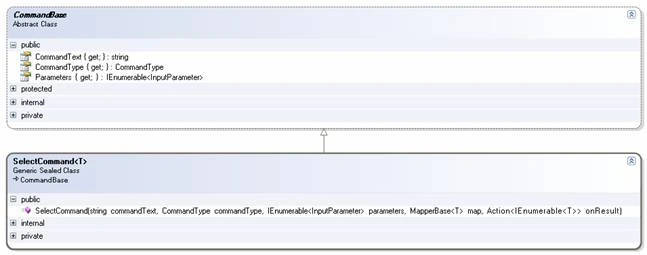
SelectCommand
Select commands are special in that they require an additional helper class (a mapper) that is responsible for transforming the IDataReader into our business objects. I'll talk about building a mapper in a bit.
InputParameters
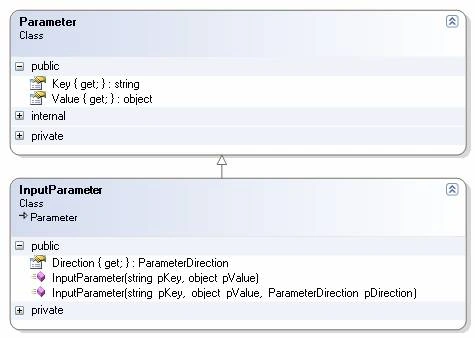
The input parameters just hold the parameter direction, the key and the values that will be later be transformed into SqlParameter objects (the transformation is hidden from the consumer code so we don't have to worry about it).
Using the Library
We'll look at using the SelectCommand because it is the most complex. There are two objects we will have to build before we are able to use the SelectCommand: the data transport object and a mapper.
DTOs (Data Transport Objects)
We first need to create the business objects that will hold a record's state in memory.
class SampleDTO
{
private string m_value;
public string Value
{
get { return m_value; }
set { m_value = value; }
}
}
Mappers:
Next we need to create a mapper. A mapper is a class that must inherit from MapperBase<> where the generic type is our data transport object. We have to implement two abstract methods. PreMap() is executed before any mapping takes place, so this is where we would get the ordinals of our fields. MapRecord() is where we instantiate our data transport object using the current state of the DataReader (which is exposed through the IDataRecord interface). We might want to implement the MapRecord() method with a try/catch block depending on the requirements of our application.
class SampleDTOMapper : MapperBase<SampleDTO>
{
private Int32 m_valueOrdinal;
protected override void PreMap(IDataReader pReader)
{
m_valueOrdinal = pReader.GetOrdinal("LastName");
}
protected override SampleDTO MapRecord(IDataRecord pRecord)
{
return new SampleDTO()
{
Value =
pRecord.IsDBNull(m_valueOrdinal)?
String.Empty:
pRecord.GetString(m_valueOrdinal)
};
}
}
Calling the Database:
Once we have the core classes we can make calls to the database as follows:
static void Main(string[] args)
{
String connectionString = "Data Source=********;Initial Catalog=*******;User ID=*******; Password=*******;Asynchronous Processing=true";
// instantiate the helper
AsyncSqlDbHelper helper = new AsyncSqlDbHelper(connectionString);
// build the mapper
SampleDTOMapper mapper = new SampleDTOMapper();
// build the command
SelectCommand<SampleDTO> command = BuildCommand(mapper);
// execute the command
helper.Execute(command);
Console.ReadLine(); // have to block main thread so we can see the results
}
Notice how we don't have to worry about explicitly creating a SqlConnection or SqlCommand object or any of the other necessary plumbing usually required to execute a database call.
Getting the Results.
Building the command is the most complex task. Here is the BuildCommand() method that is called from the above code. We have to set the command text, the input parameters, the mapper ad the callback method. Since we are waiting on SqlServer to process the request and not blocking the main thread while doing so, the callback will be handled on a worker thread from the thread pool. I used a lambda expression for this callback (in the last parameter), but we could just as easily call a non-anonymous method.
private static SelectCommand<SampleDTO> BuildCommand(SampleDTOMapper mapper)
{
return new SelectCommand<SampleDTO>(
"select LastName from People where Department = @DeptNo",
CommandType.Text,
new InputParameter[]
{
new InputParameter("@DeptNo", "541")
},
mapper,
results => // IMPORTANT: this will be called on a different thread
{
foreach (SampleDTO item in results)
Console.WriteLine(item.Value);
});
}
Wrap-up
I hope you find this library simple to use and hope it helps you in avoiding having to rewrite plumbing code. All of the source code for the library is in the downloadable files with this article.
Until next time,
Happy coding
Join the conversation! Your thoughts help the community grow.