

Recently I noticed a simple and nice control giving more functionality to partial postback, it is Postback Ritalin. This is built on top of ASP.NET Ajax extensions and offers a nice solution to a common problem i.e. disabling button during partial postbacks. Let's explore bit more with an example:
Problem
Consider an Enrollment System for an institute. Enquiries come to institute for various courses, some of them enrolled in the institute first time itself and some goes to database just as an enquiry. The user (receptionist) needs to record both (enquiry & enrollment). While enrollment, system also needs to show when the last time person was enrolled, this should be shown on the screen goes to database as this information useful and need to be available all the time.
Solution
Let's create a web application as it should be accessible from outside of intranet. We will make this with the help of UpdatePanel and Postback Ritalin. This application needs two sections Enquiry and Enrollment (see picture below). Based on outcome of the enquiry details will be entered in the required section.
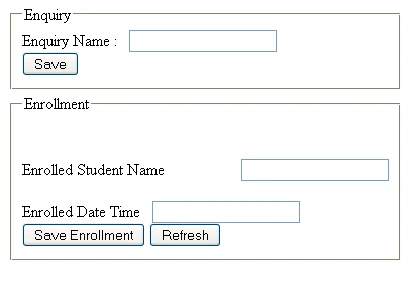
When a user saves an enrollment, date and time will show-up on top of the screen: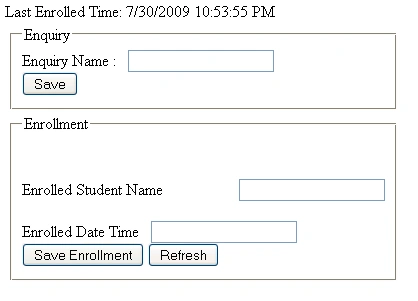
If user is saving an enquiry only Enquiry panel should be updated, no need to refresh other parts of the page. Also we need to make sure that user doesn't press Save twice (while save operation is in-progress). So we will use UpdatePanel for partial rendering and Postback Ritalin for disabling the button with appropriate text.
Shown below screenshot showing partial update. Please note Save button is disabled while system saving the details and showing label as "Saving Enquiry..."
<!DOCTYPE html PUBLIC "-//W3C//DTD XHTML 1.0 Transitional//EN" "http://www.w3.org/TR/xhtml1/DTD/xhtml1-transitional.dtd"> <html xmlns="http://www.w3.org/1999/xhtml" > <head runat="server"> <title>Untitled Page</title> </head> <body>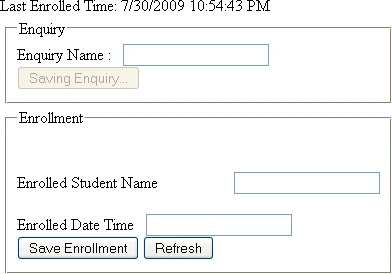
Implementation
In order to implement, first step should be to add a reference to PostBackRitalin assembly to your ASP.NET Web Application Project. You need to download this control first: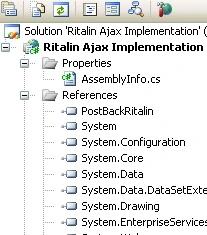
Below is the aspx page where Enquiry section is implemented with UpdatePanel:
<%@ Page Language="C#" AutoEventWireup="true" CodeBehind="Default.aspx.cs" Inherits="Ritalin_Ajax_Implementation._Default" %>
<form id="form1" runat="server">
<table>
<tr>
<td>
<asp:ScriptManager ID="ScriptManager1" runat="server"/>
<asp:Panel ID = "pnlEnquiry" GroupingText="Enquiry" runat="server">
<asp:UpdatePanel ID="UpdatePanelEnquiry" runat="server">
<ContentTemplate>
Enquiry Name :  
<asp:TextBox ID="txtName" runat="server"></asp:TextBox><br/>
<asp:Button ID="btnSave" runat="server"
Text="Save" OnClick="btnSave_Click" />
</ContentTemplate>
</asp:UpdatePanel>
</asp:Panel>
</td>
<tr>
<td>
<asp:Panel ID="pnlEnrollment" GroupingText="Enrollment" runat="server">
<br/>
<br/>
Enrolled Student Name  
<asp:TextBox ID="txtStudent" runat="server"></asp:TextBox><br/><br />
Enrolled Date Time
<asp:TextBox ID="txtDate" runat="server"></asp:TextBox><br/>
<asp:Button ID="Button2" runat="server"
Text="Save Enrollment" OnClick="btnEnrollment_OnClick" />
<asp:Button ID="btnEnrollment" runat="server"
Text="Refresh" />
</asp:Panel>
</td>
</tr>
</tr>
</table>
</form>
</body>
</html>
Now all we need is to control the Save button during wait mode. We will use Encosia namespace for accessing Postback Ritalin library and obtain the desired functionality. Create an instance of MontoredUpdatePanel and assign "updatePanelEnquiry" to it. Finally we will add Postback Ritalin control and attach newly created instance of MonitoredUpdatePanel. This can be done on the aspx page or in code behind. We will put this in code behind (.cs) to make it flexible:
protected override void OnPreRender(EventArgs e)
{
MonitoredUpdatePanel enquiryPanel = new MonitoredUpdatePanel();
enquiryPanel.UpdatePanelID = "updatePanelEnquiry";
Encosia.PostBackRitalin pbrControl = new Encosia.PostBackRitalin();
pbrControl.WaitText = "Saving Enquiry...";
pbrControl.MonitoredUpdatePanels.Add(enquiryPanel);
this.Controls.Add(pbrControl);
}
Below are the contents of .cs file:
using System; using System.Collections; using System.Configuration; using System.Data; using System.Linq; using System.Web; using System.Web.Security; using System.Web.UI; using System.Web.UI.HtmlControls; using System.Web.UI.WebControls; using System.Web.UI.WebControls.WebParts; using System.Xml.Linq; using Encosia; // This is Postback Ritalin using System.Threading; namespace Ritalin_Ajax_Implementation { public partial class _Default : System.Web.UI.Page { protected void Page_Load(object sender, EventArgs e) { } protected void btnSave_Click(object sender, EventArgs e) { Thread.Sleep(2000); // This is where we can save to database, for now just using sleep. txtName.Text = ""; } protected void btnEnrollment_OnClick(object sender, EventArgs e) { Response.Write("Last Enrolled Time: " + DateTime.Now.ToString()); } protected override void OnPreRender(EventArgs e) { MonitoredUpdatePanel enquiryPanel = new MonitoredUpdatePanel(); enquiryPanel.UpdatePanelID = "updatePanelEnquiry"; //Attaching UpdatePanel to be monitored Encosia.PostBackRitalin pbrControl = new Encosia.PostBackRitalin(); pbrControl.WaitText = "Saving Enquiry..."; pbrControl.MonitoredUpdatePanels.Add(enquiryPanel); this.Controls.Add(pbrControl); //Adding Postback Ritalin to the page } } }
Postback Ritalin also has a property WaitImage to specify alternate image during partial postback. Isn't this simple and nice!
Rekha SinghPosted Aug 5, 2009, 3:44 AM
Hey Rohit.. good article