
SIGN UP MEMBER LOGIN:    
ARTICLE

How to add SilverLight Web part in Sharepoint 2010

Posted by Sachin Kalia Articles | SharePoint November 01, 2010
In this article I am going to describe how to easily add a SilverLight Web part to SharePoint 2010 site.
Reader Level:


In this article I am going to describe "How to add SilverLight Web part in SharePoint 2010 site in very easiest way".

Once you are done with your SilverLight Application then follow the following steps:

1. Go to SilverLight application Bin folder and find .XAP file.

2. Copy that file and paste it into 14 Hive folder on this path "C:\Program Files\Common Files\Microsoft Shared\web server extensions\14\TEMPLATE\LAYOUTS\ClientBin"

You could also make your own folder to put you .XAP file.

Now go to your SharePoint site.

1. Open the required page into Edit mode (where you would like to place your Web part)

2. Go to Insert tab-> Web part and select SilverLight web part from these as shown in given below image
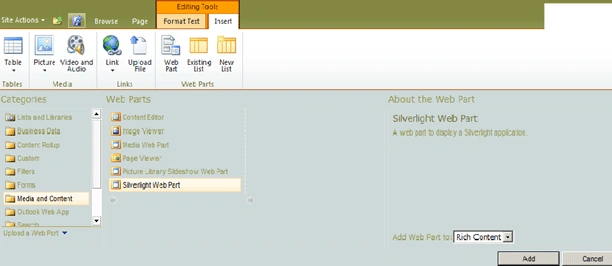


sharepoint1.gif

Click On Add; it will ask you to put your path of SilverLight Web part.

Put _LAYOUTS\ClientBin\SlWebPart.XAP

And click ok.

Your web part will be on your page and save it.

Please reply to me if you feel you have any modification for this.

Login to add your contents and source code to this article
Article Extensions
Contents added by Ramesh Sahu on Nov 08, 2010
Thank you
share this article :
post comment
 

Hey..i have done the same to deploy the silverlight web part but i'm getting this message"Could not download the Silverlight application or the Silverlight Plugin did not load. To re-configure the Web Part or to provide a different Silverlight application (.xap), open the tool pane and then click Configure." My XAP file size is 421kb and MIME settings are properly configured to XAP file,is there

Posted by damodar reddy Sep 29, 2011
Become a Sponsor
PREMIUM SPONSORS
  • ceTE software specializes in components for dynamic PDF generation and manipulation. The DynamicPDF™ product line allows you to dynamically generate PDF documents, merge PDF documents and new content to existing PDF documents from within your applications. Visit DynamicPDF here
    Finally – a virtual platform that delivers next-generation Windows Server 2008 Hyper-V virtualization technology from a managed hosting partner you can truly depend on. Visit www.maximumasp.com/max for a FREE 30 day trial. Hurry offer ends soon. Climb aboard the MaxV platform and take advantage of High Availability, Intelligent Monitoring, Recurrent Backups, and Scalability – with no hassle or hidden fees. As a managed hosting partner focused solely on Microsoft technologies since 2000, MaximumASP is uniquely qualified to provide the superior support that our business is built on. Unparalleled expertise with Microsoft technologies lead to working directly with Microsoft as first to offer IIS 7 and SQL 2008 betas in a hosted environment; partnering in the Go Live Program for Hyper-V; and product co-launches built on WS 2008 with Hyper-V technology.
Become a Sponsor