

Introduction:
For building robust and high quality service oriented applications transactions plays important role. Windows Communication Foundation provides simple, declarative transaction support for the developers, enabling you to configure parameters such as transaction flow, transaction scope, Isolation level and transaction time out. In this article I am going to explain step by steps approach to create transaction enabled WCF service.
Summary:
In brief following are the steps to be followed:
- In service contract at operation contract level
- Set TransactionFlow property of OperationContract attribute: This adds transaction support to the service contract and enables client to start transaction.
- In the service at operation behavior level
- Set TransactionScopeRequired property of OperationBehavior attribute: This adds transaction support to the code that implements interface i.e. service. This enables WCF runtime to include service method in a transaction.
- Set TransactionAutoComplete property of OperationBehavior attribute: Setting this property to true commits the transaction if no exception occurs.
- In the service at service behavior level
- TransactionIsolationLevel property of ServiceBehavior attribute: This specifies transactions locking behavior.
- TransactionTimeout property of ServiceBehavior attribute: By setting this property to certain time and transaction doesn't complete in specified time it will roll back the transaction.
- In the configuration file at binding level
- TransactionFlow property of binding to true: This enables transaction on binding. Following binding supports transaction
- NetTcpBinding
- NetNamedPipeBinding
- WSHttpBinding
- WSDualHttpBinding
- WSFederationHttpBinding
- TransactionFlow property of binding to true: This enables transaction on binding. Following binding supports transaction
- Choose transaction protocol: WCF runtime choose protocol by default. Following are the two protocols :
- Ole Transactions: This is used when clients are .Net clients.
- Web Service Atomic clients: This is used when clients are not .Net clients.
Database details:
In this demo, I am going to add data first to Order table and then to OrderDetails table through WCF service. For this demo purpose adding data to Order and OrderDetails table will be two separate calls to WCF service which will be part of transaction.
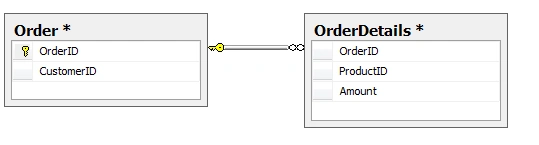
Step 1: Set TransactionFlowOption Property
In the following figure, there is IOrderService contract having two operation contract:
- AddOrder: To insert data to Order table
- AddOrderDetails : To insert data to OrderDetails table
To both AddOrder and AddOrderDetails method set it's TransactionFlowOption to Mandatory
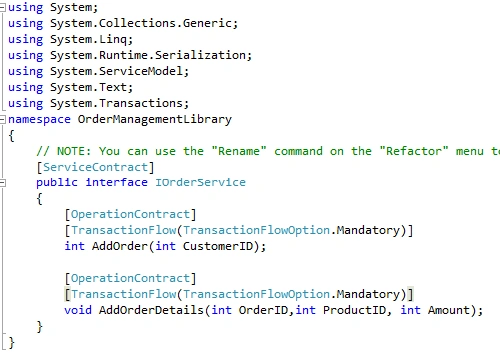
When the operation is configured to:
- TransactionFlowOption.NotAllowed, the client cannot propagate its transaction to the service. Even if transaction flow is enabled at the binding and the client has a transaction, it will be silently ignored and not propagate to the service. As a result, the service will never use the client's transaction, and the service and the client can select any binding with any configuration.
- TransactionFlowOption.Allowed, if the client has a transaction, then the service will allow the client's transaction to flow across the service boundary. However, the service may or may not use the client's transaction even though it was propagated. The service can be configured to use any binding, transaction-aware or not, but the client and the service must be compatible in their binding configuration.
- TransactionFlowOption.Mandatory means the client must have a transaction to propagate to the service. Trying to call a service without a transaction throws an exception on the client. With mandatory flow, the client's transaction always propagates to the service. Once again, the service may or may not use the client's transaction.
Step 2: Set TransactionScopeRequired, TransactionIsolationLevel and TransactionTimeOut Property
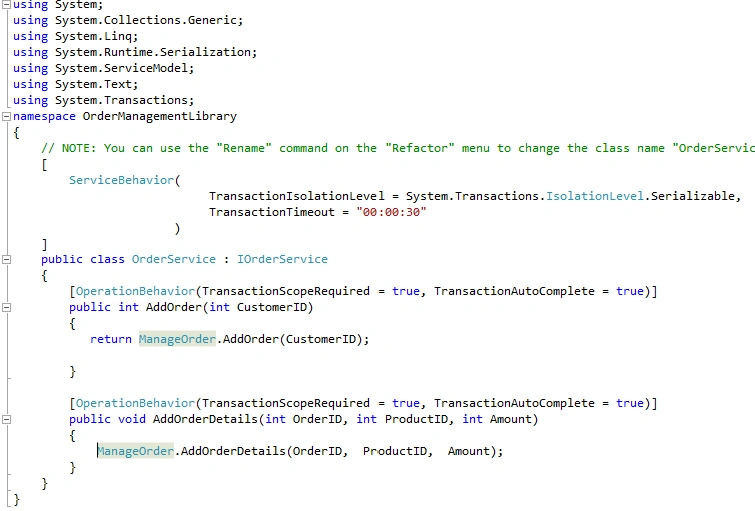
In the OrderService, which s implements IOrderService contract, set:
- At operation level set TransactionScopeRequired = true and TransactionAutoComplete = true
- At class level set TransactionIsolationLevel = Serializable and TransactionTimeOut = 30 seconds
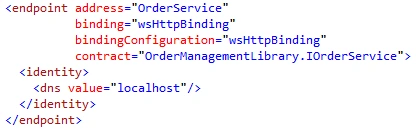
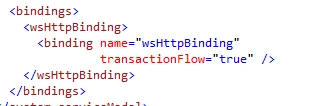
Step 3: Set TransactionFlow = true for binding
In the configuration file of the service, set TransactionFlow = true for binding
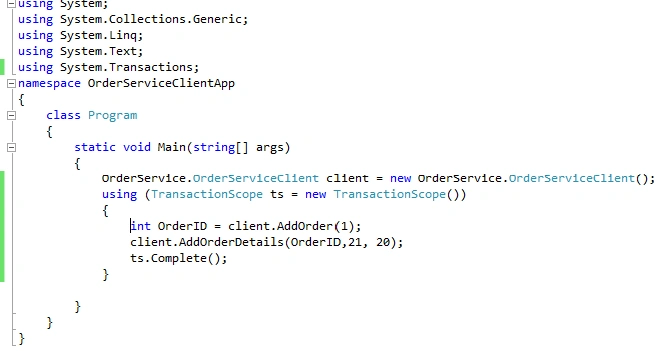
Step 4: On client side, add TransactionScope
On client side, call AddOrder and AddOrderDetails method within TransactionScope. This ensures that when executing AddOrder and AddOrderDetails method no exception occurs it's going to commit the transaction.
Conclusion: In this article, we have seen the step by step process of using transaction in Windows Communication Foundation. In my next article I will try explain how we can use Transaction and Session in WCF. In the attachment, I have included a sample code, tables SQL script.
dev soniPosted Dec 26, 2012, 6:59 AM
Good work bro