

Visual Studio 2008 with SP1 introduced a new template for creating data driven web sites without any coding. There are two templates used for creating web sites within a short span of time. I am going to discuss about Dynamic Data web Application template in this article. In coming articles, we will look into Dynamic Data Entities web Application model.
Introduction:
Most of the ASP.NET applications will interact with a database like SQL Server. 90% of our code will be retrieving/updating data of a database. Before knowing the greatness of Dynamic Data template, we need to have a look into the steps; we follow for developing any web sites:
Generic steps for developing a Web site:
- First, we will get a list of tables for retrieving/updating the data.
- Create the pages for displaying, inserting, updating and deleting the data.
- Write code for saving it back to database.
Most of our code is handling data present in the database. So, Microsoft came up with a template that will handle most of the data handling tasks. I am going to use VS 2008 with SP1 and SQL Server 2008 Express Edition with Advanced Services for these demos.
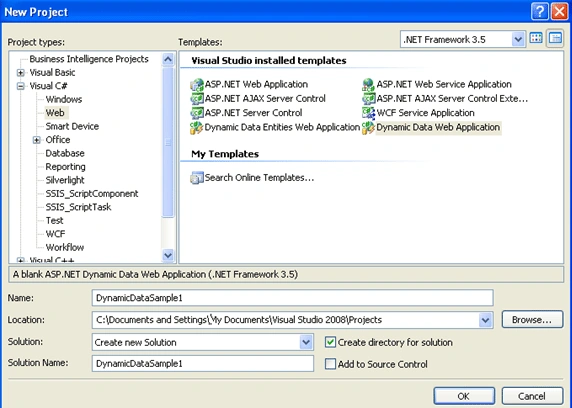
Open your Visual Studio, select New Project --> Web --> Dynamic Data Web Application and give name as DynamicDataSample1 as shown below:
We will have a look into the files that are created for us by this template:
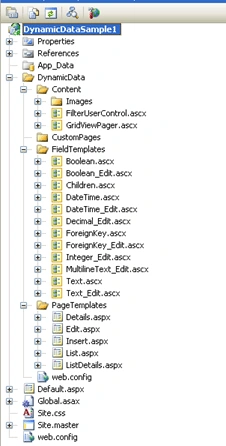
We can see there are page and field templates in it. These templates will be used for displaying/editing/inserting data irrespective of the tables.
Now, we will look deep into these templates:
Page Templates:
Details.aspx: This page is used to display the contents of a table in a detail view using controls like textbox, checkboxes etc…
Edit.aspx: This page is used to edit the contents of a table.
Insert.aspx: This page is used to insert new records into the table.
List.aspx: This page is used to list contents of a table in a gridview.
ListDetails.aspx: This page is used to list contents of a table with an inline edit/insert capability.
FieldTemplates:
This are used to set properties for the controls present in Page templates. Whatever we change here, it will applicable for all the pages using this field in it. For example, if we change a property for Text.ascx control; than it will reflect in all pages using that. We will look into these templates deeply in coming articles.
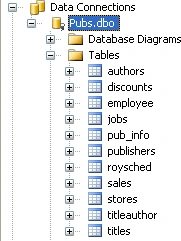
Let's start with a sample, create a connection to Pubs Database in Server Explorer as shown below:
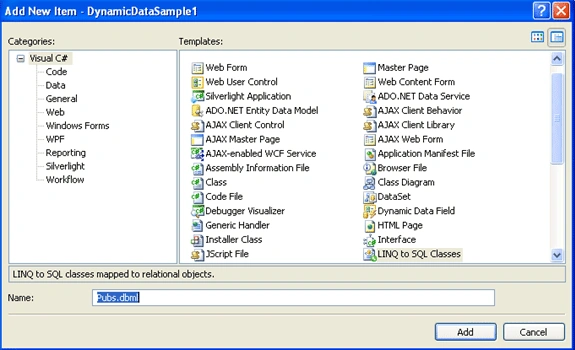
Now, add a LINQ to SQL class to the solution and name it as Pubs.dbml as shown below:
Now, drag and drop title and titleauthor tables from server explorer onto design view of pubs.dbml as shown below:
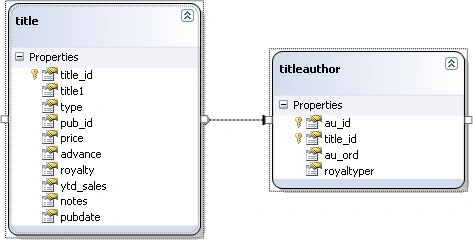
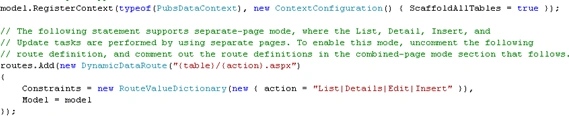
Go to Global.asax.cs and uncomment model.RegisterContext statement and make ScaffoldAllTables = true and name of data context as PubsDataContext[Which we got from Pubs.cs of Pubs.dbml] as shown below:
It's ready to run it without a single line of coding. Make sure Default.aspx is a Startup page. This page will list the tables. Select a table that will direct you to a page, where we can edit/delete/insert records. This template uses AJAX features also in page design. So, we no need to bother about the User Experience.
I will end up the things here. In coming articles, we will look deep into the customization of this template. I hope this will be helpful for all.
Gowtham RajamanickamPosted Apr 28, 2016, 2:15 AM
good work..