

In previous article, we had discussed about customization of page layout using DynamicControl. In this article, we will look into interfacing stored procedures with Dynamic Data followed by an introduction to Dynamic Data Entities Web Application template. Up to now, we are getting data directly from the tables and displaying it. But, most of the cases; we might need to write stored procedures for getting data from the tables. Now, we look into mapping of stored procedures.
Open the solution used in previous article, go to pubs.dbml and drag-drop the SP getalltitles from Server Explorer as shown below:
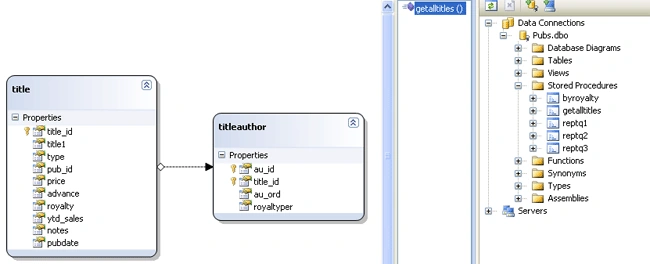
Now, go to List.aspx and select GridDataSource [LINQDataSource] and select GridDataSource_Selecting event. Add the below code to the event:
PubsDataContext db = new PubsDataContext();
ISingleResult<getalltitlesResult> results = db.getalltitles();
e.Result = results.ToList();
e.Arguments.TotalRowCount = ((List<getalltitlesResult>)e.Result).Count;
Run the application.
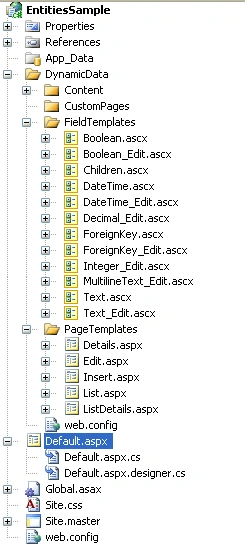
Now, we look into Dynamic Data Entities Web Application template. Create a new VS 2008 project of this template with name as EntitiesSample. This template uses ADO.NET Entity framework and EntityDataSource internally. Whereas, previous template using LINQ to SQL and LinqDataSource for its data management. The structure of this template is similar to that of old template as shown below:
Now, add ADO.NET Entity Data model to the project with name as Pubs.edmx in the following way:
Select Project  New Item ADO.NET Entity Data Model Select from Database Select Connection & Pubs Database Check Tables Ok.
Select the appropriate tables and goto Global.asax.cs and uncomment model.RegisterContext statement and replace YourDataContextType with pubsEntities and make ScaffoldAllTables to true.
Run the application.
I am ending up this series here. I hope this series helped all to understand Dynamic Data template.
Gowtham RajamanickamPosted Mar 27, 2015, 2:42 PM
good
Abhishek MishraPosted Jun 22, 2010, 7:00 AM
Thanks alot...... This is a great article to know indepth about Dynamic Data Web Application Development......... Thanks again..........