

Here I am going to show Alphabetic Paging using
gridview control. Here user can find data according to respective alphabet link
and also can find all the data by clicking all link.
Create a table Customers with column Cus_Code varchar(50), Cus_Name varchar(50),
Cus_address varchar(MAX), Cus_sal int.
Program : Default.aspx.cs code
using
System;
using
System.Configuration;
using
System.Data;
using
System.Linq;
using
System.Web;
using
System.Web.Security;
using
System.Web.UI;
using
System.Web.UI.HtmlControls;
using
System.Web.UI.WebControls;
using
System.Web.UI.WebControls.WebParts;
using
System.Xml.Linq;
using
System.Data.SqlClient;
public
partial class
_Default : System.Web.UI.Page
{
private string
cnstr = ConfigurationManager.ConnectionStrings
["ConnectionString"].ConnectionString;
protected void
Page_Load(object sender,
EventArgs e)
{
if (!IsPostBack)
{
this.ViewState["SelectedText"]
= "All";
CreateAlphaPagings();
BindGrid(this.ViewState["SelectedText"].ToString());
}
}
private void
CreateAlphaPagings()
{
lbTitle.Text = "Alphabetic Paging Sample";
DataTable dt =
new DataTable();
dt.Columns.Add("PageIndex");
dt.Columns.Add("PageText");
if
(this.ViewState["Paging"]
== null)
{
for (int
i = 65; i <= (65 + 25); i++)
{
DataRow dr = dt.NewRow();
dr[0] = Char.ConvertFromUtf32(i);
dr[1] = Char.ConvertFromUtf32(i);
dt.Rows.Add(dr);
}
DataRow drNew = dt.NewRow();
drNew["PageIndex"] =
"All";
drNew["PageText"] =
"All";
dt.Rows.Add(drNew);
this.ViewState["Paging"]
= dt;
}
else
dt = (DataTable)this.ViewState["Paging"];
DataList1.DataSource = dt;
DataList1.DataBind();
}
private void
BindGrid(string StartAlpha)
{
SqlConnection con =
new SqlConnection(cnstr);
string sql =
"";
if (StartAlpha ==
"All")
sql = "Select * from Customers Order By
Cus_Code asc";
else
sql = "Select * from Customers
Where Cus_Name Like '"
+ StartAlpha + "%'
Order By Cus_Code asc ";
SqlDataAdapter da =
new SqlDataAdapter(sql, cnstr);
DataTable dtSelect =
new DataTable();
da.Fill(dtSelect);
GridView1.DataSource = dtSelect;
GridView1.DataBind();
}
protected void
DataList1_ItemCommand(object source,
DataListCommandEventArgs e)
{
LinkButton lbkbtnPaging = (LinkButton)e.CommandSource;
BindGrid(e.CommandArgument.ToString());
this.ViewState["SelectedText"]
= e.CommandArgument.ToString();
CreateAlphaPagings();
}
protected void
DataList1_ItemDataBound(object sender,
DataListItemEventArgs e)
{
if (e.Item.ItemType ==
ListItemType.AlternatingItem ||
e.Item.ItemType == ListItemType.Item)
{
if (this.ViewState["SelectedText"]
!= null)
{
LinkButton lbkbtnPaging = (LinkButton)e.Item.FindControl("lnkbtnPaging");
if (this.ViewState["SelectedText"].ToString()
== lbkbtnPaging.Text)
lbkbtnPaging.Enabled = false;
}
}
}
}
Default.aspx code
<%@
Page Language="C#"
AutoEventWireup="true"
CodeFile="Default.aspx.cs"
Inherits="_Default"
%>
<!DOCTYPE html PUBLIC "-//W3C//DTD XHTML 1.0 Transitional//EN" "http://www.w3.org/TR/xhtml1/DTD/xhtml1-transitional.dtd">
<html
xmlns="http://www.w3.org/1999/xhtml">
<head
runat="server">
<title>Untitled
Page</title>
</head>
<body>
<form
id="form1"
runat="server">
<div>
<h2><asp:Label
ID="lbTitle"
runat="server"
Text=""></asp:Label>
<asp:DataList
ID="DataList1"
OnItemCommand="DataList1_ItemCommand"
OnItemDataBound="DataList1_ItemDataBound"
RepeatDirection="Horizontal"
runat="server">
<SeparatorTemplate>
</SeparatorTemplate>
<ItemTemplate>
<asp:LinkButton
ID="lnkbtnPaging"
runat="server"
CommandArgument='<%#
Bind("PageIndex") %>'
Text='<%#
Bind("PageText") %>'></asp:LinkButton>
</ItemTemplate>
</asp:DataList>
</h2>
<br
/>
<asp:GridView
ID="GridView1"
runat="server"
EmptyDataText="No
Records Found">
</asp:GridView>
</div>
</form>
</body>
</html>
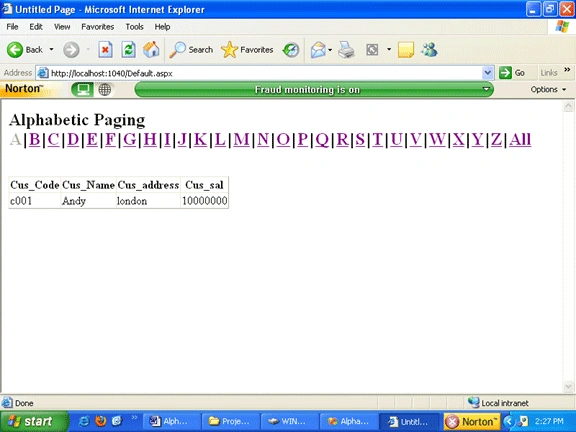
Running the program its output show below
Bryan DuchesnePosted Jan 28, 2013, 9:06 AM
I get odd behavior when clicking on the bottom pagination in that I need to click the page number twice before it responds. Not sure why. If anyone has had the same issued and solved it, I would appreciate hearing from you.
Amit SanandiyaPosted Nov 28, 2012, 11:15 AM
thanks to all my friends
F AeditedPosted Sep 19, 2012, 5:56 PMEdited Sep 20, 2012, 5:39 PM
nice
Amit SanandiyaPosted Aug 17, 2012, 9:57 AM
realy its help full friends
Elle GarhPosted Jun 2, 2012, 12:16 AM
Thanks, works great. How do I disable letters that don't have any data? I know I could include an emptyitemtemplate or something, but I don't want the user to click a letter if it doesn't have any data. Please help.
Pushkar RathodPosted Aug 3, 2011, 8:19 AM
short and simple...keep it up
Shalini JunejaPosted Aug 2, 2011, 12:24 AM
Nice Article