

Here I will show you how to Show Related Data In Textbox When We Click Related
Item In Combobox In Csharp.
Create a table named employee having fileds empid Text, empname Text, sal Number
, empaddress Text , phoneno Number in Ms-access.
Method 1:
using
System;
using
System.Collections.Generic;
using
System.ComponentModel;
using
System.Data;
using
System.Drawing;
using
System.Linq;
using
System.Text;
using
System.Windows.Forms;
using
System.Data.OleDb;
namespace
combobox_textbox_data
{
public partial
class Form1 :
Form
{
string ConnectionString =
System.Configuration.ConfigurationSettings.AppSettings["dsn"];
OleDbCommand com;
OleDbDataAdapter oledbda;
DataSet ds;
string str;
public Form1()
{
InitializeComponent();
}
private void
Form1_Load(object sender,
EventArgs e)
{
OleDbConnection con =
new OleDbConnection(ConnectionString);
str = "select * from employee";
com = new
OleDbCommand(str, con);
oledbda = new
OleDbDataAdapter(com);
ds = new
DataSet();
oledbda.Fill(ds, "employee");
comboBox1.DataSource = ds.Tables["employee"];
comboBox1.DisplayMember = "empid";
comboBox1.Text = "select";
textBox1.Text = "";
textBox2.Text = "";
textBox3.Text = "";
textBox4.Text = "";
}
private void
comboBox1_SelectedIndexChanged(object sender,
EventArgs e)
{
OleDbConnection con =
new OleDbConnection(ConnectionString);
con.Open();
str = "select * from employee where
empid='" + comboBox1.Text.Trim() + "'";
com = new
OleDbCommand(str, con);
OleDbDataReader reader =
com.ExecuteReader();
if (reader.Read())
{
textBox1.Text = reader["empname"].ToString();
textBox2.Text = reader["sal"].ToString();
textBox3.Text = reader["empaddress"].ToString();
textBox4.Text = reader["phoneno"].ToString();
}
con.Close();
reader.Close();
}
}
}
Method 2:
using
System;
using
System.Collections.Generic;
using
System.ComponentModel;
using
System.Data;
using
System.Drawing;
using
System.Linq;
using
System.Text;
using
System.Windows.Forms;
using
System.Data.OleDb;
namespace
combobox_textbox_data
{
public partial
class Form2 :
Form
{
string ConnectionString =
System.Configuration.ConfigurationSettings.AppSettings["dsn"];
OleDbCommand com;
OleDbDataAdapter oledbda;
DataSet ds;
string str;
public Form2()
{
InitializeComponent();
}
private void
Form2_Load(object sender,
EventArgs e)
{
OleDbConnection con =
new OleDbConnection(ConnectionString);
con.Open();
str = "select * from employee";
com = new
OleDbCommand(str, con);
OleDbDataReader reader =
com.ExecuteReader();
while (reader.Read())
{
comboBox1.Items.Add(reader["empid"]);
}
reader.Close();
con.Close();
comboBox1.Text = "select";
textBox1.Text = "";
textBox2.Text = "";
textBox3.Text = "";
textBox4.Text = "";
}
private void
comboBox1_SelectedIndexChanged(object sender,
EventArgs e)
{
OleDbConnection con =
new OleDbConnection(ConnectionString);
con.Open();
str = "select * from employee where
empid='" + comboBox1.Text.Trim() + "'";
com = new
OleDbCommand(str, con);
OleDbDataReader reader =
com.ExecuteReader();
if (reader.Read())
{
textBox1.Text = reader["empname"].ToString();
textBox2.Text = reader["sal"].ToString();
textBox3.Text = reader["empaddress"].ToString();
textBox4.Text = reader["phoneno"].ToString();
}
con.Close();
reader.Close();
}
}
}
Method 3:
using
System;
using
System.Collections.Generic;
using
System.ComponentModel;
using
System.Data;
using
System.Drawing;
using
System.Linq;
using
System.Text;
using
System.Windows.Forms;
using
System.Data.OleDb;
namespace
combobox_textbox_data
{
public partial
class Form3 :
Form
{
string ConnectionString =
System.Configuration.ConfigurationSettings.AppSettings["dsn"];
OleDbCommand com;
OleDbDataAdapter oledbda;
DataSet ds;
string str;
DataTable dt;
public Form3()
{
InitializeComponent();
}
private
void Form3_Load(object
sender, EventArgs e)
{
OleDbConnection con =
new OleDbConnection(ConnectionString);
con.Open();
str = "select * from employee";
com = new
OleDbCommand(str, con);
oledbda = new
OleDbDataAdapter(com);
ds = new
DataSet();
oledbda.Fill(ds, "employee");
dt = ds.Tables["employee"];
int i;
for (i = 0; i <= dt.Rows.Count - 1;
i++)
{
comboBox1.Items.Add(dt.Rows[i].ItemArray[0]);
}
con.Close();
comboBox1.Text = "select";
textBox1.Text = "";
textBox2.Text = "";
textBox3.Text = "";
textBox4.Text = "";
}
private
void comboBox1_SelectedIndexChanged(object
sender, EventArgs e)
{
OleDbConnection con =
new OleDbConnection(ConnectionString);
con.Open();
str = "select * from employee where
empid='" + comboBox1.Text.Trim() + "'";
com = new
OleDbCommand(str, con);
OleDbDataReader reader =
com.ExecuteReader();
if (reader.Read())
{
textBox1.Text = reader["empname"].ToString();
textBox2.Text = reader["sal"].ToString();
textBox3.Text = reader["empaddress"].ToString();
textBox4.Text = reader["phoneno"].ToString();
}
con.Close();
reader.Close();
}
}
}
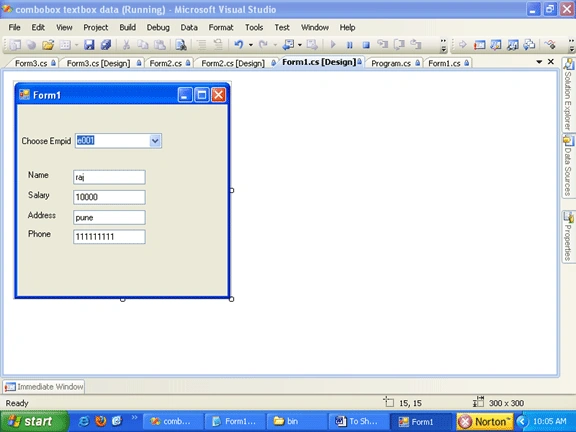
Running the program
After running the program when you select any empid from the combobox its
corresponding values will be shown.
Thanks for reading.
Sakshi KaulPosted Apr 4, 2019, 3:06 AM
If in the above form instead of empid combobox if i have text box then what changes will be done ?
Sakshi KaulPosted Apr 3, 2019, 2:08 AM
I need same to be implemented in asp.net
Bharat DhimanPosted Feb 3, 2015, 8:24 AM
All the methods you have mentioned above are good but you didn't explain this through LINQ. I want to display the database values on textboxs not on gridview. so, what is the possible solution for this problem
Madhu BendiPosted Jul 18, 2013, 6:39 AM
i want to store register form data in to ms access 2010 database. any one can help me the code.. Thank in advance
namelyia shamshulPosted Dec 25, 2012, 1:35 PM
in string ConnectionString = System.Configuration.ConfigurationSettings.AppSettings["dsn"]; what is dsn???
Angelina ErinPosted Aug 1, 2011, 2:52 AM
Useful Article.......