

Introduction
Lightbox 2 is a free download made available by Lokesh Dhakar on this website:
http://www.huddletogether.com/projects/lightbox2
The site describes Lightbox as, "... a simple, unobtrusive script used to overlay images on the current page." It delivers a nice, professional looking method for displaying images as overlays through the use of hyperlinks. Implementation of Lightbox is quite simple involving nothing more that adding some JavaScript and a style sheet to the page and then adding some simple attributes to each link where the effect is to be used. The download includes all of the images, style sheets, and JavaScript necessary to implement Lightbox.
Lightbox allows the developer the option of displaying images singly or in sequence. Images grouped into sequences may be viewed by the user in a slideshow like presentation that the user can control with either the mouse or the left and right arrow keys. All in all, it is a nice way to present a image gallery of thumbnails. As each image is displayed, the control is resized to fit the image and the image is centered on the page. If the image is too large, it will overrun the page so it is important to resize the images so that they will fit within the space available. Once the image is displayed, the user may click off the image or hit the Escape key in order to return to the page.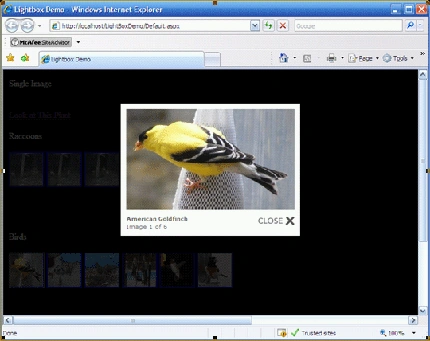
Figure 1: Lightbox in Use within an ASP.NET Web Application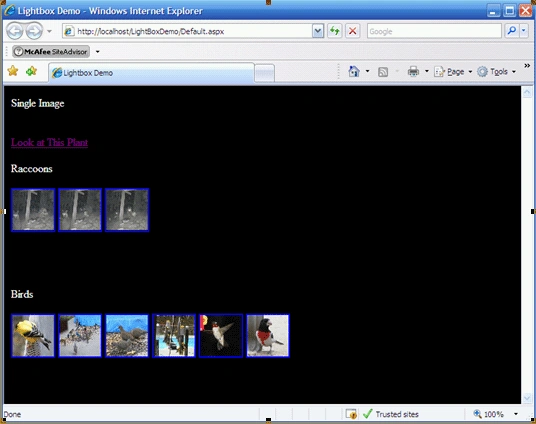
Figure 2: Lightbox at Rest within an ASP.NET Web Application
(Clicking a link or an image will launch the image into Lightbox)
Getting Started
In order to get started, unzip the included project and save it to your hard drive. Open the web application and examine the contents in the solution explorer.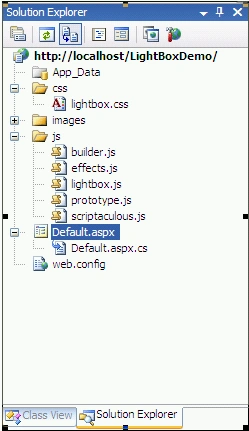
Figure 3: Solution Explorer
The solution contains a single web application entitled, "LightBoxDemo". The solution contains three added folders: css, images, and js. These folders contain the style sheet, images, and JavaScript provided with the Lightbox download. Additional images were added to the images folder to support the demonstration project. If starting a new project, just create the three folders using these folder names and then copy the contents over into each of the folders from the Lightbox 2 download.
Code: Default.aspx.cs
No additional code was provided to the default page's code behind file. It is in its default condition and is shown here to illustrate that no coding is required to make use of Lightbox 2.
using System;
using System.Collections.Generic;
using System.Linq;
using System.Web;
using System.Web.UI;
using System.Web.UI.WebControls;
public partial class _Default : System.Web.UI.Page
{
protected void Page_Load(object sender, EventArgs e)
{
}
}
Code: Default.aspx
What little work is required to implement Lightbox 2 is contained in the Default.aspx file itself.
The markup starts with the following unmodified, default code:
<%@ Page="" Language="C#" AutoEventWireup="true"
CodeFile="Default.aspx.cs" Inherits="_Default" %>
<!DOCTYPE html PUBLIC "-//W3C//DTD XHTML 1.0 Transitional//EN" "http://www.w3.org/TR/xhtml1/DTD/xhtml1-transitional.dtd">
<html xmlns="http://www.w3.org/1999/xhtml">
The first bit of actual work is contained in the head section of the markup; here the JavaScript is references as is the style sheet:
<head runat="server">
<%--javascript references="" for="" lightbox--=""%>
<script type="text/javascript" src="js/prototype.js"></script>
<script type="text/javascript"
src="js/scriptaculous.js?load=effects,builder"></script>
<script type="text/javascript" src="js/lightbox.js"></script>
<%--stylesheet for="" lightbox--=""%>
<link rel="stylesheet" href="css/lightbox.css" type="text/css"
media="screen" />
<%--page title--=""%>
<title>Lightbox Demo</title>
</head>
Next up, within the form, the first example shows using a simple link to an image; the "rel" tag defines the relationship to the Lightbox style sheet and that is pretty much all that you need to do to evoke the effect.
<body bgcolor="Black">
<form id="form1" runat="server" style="background-color: #000000; color:
FFFFFF">
<%--single image="" hyperlink--=""%>
<div>
Single Image<br /><br />
<br />
<a href="images/image-1.jpg" rel="lightbox" title="Plant
Life">Look at This Plant</a>
<br /><br />
</div>
The next example shows how to setup a sequence of images. The defined sequence may be controlled by the user with either the mouse or the left and right arrow keys (to move back and forth through the images). Note the passing of "roadtrip1" to Lightbox; all links using 'roadtrip1' will be treated as a group of images. In this case, there are three images using that name and so those three images are treated as a single series; other images on the page that do not use 'roadtrip1' are ignored. This example as well as the next both display thumbnail versions of the image.
<%--using multiple="" images="" in="" a="" sequence="", link="" is="" thumbnail="" of="" image--=""%>
<div>
Raccoons<br /><br />
<a href="images/bottletree1.JPG" rel="lightbox[roadtrip1]"
title="Raccoons and Baby Bottles">
<img src="images/bottletree1.JPG" width="60" height="60" alt="" />
</a>
<a href="images/bottletree2.JPG" rel="lightbox[roadtrip1]"
title="Sugar Water Bottles">
<img src="images/bottletree2.JPG" width="60" height="60" alt="" />
</a>
<a href="images/bottletree3.JPG" rel="lightbox[roadtrip1]"
title="More Sugar Water">
<img src="images/bottletree3.JPG" width="60" height="60" alt="" /> </a>
</div>
<br />
<br />
<br />
<br />
The last example shows how to setup a second sequence of images; note that these images are banded together as 'roadtrip2' and as such they will be kept separate from the other images on this page when viewed using Lightbox:
<%--using multiple="" images="" in="" a="" sequence="", link="" is="" thumbnail=""
of="" image--=""%>
<div>
Birds<br /><br />
<a href="images/AmericanGoldfinch_male.jpg" rel="lightbox[roadtrip2]"
title="American Goldfinch">
<img src="images/AmericanGoldfinch_male.JPG" width="60" height="60"
alt="" />
</a>
<a href="images/birdgroup1.jpg" rel="lightbox[roadtrip2]"
title="Mixed Birds">
<img src="images/birdgroup1.JPG" width="60" height="60" alt="" />
</a>
<a href="images/doves.jpg" rel="lightbox[roadtrip2]"
title="Mourning Doves">
<img src="images/doves.JPG" width="60" height="60" alt="" />
</a>
<a href="images/goldfinch_fiesta.jpg" rel="lightbox[roadtrip2]"
title="American Goldfinches">
<img src="images/goldfinch_fiesta.JPG" width="60" height="60" alt="" />
</a>
<a href="images/hummingbird.jpg" rel="lightbox[roadtrip2]"
title="Ruby Throated Hummingbird">
<img src="images/hummingbird.JPG" width="60" height="60" alt="" />
</a>
<a href="images/RoseBreastedGrosbeak_male.jpg"
rel="lightbox[roadtrip2]"
title="Rose Breasted Grosbeak">
<img src="images/RoseBreastedGrosbeak_male.JPG" width="60" height="60" alt="" />
</a>
</div>
</form>
</body>
</html>
Summary
Lightbox 2 is sort of a fun little tool that is very useful if one wants to display images from either links or thumbnail versions of an image. I thought it was a good find that simplified the process of displaying a large or small number of images in an interesting way and of course the price is perfect.
Luan PhamPosted Nov 11, 2011, 3:50 PM
I've seen that we have to manually enter each image name in the href line. Is there a way to point it to a folder so it would read all image files from there?
Yassar Ilyas KhanPosted Jul 5, 2011, 5:17 AM
Thanks for this article. The code worked perfectly.
Gangadhar BesthaPosted Jun 16, 2011, 8:24 AM
when ajax timer control is used the slide show is getting stopped when timer tick event fired. can anyone solve this problem. Thanks in advance.
maya amatyaPosted Mar 10, 2011, 1:01 AM
:) thanks in advance
Rathanavel SubramnaimamPosted Nov 17, 2010, 4:55 AM
excellent
laxman singhPosted May 31, 2010, 10:57 AM
its not working in master page please help
Rakesh nelliyottuPosted May 28, 2010, 10:03 AM
excellent
RankeePosted Jun 25, 2009, 4:54 AM
i am very lucky to hav this site
ashraf mansourPosted May 27, 2009, 9:28 PM
i want to use this demo in my project to school. do i have the rights to do that? and thank u for a nice article
mvpajun liuPosted May 26, 2009, 9:18 PM
hi,this demo is very cool,i must say that thank you by my heart . and i like this articles .
freezesoulPosted May 26, 2009, 11:15 AM
http://hi.baidu.com/freezesoul/blog/item/0083c0fd4eb7cc40d7887d63.html Lightbox Projects List
gaggaPosted May 25, 2009, 7:18 AM
Is the same as the jQuery plugin, http://leandrovieira.com/projects/jquery/lightbox/ ?
sherwin kuizonPosted May 4, 2009, 7:35 PM
I will try