In Focus
Delhi Chapter Hands On June 22: Limited Seats Register Now
Kolkata Chapter Developer Day: May 25
C# Corner Delhi Chapter Meet, May-18, 2013 Official Recap
Istanbul Chapter May 2013 2nd Seminar Announced : Learn WinJS, Windows Store, MVC
Email :
Password :
Remember me?
Forgot password
Contribute
An Article
A Blog
A News
A Video
A Link
An Interview Question
Ask a Question
TECHNOLOGIES
.NET 4.5
Current Affairs
Learn .NET
SharePoint 2010
Web Development
.NET Assemblies
Databases & DBA
LightSwitch 2012
SharePoint 2013
Web Services in C#
ADO.NET in C#
Design & Architecture
LINQ
Silverlight with C#
Windows 8
AJAX in C#
Exception Handling C#
Mobile & Embedded
Smart Devices
Windows Azure
Android Programming
Graphics Design
Office 2013
SQL
Windows Controls C#
Articles C#
Hardware
OOP/OOD
SQL Server 2012
Windows Forms C#
ASP.NET Controls in C#
How do I
Operating Systems
Testing
Windows Phone 8
ASP.NET MVC with C#
HTML 5
PHP
TypeScript
Windows Server 2012
ASP.NET Programming
Internet & Web
Products
Visual C#
Windows Store Apps
C# Language
iPhone/iPad
Project Management
Visual Studio .NET
Workflow Foundation in C#
C# Tutorials
Java
Reports using C#
Visual Studio 2010
WPF
C, C++, MFC
Java and .NET
Robotics & Hardware
Visual Studio 2012
XAML
Career Advice
JavaScript, CSS
Security in .NET
WCF with C#
XML
Chapters
JQuery
Request a new Category
|
View All
ANSWERS
BLOGS
VIDEOS
INTERVIEWS
BOOKS
LINKS
NEWS
CHAPTERS
CAREER ADVICE
Create Outlook Add-in by MAPI Functionality ...
Debugging jQuery in ASP.NET
Top 10 HTML5 Interview Questions
How to Enable Sign in as Different User Opti ...
How to Select Multiple Rows in Grid Using Li ...
Find and Delete Duplicate Records From SQL Table
Encrypt and Decrypt in SQL Server: Part 2
Custom Paging With GridView in ASP.NET 4.5
Resolving Dependency Using Ninject
Introduction To Serialization In Java
ARTICLE
RichTextbox with context menu for setting Color and Font in .Net windows application
Posted by
Shinuraj
in
Articles
|
Windows Forms C#
on
December 21, 2010
Tags:
.net
,
.Net windows application
,
context menu
,
RichTextbox
,
windows application
,
olorDialog
In this article you will learn how ro use RichTextbox with context menu for setting Color and Font in .Net windows application
Tweet
5802
0
0
Reader Level:
Steps:
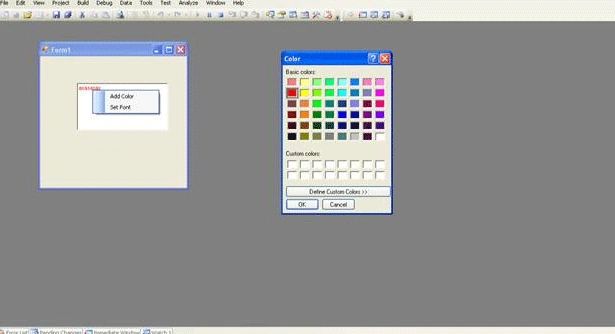
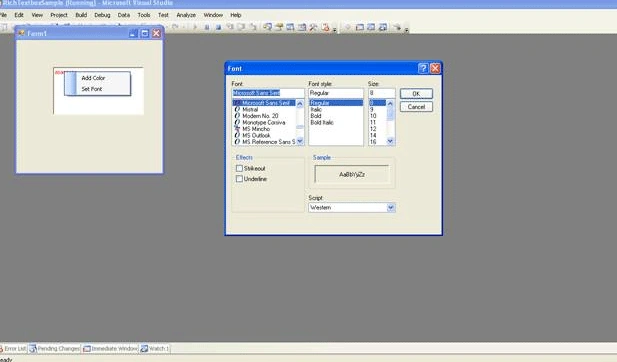
Add a RichTextBox to the Form
Add Contextmenu and set two items as a)Add Color , b)Set Font
Set this as the contextmenu for the RichTextbox(take the property and directly set )
Add ColorDialog and fontDialog to the form
Hook the event contextMenuStrip1_ItemClicked and use the "SelectionFont" and "SelectionColor" property of RichTextbox as shown in the below code to set the color and font
private
void
contextMenuStrip1_ItemClicked(
object
sender, ToolStripItemClickedEventArgs e)
{
if
(e.ClickedItem.Text ==
" Add Color "
)
{
DialogResult color = colorDialog1.ShowDialog();
// See if user pressed ok.
if
(color == DialogResult.OK)
{
// Set Color to the selected text
this
.richTextBox1.SelectionColor = colorDialog1.Color;
}
}
if
(e.ClickedItem.Text ==
" Set Font "
)
{
DialogResult font = fontDialog1.ShowDialog();
if
(font == DialogResult.OK)
{
// Set selection font to the fontDialog1.Font
this
.richTextBox1.SelectionFont = fontDialog1.Font;
}
}
}
Login
to add your contents and source code to this article
This Feature is Sponsored By
DynamicPDF Merger is a developers dream for interacting with any existing PDF documents. Merge, append, split, form fill, flatten stamp and so much more.
PictureBox and ProgressBar Control
Tags:
loading Image asynchronously
,
loadProgressChanged
,
oading Image from http location
,
PictureBox control
,
progressBar Control
,
windows forms
Building Web Browser Application using Visual Studio 2010
Tags:
C#
,
Visual Studio 2010
,
Web Browser
,
WebBrowser
,
Windows Application
Related Articles
How to Create Context Menu in Windows Forms Application Using C#
Using RichTextBox control in Dot Net Applications
Font in .NET in context of GDI classes
Context Menu in C#
Add Opening Methods to the Context Menu For All Files in Windows 8
Spell Checker Context Menu In Windows Store Apps
Simple Context Menu Using JavaScript and HTML
Adding Context Menu to the System Tray
Save the application settings for subsequents sessions
Adding Context Menu in SharePoint List/Library using Content Editor Web part
post comment
COMMENT USING
PREMIUM SPONSORS
DynamicPDF Developer Components
DynamicPDF™ product line allows you to dynamically generate PDF documents, merge PDF documents and add new content to existing PDF documents from within your applications.
TRENDING UP
Create Outlook Add-in by MAPI Functionality by Using Visual Studio 2010 Outlook Project
Debugging jQuery in ASP.NET
Top 10 HTML5 Interview Questions
How to Enable Sign in as Different User Option in SharePoint 2013
How to Select Multiple Rows in Grid Using LightSwitch 2012
Find and Delete Duplicate Records From SQL Table
Encrypt and Decrypt in SQL Server: Part 2
Custom Paging With GridView in ASP.NET 4.5
Resolving Dependency Using Ninject
Introduction To Serialization In Java
View All
MOST LIKED ARTICLE
WCF Introduction and Contracts - Day 1
Create SSRS Report Using Report Wizard
CREATE READ UPDATE and DELETE - CRUD Operation Using LINQ to SQL
WCF - Data Contract - Day 4
Factory Design Pattern
Follow @twitterapi
HOT KEYWORDS
binary formatters
clock
Delegates
Drag and Drop
Event Handlers
FTP
FTP Server
GAC
ListView
MDI
MenuItem
Panel
PrintDocument
Printing
progress bar
Reporting Services
Reports
Smart Client
StringReader
timer
WebBrowser
Windows Application
windows form
WinForms
WinGhost
SPONSORED BY
DynamicPDF ReportWriter Suite
PDF reports have never been easier to create. With our included WYSIWYG Designer, you can layout your reports, set up your data source and let DynamicPDF ReportWriter do the rest.
My Facebook Friends
WHITEPAPERS AND BOOKS
Interview Questions on SharePoint 2013
SharePoint 2010 Administration & Development
Getting Started with Managed Metadata Service in SharePoint 2010
Windows Phone 7 Hileleri
Windows Phone Development Step by Step Tutorial
Essentials of SharePoint 2010: Business Intelligence Capabilities
Working with Directories in C#
FileInfo in C#
Programming List with C#
Source Code: Graphics Programming with GDI+
View All
Poll
Result
All Polls
What is the best product to build Mobile apps?
What is the best product to build Mobile apps
PhoneGap
Icenium
Xamarin Studio
KendoUI Mobile
JQueryMobile
Native iOS/Android
What is the best product to build Mobile apps
Options
Votes
%
PhoneGap
2
2.74
Icenium
0
0.00
Xamarin Studio
1
1.37
KendoUI Mobile
1
1.37
JQueryMobile
61
83.56
Native iOS/Android
8
10.96
Total
73
100%