

Introduction and Goal
LINQ has been criticized by many early adopters for its performance issues. Well if you are just going to drag and drop using DBML code generator I am sure you will land up in to mess. Try doing this make a simple LINQ to SQL project using DBML and see your SQL profiler, I am sure you will never like to touch DBML code generator again.
In this article we will first look in to how LINQ queries are executed, and then we will touch base on how compiled LINQ queries can help us improve our application performance at least 5 times. My numbers can be 10% up and down as I had come to that figure using my environmental situations.
Watch my 500 videos on WCF, WPF, LINQ, Design patterns, WWF, Silverlight, UML @ http://www.questpond.com
Still new to LINQ below are some real quick starters
This article requires some pre-requisites, in case you are new to LINQ I would suggest you to go through the below links.
Are you a complete newbie :- http://www.c-sharpcorner.com/UploadFile/shivprasadk/654654607132009040318AM/6546546.aspx?ArticleID=e51427a9-7f26-4db9-8b84-f6a3a6a698a6
LINQ FAQ part II :- http://www.c-sharpcorner.com/UploadFile/shivprasadk/34325423507132009082912AM/343254235.aspx?ArticleID=2903108e-539b-46aa-843e-4a7b354cb136
Want to define 1-* and *-1 using LINQ :- http://www.c-sharpcorner.com/UploadFile/shivprasadk/789789707022009112548AM/7897897.aspx?ArticleID=98ced0b9-c379-4ce2-92af-1a8b381876c4
Do not know how to call stored procedures using LINQ :- http://www.c-sharpcorner.com/UploadFile/shivprasadk/534534507082009003835AM/5345345.aspx?ArticleID=e55e7af4-0e79-420c-aa7b-71b9e630285d
Deep dive in to how LINQ query works
Before we get in to how we can improve LINQ query performance, let's first try to understand what are the various steps involved in a LINQ query execution. All LINQ queries are first converted to SQL statements. This conversion also involves checking of LINQ query syntaxes and translating this query to SQL.
Below is a simple LINQ query which selects data from a customer table. This LINQ query is then transformed in to necessary SQL statements by the LINQ engine.
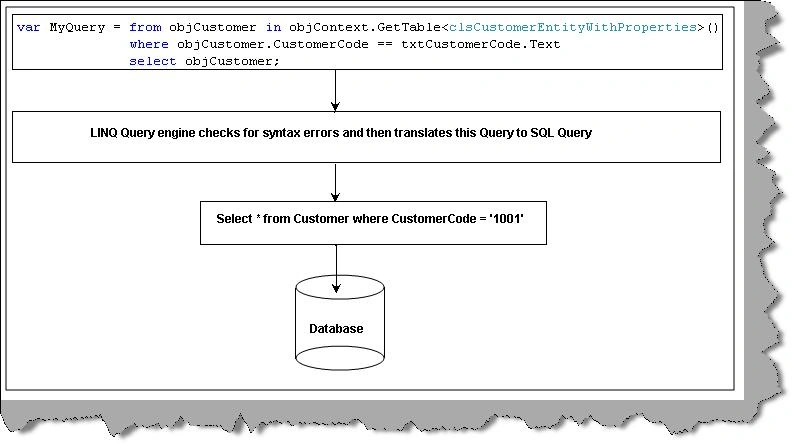
The checking of syntaxes and generating SQL query accordingly is a bit of tedious job. This task is performed every time we fire LINQ query. So if we can cache the LINQ query plan we can execute much faster.
LINQ has provided something called as compiled LINQ queries. In compiled LINQ queries the plan is cached in a static class. As we all know that static class is global cache. So LINQ uses the query plan from the static class object rather than building the preparing the query plan from scratch.
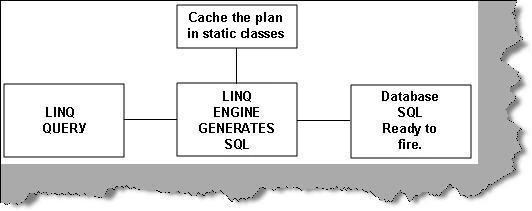
Figure: - LINQ Query Caching
In all there are 4 steps which need to be performed right from the time LINQ queries are built till they are fired. By using compiled LINQ queries the 4 steps are reduced to 2 steps.
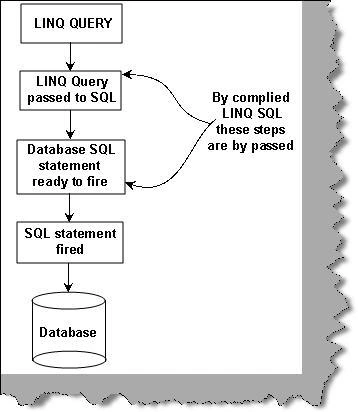
Figure: - Query plan bypasses many steps
Steps involved to write compiled LINQ queries
The first thing is to import Data.Linq namespace.
Import namespace using System.Data.Linq;

The syntax to write compiled queries is a bit cryptic. So let us break those syntaxes in small pieces and then we will try to see how the complete
syntax looks like. To execute a compiled function we need to write function to pointer. This function should be static so that LINQ engine can use
the query plan stored in those static class objects.
Below is how we define the function it starts with 'public static' stating that this function is static. Then we use the 'Func' keyword to define the
nput parameters and output parameters. Below is how the parameter sequence needs to be defined:-
- The first parameter should be a data context. So we have defined the data type as 'DataContext'.
- Followed by 1 or many input parameters currently we have only one i.e. customer code so we have defined the second parameter data type as string.
- Once we are done with all input parameters we need to define the data type of the output. Currently we have defined the output data type as 'IQueryable'.
We have given a name to this delegate function as 'getCustomers'.
public static Func<DataContext, string, IQueryable<clsCustomerEntity>> getCustomers
We need to call method 'Compiled' of static class 'CompiledQuery' with the datacontext object and necessary define input parameters followed by the LINQ query. For the below snippet we have not specified the LINQ query to minimize complications.
CompiledQuery.Compile((DataContext db, string strCustCode)=> Your LINQ Query );
So now uniting the above two code snippets below is how the complete code snippet looks like.
public static Func<DataContext, string, IQueryable<clsCustomerEntity>>
getCustomers= CompiledQuery.Compile((DataContext db, string strCustCode)=> Your LINQ Query );
We then need to wrap this static function in a static class. So we have taken the above defined function and wrapped that function in a static class 'clsCompiledQuery'.
public static class clsCompiledQuery
{
public static Func<DataContext, string, IQueryable<clsCustomerEntity>>
getCustomers = CompiledQuery.Compile((DataContext db, string strCustCode)
=> from objCustomer in db.GetTable<clsCustomerEntity>()
where objCustomer.CustomerCode == strCustCode
select objCustomer);
}
Consuming the compiled query is pretty simple; we just call the static function. Currently this function is returning data type as 'IEnumerable'. So we have to define an 'IEnumerable' customer entity which will be flourished through the 'getCustomers' delegate function. We can loop through the customer entity using 'clsCustomerEntity' class.
IQueryable<clsCustomerEntity> objCustomers = clsCompiledQuery.getCustomers(objContext, txtCustomerCode.Text);
foreach (clsCustomerEntity objCustomer in objCustomers)
{
Response.Write(objCustomer.CustomerName + "<br>");
}
Performance comparison
Out of curiosity we thought to do some kind of comparison to see how much the performance difference is. We took a simple customer table with 3000 records in it and we ran a simple query on the customer code. We have attached the sample source also with the article. Below is a simple screen shot of the same :-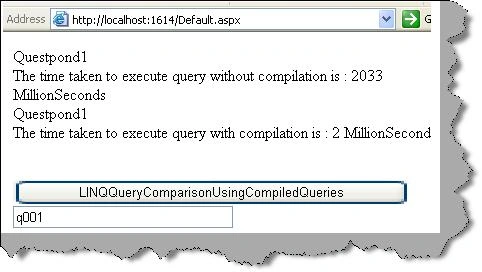
So what we have done in this project is we have executed LINQ SQL without query compilation and with query compilation. We have recorded the time using 'System.Diagnostic.StopWatch' class. So here's how the performance recording has taken place. We start the stop watch, run the LINQ SQL without compile and then we stop the watch and record the timings. In the same way we have recorded the performance LINQ query with compilation. 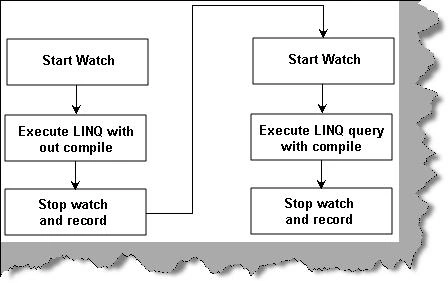
So we create the data context object and start the stop watch.
System.Diagnostics.Stopwatch objStopWatch = new System.Diagnostics.Stopwatch();
DataContext objContext = new DataContext(strConnectionString);
objStopWatch.Start();
We run the LINQ query with out compilation , after execution stop the watch and record the time differences.
var MyQuery = from objCustomer in objContext.GetTable<clsCustomerEntity>()
where objCustomer.CustomerCode == txtCustomerCode.Text
select objCustomer;
foreach (clsCustomerEntity objCustomer in MyQuery)
{
Response.Write(objCustomer.CustomerName + "<br>");
}
objStopWatch.Stop();
Response.Write("The time taken to execute query without compilation is : " +
objStopWatch.ElapsedMilliseconds.ToString() + " MillionSeconds<br>");
objStopWatch.Reset();
Now we again start the stop watch, run LINQ query with compilation and record the time taken for the same.
objStopWatch.Start();
IQueryable<clsCustomerEntity> objCustomers = clsCompiledQuery.getCustomers(objContext, txtCustomerCode.Text);
foreach (clsCustomerEntity objCustomer in objCustomers)
{
Response.Write(objCustomer.CustomerName + "<br>");
}
objStopWatch.Stop();
Response.Write("The time taken to execute query with compilation is : " + objStopWatch.ElapsedMilliseconds.ToString() + " MillionSeconds");
Analyzing the results
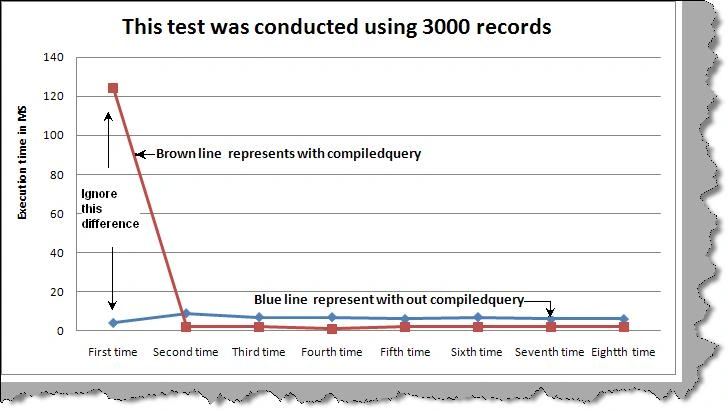
When we measure performance we need to see time of execution during first time and as well as subsequent times. At least 8 recordings are needed so that any kinds of .NET run time performance are averaged out.
There are two important points we can conclude from the experiment:-
-
We need to excuse the first reading as there can be lot of.NET framework object initialization. It can lead to lot of wrong conclusions as there is lot of noise associated in the first run.
-
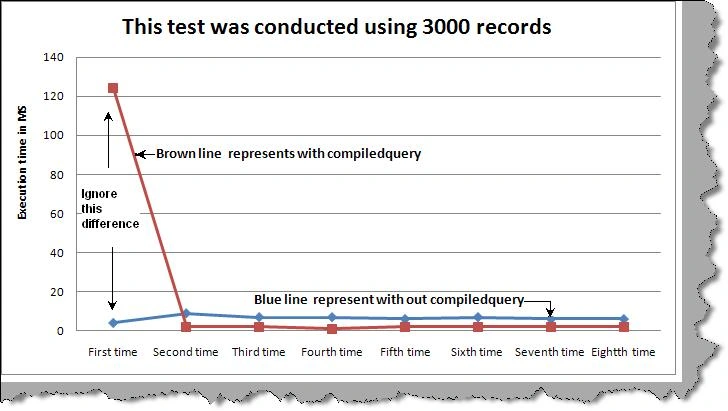
The subsequent readings have the real meat difference. The average difference between then is 5 times. In other words LINQ query executed using no compilation was 5 MS slower than compiled LINQ queries.
| No Compilation | Milliseconds Query Compilation | |
| First time | 4 | 124 |
| Secound Time | 9 | 2 |
| Third Time | 7 | 2 |
| Fourth Time | 7 | 1 |
| Fifth Time | 6 | 2 |
| Sixth Time | 7 | 2 |
| Seventh Time | 6 | 2 |
| Eight Time | 6 | 2 |
Below is a graphical representation of the same you can see how compiled queries have better performance than non-compiled ones.
Hardware and software configuration used for test conduction
-
Web application and database application where on different boxes.
-
Web application was running on windows XP using simple personal web server provided by VS 2008 (sorry for that guys but did not have any options at that moment). Web application PC hardware configuration was 2 GB RAM, P4, 80 GB hard disk.
-
Database was SQL 2005 on windows 2003 server with 2 GB RAM , P4 , 80 GB hard disk
Seth Petry JohnsonPosted Sep 11, 2009, 11:33 AM
I don't think that a ~5ms improvement justifies the development and maintenance cost of the additional code. If a single 5ms improvement is critically important to you then you probably shouldn't be working in managed code. If these queries are being executed at a high volume, such as within a tight loop, then you're probably better off batching them or running a single aggregate query. I'd be very interested to see some analysis on compiled vs. non-compiled LINQ queries when the LINQ query is more complex, such as joining some tables and doing some transformations on the results.