

Introduction
This is my fourth series of SharePoint Quick Start FAQ. In this series the theme is WebPart, WebPart and WebPart J. So let us enjoy the WebPart bonanza.
Previous SharePoint QuickStart FAQ
Quick Start FAQ Part 1:- 11 basic FAQ questions , must for every new comer. It's a the basic Quick Start FAQ tutorial which talks about What is SharePoint, WSS, MOSS, Site/Site collection , Virtual Path provider and then ends with explaining SitePages and Application pages SharePoint Quick Start FAQ - Part 1
Quick Start FAQ Part 2:- This is the second part in the series which explains the ready made functionalities, custom pages, deploying/activating/deactivating features and lot. SharePoint Quick Start FAQ - Part 2
Quick Start FAQ Part 3:- This is the third part of the series in which we have explained page templates , page instances, WSS model, understand safe mode processing and deploy custom controls. SharePoint Quick Start FAQ - Part 3
What are WebParts and in what ways does it vary in SharePoint environment?
It helps to build reusable components which can be customized and personalized according to business user. We can either make our own webpart or we can reuse the existing one's from SharePoint itself.
Following WebParts are available with WSS:-
- Data View Web Part: - Displays data with rich design support through Microsoft SharePoint Designer.
- List View Web Part: - Helps us to display list content for any list in the SharePoint site.
- Image Web Part: - Helps us to display image files.
- Content Editor Web Part: - Use this to display static HTML content using a WYSIWYG editor or to link to a text file.
- Members Web Part: - Helps us to display members of the site.
- Page Viewer Web Part: - Displays web page in an Iframe.
WebPart is nothing but a simple class which inherits from System.Web.UI.WebControls.WebParts. In other words you can say WebPart is kind of a WebControl which can be deployed in a WebPartZoneControl.

WebPart manager control is like controller which maintains instances of Webpart. It adds WebParts to the WebPartZone when the ASP.NET pages get initialized.

Now let's try to how 'WebParts' work in SharePoint environment. 'WebPartManager' uses the 'SPWebPartManager'. 'WebPartZone' interacts with the 'WebPartManager' who in-turn stores a serialized instance of the 'WebPart' in the content database. In other words code is stored in content database for customization.

The big difference is that the 'WebPart' code is stored in content database. So some of the differences as compared to normal ASP.NET is that, the code is deployed in content database and is parsed using 'Safe Mode Parser'.
What are the different life cycle events that WebPart goes through?
A 'WebPart' control goes through various events and has a typical life cycle.
- OnInit: - This is the initialization event and is the first event to occur.
- OnLoad: - The load event.
- CreateChildControls: - When any child controls are added to a composite control this event fires.
- EnsureChildControls: - This event makes sure that 'CreateChildControls' fires.
- OnPreRender: - This fires just before the render event.
- Page.PreRenderComplete :- When all controls have executed the 'OnPreRender' event this event fires.
- Render: - Render the full control.
- RenderContents: - Renders the contents of the control only.
What's the difference between WebParts in WSS 2.0 and 3.0?
Ok, first let's talk about a bit of history. 'WebParts' was born when WSS 2.0 was first introduced. In ASP.NET 2.0 framework new version of 'WebPart' was built which can run with out WSS. WSS 3.0 uses the ASP.NET 2.0 'WebPart' framework.
So some quick points:-
- If you are doing new development using WSS 3.0 you should use ASP.NET 2.0 'WebPart' framework.
- If you want backward compatibility you an use 'Microsoft.SharePoint.WebPartPages.WebPart' class.
So the decision will be more based on what level of back ward compatibility you are looking for.
Below sheet shows the new WebPart classes as compared to SharePoint Backward compatible class.
| ASP.NET Web Parts classes | SharePoint Backward Compatibility classes |
| WebBrowsableAttribute | BrowsableAttribute |
| WebDisplayName | FriendlyName |
| WebDescription | Description |
| Personalizable | WebPartStorage |
| PersonalizationScope | Storage |
| EditorPart | ToolPart |
| EditorPartCollection | ToolPart |
| CreateEditorParts() | GetToolParts() |
| RenderContents() | RenderWebPart() |
| SetPersonalizationDirty() | SaveProperties |
Can you explain the 6 steps we need to create a WebPart in SharePoint?
Ok, now that we have understood the basics of WebPart lets deploy a WebPart practically. There are overall three steps to deploy WebParts :-
Step 1:- Create the Webpart
The first step is to create the WebPart. Below is the code snippet of a webPart. So we need to reference the 'WebParts' , the custom webpart class should inherit from 'WebPart' class and finally we need to override the 'CreateChildControls' method with our custom implementation.
Step 2 :- Copy the compile DLL to the virtual directory in the BIN folder.
The second step is to copy the compiled DLL in the virtual directory of the sharepoint site.
You can get the virtual directory from the IIS from home directory tab in IIS. For instance the current website is hosted on the sharepoint 80 virtual site which is actually located at 'C: \Inetpub\wwwroot\wss\VirtualDirectories\80'.

So now let's browse to 'C: \Inetpub\wwwroot\wss\VirtualDirectories\80\bin' directory and copy the DLL in the bin folder.
Step 3:- Make entry of the WebPart in to web.config file.
Now that we have copied the DLL to 'bin' folder , we need to make a 'SafeControl' entry in the 'Web.Config' file of the virtual directory.
So now let's browse to 'C:\Inetpub\wwwroot\wss\VirtualDirectories\80' , open the web.config file and add the class library name in the 'SafeControls' section of the web.config file. Below code snippet shows the same in a visual manner.
Step 4:- Add it to the WebPart gallery
Now that we have added the WebPart in the 'web.config' file its time to make it available in the web part gallery. So click on Site settings  then click webparts Click new button, you should see the figure shown below.
You can also see the webpart which you recently added is seen the gallery. To make it available click the check box and click populate gallery.
You should now see your webpart ( for this context it is SimpleLabelWebPart) in the WebPart gallery.

Step 5:- Add the WebPart to site pages.
Ok so now that our WebPart is available in the gallery it's time to add this WebPart to a SharePoint page. So goto the page where you want to add this WebPart , click on the site action menu and click edit page as shown in the below figure.

On the page you should see a 'Add a webpart' button , click on it and it will populate with the existing web parts. Browse to your web part and click add.
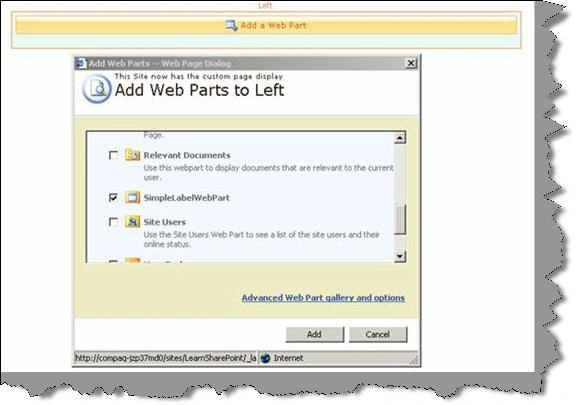
Once done your webpart is now added to the site page. You can edit the default webpart properties by clicking on 'Modify Shared WebPart'. For simplicity sake we have changed the title.

Step 6:- View the WebPart
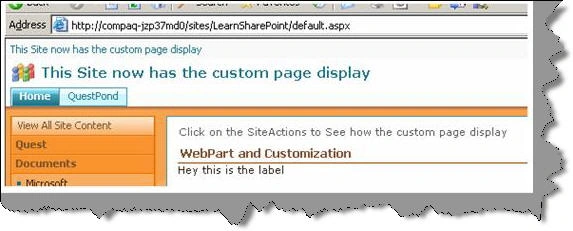
You can see the changed title display when view the page normally. So with a few lines of coding you can see how we have achieved huge customization.
How can we implement customization and personalization in WebParts?
Personalization and customization is all about improving individual user experience as per personal choices. Every human is different and everybody wants that the world moves as per their individual choice. Same holds true for websites. For instance your website can have features like weather forecast, business news and sports news. As an admin you have the capability to change the look and feel of the website which gets displayed to all users. Now some individual users would like to only see news and not weather forecast. So the website should provide some kind of functionality where the users can go and personalize their choices so that website behaves according to their choice.
Now from the capability where the admin can change the look and feel is called a customization. This change is reflected to every viewer who comes to the site. The capability that individual users can either choose to view the news with weather forecast and not is personalization.
Just cutting it short when changes made to site are shared by all users it's called as customization. When we make changes to some feature which is only shared and seen by individual users is termed as personalization.
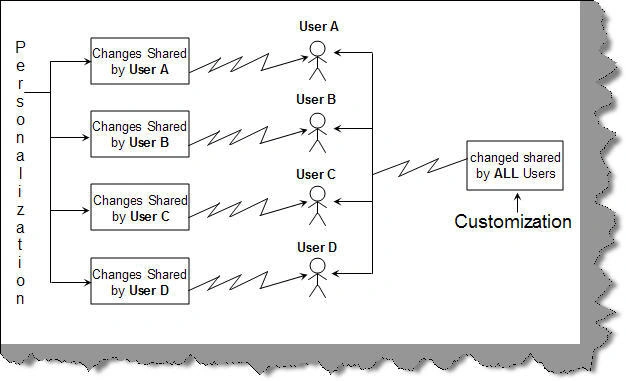
Let's try understanding personalization and customization in SharePoint using a small sample. Let's make a label whose text / data can be personalized by every user, but its font size can only be customized by admin. The font size customization activity is only limited to admin and cannot personalized by every end user who logs in to the website.

Let's create the label webpart which are discussing. So we will create a webpart whose label data can be personalized as per every user and the font size can only be customized by the admin.
The first thing is that we need to create a class for the webpart. Below is the code snippet of the webpart class. We have created two private properties font size and label data.
public class SimpleLabelCustomization : WebPart
{
private int _intFontSize;
private string _strLblData = "";
}
Second thing we need to do is define the personalization scope for both of these properties.
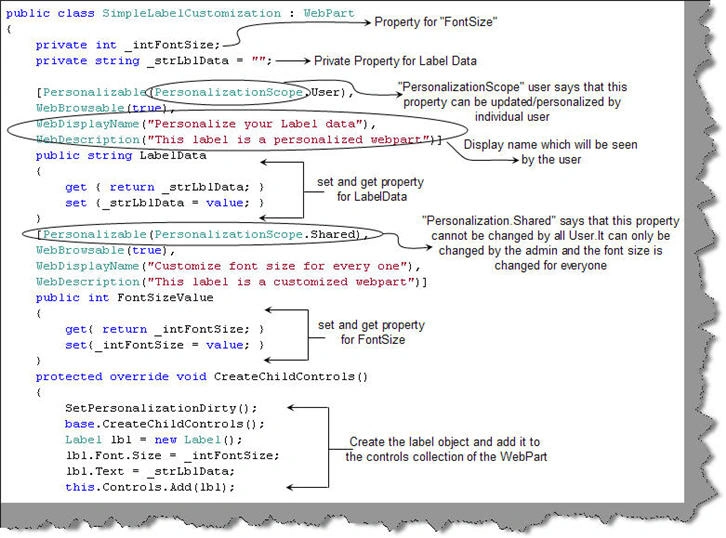
We want the label data changes to be personalized as per user. So we need to attribute the personalizable to personalizationscope.user. In order to display description and display name we specified the 'WebDisplayName' and 'WebDescription'.
[Personalizable(PersonalizationScope.User),
WebBrowsable(true),
WebDisplayName("Personalize your Label data"),
WebDescription("This label is a personalized webpart")]
public string LabelData
{
get { return _strLblData; }
set {_strLblData = value; }
}
We want font size changes to view by all users so we need to attribute the "personalizable" value to "personalizationscope.Shared".
[Personalizable(PersonalizationScope.Shared),
WebBrowsable(true),
WebDisplayName("Customize font size for every one"),
WebDescription("This label is a customized webpart")]
public int FontSizeValue
{
get{ return _intFontSize; }
set{_intFontSize = value; }
}
Below is the complete code snippet with explanation.
So now that we are done with our webpart we need to deploy the same. You can see the previous question to understand how to deploy a webpart.
Now let's see the fun of personalization. To personalize the page you need to click on the top right hand corner and then click personalize page. Now if you edit the webpart you will see only the label data can be changed.
This because we have given label data as user based personalization and font size as shared personalization.

To customize the webpart we need to click on site action and click edit page. You can now see both the properties. The site actions menu can be restricted to administrators to have a better control on customization and personalization.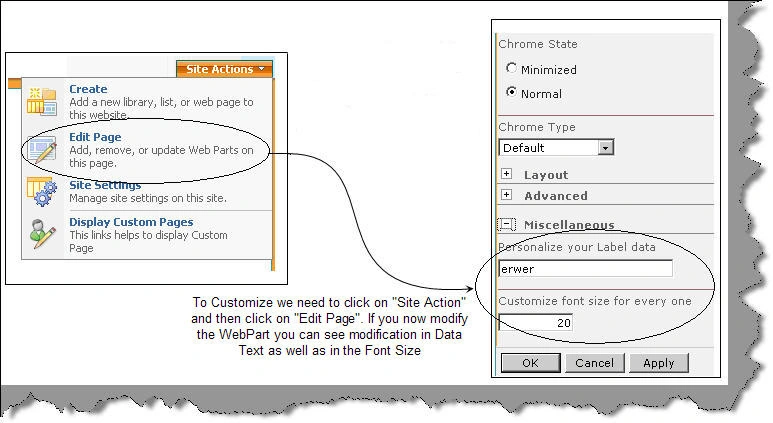
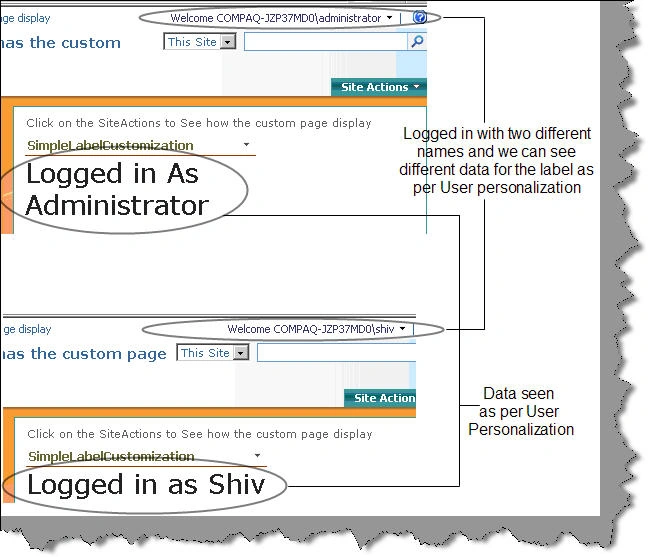
To see the actual action create two different login's and change data with each user logged in. You will see that depending with what username you have logged in you will see the label data as per user personalization.
How can we create a custom editor for WebPart?
There are situations where you want to use your own custom WebPart editor rather than using the default WebPart editor.
Note: - In case you do not know how to deploy a WebPart we advice you to read the answer for question "Can you explain the 6 steps we need to create a WebPart in SharePoint?"
To make your own custom web part editor is a four step procedure.
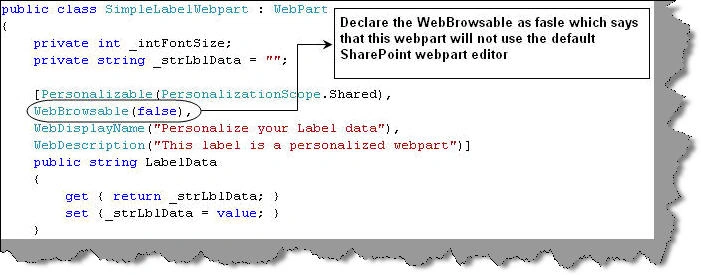
Step 1: - So the first the thing is to create the WebPart. We need to make a slight change i.e. 'WebBrowsable (false)' so that it does not use the default 'WebPart' editor. Below is the code snippet of the same font size 'WebPart' which has 'WebBrowsable' value as false.
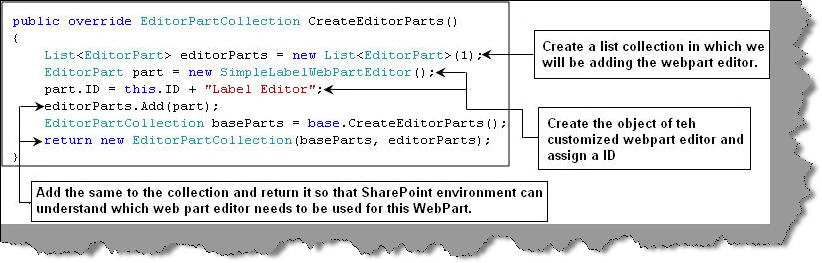
Step 2: - The other thing which we need to do in the WebPart is override the 'CreateEditorParts' method and add our custom webpart editor. We will be seeing in the next step how we can create the web part editor. For this example we have created 'SimpleWebPartEditor'.
Step 3: - In order to create your custom web part editor the first step we need to do is inherit from 'EditorPart' class. Currently we have created a custom web part editor class called as 'SimpleLabelWebPart'. In this custom class we have create two labels and two text boxes. The two textboxes will take font size and label value while the labels will display description for those text boxes. In other words we have defined our UI which take inputs which can customize our web part.

Step 4: - Two activities takes place in general one is when we the user gives customization values which customizes the web part and the other when we need to synchronize the customization values with web part.

The web part customization values are stored in content database according to user logged in. So when customization data is provided for a web part through our custom web part editor we need to override the 'ApplyChanges' method and push the customization data to the web part object. So in other words the data is pushed from the web part editor to the content database on per user basis.
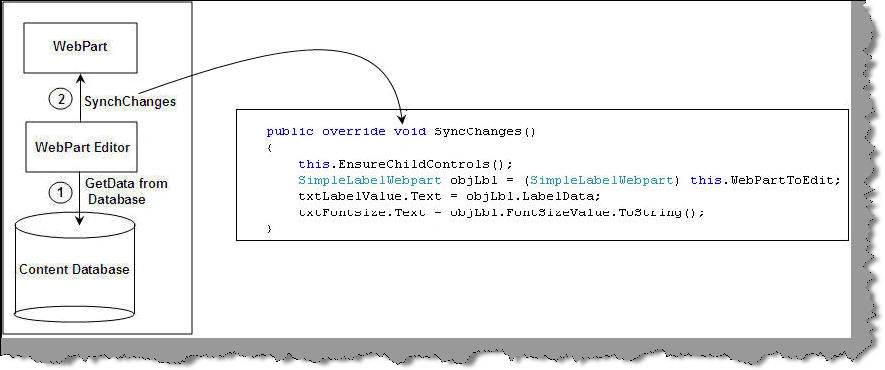
Now comes the second aspect where we need to synch the web part data from content database with the web part itself. For this we need to override the 'syncchanges' method and push the data from the web part object in to the web part editor user interface.
Ok , now if you edit your web part you can see how the custom editor looks like.

What are List and Content Types in SharePoint?
SharePoint is all about data and collaboration of the data between different types of users. When we talk about data it varies from user to user and different types of meta-data. For instance below we have four kinds of user's project manager, accountant, security personnel and HR.
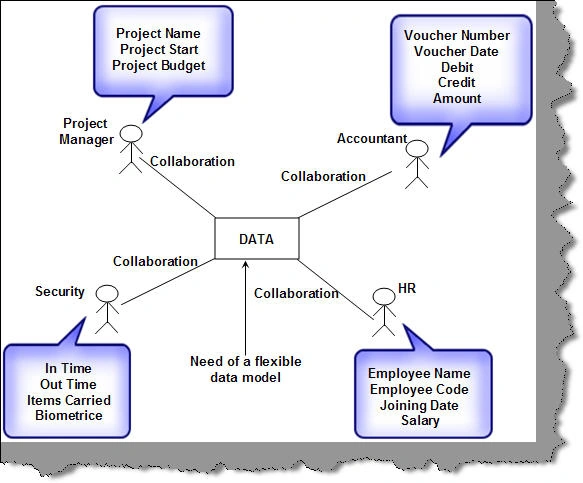
All these four users have different kind of data formats. For instance the accountant needs to save data with different data types and fields like voucher number( 20 character string) , voucher date (MM/DD/YYYY), debit (Boolean true) , credit ( Boolean false) and amount ( Double). The security needs In-time, out-time, items carried and biometrics data.
In order to bring a flexible collaborative data model which can be further extended SharePoint brought in something called as List and Content Types. Data was visualized in terms of List data as shown below. With this approach you can add more fields and content type on a need basis.
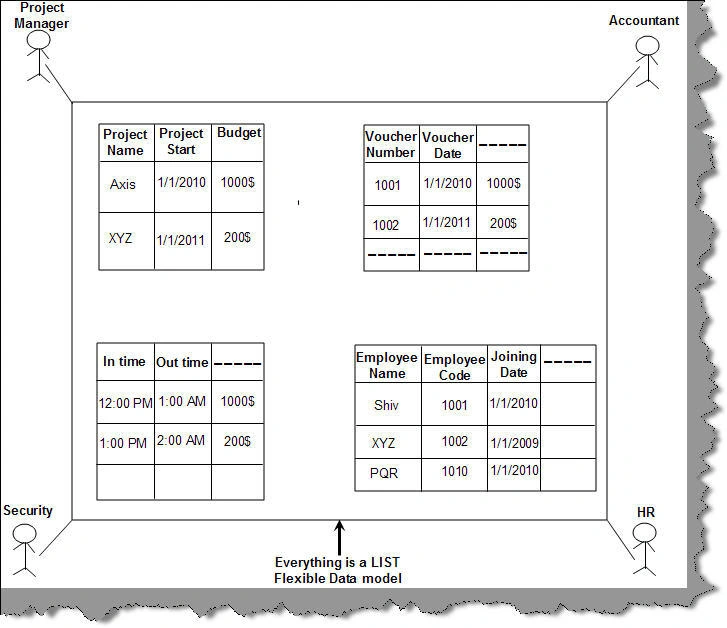
The best part about organizing data in list is the amount of flexibility and extensibility we can bring in. Some of the flexibility a list type of approach brings in are give below :-
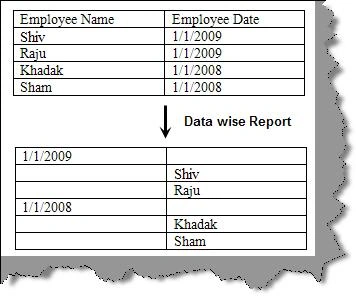
Different views of the list
For instance an employee list can view employee wise or date wise.
Create content from external list storage
You can take a excel and instruct SharePoint to create a list of that type.
Which are the various ready made list types that SharePoint provides currently?
There are approximately thirteen different ready made list types, below mentioned are some of the most used ones.
Document library
Used for collaborating on documents with support for versioning, check-in and check-out, and workflow. Includes support for deep integration with Microsoft Office.
Form library
Used to store XML documents and forms for use with Microsoft Office InfoPath.
Wiki page library
Used for collaborative Web pages based on wiki pages, which are dynamically generated and collaboratively edited Web pages.
Picture library
A specialized document library enhanced for use with pictures. Includes support for slide shows, thumbnails, and simple editing through Microsoft Office Picture Manager.
Announcements
Used for simple sharing of timely news with support for expiration.
Contacts
A list for tracking people and contact information, with support for integration into Microsoft Office Outlook and other WSS-compatible contacts applications.
Discussions
A simple list for threaded discussions with support for approval and managing discussion threads.
Links
A list for managing hyperlinks.
Calendar
A list for tracking upcoming events and deadlines. Includes support for integration and synchronization with Office Outlook.
Tasks
A list of activity-based items that can integrate with workflow.
Project tasks
An enhanced tasks list with support for Gannt chart rendering and integration with Microsoft Office Project.
Issue tracking
A list for tracking issues and resolution, with support for prioritization.
Custom list
An empty list definition for extending with custom columns, or created using Microsoft Office Excel spreadsheets
Source code
Above attached is the source code which shows simple web parts, custom web parts and custom web part editor. Please fell free to modify and understand the concepts.
Join the conversation! Your thoughts help the community grow.