

Introduction and Goal
This FAQ is completed dedicated to animations and transformations using SilverLight. The tutorial starts with animation basics like timelines and storyboard. Later the article moves ahead to talk about different animations supported and we finally end the tutorial with a simple rectangle animation.
I have collected around 400 FAQ questions and answers in WCF, WPF, WWF, SharePoint, design patterns, UML etc. Feel free to download these FAQ PDF's from my site http://www.questpond.com/
Some news about Silverlight which is floating around
I know I need to concentrate on technical for this article but still I found something interesting to share about achievements and news about SilverLight , just thought it should be shared. If you are still thinking SilverLight is not that worth putting effort then below are some news which can excite you :-
-
300 Million Installations of silverlight, not bad as compared to flash which is now there for years. We are not trying to underestimate flash but the start of flash was definitely not so good.
-
Ooooh Silverlight covered the last Olympics and NBC.
-
3000 developers and designers behind this initiative.
-
Netfix CEO redhastings joins on the Microsoft board of directors
Still not convinced read detail report at the end of this article here . Ok just that I am not biased I have also covered some bad news of Silverlight.
Other silverlight FAQ
Silverlight FAQ Part 1:- This tutorial has 21 basic FAQ's which will help you understand WPF , XAML , help your build your first silverlight application and also explains the overall silverlight architecture.
What is the definition of animation from Silverlight perspective?
Animation is modification of a value over a period of time. Due to the modification of value over a period of time it creates an illusion of animation. For instance you can place a circle and modify the 'Canvas.Right' property to create an animation which moves the circle to the right.
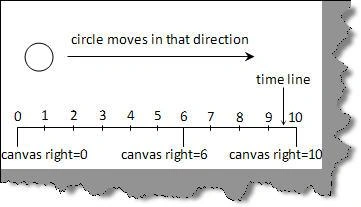
Figure: - Canvas right direction
What is a timeline in Silverlight?
Time represents a segment / unit of time on which the animation will move. The unit of time can be in seconds, minutes or hours. The unit depends on the animation nature. 'System.Windows.Media.Animation.Timeline' class represents the time line.
What are the different kinds of animation supported by Silverlight?
As said previously animation is all about a start value and the moving towards some new value and thus providing illusion. Silver light uses three properties for it 'From', 'To' and 'By'. 'From' specifies the start of the animation and 'To' specifies till where the animation should run. 'By' is relative animation. When we specify the 'From' and "By' animation progresses from the value specified by the 'From' property to the value specified by the sum of the 'From' and 'By' properties.
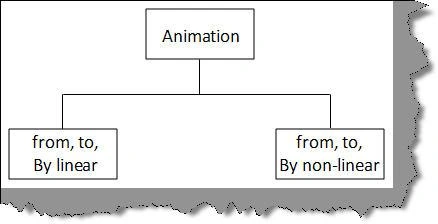
Figure :- Different kind of animations
Now again using 'From', 'By' and 'To' you can have linear animation or you can non-linear animation. In linear animation everything is straight forward while non-linear animation changes as per animation needs.
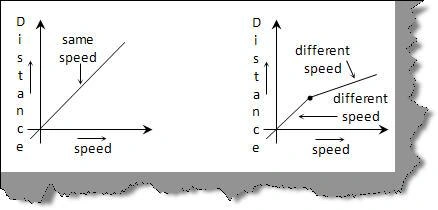
Figure :- Linear and Non-linear
Can you explain doubleanimation , coloranimation and pointanimation ?
As discussed in the previous question silverlight animation is all about specifying 'From' ,'To' and 'By' value for a property. Now the property can be a simple double value, can be color or can be a point. Silverlight has categorized these properties in to three sections as explained below.
'DoubleAnimation' uses properties with double value, for instance Rectangle.Height or width. You can specify double values by using 'From','To' and 'By'.
'PointAnimation' uses point value i.e. X, Y values for line segments and curves.
'ColorAnimation' helps to alter the value of color value of an object.
What is a story board?
Storyboard is sequence of snapshots / sketches which depict changes over a period of time. You can visualize storyboard as a time line which we have discussed in one of our previous questions. Storyboard has collection of animations grouped together. The collection of animation is because storyboard uses sketches to depict changes over a period of time.
For instance you can see there are four sketches used in the below animation to depict clash of two arrows with a boom boom at the end. So basically storyboard will have collection of four animation objects which will be shown rapidly over a period of time.
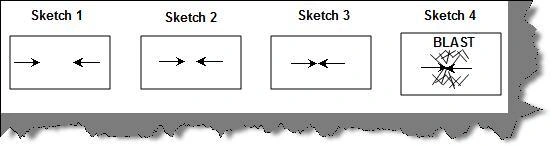
Figure: - Arrow Sketches
Can we see a simple silverlight animation to just get started?
Let's create a simple animation shown below. We will create a rectangle object whose height will increase in an animated manner. You can see from the below figure how the animation will look like. We will execute this animation using 'DoubleAnimation' object
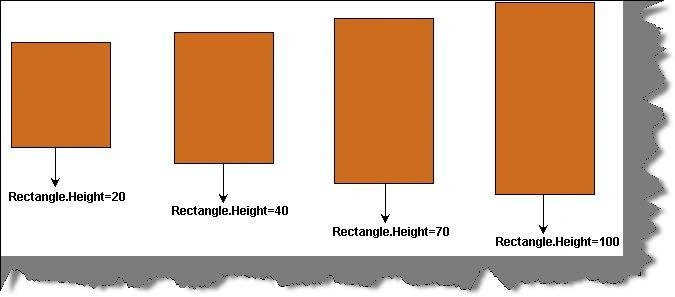
Figure :- Rectangle height animation
So the first step is to define the rectangle object. Below is the XAML code snippet for which defines the rectangle object with height and width equal to 100 and chocolate background.
<Grid x:Name="LayoutRoot" Background="White">
<Rectangle x:Name="RectAnimated" Fill="Chocolate" Stroke="Black" Width="100" Height="100"></Rectangle>
</Grid>
As a second step we need to define when the animation will be trigger. You can see from the below code snippet we have defined that the story board will be invoked when the rectangle object is loaded.
<Grid x:Name="LayoutRoot" Background="White">
<Rectangle x:Name="RectAnimated" Fill="Chocolate" Stroke="Black" Width="100" Height="100">
<Rectangle.Triggers>
<EventTrigger RoutedEvent="Rectangle.Loaded">
<BeginStoryboard>
</Storyboard>
</BeginStoryboard>
</EventTrigger>
</Rectangle.Triggers>
</Rectangle>
</Grid>
Finally we have put in the 'DoubleAnimation' object which uses the 'Height' as the target property which will be animated '100' value to '300' value in 5 seconds. Also note that target name is the rectangle object 'RectAnimated'. We have also define 'AutoReverse' as 'true' which means once it reaches '300' it will restart from '100'.
What are the different ways in which silver light does transformation?
There are times when you want to transform your object in various ways. For example you would like to tilt the object in 45 degree; you would like skew the object or rotate the object. Below are some important transformation example which you can achieve using Silverlight.
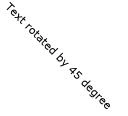
Below is a simple example which uses 'RotateTransform' to tilt the text at 45 degree.
<TextBlock HorizontalAlignment="Center" Text="Text rotated by 45 degree">
<TextBlock.RenderTransform>
<RotateTransform Angle="45" />
</TextBlock.RenderTransform>
</TextBlock>
S
Below is a simple example which uses 'ScaleTransform' to scale the text to '2'.
<TextBlock VerticalAlignment="Center" HorizontalAlignment="Center" Text="Text scaled with 2">
<TextBlock.RenderTransform>
<ScaleTransform ScaleX="2"/>
</TextBlock.RenderTransform>
</TextBlock>

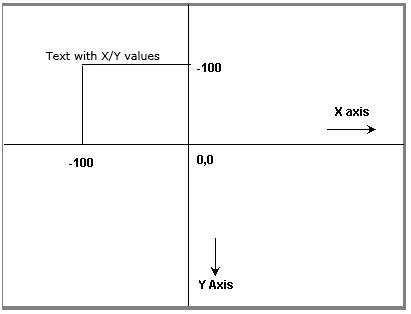
Below is a simple example which uses 'RenderTransform' to position your text at a particular X and Y position.
<TextBlock VerticalAlignment="Center" HorizontalAlignment="Center" Text="Text with X/Y values">
<TextBlock.RenderTransform>
<TranslateTransform X="-100" Y="-100"/>
</TextBlock.RenderTransform>
</TextBlock>
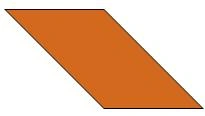
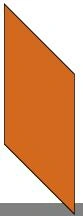
In case you want skew your object, below is a simple XAML code snippet which
skews you rectangle object at 45 degree.
<Rectangle Fill="Chocolate" Stroke="Black" Width="100" Height="100">
<Rectangle.RenderTransform>
<SkewTransform AngleX="45"/>
</Rectangle.RenderTransform>
</Rectangle>
There situations when you would like to apply two or more transformation types
on an object. In those scenarios you can use 'TransformGroup' to apply multiple transformation.
Below is a code snippet which shows 'SkewTransform' and 'RotateTransform' applied in a group to
the rectangle object.
<Rectangle Fill="Chocolate" Stroke="Black" Width="100" Height="100">
<Rectangle.RenderTransform>
<TransformGroup>
<SkewTransform AngleX="45"/>
<RotateTransform Angle="45"/>
</TransformGroup>
</Rectangle.RenderTransform>
</Rectangle>
Silverlight VS Flash good news and bad news
300 Million Installations of Silverlight
Complete analysis report of Flash VS Silverlight http://silverlight.net/forums/t/3015.aspx
300,000 developers and designers are working on the Silverlight http://www.techcrunch.com/2009/05/18/microsoft-says-silverlight-installed-more-than-firefox-safari-and-chrome-combined/
Last olympics was covered by them http://team.silverlight.net/announcements/nbc-olympics-wins-an-emmy-with-silverlight/
NetFlix CEO redhastings is on Microsoft board of directors
Flash VS silver light stories http://weblogs.asp.net/jezell/archive/2007/05/03/silverlight-vs-flash-the-developer-story.aspx
New competition for flash http://www.intelligententerprise.com/showArticle.jhtml?articleID=201804089
Bill gates on Flash and Silverlight http://www.bit-101.com/blog/?p=1102
Some bad news
Flash/Flex is available in 99% of computers in the world while silverlight is present only 25%
Bad news MLB.COM dropped silverlight http://news.cnet.com/8301-1023_3-10098963-93.html
Continue to next part >>
| Below is a simple example which uses 'RotateTransform' to tilt the text at 45 degree. | |
|
<TextBlock HorizontalAlignment="Center" Text="Text rotated by 45 degree"> |
|
| Below is a simple example which uses 'ScaleTransform' to scale the text to '2'. | |
|
<TextBlock VerticalAlignment="Center" HorizontalAlignment="Center" Text="Text scaled with 2"> |
|
| Below is a simple example which uses 'RenderTransform' to position your text at a particular X and Y position. | |
|
<TextBlock VerticalAlignment="Center" HorizontalAlignment="Center" Text="Text with X/Y values"> |
|
| In case you want skew your object, below is a simple XAML code snippet which skews you rectangle object at 45 degree. | |
|
<Rectangle Fill="Chocolate" Stroke="Black" Width="100" Height="100"> |
|
| There situations when you would like to apply two or more transformation types on an object. In those scenarios you can use 'TransformGroup' to apply multiple transformation. Below is a code snippet which shows 'SkewTransform' and 'RotateTransform' applied in a group to the rectangle object. | |
|
<Rectangle Fill="Chocolate" Stroke="Black" Width="100" Height="100"> |
|
300 Million Installations of Silverlight
Complete analysis report of Flash VS Silverlight http://silverlight.net/forums/t/3015.aspx
300,000 developers and designers are working on the Silverlight http://www.techcrunch.com/2009/05/18/microsoft-says-silverlight-installed-more-than-firefox-safari-and-chrome-combined/
Last olympics was covered by them http://team.silverlight.net/announcements/nbc-olympics-wins-an-emmy-with-silverlight/
NetFlix CEO redhastings is on Microsoft board of directors
Flash VS silver light stories http://weblogs.asp.net/jezell/archive/2007/05/03/silverlight-vs-flash-the-developer-story.aspx
New competition for flash http://www.intelligententerprise.com/showArticle.jhtml?articleID=201804089
Bill gates on Flash and Silverlight http://www.bit-101.com/blog/?p=1102
Some bad news
Flash/Flex is available in 99% of computers in the world while silverlight is present only 25%
Bad news MLB.COM dropped silverlight http://news.cnet.com/8301-1023_3-10098963-93.html
Gowtham RajamanickamPosted May 20, 2015, 12:58 AM
good