Introduction
In this article we will go through FAQ's from WPF section. We will start first with understanding why WPF..? and later we will create a small sample hello world project for WPF which will make us understand WPF much better.
What is the need of WPF when we had GDI, GDI+ and DirectX?
First let us try to understand how display technology has evolved in Microsoft technology.
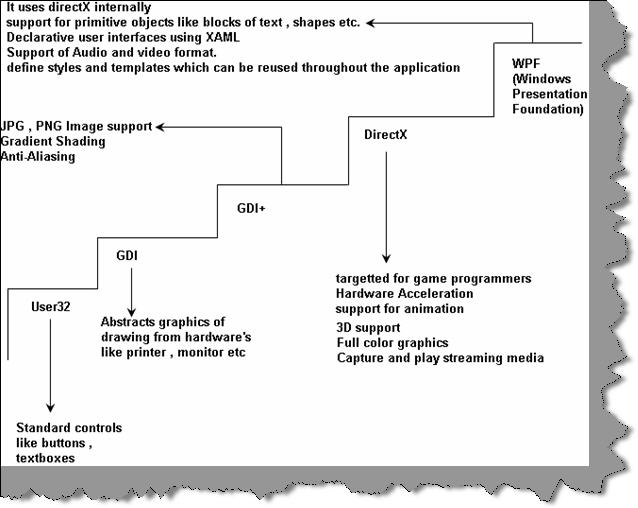
User32:- This provides the windows look and feel for buttons and textboxes and other UI elements. User32 lacked drawing capabilities.
GDI (Graphics device interface):- Microsoft introduced GDI to provide drawing capabilities. GDI not only provided drawing capabilities but also provided a high level of abstraction on the hardware display. In other words it encapsulates all complexities of hardware in the GDI API.
GDI+:- GDI+ was introduced which basically extends GDI and provides extra functionalities like JPG and PNG support, gradient shading and anti-aliasing. The biggest issue with GDI API was it did not use hardware acceleration and did not have animation and 3D support.
Note: - Hardware acceleration is a process in which we use hardware to perform some functions rather than performing those functions using the software which is running in the CPU.
DirectX:- One of the biggest issues with GDI and its extension GDI+ was hardware acceleration and animation support. This came as a biggest disadvantage for game developers. To answer and server game developers Microsoft developed DirectX. DirectX exploited hardware acceleration, had support for 3D, full color graphics , media streaming facility and lot more. This API no matured when it comes to gaming industry.
WPF:- Microsoft almost had 3 to 4 API's for display technologies , so why a need for one more display technology. DirectX had this excellent feature of using hardware acceleration. Microsoft wanted to develop UI elements like textboxes,button,grids etc using the DirectX technology by which they can exploit the hardware acceleration feature. As WPF stands on the top of directX you can not only build simple UI elements but also go one step further and develop special UI elements like Grid, FlowDocument, and Ellipse. Oh yes you can go one more step further and build animations.WPF is not meant for game development. DirectX still will lead in that scenario. In case you are looking for light animation ( not game programming ) WPF will be a choice. You can also express WPF using XML which is also called as XAML.In other words WPF is a wrapper which is built over DirectX. So let's define WPF.
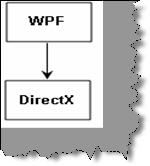
WPF is a collection of classes that simplify building dynamic user interfaces. Those classes include a new set of controls, some of which mimic old UI elements (such as Label, TextBox, Button), and some that are new (such as Grid, FlowDocument and Ellipse).
How does hardware acceleration work with WPF?
Hardware acceleration is a process in which we use hardware to perform some functions rather than performing those functions using the software which is running in the CPU.
WPF exploits hardware acceleration in a two tier manner.
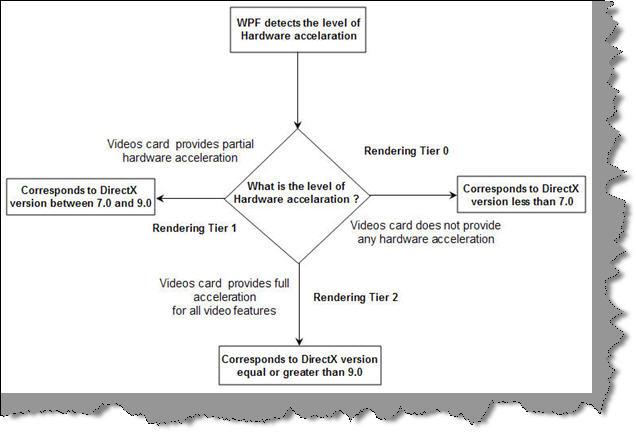
WPF API first detects the level of hardware acceleration using parameters like RAM of video card , per pixel value etc. Depending on that it either uses Tier 0, Tier 1 or Tier 2 rendering mode.
Tier 0:- If the video card does not support hardware acceleration then WPF uses Tier 0 rendering mode. In other words it uses software acceleration. This corresponds to working of DirectX version less than 7.0.
Tier 1:- If the video card supports partial hardware acceleration then WPF uses Tier 1 rendering mode. This corresponds to working of DirectX version between 7.0 and 9.0.
Tier 2:- If the video card supports hardware acceleration then WPF uses Tier 2 rendering mode. This corresponds to working of DirectX version equal or greater than 9.0.
Does that mean WPF has replaced DirectX?
No, WPF does not replace DirectX. DirectX will still be still needed to make cutting edge games. The video performance of directX is still many times higher than WPF API. So when it comes to game development the preference will be always DirectX and not WPF. WPF is not a optimum solution to make games, oh yes you can make a TIC TAC TOE game but not high action animation games.
One point to remember WPF is a replacement for windows form and not directX.
So can we define WPF in a precise way?
Windows Presentation Framework is the new presentation API. WPF is a two and three dimensional graphics engine. It has the following capabilities:-
- Has all equivalent common user controls like buttons, check boxes sliders etc.
- Fixed and flow format documents
- Has all of the capabilities of HTML and Flash
- 2D and 3D vector graphics
- Animation
- Multimedia
- Data binding
Can you explain the overall architecture of WPF?
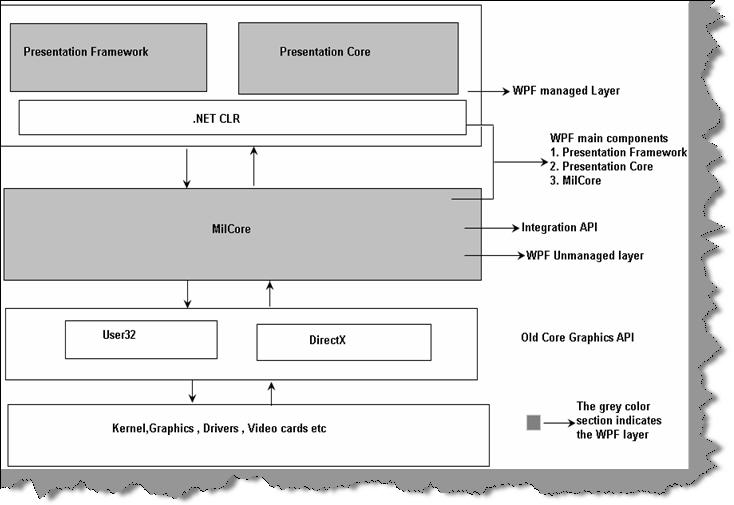
Above figure shows the overall architecture of WPF. It has three major sections presentation core, presentation framework and milcore. In the same diagram we have shown how other section like direct and operating system interact with the system. So let's go section by section to understand how every section works.
User32:- It decides which goes where on the screen.
DirectX:- As said previously WPF uses directX internally. DirectX talks with drivers and renders the content.
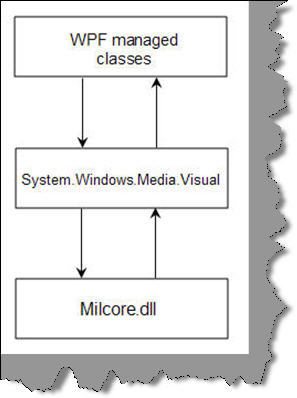
Milcore:- Mil stands for media integration library. This section is a unmanaged code because it acts like a bridge between WPF managed and DirectX / User32 unmanaged API.
Presentation core:- This is a low level API exposed by WPF providing features for 2D, 3D, geometry etc.
Presentation framework:- This section has high level features like application controls, layouts. Content etc which helps you to build up your application.
Which are the different namespaces and classes in WPF?
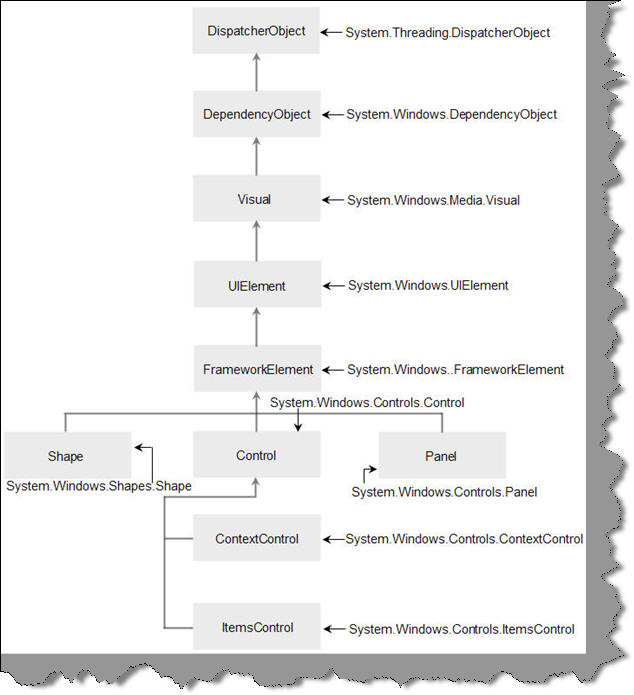
There are ten important namespaces / classes in WPF.
System.Threading.DispatcherObject
All WPF objects derive from the DispatcherObject. WPF works on STA model i.e. Single Threading Apartment Model. The main duty of this object is to handle concurrency and threading. When any message like mouse clicks, button clicks etc are initiated they are sent to the DispatcherObject who verifies whether code is running on the correct thread. In the coming section we will look in to detail how WPF threading works.
System.Windows.DependencyObject
When WPF was designed property based architecture was considered. In other words rather than using methods, functions and events object behavior will interact using properties. For now we will only restrict ourselves to this definition. In the coming section we have dedicated question for the same.
System.Windows.Media.Visual
Visual class is a drawing object which abstracts drawing instructions, how drawing should be drawn like clipping, opacity and other functionalities. Visual class also acts like a bridge between unmanaged MilCore.dll and WPF managed classes. When any class derived from visual it can be displayed on windows. If you want to create your own customized user interface then you can program using visual objects.
System.Windows.UIElement
UIElement handled three important aspects layout, input and events.
System.Windows.FrameworkElement
FrameWorkElement uses the foundation set by UIElement. It adds key properties like HorizontalAlignment , VerticalAlignment , margins etc.
System.Windows.Shapes.Shape
This class helps us to create basic shapes such as Rectangle, Polygon, Ellipse, Line, and Path.
System.Windows.Controls.Control
This class has controls like TextBox,Button,ListBox etc. It adds some extra properties like font,foreground and background colors.
System.Windows.Controls.ContentControl
It holds a single piece of content. This can start from a simple label and go down to a unit level of string in a layout panel using shapes.
System.Windows.Controls.ItemsControl
This is the base class for all controls that show a collection of items, such as the ListBox and TreeView.
System.Windows.Controls.Panel
This class is used for all layout containers-elements that can contain one or more children and arrange them as per specific layout rules. These containers are the foundation of the WPF layout system, and using them is the key to arranging your content in the most attractive, flexible way possible.
What is XAML?
XAML (pronounced as Zammel) is a declarative XML-based language by which you can define object and properties in XML. XAML document is loaded by a XAML parser. XAML parser instantiates objects and set their properties. XAML describes objects, properties and their relation between them. Using XAML, you can create any kind of objects that means graphical or non-graphical. WPF parses the XAML document and instantiates the objects and creates the relation as defined by XAML.
So XAML is a XML document which defines objects and properties and WPF loads this document in actual memory.
So is XAML meant only for WPF?
No, XAML is not meant only for WPF. XAML is a XML-based language and it had various variants.
WPF XAML is used to describe WPF content, such as WPF objects, controls and documents. In WPF XAML we also have XPS XAML which defines an XML representation of electronic documents.
Silverlight XAML is a subset of WPF XAML meant for Silverlight applications. Silverlight is a cross-platform browser plug-in which helps us to create rich web content with 2-dimensional graphics, animation, and audio and video.
WWF XAML helps us to describe Windows Workflow Foundation content. WWF engine then uses this XAML and invokes workflow accordingly.
Can explain the different elements involved in WPF application practically?
In order to understand the different elements of WPF, we will do a small 'hello world' sample and in that process we will understand the different elements of WPF.
Note:- For this sample we have VS 2008 express edition.
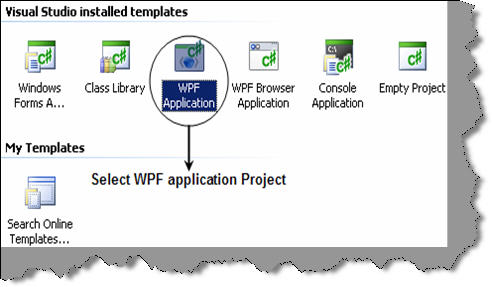
So start VS 2008 express and from the templates select the WPF application as show in the below figure below.
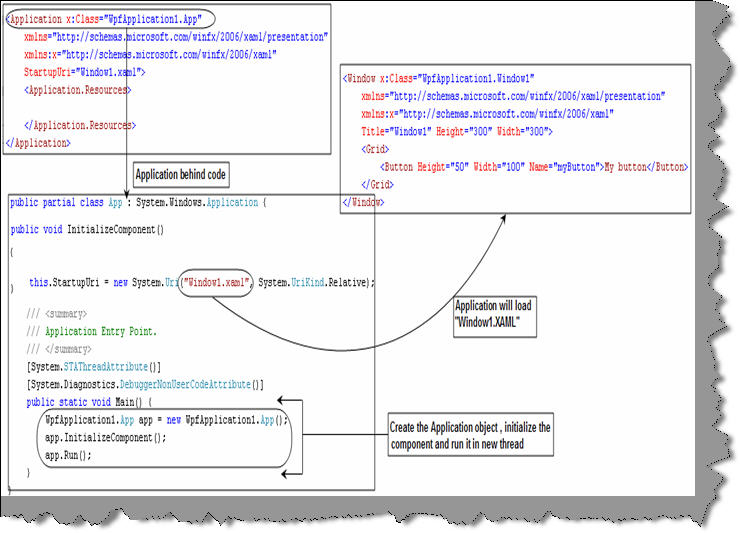
Once we have created the WPF application project you will see two file types one the XAML file and the other is the behind code i.e. XAML.cs. XAML files are nothing but XML files which has all the elements needed to display the windows UI. Every of the XAML elements maps to come class. For instance the 'Window' element maps to 'WpfApplication1.Window1' class , 'Button' elements in XAML file maps to 'System.Windows.Control.Button' class and 'Grid' XAML element is mapped to 'System.Windows.Control.Grid'.
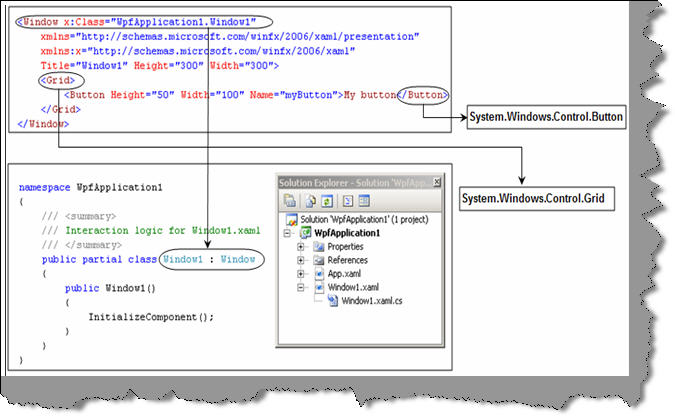
The 'App.XAML' and 'App.XAML.CS' are the entry point files. If we see the code for 'App.XAML.CS' you will see the reference to XAML file which needs to be loaded. So the first code which runs in the application is 'void main()' method from 'App.XAML.CS' which in turn loads the 'Window1.XAML' file for rendering.
We can now connect the behind code method and function to events in XAML file elements.
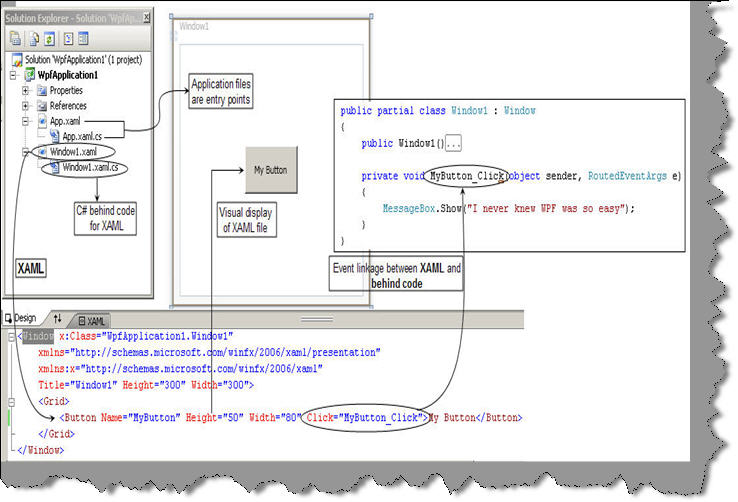
You can see from the above code snippet how the button element has the click event linked to the 'MyButton_Click' function. 'MyButton_Click' is the method which is in the XAML.CS behind code.
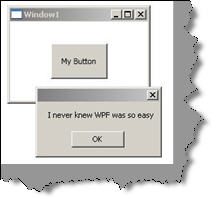
So now if you run the code you can see the button and if you click on it you can see the message box for the same.
What are dependency properties?
These dependency properties belong to one class but can be used in another.
Consider the below code :-
<Rectangle Height="72" Width="131" Canvas.Left="74" Canvas.Top="77" />
Height and Width are regular properties of the Rectangle. But Canvas. Top and Canvas. Left is dependency property as it belongs the canvas class. It is used by the Rectangle to specify its position within Canvas.
Are XAML file compiled or built on runtime?
XAML files are usually compiled rather than parsing on runtime. But it also supports parsing during runtime. When we build a XAML based project, you will see it creates g.cs extension in obi\Debug folder. Therefore, for every XAML file you will find a g.cs file. For instance, a Shiv.XAML will have Shiv.g.cs file in obi\Debug folder. In short, in runtime you actually do not see the XAML file. But if you want to do runtime, parsing of XAML file it also allows that to be done.
Can you explain how we can separate code and XAML?
This is one of the most important features of WPF, separating the XAML from the code to be handled. So designers can independently work on the presentation of the application and developers can actually write the code logic independent of how the presentation is.
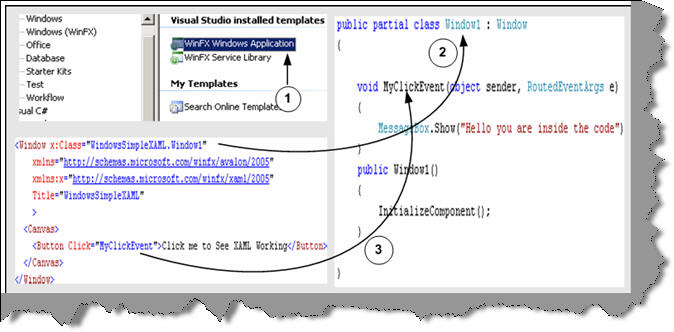
Figure 16.1:- XAML and behind code in action
Above is the code snippet, which shows a XAML file and the code completely detached from the XAML presentation. In order to associate a class with XAML file you need to specify the x: Class attribute. Any event specified on the XAML object can be connected by defining a method with sender and event values. You can see from the above code snippet we have linked the MyClickEvent to an event in the behind code.
Note: - You can get a simple sample in WindowsSimpleXAML folder. Feel free to experiment with the code… experimenting will teach you much more than reading something theoretical.
How can we access XAML objects in behind code?
To access XAML objects in behind code you just need to define them with the same name as given in the XAML document. For instance in the below code snippet we named the object as objtext and the object is defined with the same name in the behind code.
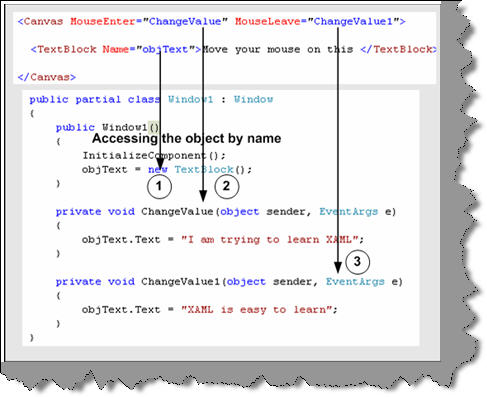
Figure 16.2 Accessing XAML object
Note: - You can get the source code in WindowsAccessXAML folder.
What kind of documents are supported in WPF?
There are two kind of major document supported in WPF Fixed format documents and Flow format document. Fixed format documents look like PDF format. They display content regardless of screen size and resolution. But flow format document adjust depending on screen size and resolution.
Below is the code snippet for fixed format. You can see the document has a look of PDF reader. Step 1 defines the tag to define a document and Step 2 shows how the document looks.
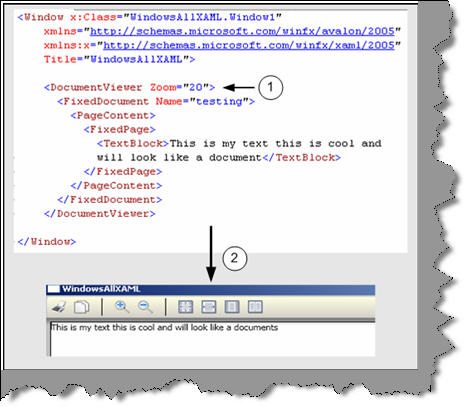
Figure 16.3:- Document viewer in action