

Sparse column is associated with two specialised sub-features:
- Column Sets - This will provide you the consolidated report of all the sparse columns. We will see this one in our example below.
- Filtered index - Index will be created on the non-null data in the sparse columns.
Limitations and conditions to use Sparse column:
1. We can create index on the sparse column.
2. Sparse column cannot be added on certain column types like text, filestreamdatatype, geography, image, ntext etc..,
3. Sparse column could not be bounded with default value or rule cannot be applied on it.
Let's see an example,
drop table Venkat_Sparse_ColumnCheck
go
-- created a table to check the sparse column
CREATE TABLE dbo.Venkat_Sparse_ColumnCheck
(
ID INT IDENTITY(1,1) NOT NULL,
FIRST_NAME NVARCHAR(50) NOT NULL,
LAST_NAME NVARCHAR(50) NOT NULL,
ADDRESS1 NVARCHAR(20) SPARSE NULL, -- Sparse columns
ADDRESS2 NVARCHAR(20) SPARSE NULL, -- Sparse columns
CITY NVARCHAR(20) SPARSE NULL, -- Sparse columns
STATE NVARCHAR(2) SPARSE NULL, -- Sparse columns
COUNTRY NVARCHAR(10) SPARSE NULL, -- Sparse columns
ZIP_CODE NVARCHAR(20) SPARSE NULL, -- Sparse columns
CONSTRAINT PK_Venkat_Sparse_ColumnCheck PRIMARY KEY (ID)
)
GO
set nocount on
go
insert into dbo.Venkat_Sparse_ColumnCheck (first_name, last_name, ADDRESS1, ADDRESS2, city, STATE, country, zip_code)
values ('Venkatesan', 'Prabu', '1, first raod', null, 'Dharmapuri', 'TN', 'India', NULL);
insert into dbo.Venkat_Sparse_ColumnCheck (first_name, last_name, ADDRESS1, ADDRESS2, city, STATE, country, zip_code)
values ('Subs', 'subs', '2 Second road', null, 'trichy', 'tr', 'india', '636701');
insert into dbo.Venkat_Sparse_ColumnCheck (first_name, last_name, ADDRESS1, ADDRESS2, city, STATE, country, zip_code)
values ('Janu', 'C', '3 Third road', null, 'trichy', 'tr', 'india', '636701');
-- Here, we are getting a very ordinary output.
Select * from dbo.Venkat_Sparse_ColumnCheck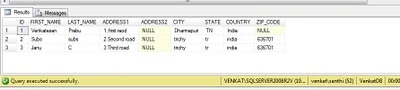
To see the exact data storage, we need to use the column sets functionality.
Column Set should be defined with datatype as XML and it should be given the condition as ALL_SPARSE_COLUMNS
drop table Venkat_Sparse_ColumnCheck
go
-- created a table to check the sparse column
drop table Venkat_Sparse_ColumnCheck
go
-- created a table to check the sparse column
CREATE TABLE dbo.Venkat_Sparse_ColumnCheck
(
ID INT IDENTITY(1,1) NOT NULL,
FIRST_NAME NVARCHAR(50) NOT NULL,
LAST_NAME NVARCHAR(50) NOT NULL,
ADDRESS1 NVARCHAR(20) SPARSE NULL, -- Sparse columns
ADDRESS2 NVARCHAR(20) SPARSE NULL, -- Sparse columns
CITY NVARCHAR(20) SPARSE NULL, -- Sparse columns
STATE NVARCHAR(2) SPARSE NULL, -- Sparse columns
COUNTRY NVARCHAR(10) SPARSE NULL, -- Sparse columns
ZIP_CODE NVARCHAR(20) SPARSE NULL, -- Sparse columns
ADDRESS_SET XML COLUMN_SET FOR ALL_SPARSE_COLUMNS, -- Column Set to get all the details of the sparse columns
CONSTRAINT PK_Venkat_Sparse_ColumnCheck PRIMARY KEY (ID)
)
GO
setnocount on
go
insert into dbo.Venkat_Sparse_ColumnCheck (first_name, last_name, ADDRESS1, ADDRESS2, city, STATE, country, zip_code)
values ('Venkatesan', 'Prabu', '1, first raod', null, 'Dharmapuri', 'TN', 'India', NULL);
insert into dbo.Venkat_Sparse_ColumnCheck (first_name, last_name, ADDRESS1, ADDRESS2, city, STATE, country, zip_code)
values ('Subs', 'subs', '2 Second road', null, 'trichy', 'tr', 'india', '636701');
insert into dbo.Venkat_Sparse_ColumnCheck (first_name, last_name, ADDRESS1, ADDRESS2, city, STATE, country, zip_code)
values ('Janu', 'C', '3 Third road', null, 'trichy', 'tr', 'india', '636701');
-- Here, we are getting a very ordinary output.
Select * from dbo.Venkat_Sparse_ColumnCheck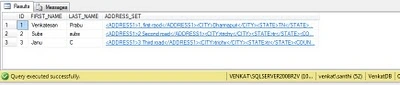
Output for the first record,
1, first raod
Dharmapuri
TN
India
Output for the Second record,
2 Second road
trichy
tr
india
636701
Output for the Third record,
3 Third road
trichy
Cheers,
Venkatesan Prabu .J
Kumaresh RajalingamPosted Feb 19, 2016, 8:02 PM
good one
Kumaresh RajalingamPosted Feb 19, 2016, 8:02 PM
Nice explanation
Sr KarthigaPosted Feb 19, 2016, 5:51 AM
Nice Explanation
Sr KarthigaPosted Feb 19, 2016, 5:50 AM
Nice Explanation
Lajapathy ArunPosted Jun 23, 2012, 3:25 PM
Good piece of example.