

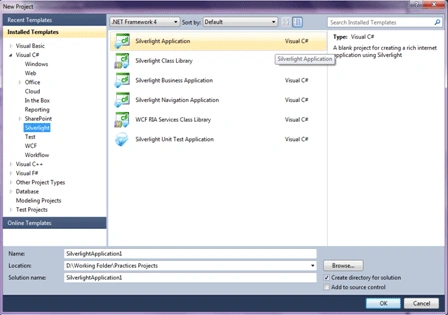
Create a new Silverlight application. Be sure that .NET Framework 4.0 is selected.
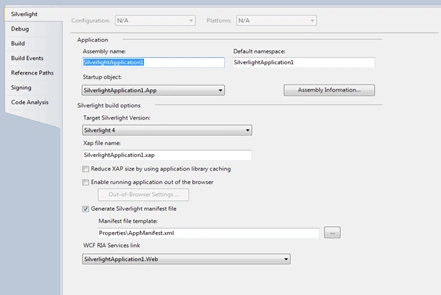
Next dialog would be following dialog. Select "Enable WCF RIA Services"

To check if WCF RIA Services is enable or not, go to Silverlight application and
right click on it to open Properties pane. It will show you the WCF RIA Services
link at the bottom
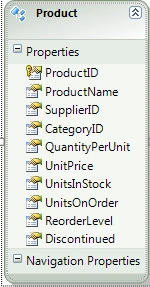
Add an Entity Data Model in Silverlight Web application. For my application, I
used Northwind database and its Products table. The snapshot of ED model is
shown below
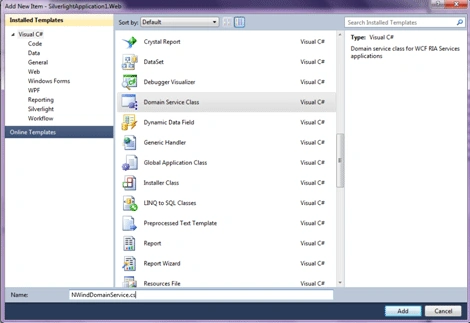
Build your application and add one Domain Service class in Silverlight web
application.
Select Entities and Enable Entities as specified below.
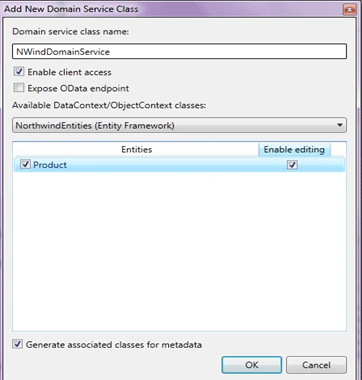
If you go to the Domain Service code file created above, you will find one
GetProducts method. You need to add orderby clause with it to make sure that
paging works fine.

Go to Data Sources window, you will get following data sources.
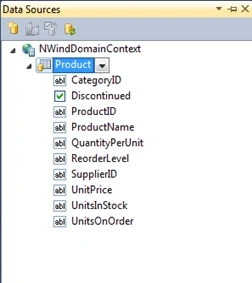
Click on Product and drag into the MainPage.xaml layout. It would automatically
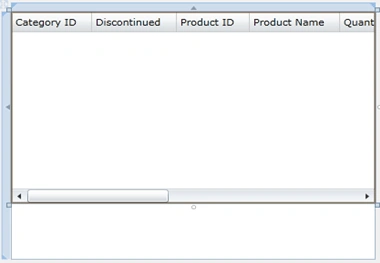
create the DataGrid and bind it with the data source.
The xaml design would look like below
Build and run the application. It would be shown like below
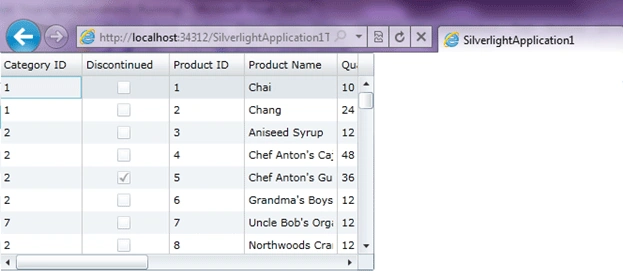
If you go to the xaml, you will find riacontrols tag
<riaControls:DomainDataSource
AutoLoad="True"
d:DesignData="{d:DesignInstance
my:Product,
CreateList=true}"
Height="0"
LoadedData="productDomainDataSource_LoadedData"
Name="productDomainDataSource"
QueryName="GetProductsQuery"
Width="0">
<riaControls:DomainDataSource.DomainContext>
<my:NWindDomainContext
/>
</riaControls:DomainDataSource.DomainContext>
</riaControls:DomainDataSource>
Add two properties LoadSize and Pagesize and put values according to your requirement.
<riaControls:DomainDataSource AutoLoad="True" d:DesignData="{d:DesignInstance my:Product, CreateList=true}" Height="0" LoadedData="productDomainDataSource_LoadedData" Name="productDomainDataSource" QueryName="GetProductsQuery" Width="0" LoadSize="30" PageSize="10">
Put one DataPager control and use same source as DataGrid. The final xaml markup would look like
<UserControl
x:Class="SilverlightApplication1.MainPage"
xmlns="http://schemas.microsoft.com/winfx/2006/xaml/presentation"
xmlns:x="http://schemas.microsoft.com/winfx/2006/xaml"
xmlns:d="http://schemas.microsoft.com/expression/blend/2008"
xmlns:mc="http://schemas.openxmlformats.org/markup-compatibility/2006"
mc:Ignorable="d"
d:DesignHeight="300"
d:DesignWidth="400"
xmlns:riaControls="clr-namespace:System.Windows.Controls;assembly=System.Windows.Controls.DomainServices"
xmlns:my="clr-namespace:SilverlightApplication1.Web"
xmlns:sdk="http://schemas.microsoft.com/winfx/2006/xaml/presentation/sdk">
<Grid
x:Name="LayoutRoot"
Background="White">
<riaControls:DomainDataSource
AutoLoad="True"
d:DesignData="{d:DesignInstance
my:Product,
CreateList=true}"
Height="0"
LoadedData="productDomainDataSource_LoadedData"
Name="productDomainDataSource"
QueryName="GetProductsQuery"
Width="0"
LoadSize="30"
PageSize="10">
<riaControls:DomainDataSource.DomainContext>
<my:NWindDomainContext
/>
</riaControls:DomainDataSource.DomainContext>
</riaControls:DomainDataSource>
<StackPanel>
<sdk:DataGrid
AutoGenerateColumns="False"
Height="232"
HorizontalAlignment="Left"
ItemsSource="{Binding
ElementName=productDomainDataSource,
Path=Data}"
Name="productDataGrid"
RowDetailsVisibilityMode="VisibleWhenSelected"
VerticalAlignment="Top"
Width="400">
<sdk:DataGrid.Columns>
<sdk:DataGridTextColumn
x:Name="categoryIDColumn"
Binding="{Binding
Path=CategoryID}"
Header="Category
ID"
Width="SizeToHeader"
/>
<sdk:DataGridCheckBoxColumn
x:Name="discontinuedColumn"
Binding="{Binding
Path=Discontinued}"
Header="Discontinued"
Width="SizeToHeader"
/>
<sdk:DataGridTextColumn
x:Name="productIDColumn"
Binding="{Binding
Path=ProductID,
Mode=OneWay}"
Header="Product
ID"
IsReadOnly="True"
Width="SizeToHeader"
/>
<sdk:DataGridTextColumn
x:Name="productNameColumn"
Binding="{Binding
Path=ProductName}"
Header="Product
Name"
Width="SizeToHeader"
/>
<sdk:DataGridTextColumn
x:Name="quantityPerUnitColumn"
Binding="{Binding
Path=QuantityPerUnit}"
Header="Quantity
Per Unit"
Width="SizeToHeader"
/>
<sdk:DataGridTextColumn
x:Name="reorderLevelColumn"
Binding="{Binding
Path=ReorderLevel}"
Header="Reorder
Level"
Width="SizeToHeader"
/>
<sdk:DataGridTextColumn
x:Name="supplierIDColumn"
Binding="{Binding
Path=SupplierID}"
Header="Supplier
ID"
Width="SizeToHeader"
/>
<sdk:DataGridTextColumn
x:Name="unitPriceColumn"
Binding="{Binding
Path=UnitPrice}"
Header="Unit
Price"
Width="SizeToHeader"
/>
<sdk:DataGridTextColumn
x:Name="unitsInStockColumn"
Binding="{Binding
Path=UnitsInStock}"
Header="Units
In Stock"
Width="SizeToHeader"
/>
<sdk:DataGridTextColumn
x:Name="unitsOnOrderColumn"
Binding="{Binding
Path=UnitsOnOrder}"
Header="Units
On Order"
Width="SizeToHeader"
/>
</sdk:DataGrid.Columns>
</sdk:DataGrid>
<sdk:DataPager
Source="{Binding
ElementName=productDomainDataSource,
Path=Data}"
/>
</StackPanel>
</Grid>
</UserControl>
Build the application and run it. The paging will start working.
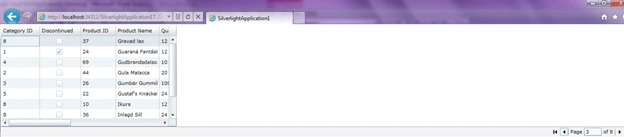
This is how we can do binding and paging without writing any single line of code
in Silverlight. All you need to do is drag and drop and configuring.
siavash YarahmadPosted Jan 3, 2013, 3:44 AM
Would You Mind using an store procedure insestead of Products Table in above sample please.It help me to know many things
HYUK NAMPosted Jan 16, 2011, 9:17 PM
Would you post an article about how to do paging under MVVM pattern?
pradeep kumarPosted Jan 12, 2011, 1:52 AM
I want to create a chart(pie or bar)in silverlight using wcf.Am using telerik controls with oracle database.I need to bind data from db to chart.In Declarative approach i dont have any problem..please send code as soon as possible with screenshots.